Spigot、Paper 和 Folia 1.19.4 及更高版本 · Java 17+ · 免费且开源 (GPL-3.0) · 无需客户端模组
文档 · Discord · 源代码 · 插件
RP Engine 是什么?
RP Engine 将你服务器上的 YAML 文件夹转化为自定义物品、方块、家具、动画模型、玩家动作、载具、屏幕、HUD、对话框、音效和配方。然后它会构建资源包并分发给所有加入的玩家。
你负责编写内容,引擎负责生成资源包。
# plugins/RPEngine/content/mypack/items/gems.yml
ruby:
  material: DIAMOND
  name: "Ruby"
将 ruby.png 放在旁边,运行 /rp reload,然后执行 /rp give mypack:ruby。模型、纹理、资源包以及将它们关联起来的物品组件都会自动为你完成配置。
功能特性
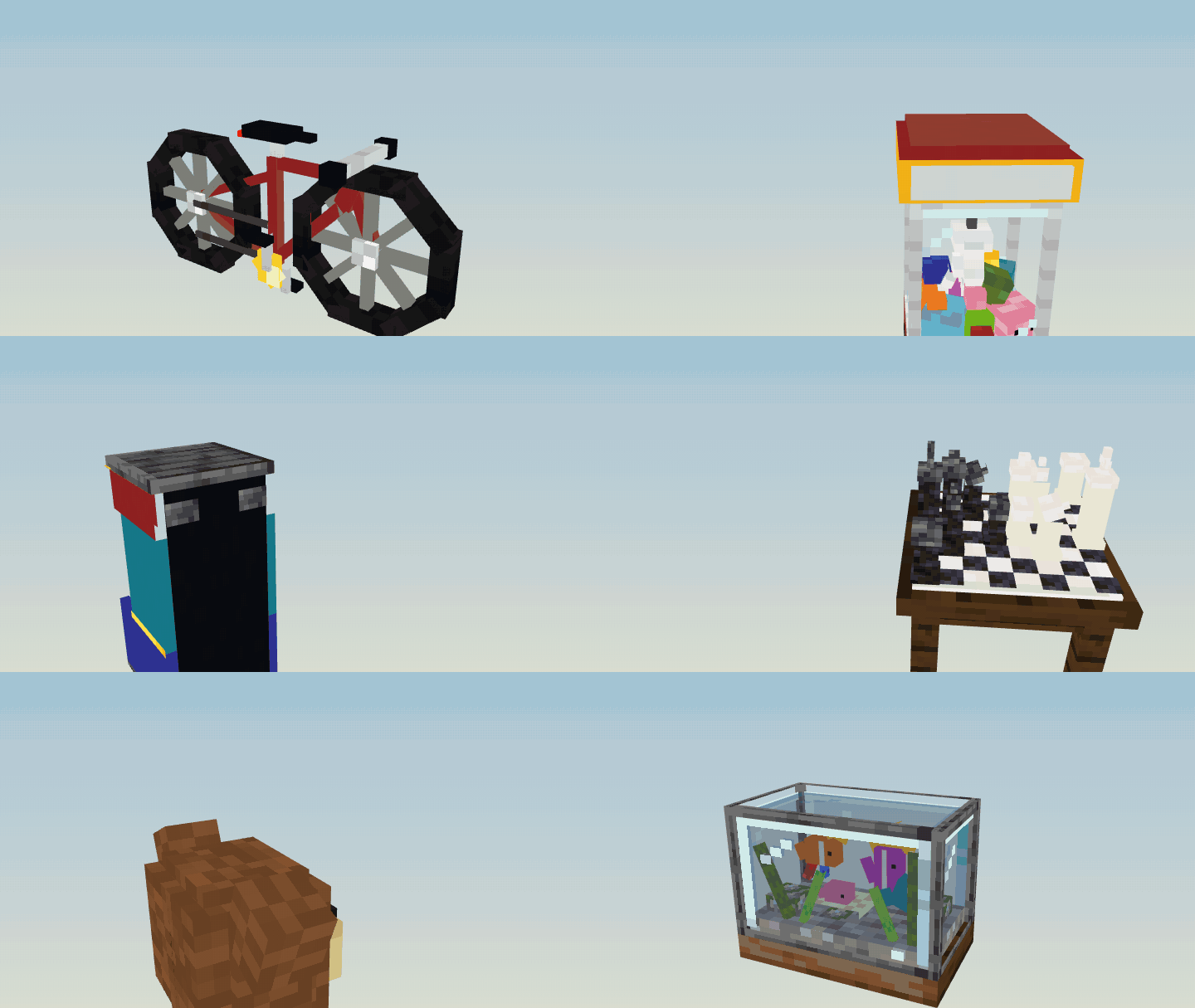
- ✔ 自定义物品:名称、描述、附魔、属性、耐久度、食物效果以及使用时的动作。
- ✔ 自定义方块:硬度、正确工具、光照和掉落物,以及楼梯、台阶、门、陷阱门、植物和灯。
- ✔ 家具:放置任意 Blockbench 模型。碰撞箱根据模型测量,部件可设置为座位、光源或储物空间。
- ✔ 动画模型:放入
.bbmodel 文件,其骨骼和动画会按你的设计播放。可放置在世界中,或赋予生物(包括 MythicMobs 生物和 Citizens NPC)。
- ✔ 玩家动作:使用
/emote wave,你可以独自表演,也可以邀请好友共同参与(需先征得同意)。移动集替换了玩家的行走方式。
- ✔ 可驾驶的载具:汽车、自行车、船只、飞机和直升机,具备真实的操控性、乘客座位、音效、粒子效果和每种状态下的动画。
- ✔ 自定义生物:拥有你自己定义的实体和模型。
- ✔ 护甲:任何物品都可以穿戴,并带有专属的艺术风格。
- ✔ GUI 界面和 HUD 覆盖层:自定义菜单背景和屏幕艺术。
- ✔ 对话框 (1.21.6+):按你的方式绘制菜单,支持侧边栏、分页、开关、滑块和下拉菜单、玩家头像、进度条、实时占位符和物品槽。每次点击都会触发游戏的按钮音效。
- ✔ 音效 和 聊天图标:在聊天中输入
:mypack:heart: 即可显示图片。
- ✔ 配方:合成、烹饪、营火、切石机、锻造台、纹饰锻砧,以及在 Paper 上的酿造台。
- ✔ 液体:标记出酸液、粘液或其他液体的区域。它是真实的水或熔岩,但对其中的实体应用你设定的规则。
- ✔ 资源包由你托管,并根据你服务器的版本采用正确的资源包格式。或者关闭主机功能,从你自己的 Web 服务器提供 zip 文件。
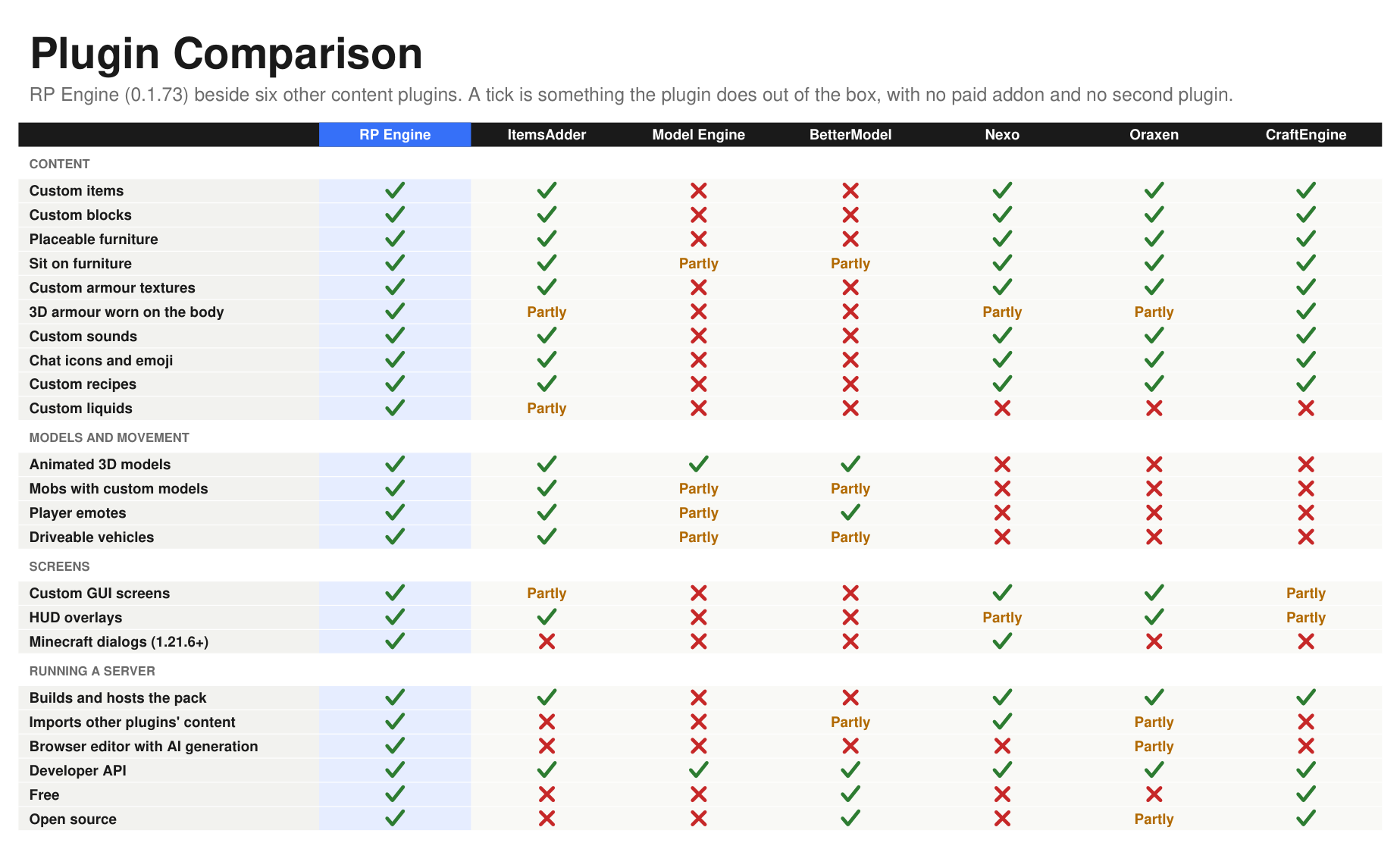
以 PDF 形式查看对比表,包含备注及各列的勾选情况
在浏览器中编辑
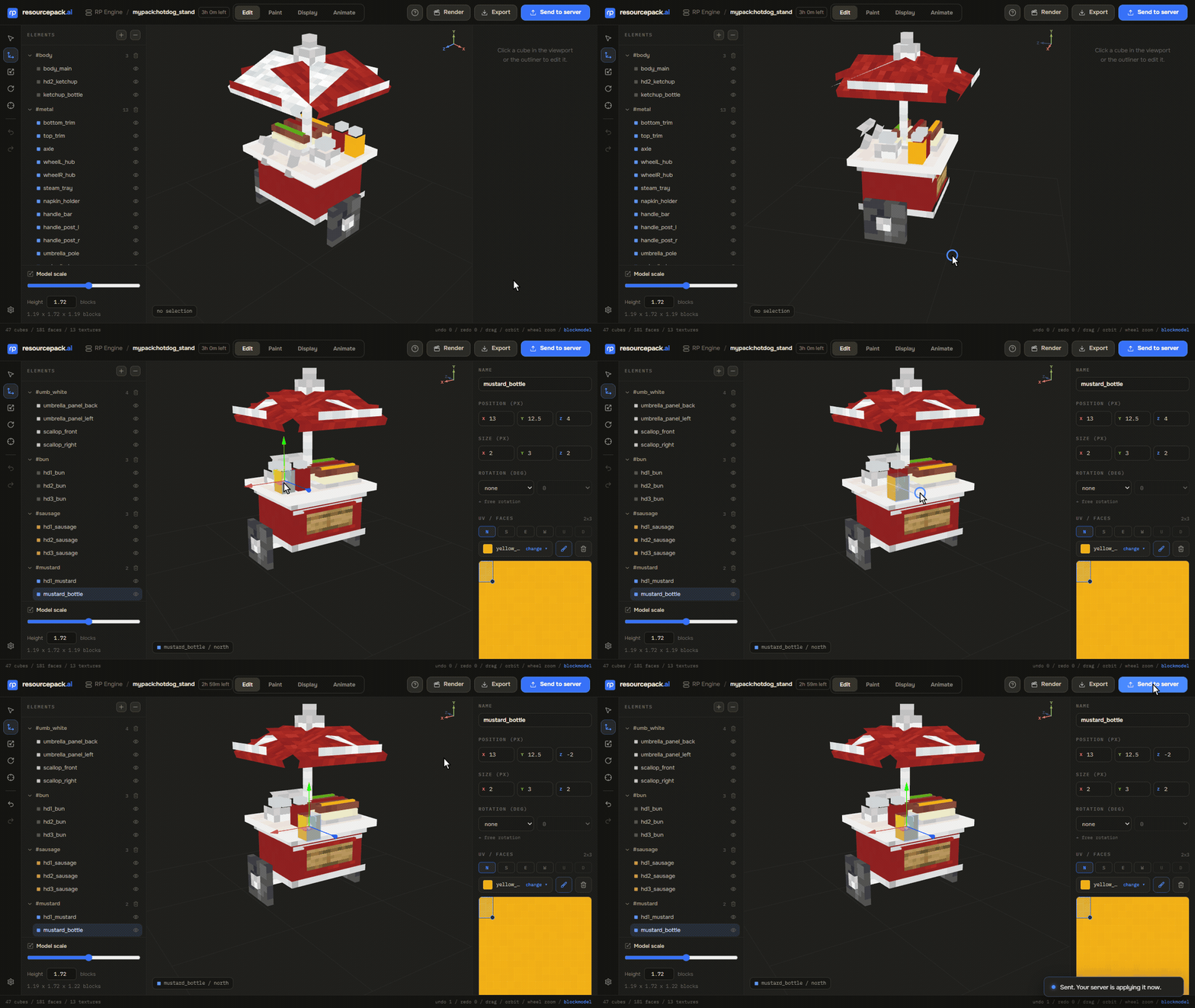
输入 /rp edit mypack:chair 会给你一个链接。它在浏览器中打开一个真正的 3D 编辑器:移动方块、重新上色,然后点击 发送到服务器。内容文件夹中的文件随之更改并重新加载。无需注册账号或登录。该链接仅使用一次且有效期为三小时,仅携带你所命名的那个对象的数据。
从其他插件迁移?
RP Engine 直接读取 ItemsAdder、Nexo、Oraxen、CraftEngine、Model Engine 和 BetterModel 的内容文件夹。只需将文件夹放入,重新加载,你的物品、家具、方块、模型和配方就会迁移过来。无法迁移的项目会在加载时以警告形式列出原因,确保不会静默丢失任何内容。
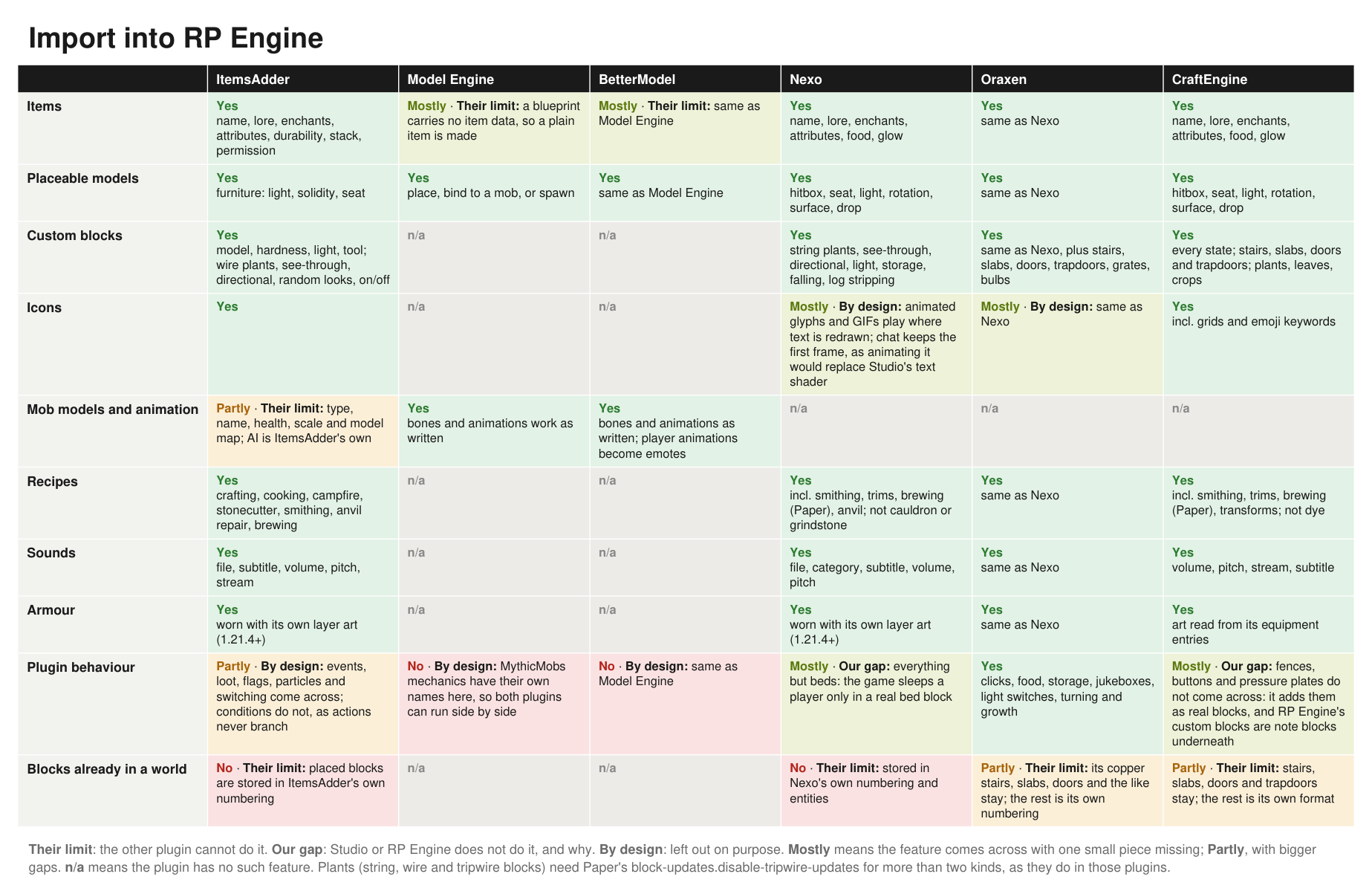
完整的兼容性表格,以 PDF 形式提供
兼容插件
以下均为可选。RP Engine 在没有这些插件的情况下也能正常运行。
- PlaceholderAPI:RP Engine 自己的占位符用于计分板、菜单和全息图,以及任意插件的占位符用于 HUD 文本和物品动作。
- MythicMobs 和 Citizens:在其生物和 NPC 上放置动画模型。
- WorldGuard:用于限制模型放置位置和自定义物品使用的区域标志。
安装方法
- 将
RPEngine.jar 放入 plugins/ 目录并启动服务器。
- 在
plugins/RPEngine/content/ 下添加一个内容文件夹,并运行 /rp reload。
玩家加入时无需任何设置:默认情况下资源包会上传至我们免费的资源包托管服务。若想从你自己的服务器提供资源包,请在 config.yml 中设置 host.mode。
完整指南:resourcepack.ai/docs/rp-engine/install
要求: Spigot、Paper、Folia 或其分支之一,Minecraft 1.19.4 或更高版本,Java 17 或更高版本。从 1.19.4 到当前版本的所有版本均兼容。如果在较旧的服务器上运行,少数需要新版游戏的功能将被禁用,启动日志会列出每个被禁用的功能。
命令与权限
每个子命令都有各自的权限,格式为 rpengine.<subcommand>。rpengine.admin(默认:op)授予所有权限。/rp、/rpe 和 /rpengine 是同一个命令。
| 命令 |
功能 |
| /rp reload |
重新读取内容文件夹并重建资源包 |
| /rp give <id> [玩家] |
给予自定义物品 |
| /rp items, /rp models, /rp entities |
列出服务器中持有的项目 |
| /rp spawn <id> |
生成自定义实体 |
| /rp bind <id>, /rp unbind |
将你注视的生物模型绑定到其身上,或解除绑定 |
| /rp vehicle <id> |
在你站立的位置生成载具 |
| /rp screen <id> [玩家] |
打开 GUI 屏幕 |
| /rp hud <id|clear> [玩家] |
显示或清除 HUD 覆盖层 |
| /rp dialog <id> [玩家] |
打开对话框 |
| /rp sound <id> [玩家] |
播放自定义音效 |
| /rp liquid corner | fill <id> | clear |
标记液体池区域 |
| /rp edit <id> |
在浏览器编辑器中打开它 |
| /emote <名称> [玩家...] |
播放动作表情,可单人或多人一起 |
所有命令与权限说明:resourcepack.ai/docs/rp-engine/commands
插件 (Addons)
基于 RP Engine 公共 API 构建的插件,每个都是一个你需要放在主 jar 旁边的第二个 jar 文件。首个插件是 Skateboards:推动、收腿、跳跃、翻转,尽量别摔下来。
面向开发者: RP Engine 提供了完整的 API,支持物品、模型、载具、动作表情、屏幕和事件。请参阅 API.md。
连接机制
- 使用统计。 每 5 分钟,该插件会向 resourcepack.ai 发送一个首次启动时生成的随机 ID、当前在线玩家数量(单个数字),以及任何依赖 RP Engine 的已安装插件名称(即其附加组件),以便我们了解有多少服务器和玩家在使用它及其附加组件。此过程完全匿名:不发送地址、服务器名称、版本、玩家名称或 UUID,也不包含任何内容数据。默认开启。如需关闭,可在
config.yml 中将 telemetry.enabled 设置为 false。
- 更新检查。 启动几秒后,插件会询问 SpigotMC 当前最新的 RP Engine 版本,如果有新版本,会在控制台和管理员聊天中提示。此过程不会发送关于你服务器的任何信息。可通过将
update-check 设置为 false 来关闭。
- 浏览器编辑 仅在你运行
/rp edit 时建立连接,且仅发送你指定的那一个文件。可通过将 edit.enabled 设置为 false 来关闭。
- Studio 推送与发布资源包 仅在通过
/rp sync 或 /rp distribute 配对后才建立连接。
若关闭以上所有选项,该插件将仅与你的玩家进行通信。
支持
请在 Discord 上提问,或在 GitHub 上提交问题。请勿在评论中报告 bug;我们无法在那里回复,而且我们更倾向于直接修复问题。
RP Engine 是在 GPL-3.0 许可下的免费软件。源代码托管于 GitHub,欢迎贡献。
由 ResourcePack AI 制作
RP Engine 来自 resourcepack.ai,这是一个资源包网页编辑器,能够生成模型、纹理、GUI、动作表情和载具,并直接推送到你的服务器进行实时测试。你并非必须使用它:手写的内容文件夹即可驱动整个插件。
What is RP Engine?
RP Engine turns a folder of YAML on your own server into custom items, blocks, furniture, animated models, player emotes, vehicles, screens, HUDs, dialogs, sounds and recipes. Then it builds the resource pack and hands it to every player who joins.
You write the content. The engine writes the pack.
# plugins/RPEngine/content/mypack/items/gems.yml
ruby:
  material: DIAMOND
  name: "Ruby"
Drop ruby.png next to it, run /rp reload, then /rp give mypack:ruby. The model, the texture, the pack and the item component that ties them together are all worked out for you.
Features
- ✔ Custom items: names, lore, enchantments, attributes, durability, food, and actions when they are used.
- ✔ Custom blocks: hardness, the right tool, light and drops, plus stairs, slabs, doors, trapdoors, plants and lamps.
- ✔ Furniture: place any Blockbench model. The hitbox is measured from the model, and pieces can be seats, lights or storage.
- ✔ Animated models: drop in a
.bbmodel and its bones and animations play as you made them. Place it in the world, or put it on a mob, including MythicMobs mobs and Citizens NPCs.
- ✔ Player emotes:
/emote wave, on your own or with a cast of friends who are asked first. Movement sets replace how a player walks.
- ✔ Vehicles you drive: cars, bikes, boats, aeroplanes and helicopters, with real handling, passenger seats, sounds, particles and an animation for each state.
- ✔ Custom mobs: your own entities with your own models.
- ✔ Armour: any item can be worn with its own art.
- ✔ GUI screens and HUD overlays: your own menu backgrounds and on-screen art.
- ✔ Dialogs (1.21.6+): menus drawn your way, with sidebars and pages, switches, sliders and dropdowns that open, players' heads, progress bars, live placeholders and item slots. Every click makes the game's button sound.
- ✔ Sounds and chat icons: type
:mypack:heart: in chat and the picture appears.
- ✔ Recipes: crafting, cooking, campfire, stonecutter, smithing and trims, anvil, and brewing on Paper.
- ✔ Liquids: mark out a pool of acid, slime or anything else. It is real water or lava with your rules applied to whoever is in it.
- ✔ The pack is built and hosted for you, with the right pack format for your server's version. Or switch the host off and serve the zip from your own web server.
The comparison as a PDF, with notes and where each column was checked
Edit in your browser
/rp edit mypack:chair gives you a link. It opens the model in a proper 3D editor in your browser: move the cubes, repaint it, then press Send to server. The file in your content folder changes and reloads. No account and no sign-in. The link works once and lasts three hours, and it carries only the one thing you named.
Moving from another plugin?
RP Engine reads ItemsAdder, Nexo, Oraxen, CraftEngine, Model Engine and BetterModel content folders as they are. Put the folder in, reload, and your items, furniture, blocks, models and recipes come across. Anything that cannot come across is named in a warning at load, with the reason, so nothing goes missing silently.
The full compatibility sheet, as a PDF
Works with
All optional. RP Engine runs fine without any of them.
- PlaceholderAPI: RP Engine's own placeholders for scoreboards, menus and holograms, and any plugin's placeholders in HUD text and item actions.
- MythicMobs and Citizens: put animated models on their mobs and NPCs.
- WorldGuard: region flags for where models can be placed and custom items used.
Installing
- Drop
RPEngine.jar into plugins/ and start the server.
- Add a content folder under
plugins/RPEngine/content/ and run /rp reload.
Players get the pack with nothing to set up: it is uploaded to our free pack host by default. To serve it from your own server instead, set host.mode in config.yml.
Full guide: resourcepack.ai/docs/rp-engine/install
Requirements: Spigot, Paper, Folia or a fork of any of them, Minecraft 1.19.4 or newer, Java 17 or newer. Everything from 1.19.4 to the current version works. On an older server, the few features that need a newer game are switched off, and the startup log names each one.
Commands and permissions
Every subcommand has its own permission, rpengine.<subcommand>. rpengine.admin (default: op) grants all of them. /rp, /rpe and /rpengine are the same command.
| Command |
What it does |
| /rp reload |
Reread the content folder and rebuild the pack |
| /rp give <id> [player] |
Give a custom item |
| /rp items, /rp models, /rp entities |
List what the server holds |
| /rp spawn <id> |
Spawn a custom entity |
| /rp bind <id>, /rp unbind |
Put a model on the mob you are looking at, or take it off |
| /rp vehicle <id> |
Park a vehicle where you stand |
| /rp screen <id> [player] |
Open a GUI screen |
| /rp hud <id|clear> [player] |
Show or clear a HUD overlay |
| /rp dialog <id> [player] |
Open a dialog |
| /rp sound <id> [player] |
Play a custom sound |
| /rp liquid corner | fill <id> | clear |
Mark out a liquid pool |
| /rp edit <id> |
Open it in the browser editor |
| /emote <name> [players...] |
Play an emote, alone or with others |
Every command and permission: resourcepack.ai/docs/rp-engine/commands
Addons
Plugins built on RP Engine's public API, each a second jar you drop in beside it. The first is Skateboards: push, tuck, jump, flick it round, and try not to bail.
For developers: RP Engine has a full API for items, models, vehicles, emotes, screens and events. See API.md.
What it connects to
- Usage count. Every 5 minutes the plugin sends resourcepack.ai a random id that it made up the first time it started, how many players are online (a single number), and the names of any installed plugins that depend on RP Engine (its addons), so we know how many servers and players use it and which addons. It is anonymous: no address, server name, version, player names or UUIDs, or content. It is on by default. Turn it off with
telemetry.enabled: false in config.yml.
- Update check. A few seconds after start, the plugin asks SpigotMC which version of RP Engine is current, and tells the console and ops if there is a newer one. It sends nothing about your server. Turn it off with
update-check: false.
- Browser editing only connects when you run
/rp edit, and only sends the one file you named. Turn it off with edit.enabled: false.
- Studio pushes and published packs only connect after you pair with
/rp sync or /rp distribute.
With all of that off, the plugin talks to nothing but your own players.
Support
Ask on Discord or open an issue on GitHub. Please don't post bugs in the reviews; we can't reply there, and we would rather fix it.
RP Engine is free software under the GPL-3.0 licence. The source is on GitHub, and contributions are welcome.
Made by ResourcePack AI
RP Engine comes from resourcepack.ai, a web editor for resource packs that can generate models, textures, GUIs, emotes and vehicles and push them straight to your server for live testing. You never need it: a hand-written content folder gets the whole plugin.

 插件

 插件

 插件
 插件
 插件
 插件
评论 0
登录后参与评分
还没有评论,来抢沙发吧