
管理工具
- 一个高级且用户友好的游戏内界面,专为服务器管理员和单人玩家设计。
▶️ 工具概览
▶️ 使用方法
你可以从快捷栏获取专用的管理工具物品,以访问所有菜单(仅限创造模式)。
运行以下命令打开管理工具主菜单:
/dialog show @s admin_tools:main_menu
获取管理工具物品(仅限创造模式):
/function admin_tools:1_give_admin_tool
注意:在数据包版本中,需要安装资源包才能正确显示管理工具界面。
▶️ 当前功能
■ 玩家设置
封禁玩家
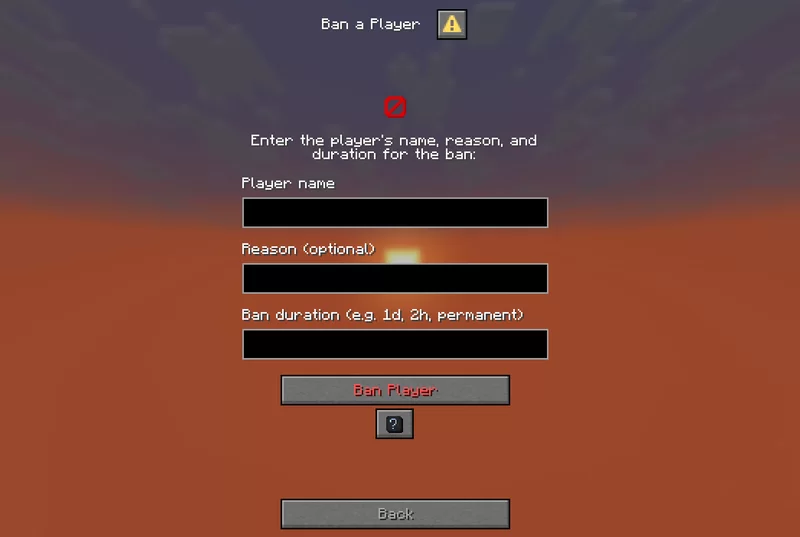 允许通过输入玩家名称、原因和持续时间来封禁玩家。
踢出玩家
将指定玩家从服务器断开连接,但不进行封禁。
击杀玩家
使用 /kill 命令立即击杀指定玩家。
施加效果
为自己或另一名玩家施加药水效果,可选择效果类型、持续时间和等级。
施加效果(高级)
允许通过设置效果 ID、持续时间和等级,为自己或另一名玩家施加自定义药水效果。
游戏模式切换器
快速切换自己或其他人的游戏模式。
传送至玩家 / 位置
通过输入确切的玩家名称或坐标,将自己传送到指定玩家或位置。
修改玩家属性
通过选择玩家、属性和新值,修改玩家的属性基础值。
设置玩家出生点
通过指定玩家和 X、Y、Z 坐标,设置玩家的出生点。
给予护甲套装
选择一种护甲套装材质,并将其给予目标玩家。
■ 世界设置
时间调整器
通过选择刻数来设定一天中的时间。
天气调整器
设置自定义天气类型和持续时间(以刻为单位)。
设置世界出生点
通过输入 X、Y、Z 坐标设置全局出生点。
难度调整器
选择世界难度(和平、简单、普通、困难)。
高级刷怪笼
召唤具有详细选项的实体:名称、属性、装备、效果、大小、可见性等。
实体控制
通过选择实体类型和数量,轻松生成或击杀选定的实体。
修改实体属性
编辑 10 格范围内最近实体的基础属性值。
设置自定义刷怪笼
通过调整生成参数、装备、效果和自定义光照条件,配置自定义刷怪笼。
■ 实用设置
广播标题
发送带有格式化消息的全局公告。
物品清理
移除掉落的物品。
自定义物品创建器
创建自定义物品,包括名称、描述、附魔和属性修饰符。
维度切换器
选择要传送到的维度。支持自定义 ID。
创建文本显示
创建 text_display 实体,完全控制文本样式、对齐方式、大小、颜色、可见性、旋转等。
编辑文本显示
直接在世界中编辑现有的 text_display 实体。
队伍管理器:
创建队伍
删除队伍
管理队伍成员
编辑队伍设置
显示队伍列表
■ 快捷设置:
设置排名
轻松设置预定义的排名(仅为视觉前缀,不涉及权限)。
■ 趣味设置
爆炸生成器
生成 TNT,可调节爆炸威力和引信计时器。
■ 游戏规则设置
通过分类菜单切换游戏规则,提供启用/禁用选项:
游戏规则菜单
■ 帮助菜单
- 包含关于如何使用每个菜单的信息和提示
帮助对话框示例
▶️ 详情
- 非常适合冒险地图创作者、服务器操作员或希望无需命令即可掌控全局的单人生存玩家
- 仍在开发中——未来更新将添加新工具和菜单类别
- 欢迎提供建议、错误报告和功能请求!
The Admin Tool
- An advanced and user-friendly in-game interface designed for both server admins and singleplayer users.
▶️ The Tool
▶️ How to use
You can get a dedicated Admin Tool item to access all menus from your hotbar (Creative only).
Run this command to open the admin tool main menu:
/dialog show @s admin_tools:main_menu
To get the Admin Tool item (Creative only):
/function admin_tools:1_give_admin_tool
Note: In Datapack Version, the resource pack is required to display the Admin Tool correctly.
▶️ Current Features
■ Player Settings
Ban a player
Allows banning a player by entering their name, reason, and duration.
Kick a player
Disconnects a specified player from the server without banning them.
Kill a player
Kills a specified player instantly using the /kill command.
Apply effect
Apply potion effects to yourself or another player, choosing effect type, duration, and level.
Apply effect (advanced)
Allows applying a custom potion effect to yourself or another player by setting effect ID, duration, and level.
Gamemode switcher
Switch gamemode for yourself or others quickly.
Teleport to player / location
Teleports you to a specified player or coordinates by entering the exact player name or position.
Modify player attributes
Modify a player’s attribute base value by selecting the player, attribute, and new value
Set player spawnpoint
Set a player’s spawnpoint by specifying the player and coordinates X, Y, Z.
Give Armor Kit
Select an armor kit material and give it to the targeted player.
■ World Settings
Time changer
Set the time of day by choosing ticks.
Weather changer
Set custom weather type and duration in ticks.
Set world spawn
Set the global spawn point by entering X, Y, Z coordinates.
Difficulty changer
Select the world difficulty (peaceful, easy, normal, hard).
Advanced mob spawner
Summon a mob with detailed options: name, attributes, equipment, effects, size, visibility, and more.
Mob control
Spawn or kill selected mobs easily by choosing the mob type and amount.
Modify entity attributes
Edit the base attribute value of the nearest mob within 10 blocks.
Set Custom Mob Spawner
Configure a custom mob spawner by adjusting spawn parameters, equipment, effects, and custom light conditions.
■ Utility Settings
Broadcast title
Send global announcements with formatted messages.
Items cleaner
Removes dropped items.
Custom item creator
Create custom items with names, lore, enchantments, and attribute modifiers.
Dimension switcher
Select a dimension to teleport to. Custom IDs allowed.
Create text display
Create text_display entities with full control over text style, alignment, size, color, visibility, rotation, and more.
Edit text display
Edit existing text_display entities in the world directly.
Teams manager:
Create a team
Delete a team
Manage team members
Edit team settings
Show team list
■ Quick Settings:
Set Ranks
Set predefined ranks easily (just visual prefix, not perms).
■ Fun Settings
Explosion generator
Generate TNT with adjustable explosion power and fuse timer.
■ Gamerules Settings
Toggle gamerules through categorized menus with activate/deactivate options:
Gamerules menu
■ Help Menu
- Contains information and tips about how to use every menu
Help dialog example
▶️ Details
- Perfect for adventure map creators, server operators, or singleplayer users who want control without commands
- Still in development – new tools and menu categories will be added in future updates
- Suggestions, bug reports, and feature requests are welcome!

下载 The Admin Tool
需要联机服务器吗?
稳定流畅、一键部署,几分钟即可和朋友联机开服
最低仅需 8 元/月 即可畅快联机
下载 The Admin Tool
需要联机服务器吗?
稳定流畅、一键部署,几分钟即可和朋友联机开服
最低仅需 8 元/月 即可畅快联机
下载 The Admin Tool
需要联机服务器吗?
稳定流畅、一键部署,几分钟即可和朋友联机开服
最低仅需 8 元/月 即可畅快联机
下载 The Admin Tool
需要联机服务器吗?
稳定流畅、一键部署,几分钟即可和朋友联机开服
最低仅需 8 元/月 即可畅快联机
下载 The Admin Tool
需要联机服务器吗?
稳定流畅、一键部署,几分钟即可和朋友联机开服
最低仅需 8 元/月 即可畅快联机
下载 The Admin Tool
需要联机服务器吗?
稳定流畅、一键部署,几分钟即可和朋友联机开服
最低仅需 8 元/月 即可畅快联机
下载 The Admin Tool
需要联机服务器吗?
稳定流畅、一键部署,几分钟即可和朋友联机开服
最低仅需 8 元/月 即可畅快联机
下载 The Admin Tool
需要联机服务器吗?
稳定流畅、一键部署,几分钟即可和朋友联机开服
最低仅需 8 元/月 即可畅快联机
下载 The Admin Tool
需要联机服务器吗?
稳定流畅、一键部署,几分钟即可和朋友联机开服
最低仅需 8 元/月 即可畅快联机
下载 The Admin Tool
需要联机服务器吗?
稳定流畅、一键部署,几分钟即可和朋友联机开服
最低仅需 8 元/月 即可畅快联机
- 更新到 1.21.11
- 添加了新的游戏规则
关于这个资源的讨论、问题反馈与使用心得
还没有讨论,来发第一帖吧
你是这个资源的作者?登录后可认领此资源。
相似资源
 数据包

此数据包添加了属于阿瓦里海盗的独特结构,将他们的独特风格带入你的 Minecraft 世界!兼容性:1.20 至 26.3
 数据包
一个 Minecraft 光线投射库,能够精确检测玩家正在查看的方块,包括像台阶和楼梯这样的特殊方块形状。
 数据包

此数据包添加了新的“祝福模式”难度。
 数据包
允许服务器管理员方便地禁用 Xaero's Map 系列模组中的实体雷达、小地图等功能,使竞技游戏更加公平。
 数据包

为你的 Minecraft 世界添加了超过 900 个新的进度
 数据包

我的“NRG”整合包的核心数据包。这个整合包的主要更新就在这里。
评论 0
登录后参与评分
还没有评论,来抢沙发吧