
Anytag 数据包(任意物品,任意位置打标签)
你是否曾想过给任何东西打上名称标签?现在你可以了!Anytag 是一款 Minecraft 数据包,允许玩家通过一个简单的合成配方制作特殊的 Anytag 物品。使用该物品时,任何玩家都可以手持它右击任意方块,从而在玩家指向的位置放置漂浮文字,同时消耗该物品。
合成
制作 Anytag 物品的配方非常简单。你只需要一个名称标签和任意一种告示牌(如深色橡木告示牌、橡木告示牌、云杉木告示牌等),并按以下顺序摆放:
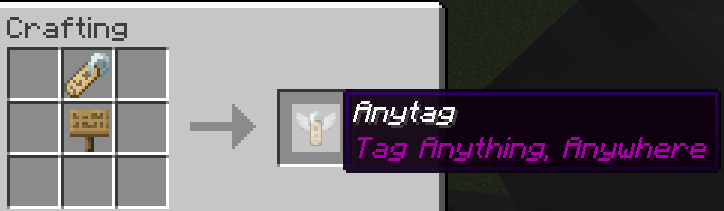
你可以根据需要为 Anytag 物品重命名。
用法
以下是 Anytag 物品合成与使用的简要演示:
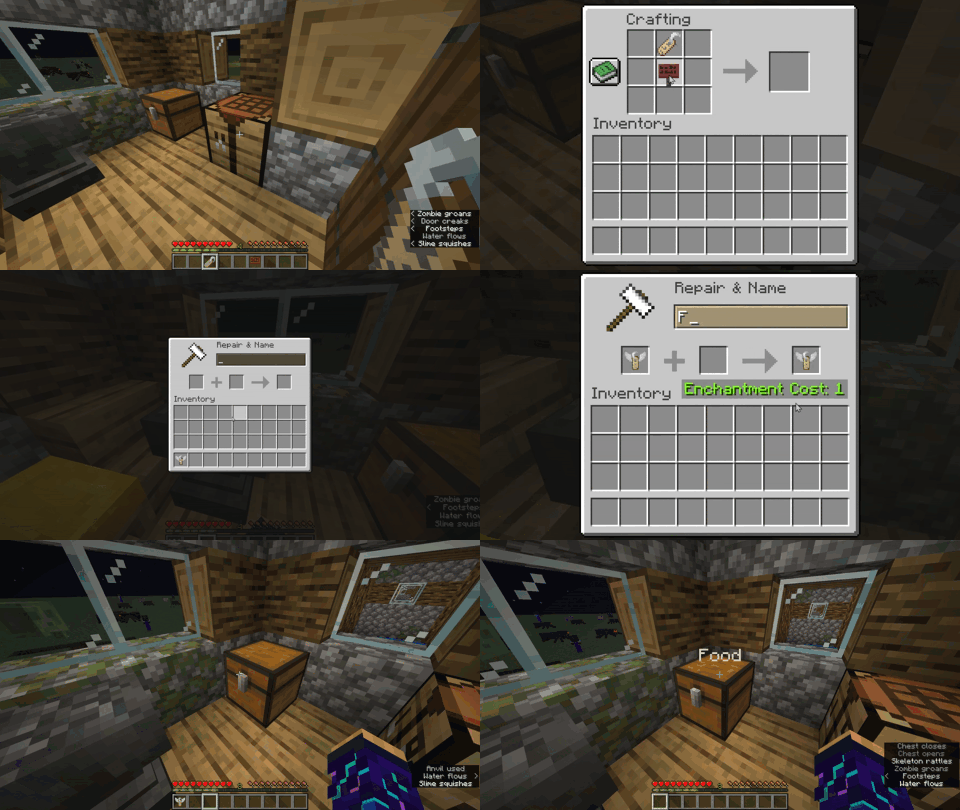
右击 Anytag 物品所在的任意方块,将以 Anytag 物品的自定义名称放置漂浮文字。
右击漂浮文字的中间部分,将移除文字并掉落之前使用的 Anytag 物品。
左击漂浮文字的中间部分,将移除文字并掉落 名称标签 物品,而非 Anytag 物品。
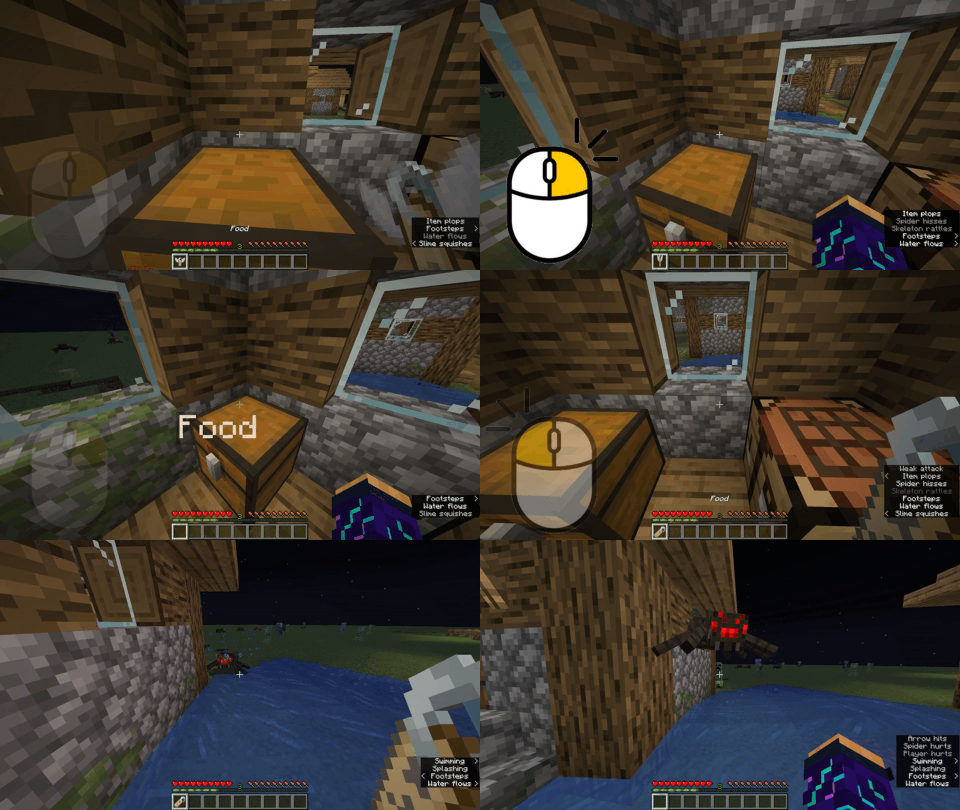
尝试在游戏中按下
F3 + B以查看漂浮文字的碰撞箱。

Anytag Datapack (Tag Anything, Anywhere)
Have you ever wanted to place name tags on anything? Now you can! Anytag is a Minecraft Datapack which allows players to craft a special Anytag item through a simple recipe. The item is used so any player can right-click on any block with the item in their hand, which will then place flying text where the player is pointing at and simultaneously consume itself.
Crafting
The recipe for crafting the Anytag item is simple. You just need a name tag and a sign of any kind (Dark oak sign, Oak sign, Spruce sign, etc.) and place them in this order:
You can rename the Anytag item according to your desires.
Usage
Here is a short depiction of how the Anytag item is crafted and used:
Right-clicking the Anytag item on any block will place flying text with the custom name of Anytag item.
Right-clicking in the middle of flying text will remove the text and drop the previously used Anytag item.
Left-clicking in the middle of flying text will remove the text and drop the name tag item instead of the Anytag item.
Try pressing
F3 + Bin-game to see the hitbox of the floating text.

下载 Anytag
需要联机服务器吗?
稳定流畅、一键部署,几分钟即可和朋友联机开服
最低仅需 8 元/月 即可畅快联机
下载 Anytag
下载 Anytag
需要联机服务器吗?
稳定流畅、一键部署,几分钟即可和朋友联机开服
最低仅需 8 元/月 即可畅快联机
下载 Anytag
下载 Anytag
需要联机服务器吗?
稳定流畅、一键部署,几分钟即可和朋友联机开服
最低仅需 8 元/月 即可畅快联机
下载 Anytag
下载 Anytag
需要联机服务器吗?
稳定流畅、一键部署,几分钟即可和朋友联机开服
最低仅需 8 元/月 即可畅快联机
下载 Anytag
- 修复了悬停文本的位置,使其略微上移以避免显示为灰色
关于这个资源的讨论、问题反馈与使用心得
还没有讨论,来发第一帖吧
你是这个资源的作者?登录后可认领此资源。
相似资源
 数据包

此数据包添加了属于阿瓦里海盗的独特结构,将他们的独特风格带入你的 Minecraft 世界!兼容性:1.20 至 26.3
 数据包
一个 Minecraft 光线投射库,能够精确检测玩家正在查看的方块,包括像台阶和楼梯这样的特殊方块形状。
 数据包

此数据包添加了新的“祝福模式”难度。
 数据包

为下界添加了名为“贝尔泽布城堡”的新闻结构,以及新的 Boss、新工具、新物品、新敌人和新音乐唱片!
 数据包
允许服务器管理员方便地禁用 Xaero's Map 系列模组中的实体雷达、小地图等功能,使竞技游戏更加公平。
 数据包

手持潜影盒时可直接打开,无需将其放置在地面上。只需按住 Shift 并右键点击即可访问你的潜影盒。
评论 0
登录后参与评分
还没有评论,来抢沙发吧