
此数据包新增了 4 种箱子:
*未在多人游戏中测试
1.21+
物品磁吸箱
吸引半径 8 格内的物品并将其存入箱中。
若手持幻翼膜右键点击上方的玻璃,物品将穿透方块进入箱内。若要移除该效果,只需按住 Shift 键并右键点击幻翼膜即可。
经验磁吸箱
吸引半径 8 格内的经验球,并将其以经验书的形式存入箱中。
末影箱+
提供两种箱子:发送箱和接收箱。在主手持有箱子的情况下按住 Shift 键可切换模式。
发送箱会将物品发送至具有匹配编码的最近接收箱。
你可以通过在箱子上的 3 个槽位之一使用染料右键点击来更改编码;按住 Shift 键右键点击可将该槽位重置。
礼物盒
空手按住 Shift 键右键点击可旋转它。
空手右键点击可打开它。
使用染料按住 Shift 键右键点击可涂装胶带。
使用任意方块按住 Shift 键右键点击可涂装底座。
当礼物盒处于打开状态时,手持物品右键点击可将其放入。
左键点击可破坏礼物盒,它将保存所有配置(颜色和内部物品)。
若放置在墙壁上,则会直接破碎。
1.20-1.20.4
物品磁吸箱
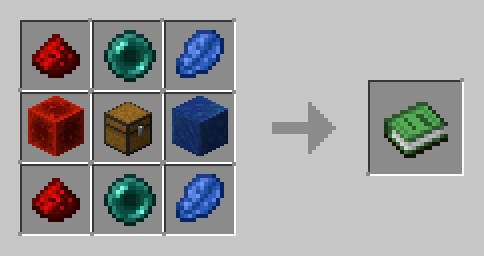
吸引半径 8 格内的物品并将其存入箱中。
经验磁吸箱
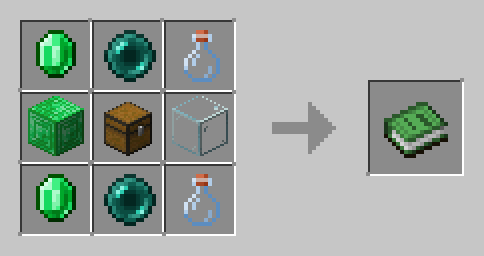
吸引半径 8 格内的经验球,并将其以经验瓶的形式存入箱中。
末影箱+
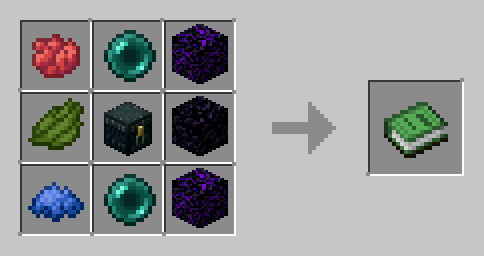
提供两种箱子:发送箱和接收箱。发送箱会将物品发送至具有匹配编码的接收箱。
你可以通过在箱子上的 3 个槽位之一使用染料右键点击来更改编码;空手右键点击可将该槽位重置。
如果有两个或更多接收箱共享相同的编码,发送箱将无法工作。
礼物盒
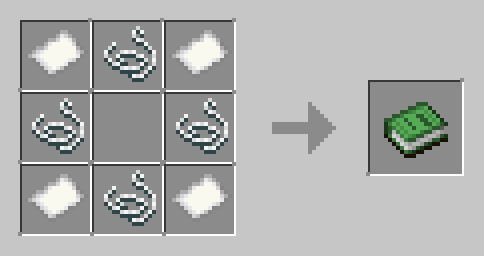
空手按住 Shift 键右键点击可旋转它。
空手右键点击可打开它。
使用染料按住 Shift 键右键点击可涂装底座。
使用染料右键点击可涂装胶带。
当礼物盒处于打开状态时,手持物品右键点击可将其放入。
左键点击可破坏礼物盒,它将保存所有配置(颜色和内部物品)。
This datapack adds 4 new chests:
- Item Magnet Chest
- Xp Magnet Chest
- Ender Chest+
- Present
*Not tested in multiplayer
1.21+
Item Magnet Chest
Attracts items within 8-block radius and stores them in the chest
If you right-click on the glass above with a phantom membrane, items will phase through blocks. To remove it, just shift right-click the phantom membrane
Xp Magnet Chest
Attracts experience orbs within an 8-block radius and stores them in the chest as Xp Books
Ender Chest+
It gives you 2 chests. There are 2 modes: sender and receiver. You can switch between modes by shifting with the chest in your main hand.
The sender chest dispatches items to the nearest receiver chest with matching codes.
You can change the code by right-clicking with a dye in one of the 3 slots on the chest; shift-right clicking will reset the slot.
Present
Shift-Right click with empty hand to rotate it
Right click with empty hand to open it
Shift-Right click with a dye to paint the tape
Shift-Right click with any block to paint the base
Right click with an item when the present is open to insert it
Left click to break the present, it will save all its configuration (color and item inside)
If they are placed on walls, they break.
1.20-1.20.4
Item Magnet Chest
Attracts items within 8-block radius and stores them in the chest
Xp Magnet Chest
Attracts experience orbs within an 8-block radius and stores them in the chest as experience bottles
Ender Chest+
It gives you 2 chests: a sender and a receiver. The sender chest dispatches items to the receiver chest with matching codes.
You can change the code by right-clicking with a dye in one of the 3 slots on the chest; right-clicking with an empty hand will reset the slot.
If two or more receivers share the same code, the sender won't work
Present
Shift-Right click with empty hand to rotate it
Right click with empty hand to open it
Shift-Right click with a dye to paint the base
Right click with a dye to paint the tape
Right click with an item when the present is open to insert it
Left click to break the present, it will save all its configuration (color and item inside)


 数据包

 数据包
 数据包

 数据包
 数据包

 数据包

评论 0
登录后参与评分
还没有评论,来抢沙发吧