



Compact Items 是一个专注于存储的数据包/模组,允许你将 64 个物品压缩为一个紧凑物品。节省背包空间,减少储物柜杂乱,并在需要时安全地将紧凑物品转换回原状。支持便捷地压缩和解压物品,同时保持你的物品井井有条。


- 将 64 个物品压缩为单个紧凑形态,以最大化存储空间并保持背包整洁。
- 单个紧凑物品最多可存储 (64 组) 4,096 个物品,大幅减少箱子内的杂乱。
- 随时轻松将紧凑物品还原为其原始物品状态。
- 紧凑物品是自定义玩家头颅,允许它们作为独特的装饰方块用于创意建造。
- 非常适合拥有箱子商店或玩家商店的服务器和生存多人游戏(SMP),使物品交易和存储更加高效。


/trigger ci.farmer: 召唤农夫紧凑型流浪商人。



如果我重命名 Compact Items 会发生什么?
重命名 Compact Items 会导致不匹配,因为 Minecraft 在转换回去时会检查物品的数据。更改名称可能导致自定义头颅数据不再匹配,从而阻止物品被转换回来。
一个紧凑物品能存储多少物品?
单个紧凑物品最多可存储 4,096 个物品,使得在更小的空间内管理大量物品变得更加容易。
我可以将紧凑物品转换回去吗?
可以,紧凑物品可以随时安全地转换回其原始物品状态,而不会丢失任何物品。
紧凑物品仅用于存储吗?
不是,紧凑物品使用自定义玩家头颅贴图,因此也可以用作建造的装饰方块。
我可以在服务器或 SMP 上使用它吗?
可以,Compact Items 在服务器和 SMP 上运行良好,特别是对于拥有箱子商店或玩家商店的情况,使存储和交易更加高效。
为什么它不支持 1.21.X 以下的版本?
Compact Items 使用了较新的 Minecraft 头颅数据结构。在旧版本中,放置的玩家头颅可能会丢失其自定义数据,导致物品转换问题并破坏压缩/解压系统。
如何将某人列入黑名单以禁止使用 Compact Items?
要将玩家列入黑名单,请使用:/tag player_name add ci_blacklisted
被列入黑名单的玩家将无法使用 Compact Items 的功能。
如何打开 Compact Exchange 商店?
使用对应类别的触发命令。例如:/trigger ci.farmer
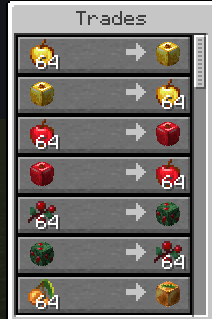
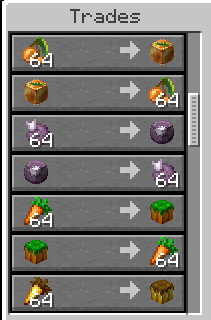
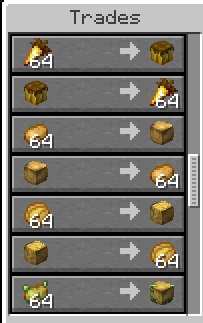
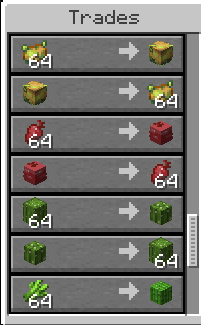
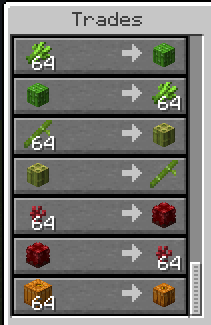
这将打开农产品交换商店。你也可以滚动到页面底部查看所有可用的交易。


Compact Items 使用基于类别的流浪商人来处理物品压缩和交换。每个商人都有一个显示在其实体上方的唯一类别名称,并在主手中持有相关物品以标识其用途。
向下滚动查看所有可用的商人类别/紧凑型及其可用交易。

Compact Items is a storage focused datapack/mod that lets you compress 64 items into a single compact item. Save inventory space, reduce storage clutter, and safely convert compact items back whenever needed. Supports easy item compression and decompression while keeping your items organized.


- Compress 64 items into a single compact form to maximize storage space and keep your inventory organized.
- Store up to (64 Stack) 4,096 items in a single compact item, greatly reducing chest clutter.
- Easily convert compact items back into their original items whenever needed.
- Compact items are custom player heads, allowing them to be used as unique decorative blocks for creative builds.
- Perfect for servers and SMPs with chest shops or player shops, making item trading and storage more efficient.


/trigger ci.farmer: Summons the Farmer Compactor wandering trader.


What happens if I rename Compact Items?
Renaming Compact Items can cause a mismatch because Minecraft checks the item's data when converting it back. Changing the name may cause the custom head data to no longer match, preventing the item from being converted back.
How many items can one compact item store?
A single compact item can store up to 4,096 items, making it easier to manage large amounts of items in a smaller space.
Can I convert compact items back?
Yes, compact items can be safely converted back into their original items whenever needed without losing any items.
Are compact items only for storage?
No, compact items use custom player head textures, allowing them to also be used as decorative blocks for builds.
Can I use this on servers or SMPs?
Yes, Compact Items works well on servers and SMPs, especially with chest shops or player shops, making storage and trading more efficient.
Why doesn't it support versions below 1.21.X?
Compact Items uses the newer Minecraft head data system. In older versions, placed player heads can lose their custom data, causing item conversion issues and breaking the compact/decompact system.
How can I blacklist someone from using Compact Items?
To blacklist a player, use: /tag player_name add ci_blacklisted
Blacklisted players will not be able to use Compact Items features.
How do I open the Compact Exchange shop?
Use the trigger command for the category you want. Example: /trigger ci.farmer
This opens the farming item exchange shop. You can also scroll to the bottom of the page to view all available trades.


Compact Items uses category-based wandering traders to handle item compression and exchange. Each trader has a unique category name displayed above the entity and holds a related item in their main hand to identify their purpose.
Scroll down to view all available trader categories/compactors and their available trades.


评论 0
登录后参与评分
还没有评论,来抢沙发吧