Create Tweaks: 复古生成配方
一个专为 Create Mod 设计的 Minecraft 数据包,特别针对在安装 Create 模组之前生成的世界。
由于 Create 模组引入了新的世界生成方块(如 Asurine、Crimsite、Ochrum、Veridium 和 Zinc Ores),玩家通常需要探索遥远且未生成的区块才能找到它们。此数据包通过为所有 Create 自然生成的方块添加自定义合成与处理配方来解决这一问题!
你不再需要生成新区块;只需使用现有资源进行合成或处理即可获取所需物品。
这是一个服务端数据包,也可用于单人游戏世界。
如需查看此处未列出的版本信息,请访问 Wiki。
依赖项
- Create Mod 或 Create Fly Mod(必需)
- 这是一个数据包。你可以使用 Global Packs 等工具全局安装,或直接将其放入世界的
datapacks 文件夹中。
功能
此数据包包含以下 Create 模组材料的配方:
Zinc Ingot
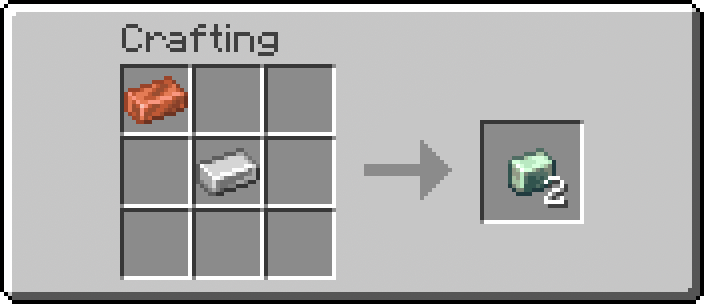
Asurine
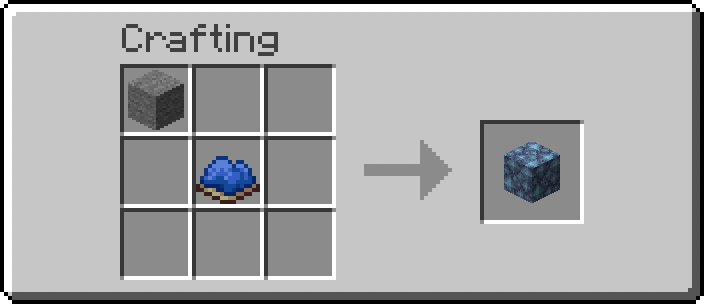
Crimsite
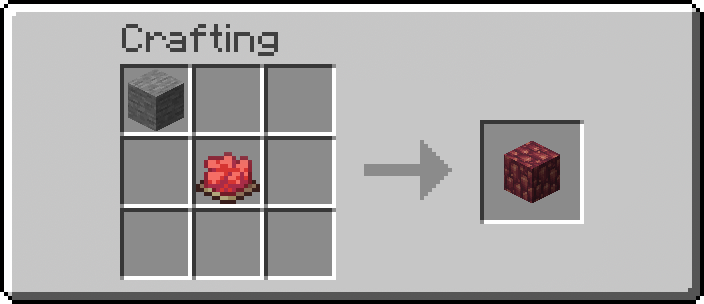
Ochrum
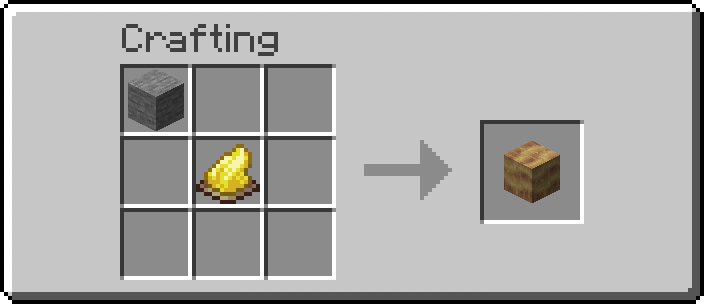
Veridium
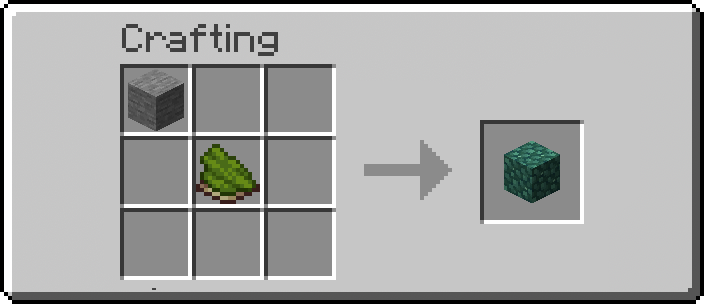
安装方法
- 下载数据包 zip 文件。
- 打开 Minecraft,选择你的世界,点击 编辑 (Edit),然后选择 打开世界文件夹 (Open World Folder)。
- 打开
datapacks 文件夹并将 zip 文件拖入其中。
- 如果你已经处于世界中,请输入
/reload 以应用更改。
工作原理与自定义
该数据包采用标准的 Minecraft 数据格式结构。如果你想修改合成所需的物品及其产出物,可以轻松进行调整。
修改配方
所有配方均以简单的 JSON 文件形式存储。要修改它们:
- 导航至
data/createtweaks/recipe/。
- 打开你想要调整的配方的 JSON 文件(例如
zinc_ingot.json、asurine.json 等)。
- 你会看到一个
ingredients 部分(合成所需材料)和一个 result 部分(产出结果)。
- 将物品 ID(如
minecraft:stone 或 minecraft:iron_nugget)替换为你喜欢的任何物品!
示例结构:
{
"type": "minecraft:crafting_shapeless",
"ingredients": [
{
"item": "minecraft:iron_ingot"
},
{
"item": "minecraft:copper_ingot"
}
],
"result": {
"item": "create:zinc_ingot",
"count": 1
}
}
高级:函数 (load.mcfunction & tick.mcfunction)
此数据包还钩入了 #minecraft:load 和 #minecraft:tick 事件:
data/createtweaks/function/load.mcfunction:在服务器/客户端加载数据包或运行 /reload 时仅运行一次。这里存放着 /recipe give 命令,用于自动为玩家解锁这些配方。它也适用于设置计分板或初始游戏规则。
data/createtweaks/function/tick.mcfunction:每刻(每秒 20 次)运行一次。适用于检查玩家状态或持续事件。默认情况下,此文件主要为空以保持性能,但如果需要,你可以在其中添加自定义命令。
Create Tweaks: Retro-Generation Recipes
A Minecraft datapack designed for the Create Mod, specifically tailored for worlds that were generated before the Create mod was installed.
Since the Create mod introduces new blocks to world generation (like Asurine, Crimsite, Ochrum, Veridium, and Zinc Ores), players usually have to explore far-off, ungenerated chunks to find them. This datapack solves that issue by adding custom crafting and processing recipes for all of Create's natural generation blocks!
You don't need to generate new chunks anymore; you can simply craft or process what you need using existing resources.
This is a server side datapack. Can be used in singleplayer worlds too.
For versions not included here, visit the wiki.
Dependencies
- Create Mod or Create Fly Mod (Required)
- This is a datapack. You can install it globally using a tool like Global Packs, or drop it directly into your world's
datapacks folder.
Features
This datapack includes recipes for the following Create mod materials:
Zinc Ingot

Asurine

Crimsite

Ochrum

Veridium

Installation
- Download the datapack zip file.
- Open Minecraft, select your world, click Edit, and then Open World Folder.
- Open the
datapacks folder and drop the zip file inside.
- If you are already in the world, type
/reload to apply the changes.
How It Works & Customization
The datapack is structured in a standard Minecraft data format. If you want to change what items are required for crafting and what they yield, you can easily tweak it.
Modifying Recipes
All recipes are stored as simple JSON files. To change them:
- Navigate to
data/createtweaks/recipe/.
- Open the JSON file for the recipe you want to tweak (e.g.,
zinc_ingot.json, asurine.json, etc.).
- You will see an
ingredients section (what you need to craft it) and a result section (what you get).
- Replace the item IDs (like
minecraft:stone or minecraft:iron_nugget) with whatever items you prefer!
Example Structure:
{
"type": "minecraft:crafting_shapeless",
"ingredients": [
{
"item": "minecraft:iron_ingot"
},
{
"item": "minecraft:copper_ingot"
}
],
"result": {
"item": "create:zinc_ingot",
"count": 1
}
}
Advanced: Functions (load.mcfunction & tick.mcfunction)
This datapack also hooks into the #minecraft:load and #minecraft:tick events:
data/createtweaks/function/load.mcfunction: Runs exactly once when the server/client loads the datapack or /reload is run. This is where the /recipe give command lives to automatically unlock the recipes for players. It's also useful for setting up scoreboards or initial game rules.
data/createtweaks/function/tick.mcfunction: Runs once every single tick (20 times a second). Useful for checking player conditions or ongoing events. By default, this is mostly empty to preserve performance, but you can add your custom commands here if needed.
评论 0
登录后参与评分
还没有评论,来抢沙发吧