
除非我改变主意,否则不会更新此项目。
CustomMagnets
作者:FerranV
重要提示!!:下载数据包时,请同时下载内置的资源包!
- 步骤 1:进入
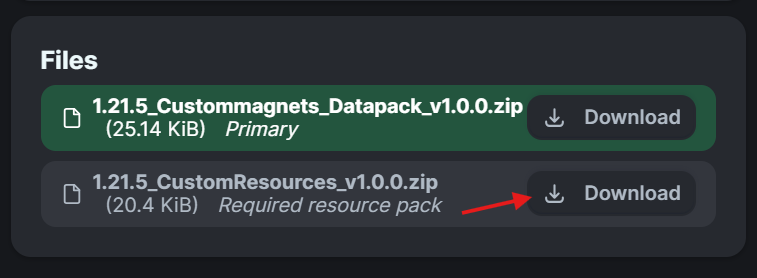
versions(版本)页面并点击所需的版本。 - 步骤 2:向下滚动至
files(文件)区域,下载数据包和资源包 BOTH(两者都要)。(如需安装指南,请参阅下文)
描述:
这是一个数据包(+资源包),它向末地城战利品池中添加了自定义磁铁物品。
-
获取磁铁:
- 你可以在末地城的箱子中找到磁铁。
- 如果你是管理员(OP),也可以在聊天栏中输入
/function custommagnets:get_magnet来获取磁铁。
-
用法:
- 手持磁铁(主手或副手均可)以根据其稀有度在一定半径内吸附物品。普通:3x3,史诗:5x5,传说:10x10。
- 手持磁铁时按住 Shift + 右键,可切换磁铁的吸附功能开关。
- 磁铁兼容经验修补和耐久附魔。(所有磁铁都有耐久度。普通:3000,史诗:7000,传说:10000)
错误报告:
- 遇到任何问题或有改进建议?请在
Report issues(报告问题)页面告知我。
更新日志:
- 1.21.7_v1.0.0:添加了对 Minecraft 1.21.7 版本的支持。
- 1.21.6_v1.0.0:添加了对 Minecraft 1.21.6 版本的支持。
- v1.0.0+mod:现打包为模组形式,便于在整合包中安装。
- v1.0.0:初始发布
安装指南:
整合包环境:
- 如果你在整合包中游玩,可以下载 +mod 版本并将其放入你的 mods 文件夹即可搞定 :D。注意:这将像其他模组一样,在你游玩的所有世界中启用该数据包。如果你希望它仅影响特定世界,请遵循以下步骤。
数据包:
-
添加到新世界:
-
步骤 1: 按下
Create New World(创建新世界)然后按More(更多)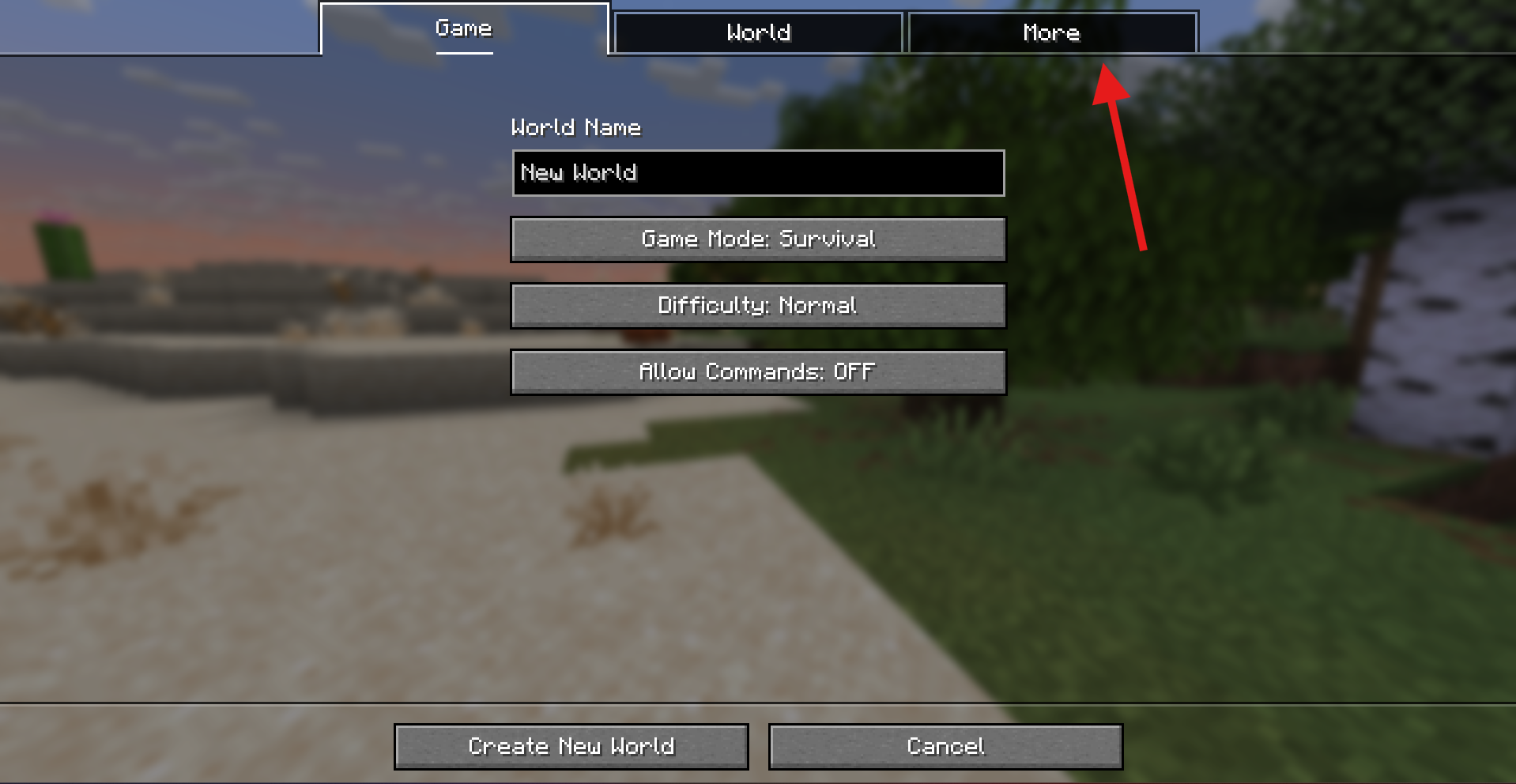
-
步骤 2: 按下
Data Packs(数据包)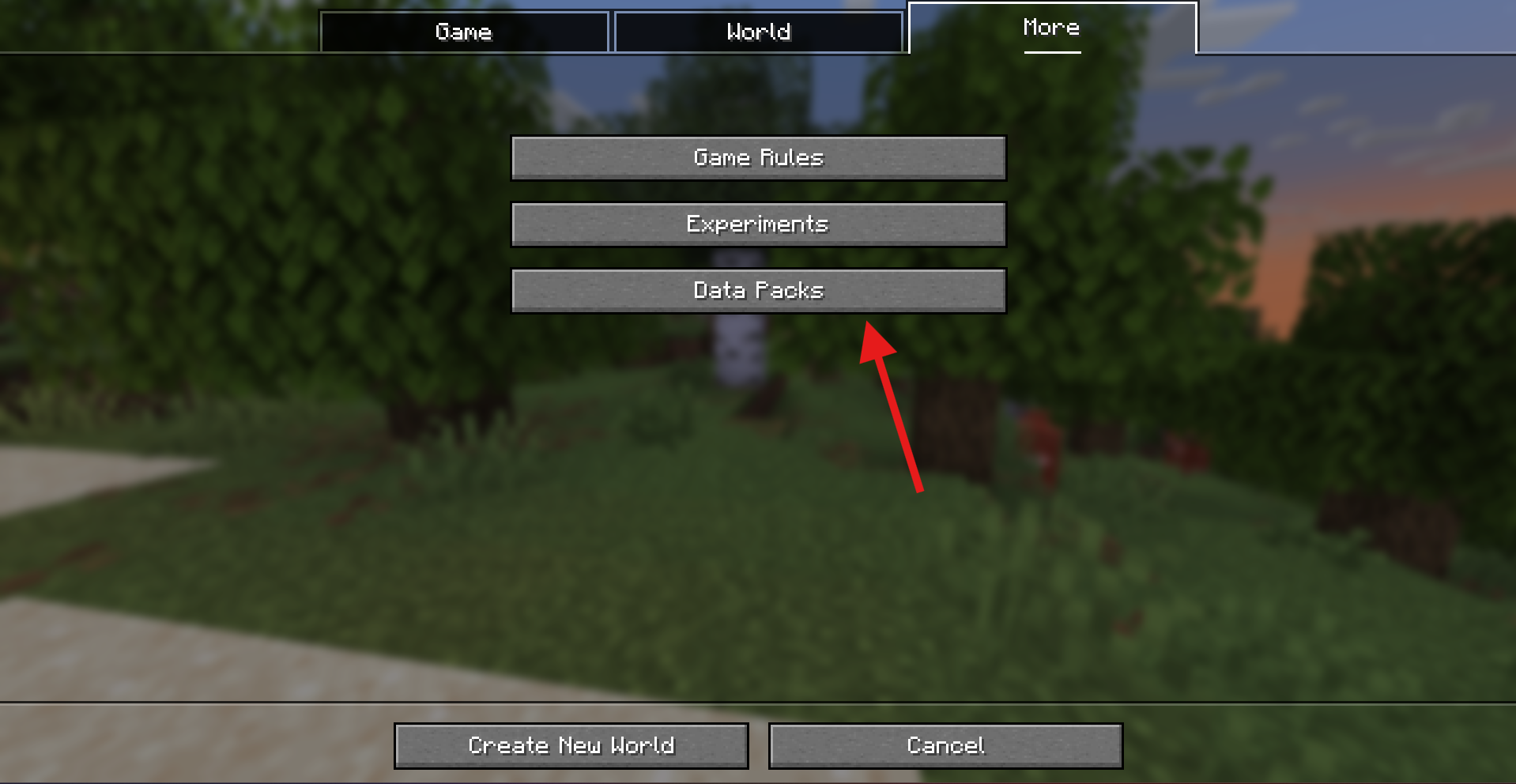
-
步骤 3: 按下
Open Pack Folder(打开包文件夹)并将你下载的.zip文件拖入打开的文件夹中。(请确保选择的是数据包而不是资源包,否则无法正常工作)。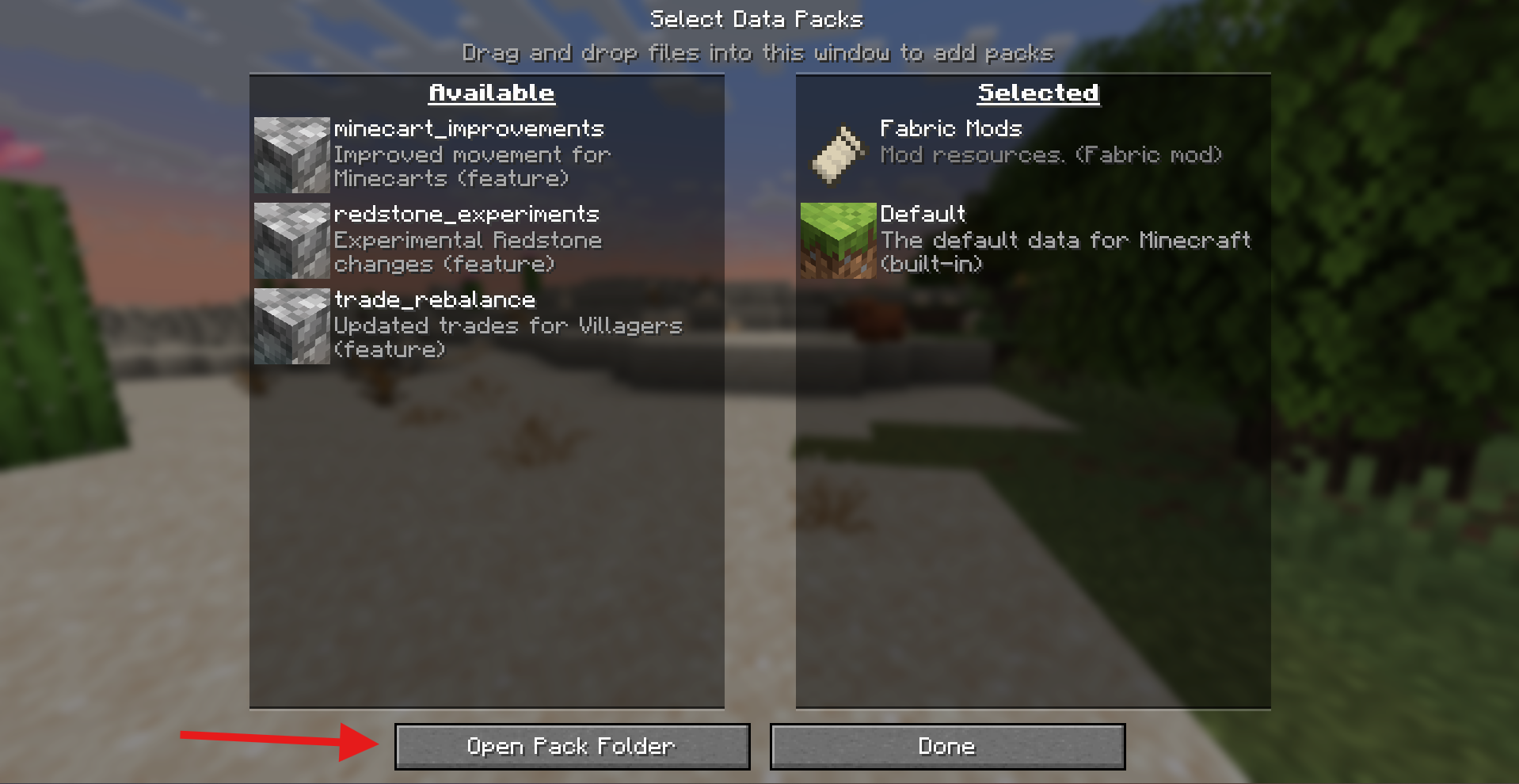
-
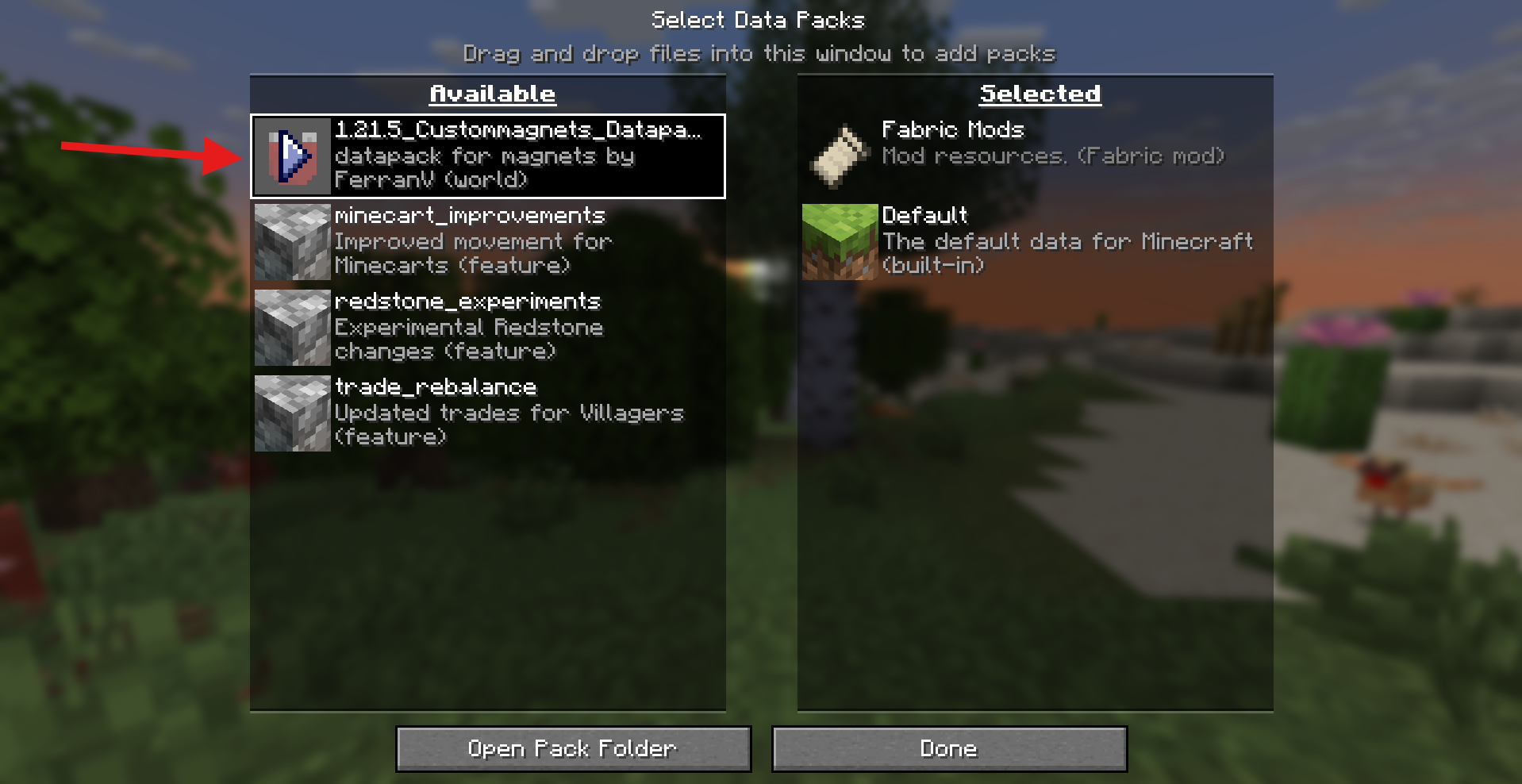
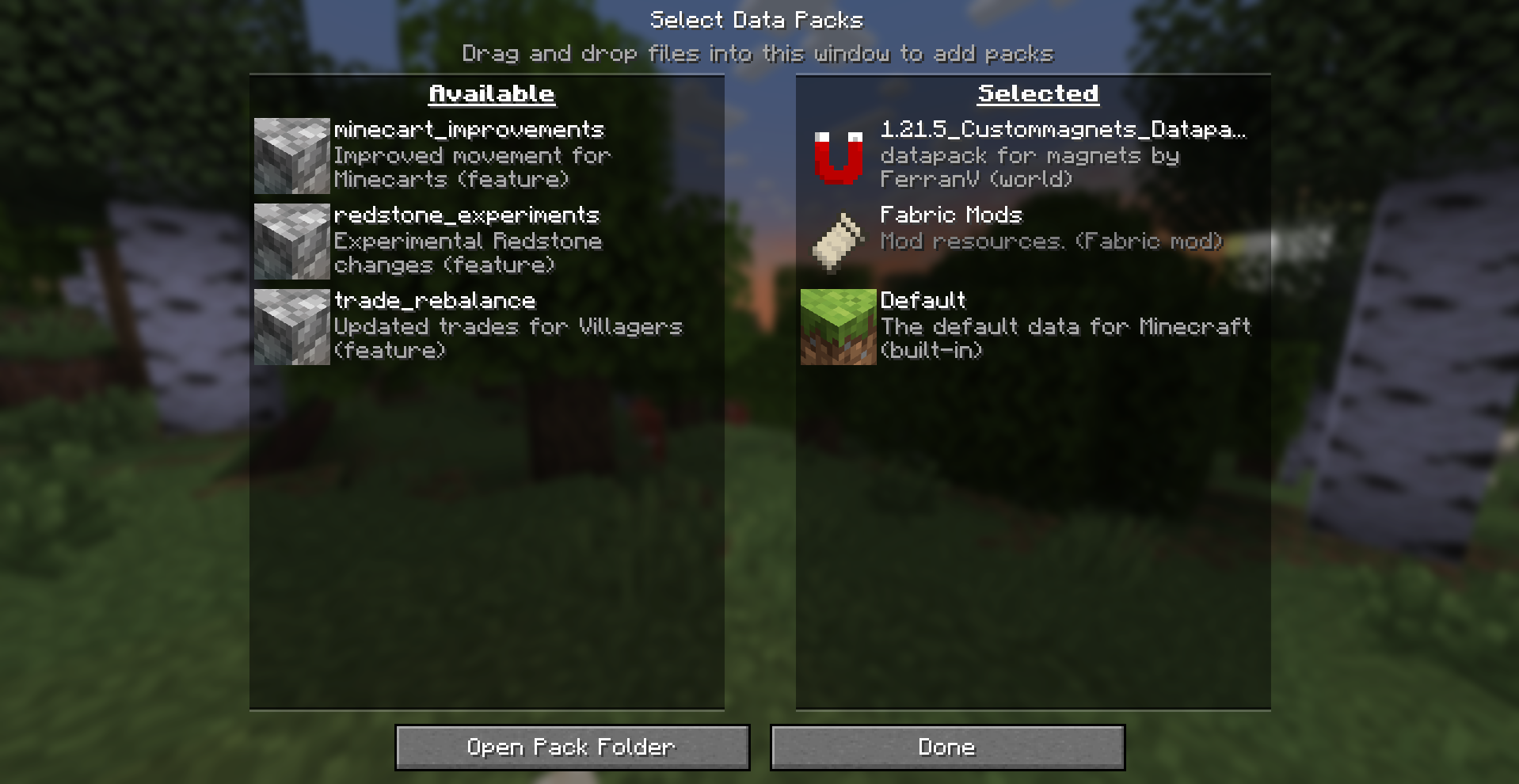
步骤 4: 点击现在出现的文件旁边的箭头,你应该会看到它从
Available(可用)变为Selected(已选中)。-
之前:
-
之后:
-
-
步骤 5: 按下
Done(完成),并在根据你的喜好调整世界选项后,按下Create New World(创建新世界),你就设置好了!
-
-
添加到已有世界:
- 步骤 1:找到你的
saves(存档)文件夹。 - 步骤 2:打开你想加入数据包的这个世界所在的文件夹。
- 步骤 3:在该世界文件夹中找到
datapacks文件夹。 - 步骤 4:将
.zip文件拖入datapacks文件夹。(请确保拖入的是数据包文件而不是资源包,否则无法正常工作)
- 步骤 1:找到你的
资源包:
- 步骤 1: 找到你的 Minecraft 文件夹。
- 步骤 2:
找到
resourcepacks文件夹 - 步骤 3:
将
.zip文件拖入resourcepacks文件夹(请确保这是资源包文件而不是数据包,否则无法正常工作)。
Will not be updating this project unless I change my mind.
CustomMagnets
By: FerranV
Important Notice!!: When downloading the datapack also download the embedded resourcepack!
- Step 1: Go to
versionsand click on the desired version. - Step 2: Scroll down to
filesand download BOTH the datapack and resourcepack. (Installation guide below if needed)
Description:
This is a datapack (+resourcepack) that adds custom magnet items to the end city loot pools.
-
Obtaining the magnets:
- You find the magnets in the chests that can be found in the end cities.
- If you are an OP you can also obtain the magnets by typing
/function custommagnets:get_magnetin chat.
-
Usage:
- Hold the magnet (either mainhand or offhand) to suck up items in a specific radius depending on it's rarity. Common: 3x3, Epic: 5x5, Legendary: 10x10
- Shift+right_click whilst holding the magnet to toggle the magnet from sucking up items.
- The magnets ARE compatible with the mending and unbreaking enchantments. (The magnets do also all have durability. Common: 3000, Epic: 7000, Legendary: 10000)
Bug report:
- Experiencing any issues or have ideas for enhancements? Please let me know at the
Report issuespage.
Changelog:
- 1.21.7_v1.0.0: Added support for the 1.21.7 version of Minecraft.
- 1.21.6_v1.0.0: Added support for the 1.21.6 version of Minecraft.
- v1.0.0+mod: now packaged as a mod for easier installation on modded instances.
- v1.0.0: Initial Push
Installation guide:
Modded instance:
- If you're playing on a modded instance you can download the +mod version and drop it in your mods folder and you're done :D. Note: this will enable the datapack on every world that you play on. Just like any other mods would. So if you want it to only affect specific worlds you should follow the steps below.
Datapack:
-
Adding to a new world:
-
Step 1: Press
Create New Worldand thenMore -
Step 2: Press
Data Packs -
Step 3: Press
Open Pack Folderand drop your download.zipfile in the opened folder. (Make sure you select the datapack and not the resourcepack or else it will not work). -
Step 4: Click the arrow next to the now appeared file and you should see it go from
AvailabletoSelected.-
Before:
-
After:
-
-
Step 5: Press
Doneand after changing your world options to your liking pressCreate New Worldand you should be all set up!
-
-
Adding to an already existing world:
- Step 1: Locate your
savesfolder. - Step 2: Open folder of the world you want the datapack to be in.
- Step 3: Locate the
datapacksfolder within that world folder. - Step 4: Drop the
.zipfile into thedatapacksfolder. (Make sure you drop the datapack file and not the resourcepack or else it will not work)
- Step 1: Locate your
Resourcepack:
- Step 1: Locate your Minecraft folder.
- Step 2:
Locate the
resourcepacksfolder - Step 3:
Drop the
.zipfile into theresourcepacksfolder (make sure this is the resourcepack file and not the datapack or else it will not work).

下载 CustomMagnets
需要联机服务器吗?
稳定流畅、一键部署,几分钟即可和朋友联机开服
最低仅需 8 元/月 即可畅快联机
下载 CustomMagnets
需要联机服务器吗?
稳定流畅、一键部署,几分钟即可和朋友联机开服
最低仅需 8 元/月 即可畅快联机
下载 CustomMagnets
需要联机服务器吗?
稳定流畅、一键部署,几分钟即可和朋友联机开服
最低仅需 8 元/月 即可畅快联机
下载 CustomMagnets
需要联机服务器吗?
稳定流畅、一键部署,几分钟即可和朋友联机开服
最低仅需 8 元/月 即可畅快联机
下载 CustomMagnets
需要联机服务器吗?
稳定流畅、一键部署,几分钟即可和朋友联机开服
最低仅需 8 元/月 即可畅快联机
下载 CustomMagnets
需要联机服务器吗?
稳定流畅、一键部署,几分钟即可和朋友联机开服
最低仅需 8 元/月 即可畅快联机
添加了对 1.21.7 的支持
关于这个资源的讨论、问题反馈与使用心得
还没有讨论,来发第一帖吧
你是这个资源的作者?登录后可认领此资源。
相似资源
 数据包

此数据包添加了属于阿瓦里海盗的独特结构,将他们的独特风格带入你的 Minecraft 世界!兼容性:1.20 至 26.3
 数据包
一个 Minecraft 光线投射库,能够精确检测玩家正在查看的方块,包括像台阶和楼梯这样的特殊方块形状。
 数据包

此数据包添加了新的“祝福模式”难度。
 数据包

添加了基于官方概念图的蓝蛙和红眼树蛙变体。
 数据包

为模组生物群系添加原版回溯特性!
 数据包
允许服务器管理员方便地禁用 Xaero's Map 系列模组中的实体雷达、小地图等功能,使竞技游戏更加公平。
评论 0
登录后参与评分
还没有评论,来抢沙发吧