Easy Holograms
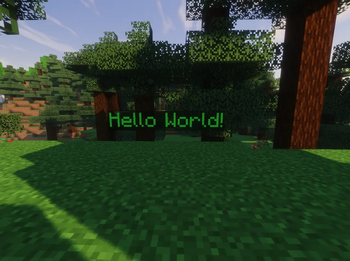
此数据包允许你在 Minecraft 世界中轻松创建自定义文本全息图。它也可以在生存模式中使用。
? 用法
要创建自己的全息图,你只需要一支书和羽毛笔,如果希望为文字着色,还可以额外准备一种染料。
在书和羽毛笔中输入你希望显示在全息图上的文字,然后点击“完成”。接着,站在你想要放置全息图的位置,在主手持有书和羽毛笔的同时执行命令 /trigger placeHolo,然后按回车键。瞧!你的新全息图就出现了!
注意:全息图的朝向将取决于你面对的方向(西、南、北或东)。
如果你希望为文字着色,只需在全息图创建过程中副手持有一种染料即可(染料不会被消耗)。
如果愿意,你可以使用 /trigger backgroundHolo 移除背景(此操作不可撤销)。
你可以通过站在全息图上并执行 /trigger scaleHolo set <int> 来调整其缩放比例。默认大小为 1。
若要删除某个全息图,请站在该全息图的文字上并使用 /trigger deleteHolo。
如果你希望防止全息图被修改或删除,可以使用 /trigger lockHolo。若要再次允许更改,请使用 /trigger unlockHolo。
? 管理员命令
如果你想删除世界中的所有全息图,请使用以下命令:
/function esholo:command/killall
聊天栏中会出现一条确认消息,询问你是否真的要移除所有全息图。
点击“点击此处执行”按钮,然后选择“是”以确认。
? 卸载
本数据包内置了集成卸载流程。请在从你的数据包文件夹中删除文件之前,先使用 /function esholo:command/uninstall。
? 报告问题
? 如果你在使用该数据包时遇到任何问题或有建议,可以通过我的 Discord 服务器 联系我。
Easy Holograms
This datapack allows you to easily create custom text holograms in your Minecraft world. It also works in survival mode.

? Usage
To create your own hologram, you just need a book and quill and optionally a dye if you want to color your text.
Write the text that you want to appear on the hologram in the book and quill, then click Done. Now, stand where you want to create the hologram and use the command /trigger placeHolo while holding the book and quill in your main hand, then press Enter. Ta-da! Here's your new hologram !
Note that the hologram’s orientation will depend on the direction you’re facing (west, south, north, or east).
If you want to color your text, just hold a dye in your off-hand while creating a hologram (Dye will not be consumed)
You can remove the background by using /trigger backgroundHolo if you wish (This action cannot be undone)
You can change the scale of your hologram by standing on it and executing /trigger scaleHolo set <int>. Default size is 1.
To delete a hologram, stand on the text and use /trigger deleteHolo.
If you want to prevent your hologram from being modified or deleted, you can use /trigger lockHolo. To allow changes again, use /trigger unlockHolo
? Admin Commands
If you want to delete all holograms from your world, use the following command:
/function esholo:command/killall
A confirmation message will appear in chat, asking if you really want to remove all holograms.
Click the "Click here to execute" button, and then Yes to confirm.
? Uninstallation
The pack comes with an integrated uninstallation process. Please use /function esholo:command/uninstall before deleting the file from you datapack folder.
? Report an issue
? If you encounter any issues with the datapack or have any suggestions, you can contact me through my Discord Server.
评论 0
登录后参与评分
还没有评论,来抢沙发吧
