
构建多物品分拣器(Multi Item Sorter,简称 MIS)通常非常复杂、容易出错,而且整体来说并不有趣。我在网上找不到符合我要求的方案:有的太贵,有的体积太大,还有的速度太慢……
于是,我决定自己动手制作一个。不同于那些被红石和矿车电路搞得一团糟的 MIS,这个设计极其简洁。
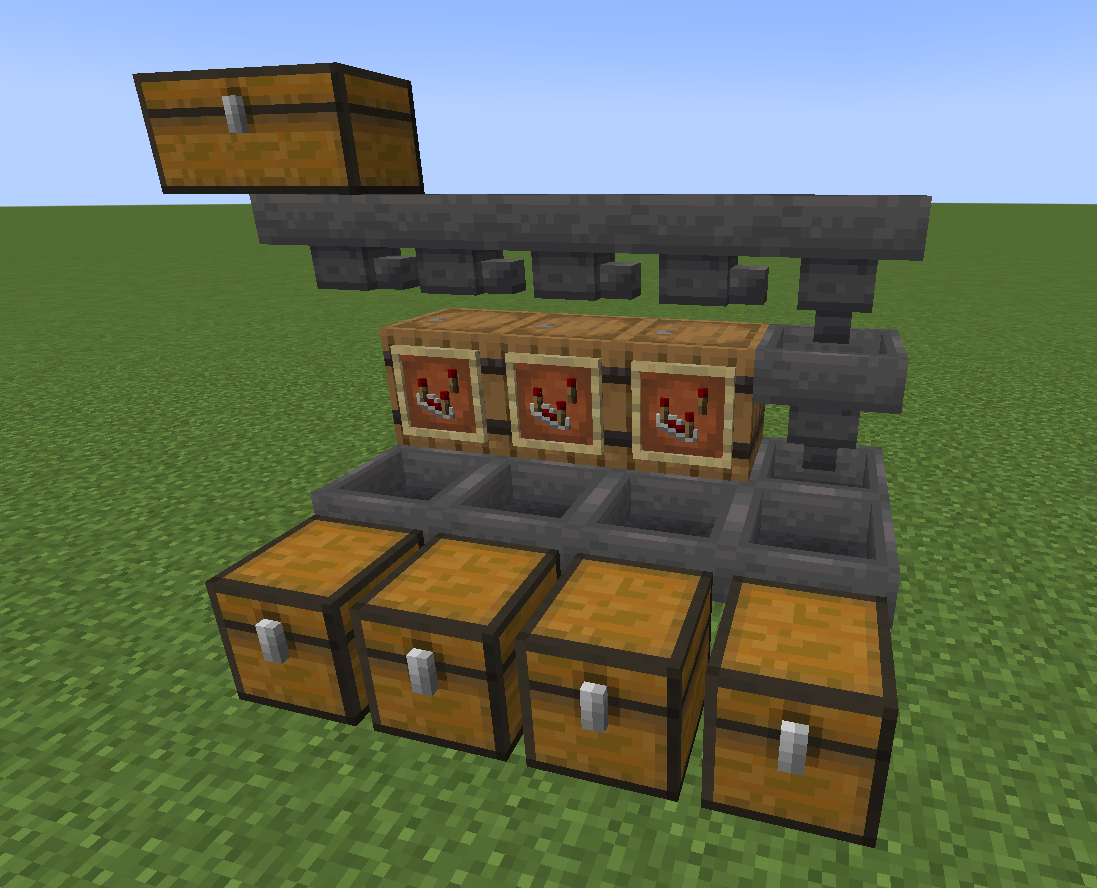
它是如何工作的?
在任意容器上放置一个物品展示框,并在该容器中放入比较器。带有物品展示框的这个容器,我们称之为“过滤容器”。
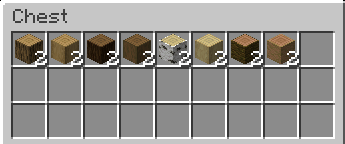
在过滤容器中放入任意可堆叠的物品,并确保其中至少包含两个该物品。你在过滤容器中放入的物品,就是将被筛选的目标物品。
再次强调:容器中必须至少有该物品的两个实例,否则系统将无法识别出要筛选的物品。
过滤容器会从上方任何容器中抽取它内部已有的物品。因此,这里通常会放置一排漏斗。当物品沿漏斗线向下运输时,过滤容器会抓取所有与其内容匹配的物品。
筛选后的物品会进入物品展示框正下方的漏斗中:
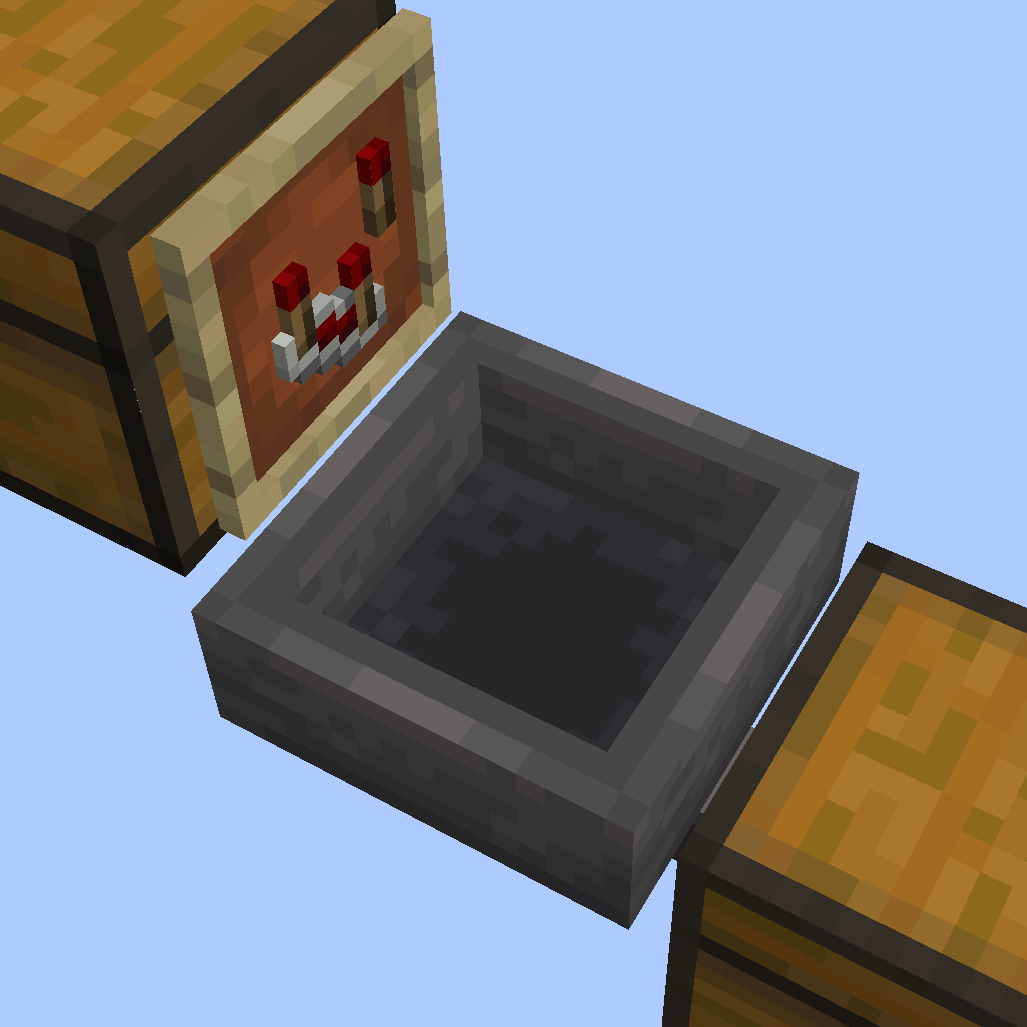
你可以将该漏斗指向一个箱子,以便你访问筛选出的物品。你也可以让漏斗指向另一个漏斗,甚至可以用箱子替换漏斗。任何能容纳物品的容器都可以使用。
切勿在过滤容器的底部放置漏斗,这会扰乱你的过滤布局。漏斗应位于物品展示框下方,而不是过滤容器下方。
如果你使用了比原版更快的漏斗,比如 Super Hopper,那么你需要调整 MIS 的过滤速率。默认速度为每 8 个刻处理 1 个物品,与原版漏斗相同。但你可以通过以下命令将 MIS 设置为每刻处理 1 个物品:
/trigger easy_mis_fast_mode
如果你的电脑配置不太理想,还可以通过以下命令将速度降低 4 倍:
/trigger easy_mis_slow_mode
并通过 /trigger easy_mis_normal_mode 恢复默认设置。
如果你的电脑配置一般,建议使用普通速度的漏斗。
查看 我的其他模组
Building a Multi Item Sorter (or MIS) is always complex, prone to breaking, and overall, not fun to build. I couldn't find one online that met my demands. Some were too expensive, others too large or too slow...
So, I decided to make this. Instead of your MIS looking clustered with redstone and minecart circuits, you get this very simple design.
How does it work?
Slap an item frame on any container with a comparator in it. The container with the item frame on it, we'll call the filtering container.
Place any stackable item in the filtering container making sure it has at least two of the items. The items you place in the filtering container will be the items that are being filtered.
Again, it MUST have at least two of the items in the container or it will not see the item for filtering.
The filtering container will pull items it already has inside it from any containers above it. So, this is typically where you'd place a line of hoppers. As the items get transported down the hopper line, the filtering containers will snatch all the items that match their contents.
The filtered items go in the hopper directly below the item frame:
You can then point that hopper into a chest where you'll be able to access your filtered items. You can also have the hopper point into another hopper or even replace the hopper with a chest. Any container that can hold items will do.
Do not place a hopper on the underside of the filtering container, that would just mess up your filtering placement. The hopper goes below the item frame, not below the filtering container.
Got hoppers that are faster than vanilla? Like the Super Hopper? Well, if you plan on using hoppers that are faster than regular hoppers, you will need to adjust the filtering rate of your MIS. The default speed is 1 item per 8 ticks, same as a vanilla hopper. However, you can set the MIS to 1 item per tick with
/trigger easy_mis_fast_mode
You can also slow things down by 4 times if you have a not-so-great pc with
/trigger easy_mis_slow_mode
and back to default with /trigger easy_mis_normal_mode
I recommend using regular-speed hoppers if you don't have great computer specs.
See my other mods

下载 Easy Multi Item Sorter
需要联机服务器吗?
稳定流畅、一键部署,几分钟即可和朋友联机开服
最低仅需 8 元/月 即可畅快联机
下载 Easy Multi Item Sorter
下载 Easy Multi Item Sorter
需要联机服务器吗?
稳定流畅、一键部署,几分钟即可和朋友联机开服
最低仅需 8 元/月 即可畅快联机
下载 Easy Multi Item Sorter
下载 Easy Multi Item Sorter
需要联机服务器吗?
稳定流畅、一键部署,几分钟即可和朋友联机开服
最低仅需 8 元/月 即可畅快联机
下载 Easy Multi Item Sorter
- 为马铃薯构建添加了慢速模式
- 轻微优化
关于这个资源的讨论、问题反馈与使用心得
还没有讨论,来发第一帖吧
你是这个资源的作者?登录后可认领此资源。
相似资源
 数据包

手持潜影盒时可直接打开,无需将其放置在地面上。只需按住 Shift 并右键点击即可访问你的潜影盒。
 数据包

这个数据包会在玩家死亡时生成一个坟墓,安全地保存他们的物品。无需担心丢失,随时取回你的财物!
 数据包
按计时器或按需自动扫描并重置试炼密室金库——无需手动操作。
 数据包

添加了来自 Minecraft Live! 的干 Ghast、Ghastling 和 Happy Ghast。
 数据包

压缩甘蔗、火药等农场物品以节省空间。支持新的自动合成器。非常适合管理大型农场并保持你的物品栏整洁有序。
 数据包
使用矿车拾取并移动刷怪笼到你想要的任何地方。
评论 0
登录后参与评分
还没有评论,来抢沙发吧