Redstone⁴ 的 𝓕𝓪𝓷𝓬𝔂 𝓓𝓸𝓸𝓻𝓼
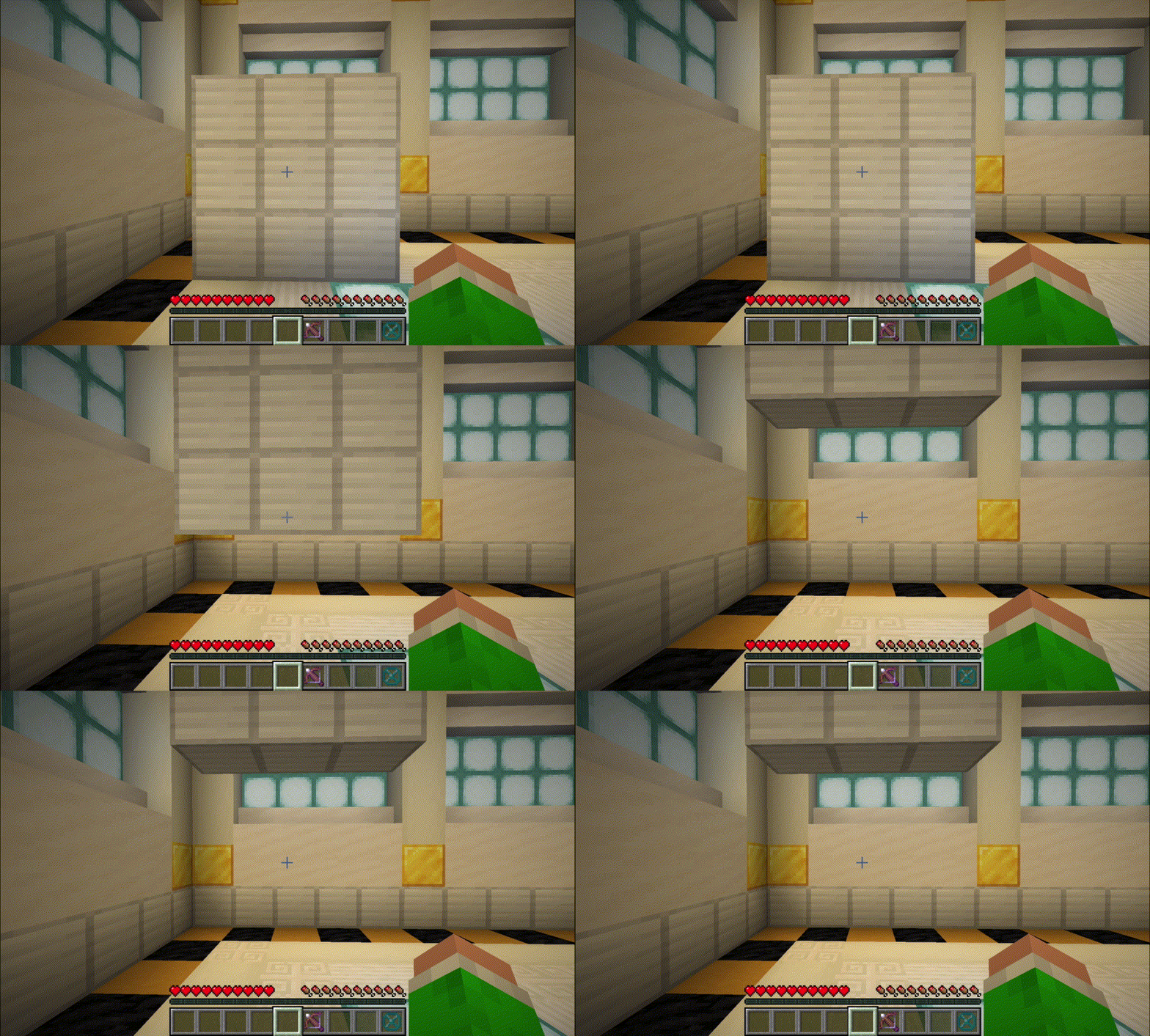
此数据包提供了使用方块显示实体构建平滑移动门所需的工具。
配置
可通过以下命令访问额外的配置选项:
/function fdoors:configure
此菜单允许管理员切换以下设置:
- 允许在门中使用屏障方块、基岩和方块实体
- 隐藏首次启动时的欢迎消息
- 切换门配置对话框是仅限管理员还是非管理员也可用
使用指南
入门指南
目前,门控制器和方块选择器只能通过作弊模式获取:
/function fdoors:give
创建门
要创建新门,请将门控制器放置在某个表面上。然后,左击方块选择器以将其与门控制器配对。
配对完成后,使用方块选择器发射箭矢即可向门中添加或移除方块:

配置门
再次使用方块选择器左敲门控制器可打开门配置对话框:

触发条件
触发条件决定了门开启所需满足的条件。目前有四种触发方式:
- 范围:当玩家处于控制器有效范围内时,门会开启
- 物品匹配:当处于控制器有效范围内的玩家主手持有特定物品时,门会开启
- 方块匹配:当控制器所在位置的方块状态匹配特定条件时,门会开启
- 谓词(Predicate):当指定的谓词表达式返回真值时,门会开启。由于对话框和功能宏的限制,不支持内联谓词。
变换效果
变换效果决定了门完全开启后的最终位置:
- 偏移量(Offset):门开启后整体在 x/y/z 轴上的最终偏移距离
- 缩放(Scale):各个方块显示实体的最终 x/y/z 缩放比例
- 偏航角(Yaw):应用于整个门的水平旋转角度
- 俯仰角(Pitch):应用于整个门的垂直旋转角度
音效
门在执行以下操作时会播放音效:
这些音效的名称、音量和音调均可单独配置。
轮廓颜色
“轮廓颜色”用于设置门预览中使用的发光颜色和粒子颜色。当多个门紧邻放置且需要区分时,此项非常有用。
Redstone⁴'s 𝓕𝓪𝓷𝓬𝔂 𝓓𝓸𝓸𝓻𝓼
This datapack adds tools for building smooth-moving doors using block displays.

Configuration
Additional configuration options are available with:
/function fdoors:configure
This menu allows an operator to toggle:
- Allowing barrier blocks, bedrock, and block entities in doors
- Hiding the first-time welcome message
- Toggling between an operator-only and a non-operator door configuration dialog
Usage Guide
Getting Started
Currently, the door controller and block selector are only obtainable with cheats:
/function fdoors:give
Creating Doors
To create a new door, place the door controller onto a surface. Then, left-click the block selector onto the door controller to pair with the controller.
Once paired, fire arrows with the block selector to add or remove blocks from the door:

Configuring Doors
Left-click on the door controller with the block selector a second time to open the door configuration dialog:

Triggers
The trigger determines the condition required for the door to open. Currently, there are four triggers:
- Range: Door opens when a player is within range of the controller
- Item match: Door opens when a player within range of the controller is holding a specific item in their main hand
- Block match: Door opens when the block at the controller's position matches a specific state
- Predicate: Door opens when the given predicate passes. Inline predicates are not accepted due to limitations with dialogs and function macros.
Transformations
Transformations determine the final position of the door once it's fully opened:
- Offset: The final x/y/z offset of the entire door when opened
- Scale: The final x/y/z scale of the individual block displays
- Yaw: The yaw-rotation applied to the entire door
- Pitch: The pitch-rotation applied to the entire door
Sound Effects
Doors play sound effects when they:
- Start opening
- Finish opening
- Start closing
- Finish closing
The name, volume and pitch of these sounds can be configured separately.
Outline Color
"Outline color" sets the glow color and particle color used in the door preview. This is useful when multiple doors are directly next to each other and need to be distinguished.
评论 0
登录后参与评分
还没有评论,来抢沙发吧
