Flop | Minecraft 的浮点运算
此数据包是一个用于通过计分板处理浮点运算的库。引入了一种新的数据表示法“eroxifloat”以支持此功能。
什么是浮点数?
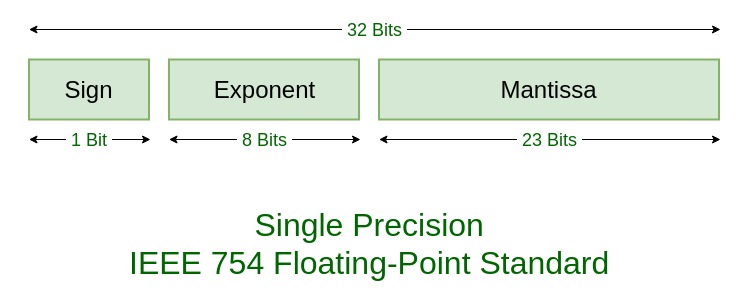
浮点数是一种用二进制表示实数的方法。它由三部分组成:
- 符号(Sign):表示数字是正数还是负数
- 指数(Exponent):决定数值的大小
- 尾数(Mantissa):决定可表示数字的精度
该表示法的数值计算方式为:
$$(-1)^\text{sign} \times \text{mantissa} \times 2^\text{exponent} $$
Eroxifloat
Eroxifloat 使用 3 个计分板分别存储符号、指数和尾数。提供了函数将 NBT 存储中的浮点数转换为 eroxifloat,以及将 eroxifloat 转换回浮点数。所有的数学运算都在此计分板表示形式上执行,但也提供了执行所有转换的函数,以便您可以直接在 NBT 存储的数字上进行数学运算。
Eroxifloat 使用 30 位来表示尾数,使其比 float(单精度浮点数)稍微精确一些,但不如 double(双精度浮点数)精确。需要注意的是,除法和平方根操作仅有 15 位的精度。其他所有操作均保留 30 位的精度。
符号可以取 -1 和 1 的值,而非常规浮点表示法中的 0 和 1。
使用方法
在使用此数据包之前,您需要运行函数 flop:api/create_scoreboards 以设置所需的计分板目标和值。默认情况下,此函数未包含在 minecraft:load 标签中,您需要自行运行它。
目前提供以下六种运算:
- 加法 ($a + b$)
- 减法 ($a - b$)
- 乘法 ($a \times b$)
- 除法 ($\frac{a}{b}$)
- 平方 ($x^2$)
- 平方根 ($\sqrt{x}$)
使用此库最简单的方法是使用 flop:api/storage/ 文件夹中的函数。这些函数直接在 NBT 存储中的浮点数上执行运算。例如,对于加法:
data modify storage flop:api operand.a set value 5d

data modify storage flop:api operand.b set value 0.13d

function flop:api/storage/add

data modify <destination> set from storage flop:api output
仅接受一个输入的运算(如 sqrt 和 square)的使用方式如下:
data modify storage flop:api input set value 42.0d

function flop:api/storage/sqrt

data modify <destination> set from storage flop:api output
高级用法
如果您要计算复杂的公式,对存储区执行运算可能会因 NBT 和 eroxifloat 表示法之间不必要的转换而产生开销。您可以改为直接在 eroxifloat 上执行运算。要从 NBT 存储中的数字创建 eroxifloat,请使用以下函数 flop:api/storage/read_as_eroxifloat。这将把存储在 storage flop:api input 中的数字转换为三个计分板值 input.sign flop、input.exponent flop 和 input.mantissa flop:
data modify storage flop:api input set value 5d

function flop:api/storage/read_as_eroxifloat

scoreboard players operation <destination 1> = input.sign flop
scoreboard players operation <destination 2> = input.exponent flop
scoreboard players operation <destination 3> = input.mantissa flop
然后您可以执行与之前相同的计算类型,但无需转换为 NBT 的开销。
scoreboard players operation operand.a.sign flop = <source 1>
scoreboard players operation operand.a.exponent flop = <source 2>
scoreboard players operation operand.a.mantissa flop = <source 3>
scoreboard players operation operand.b.sign flop = <source 4>
scoreboard players operation operand.b.exponent flop = <source 5>
scoreboard players operation operand.b.mantissa flop = <source 6>

function flop:api/eroxifloat/add

scoreboard players operation <destination 1> = output.sign flop
scoreboard players operation <destination 2> = output.exponent flop
scoreboard players operation <destination 3> = output.mantissa flop
scoreboard players operation input.sign flop = <source 1>
scoreboard players operation input.exponent flop = <source 2>
scoreboard players operation input.mantissa flop = <source 3>

function flop:api/eroxifloat/sqrt

scoreboard players operation <destination 1> = output.sign flop
scoreboard players operation <destination 2> = output.exponent flop
scoreboard players operation <destination 3> = output.mantissa flop
而对于转换回 NBT,有两种选项:作为 float 或作为 double 写入。由于 eroxifloat 比普通 float 稍微精确一些,因此推荐使用后者。然而,在某些情况下您可能需要您的数字为 float 类型。
scoreboard players operation output.sign flop = <source 1>
scoreboard players operation output.exponent flop = <source 2>
scoreboard players operation output.mantissa flop = <source 3>

function flop:api/eroxifloat/write_to_float
scoreboard players operation output.sign flop = <source 1>
scoreboard players operation output.exponent flop = <source 2>
scoreboard players operation output.mantissa flop = <source 3>

function flop:api/eroxifloat/write_to_double
最后的话
感谢阅读 :D
-Eroxen
Flop | floating point operations for Minecraft
This datapack is a library for handling floating-point operations using scoreboards. A new data representation, the 'eroxifloat', is introduced to support this.
What is a floating-point number?
A floating-point number is a way to represent real numbers in binary. It consists of three parts:
- Sign: whether the number is positive or negative
- Exponent: determines the magnitude of the number
- Mantissa: determines the precision to which numbers can be represented
The numerical value of this representation is:
$$(-1)^\text{sign} \times \text{mantissa} \times 2^\text{exponent} $$
The Eroxifloat
An eroxifloat uses 3 scoreboards to store the sign, exponent and mantissa separately. Functions are provided to convert floating-point numbers in NBT storage to eroxifloats and back again. All math operations are performed on this scoreboard representation, but there are also functions provided that perform all the conversions so that you can simply do math on numbers in NBT storage.
The eroxifloat uses 30 bits to represent the mantissa, making it slightly more precise than a float, but less precise than a double. It is worth to note that the division and square root operations only have 15-bit precision. All other operation preserve 30-bit precision.
The sign can take on the values -1 and 1, rather than 0 and 1 as is the case in regular floating point representations.
How to use
Before you can use the pack, you need to run the function flop:api/create_scoreboards to set up the required scoreboard objectives and values. This function is not included in the minecraft:load tag by default, you need to run it yourself.
Currently, the following six operations are available:
- Addition ($a + b$)
- Subtraction ($a - b$)
- Multiplication ($a \times b$)
- Division ($\frac{a}{b}$)
- Square ($x^2$)
- Square root ($\sqrt{x}$)
The easiest way to use this library is to make use of the functions in the flop:api/storage/ folder. These perform operations directly on floating-point numbers in NBT storage. For addition, for example:
data modify storage flop:api operand.a set value 5d

data modify storage flop:api operand.b set value 0.13d

function flop:api/storage/add

data modify <destination> set from storage flop:api output
Operations that take only one input, such as sqrt and square, are used as follows:
data modify storage flop:api input set value 42.0d

function flop:api/storage/sqrt

data modify <destination> set from storage flop:api output
Advanced usage
If you want to calculate complicated formulas, using the operations on storage can cause overhead due to unnecessary conversion between NBT and eroxifloat representations. You can instead perform operations on eroxifloats directly. To create an eroxifloat from a number in NBT storage, use the following function flop:api/storage/read_as_eroxifloat. This will convert the number stored in storage flop:api input into the three scoreboard values input.sign flop, input.exponent flop and input.mantissa flop:
data modify storage flop:api input set value 5d

function flop:api/storage/read_as_eroxifloat

scoreboard players operation <destination 1> = input.sign flop
scoreboard players operation <destination 2> = input.exponent flop
scoreboard players operation <destination 3> = input.mantissa flop
You can then perform the same kinds of calculations as before, but without the overhead of converting to NBT.
scoreboard players operation operand.a.sign flop = <source 1>
scoreboard players operation operand.a.exponent flop = <source 2>
scoreboard players operation operand.a.mantissa flop = <source 3>
scoreboard players operation operand.b.sign flop = <source 4>
scoreboard players operation operand.b.exponent flop = <source 5>
scoreboard players operation operand.b.mantissa flop = <source 6>

function flop:api/eroxifloat/add

scoreboard players operation <destination 1> = output.sign flop
scoreboard players operation <destination 2> = output.exponent flop
scoreboard players operation <destination 3> = output.mantissa flop
scoreboard players operation input.sign flop = <source 1>
scoreboard players operation input.exponent flop = <source 2>
scoreboard players operation input.mantissa flop = <source 3>

function flop:api/eroxifloat/sqrt

scoreboard players operation <destination 1> = output.sign flop
scoreboard players operation <destination 2> = output.exponent flop
scoreboard players operation <destination 3> = output.mantissa flop
And for converting back to NBT, there are two options: writing as a float or as a double. Since the eroxifloat is slightly more precise than a normal float, the latter is reccomended. However, in some cases you may need your number to be a float instead.
scoreboard players operation output.sign flop = <source 1>
scoreboard players operation output.exponent flop = <source 2>
scoreboard players operation output.mantissa flop = <source 3>

function flop:api/eroxifloat/write_to_float
scoreboard players operation output.sign flop = <source 1>
scoreboard players operation output.exponent flop = <source 2>
scoreboard players operation output.mantissa flop = <source 3>

function flop:api/eroxifloat/write_to_double
Final note
Thanks for reading :D
-Eroxen


 数据包
 数据包
 数据包

 数据包
 数据包

 数据包

评论 0
登录后参与评分
还没有评论,来抢沙发吧