GetSysTime
将现实世界的时钟引入 Minecraft 指令中。
GetSysTime 是一个服务端数据包,它会从运行你世界的机器读取本地时间,并通过计分板和命令存储暴露小时、分钟和秒。你可以用它来构建时钟、定时事件、每日奖励、基于时间的机制,或任何其他需要获取真实一天中时间的功能。
无需模组或资源包。
特性
- 按需获取当前系统时间
- 提供易于使用的计分板值来表示小时、分钟和秒
- 在支持的版本中,也通过命令存储暴露时间
- 支持单人游戏和专用服务器
- 包含设置检查以及完整的卸载功能
- 支持自 23w03a 起的 Minecraft Java Edition 快照版
在专用服务器上,GetSysTime 读取的是服务器主机的时钟和时区,而非每个玩家的本地时间。
安装
- 下载与你的 Minecraft 版本匹配的 GetSysTime 版本。
- 将下载的
.zip 文件放入你世界的 datapacks 文件夹中。
- 加入世界,或者如果世界已经打开,则运行
/reload。
- 站在一个始终加载的区块内的安全位置(最好在世界出生点附近),然后运行:
/function getsystime:set
设置函数会在你所在的位置放置一个重复命令方块,并在其中放置一个标记实体。该位置的方块将被替换。再次运行设置函数可以安全地替换之前的 GetSysTime 安装。
专用服务器必须在 server.properties 中启用命令方块:
enable-command-block=true
用法
当你需要当前时间时,运行:
/function getsystime:get
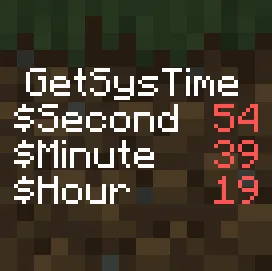
以下 GetSysTime 目标中的假人玩家会被更新为数值:
| 计分持有者 |
值 |
$Hour |
当前小时 |
$Minute |
当前分钟 |
$Second |
当前秒 |
例如,你可以直接这样读取它们:
/scoreboard players get $Hour GetSysTime
/scoreboard players get $Minute GetSysTime
/scoreboard players get $Second GetSysTime
或者在测试时显示该目标:
/scoreboard objectives setdisplay sidebar GetSysTime
原始时间也可通过 getsystime:values input 获取。在 23w31a 及更高版本的快照中,各个时间字段也存储在 getsystime:values time 下。
GetSysTime 仅在调用 getsystime:get 时更新这些值,因此其他数据包可以自行决定刷新时间的频率。
卸载
在删除数据包之前,请运行:
/function getsystime:uninstall
这将移除由 GetSysTime 创建的命令方块、标记实体、计分板目标和存储数据。之后你可以从世界的 datapacks 文件夹中移除 .zip 文件。
注意事项
- GetSysTime 使用命令方块的戳记来读取主机系统时间,因此设置所在的区块必须保持加载状态。
- 设置函数会启用
sendCommandFeedback 游戏规则,这是系统正常工作的必要条件。
- 在单人游戏中需要开启作弊权限,或在服务器上拥有足够的权限等级才能执行相关指令。
- 对于早于 23w03a 的 Minecraft 版本,请参阅 Planet Minecraft 上的旧版。
贡献者与许可
由 EclairDeFeu360 创建。
GetSysTime 采用 CC BY-SA 4.0 许可证授权。下载该数据包即表示你同意其许可条款。
支持创作者
- EclairDeFeu360: Buy Me a Coffee
GetSysTime
Bring the real-world clock into Minecraft commands.
GetSysTime is a server-side data pack that reads the local time from the machine running your world and exposes the hour, minute, and second through a scoreboard and command storage. Use it to build clocks, scheduled events, daily rewards, time-based mechanics, or anything else that needs the real time of day.
No mod or resource pack is required.
Features
- Retrieves the current system time on demand
- Provides the hour, minute, and second as easy-to-use scoreboard values
- Also exposes the time through command storage on supported versions
- Works in single-player and on dedicated servers
- Includes setup checks and a complete uninstall function
- Supports Minecraft Java Edition snapshots from 23w03a onward
On a dedicated server, GetSysTime reads the server host's clock and time zone, not each player's local time.
Installation
- Download the version of GetSysTime that matches your Minecraft version.
- Place the downloaded
.zip file in your world's datapacks folder.
- Join the world or run
/reload if it is already open.
- Stand in a safe location inside an always-loaded chunk, preferably near the world spawn, then run:
/function getsystime:set
The setup function places a repeating command block at your position and a marker inside it. The block at that position will be replaced. Running the setup function again safely replaces the previous GetSysTime installation.
Dedicated servers must have command blocks enabled in server.properties:
enable-command-block=true
Usage
Whenever you need the current time, run:
/function getsystime:get
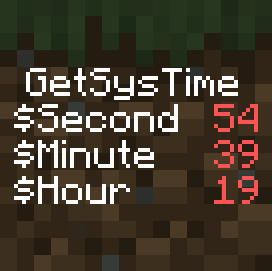
The following fake players in the GetSysTime objective are updated with numeric values:
| Score holder |
Value |
$Hour |
Current hour |
$Minute |
Current minute |
$Second |
Current second |
For example, you can read them directly with:
/scoreboard players get $Hour GetSysTime
/scoreboard players get $Minute GetSysTime
/scoreboard players get $Second GetSysTime
Or display the objective while testing:
/scoreboard objectives setdisplay sidebar GetSysTime
The raw time is also available at getsystime:values input. On snapshot 23w31a and newer, the individual time fields are stored under getsystime:values time as well.
GetSysTime updates these values only when getsystime:get is called, so other data packs can decide how often they need to refresh the time.
Uninstallation
Before deleting the data pack, run:
/function getsystime:uninstall
This removes the command block, marker, scoreboard objective, and storage data created by GetSysTime. You can then remove the .zip file from the world's datapacks folder.
Important notes
- GetSysTime uses a command block's timestamp to read the host system time, so the setup chunk must remain loaded.
- The setup function enables the
sendCommandFeedback game rule, which is required for the system to work.
- Commands require cheats in single-player or a sufficient permission level on a server.
- For Minecraft versions older than 23w03a, see the legacy version on Planet Minecraft.
Credits and license
Created by EclairDeFeu360.
GetSysTime is licensed under CC BY-SA 4.0. By downloading the data pack, you agree to its license.
Support the creator
- EclairDeFeu360: Buy Me a Coffee
 数据包

 数据包
 数据包

 数据包
 数据包

 数据包

评论 0
登录后参与评分
还没有评论,来抢沙发吧