
本项目是 Hardcore Revive+ 的官方社区维护续作,在原作者(StapleTT)的许可下开发。
Hardcore Revive+
开发状态
Hardcore Revive+ 现已由社区维护。
最新的稳定版本为 v1.13.0,适用于 Minecraft 26.1.2、Minecraft 26.2 和 Minecraft 26.3,提供传统数据包形式以及打包在模组内的数据包两种形式。
目前开发的重点在于保持 Hardcore Revive+ 与未来 Minecraft 版本的兼容性,同时继续推进独立 Fabric 模组的移植工作。
该独立的 Fabric 模组是一个长期项目,目前主要用于开发和测试。在官方宣布稳定发布之前,不应将其视为生产就绪版本。
项目状态
Hardcore Revive+ 最初由 StapleTT 创建。
经原作者许可,开发工作继续进行,以保持 Hardcore Revive+ 与新 Minecraft 版本的兼容性,同时保留原有的游戏体验。
此续作的目标并非取代原版项目,而是在尽可能兼容现有世界和服务器的基础上,继续对其进行维护和优化。
除了原版数据包外,还在同步开发一个可选的独立 Fabric 模组。该独立模组允许实现一些难以通过数据包轻易完成的功能、兼容性改进和优化,同时保持原有的游戏机制完整无损。
原有的 Discord 服务器仍可供现有的 Hardcore Revive+ 社区使用。
需要帮助?
加入我们的 Discord:
Bug 报告、功能请求和开发讨论请通过 GitHub Issues 页面提交:
什么是 Hardcore Revive+?
你是否厌倦了原版 Minecraft 的死亡机制?
也许无限重生感觉太容易,而只有一条命的硬核模式又过于苛刻。
Hardcore Revive+ 引入了一个完全可配置的生命值系统,允许每个服务器或世界在生存、合作与难度之间选择自己的平衡点。
玩家将获得可配置数量的生命值。
在失去最后一条生命后,他们不会立即永久离开世界,而是变成幽灵。
在被复活之前,幽灵仍可以通过多种方式与其他玩家互动。
根据所选设置,玩家可以:
- 互相复活
- 在可配置的延迟后自动复活
- 通过生命果酱恢复生命值
- 从其他玩家身上窃取生命值
- 旁观并协助活着的玩家
所有设置均可通过游戏内菜单进行配置。
主要特性
- 可配置的生命值系统。
- 失去最后一条生命后的幽灵玩法。
- 灵魂护符复活系统。
- 用于恢复生命值的生命果酱物品。
- 可选的生命窃取支持。
- 可选的自动复活功能。
- 可配置的幽灵出生点。
- 可配置的自动复活出生点。
- 可配置的难度行为。
- 专用的 Hardcore Revive+ 服务器出生点。
- 兼容原版重生机制。
- 既可作为数据包运行,也可作为打包在模组内的数据包运行。
幽灵玩法
当玩家失去最后一条生命后,他们会变成幽灵。
幽灵是观察者,但依然属于世界的一部分,而非永久死亡。
幽灵可以:
- 自由观察世界
- 保持区块加载
- 附身于活着的玩家(可选)
- 等待其他玩家复活自己
- 如果启用了自动复活,则会自动复活
这创造了一种鼓励团队合作的多玩家体验,而不是将玩家永久移出服务器。
复活系统
玩家可以通过制作灵魂护符来复活幽灵。
丢弃灵魂护符可以让幽灵消耗它并重返人间。
恢复的生命值数量是完全可配置的。
此外,在制作灵魂护符后或被复活后,可以选择施加临时减益效果。
生命果酱
生命果酱允许玩家在不再次死亡的情况下恢复失去的生命值。
服务器可以自由启用或禁用生命果酱的合成。
生命值总数永远不会超过配置的限制。
生命窃取
启用后,击败其他玩家可获得额外的一条生命。
此功能完全是可选的,可以随时启用或禁用。
自动复活
幽灵可以在经过一段可配置的时间后自动复活。
复活计时器可以通过游戏内配置菜单进行调整。
自动复活的玩家出现的地点也是完全可配置的。
幽灵出生点
Hardcore Revive+ 允许你配置玩家在失去最后一条生命后出现在何处。
可用的幽灵出生点模式
服务器出生点
幽灵出现在专用的 Hardcore Revive+ 服务器出生点。
此出生点完全独立于 Minecraft 的原版世界出生点,并且可以随时更改。
最近的活着的玩家
幽灵出现在距离最近的活着的玩家附近。
此选项在多玩家服务器上特别有用,因为玩家经常一起旅行。
原版出生点
幽灵在其正常的 Minecraft 出生点重生。
这遵循原版机制,并尊重:
- 床
- 重生锚
- 世界出生点
死亡位置
幽灵 exactly 出现在他们失去最后一条生命的位置。
自动复活出生点
自动复活的玩家可以出现在与幽灵不同的位置。
可用选项包括:
- 原版出生点
- Hardcore Revive+ 服务器出生点
- 死亡位置
这使得服务器可以根据其偏好的难度创建截然不同的游戏风格。
原版重生兼容性
Hardcore Revive+ 的主要目标之一是在可能的情况下保留原版 Minecraft 的行为。
当玩家失去最后一条生命时,Hardcore Revive+ 会在内部追踪正常的原版死亡与重生流程,随后将玩家转化为幽灵。
因此,原版机制仍能正常工作,包括:
- 床
- 重生锚
- 出生点处理
- 死亡位置追踪
- 原版重生逻辑
这使得 Hardcore Revive+ 比单纯替换 Minecraft 的死亡机制具有更高的原版兼容性。
配置
所有设置均可通过游戏内菜单进行配置。
使用以下命令打开:
/trigger _hcrplus_settings
新创建的世界会在首次启动时自动提示玩家配置该数据包。
生命值
最大生命值
选择每位玩家初始拥有的生命值数量。
可用值:
- 1
- 3
- 5
复活后的生命值
选择成功复活后恢复的生命值数量。
选项包括:
- 1 条生命
- 最大生命值的一半
- 最大生命值
名称颜色
玩家名称会根据其剩余生命值自动改变颜色。
这允许玩家快速识别谁即将耗尽最后一条生命。
Tab 列表中的生命值
在玩家列表(Tab 列表)中显示每位玩家的剩余生命值。
附身
幽灵可以旁观活着的玩家并提供临时增益效果。
此功能可独立启用或禁用。
生命偷取
启用后,击败其他玩家可获得额外的一条生命。
自动复活
在可配置的延迟时间后自动复活幽灵。
自动复活计时器
配置幽灵在被自动复活前保持死亡状态的时间长度。
世界
难度模式
Hardcore Revive+ 可以选择尊重 Minecraft 当前的难度设置,也可以覆盖它。
可用选项:
- 尊重服务器难度
- 简单
- 普通
- 困难
物品
灵魂护符
禁用灵魂护符的合成。
现有的灵魂护符在被丢弃时会分解为其合成原料。
生命果酱
禁用生命果酱的合成。
现有的生命果酱在被消耗时会分解为其合成原料。
灵魂护符减益
在以下情况应用可配置的减益效果:
- 合成灵魂护符
- 被复活
广播复活信息
每当玩家被复活时,向全局聊天发送一条消息。
调试菜单
内置的调试菜单允许管理员在不制作物品的情况下快速测试 Hardcore Revive+。
可用选项:
- 给予灵魂护符
- 给予生命果酱
合成配方
灵魂护符
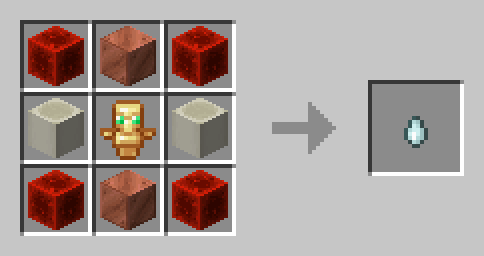
灵魂护符是用于复活幽灵的主要物品。
合成后,只需将其丢弃在地面上。
幽灵拾取灵魂护符即可立即复活。
灵魂护符合成配方
生命果酱
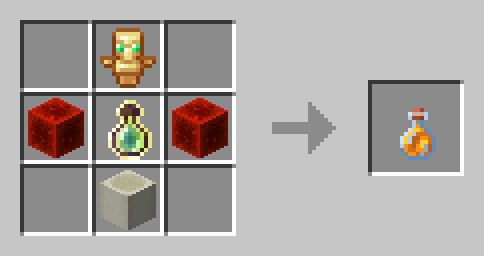
生命果酱可以在不需要其他玩家复活的情况下恢复丢失的生命值。
此合成配方可通过配置菜单禁用。
生命果酱合成配方
兼容性
Hardcore Revive+ 旨在保持与原版 Minecraft 的兼容性,并尽可能与其他模组提供良好的兼容。
由于 Hardcore Revive+ 在将玩家转化为幽灵之前,会有意处理一次正常的原版玩家死亡事件,某些模组可能会对该死亡事件做出反应。
大多数模组无需额外配置即可正常运行。
墓碑模组
Hardcore Revive+ 在幽灵被复活时有意识地执行一次正常的原版重生过程。这确保了床、重生锚、出生点以及其他与重生相关的系统继续正常工作。
一些墓碑模组会挂钩到 Minecraft 的死亡和重生事件中。在 Hardcore Revive+ 的内部原版重生序列期间,它们可能会错误地生成墓碑,尽管玩家实际上只是被复活了。
HCRPlus 兼容性
HCRPlus Compatibility 是一个可选的兼容性模组,可防止受支持的墓碑模组在 Hardcore Revive+ 的内部原版重生序列期间生成墓碑。
它不会:
- 恢复背包
- 转移背包
- 修改玩家物品
- 替换墓碑模组
它的唯一目的是防止受支持的墓碑模组在 Hardcore Revive+ 的内部复活序列期间生成不需要的墓碑。
模组兼容性
长期目标是在可能的情况下提供兼容性模块,而不是修改 Hardcore Revive+ 本身。
这样可以使主项目保持轻量级,同时通过可选集成支持更多模组。
不兼容项
目前已知存在以下不兼容项:
- 原版硬核模式
- 任何“解锁所有配方”的数据包
- Essential Mod
- WorldGameRules
如果您发现其他不兼容项,请通过 GitHub Issues 页面报告。
卸载
要完全卸载 Hardcore Revive+,请执行以下命令:
/function hcrplus:_uninstall
运行卸载函数后,在重新加载世界之前,从以下任一位置移除 Hardcore Revive+:
datapacks文件夹
或者
mods文件夹
问题反馈
如果遇到 Bug,请尽可能包含更多信息。
有用的信息包括:
- Minecraft 版本
- 加载器版本
- Hardcore Revive+ 版本
- 已安装的模组
- 服务器或单人游戏
- 崩溃报告
- 最新日志
- 复现问题所需的步骤
Bug 报告可通过 GitHub Issues 提交。
鸣谢
原始项目
StapleTT
社区维护
Suerion
特别感谢所有继续测试新版 Minecraft、报告 Bug 并帮助改进 Hardcore Revive+ 的人们。
许可证
本项目在原作者许可下,继续开发原版 Hardcore Revive+。
请在重新分发或修改本项目时,尊重原始项目、贡献者及许可证。
This project is the official community-maintained continuation of Hardcore Revive+, developed with permission from the original author (StapleTT).
Hardcore Revive+
Development Status
Hardcore Revive+ is now community maintained.
The latest stable release is v1.13.0 for Minecraft 26.1.2, Minecraft 26.2 and Minecraft 26.3 available as both, a traditional datapack and as a datapack packaged inside a mod.
Development is currently focused on keeping Hardcore Revive+ compatible with future Minecraft versions while also continuing work on the standalone Fabric mod port.
The standalone Fabric mod is a long-term project and is currently intended for development and testing. It should not yet be considered production ready until an official stable release has been announced.
Project Status
Hardcore Revive+ was originally created by StapleTT.
With the author's permission, development continues to keep Hardcore Revive+ compatible with newer Minecraft versions while preserving the original gameplay experience.
The goal of this continuation is not to replace the original project, but to continue maintaining and improving it while remaining as compatible as possible with existing worlds and servers.
Alongside the original datapack, development is also ongoing for an optional standalone Fabric mod. The standalone mod allows features, compatibility improvements and optimizations that cannot easily be implemented inside a datapack while still keeping the original gameplay intact.
The original Discord server remains available for the existing Hardcore Revive+ community.
Need Help?
Join our Discord:
Bug reports, feature requests and development discussions are handled through the GitHub Issues page:
What is Hardcore Revive+?
Are you tired of vanilla Minecraft death mechanics?
Maybe respawning infinitely feels too easy, but Hardcore mode with only one life is too punishing.
Hardcore Revive+ introduces a fully configurable lives system that allows every server or world to choose its own balance between survival, cooperation and difficulty.
Players receive a configurable number of lives.
After losing their final life they become a Ghost instead of immediately leaving the world forever.
Ghosts can still interact with other players in various ways until they are revived.
Depending on the selected settings players can:
- revive each other
- automatically revive after a configurable delay
- regain lives through Life Jam
- steal lives from other players
- spectate and assist living players
Everything is configurable through an in-game menu.
Key Features
- Configurable lives system.
- Ghost gameplay after losing the final life.
- Soul Charm revival system.
- Life Jam item for restoring lives.
- Optional Lifesteal support.
- Optional automatic revival.
- Configurable ghost spawn locations.
- Configurable automatic revive spawn locations.
- Configurable difficulty behaviour.
- Dedicated Hardcore Revive+ server spawn.
- Vanilla respawn compatibility.
- Works both as a datapack and as a datapack packaged inside a mod.
Ghost Gameplay
After a player loses their final life they become a Ghost.
Ghosts are spectators that remain part of the world instead of permanently dying.
Ghosts can:
- freely spectate the world
- keep chunks loaded
- possess living players (optional)
- wait for another player to revive them
- automatically revive if Auto Revive is enabled
This creates a multiplayer experience that encourages teamwork instead of permanently removing players from the server.
Revival System
Players can revive Ghosts by crafting a Soul Charm.
Dropping the Soul Charm allows a Ghost to consume it and return to life.
The amount of lives restored is fully configurable.
Optionally, temporary debuffs can be applied after crafting a Soul Charm and after being revived.
Life Jam
Life Jam allows players to regain lost lives without dying again.
Servers can freely enable or disable Life Jam crafting.
The maximum amount of lives can never exceed the configured limit.
Lifesteal
When enabled, defeating another player grants an additional life.
This feature is completely optional and can be enabled or disabled at any time.
Auto Revive
Ghosts can automatically revive after a configurable amount of time.
The revival timer can be adjusted through the in-game configuration menu.
The location where automatically revived players appear is also fully configurable.
Ghost Spawn
Hardcore Revive+ allows you to configure where players appear after losing their final life.
Available Ghost Spawn Modes
Server Spawn
Ghosts appear at the dedicated Hardcore Revive+ server spawn.
This spawn point is completely independent from Minecraft's vanilla world spawn and can be changed at any time.
Nearest Living Player
Ghosts appear close to the nearest living player.
This option is especially useful on multiplayer servers where players frequently travel together.
Vanilla Spawn
Ghosts respawn at their normal Minecraft spawn location.
This follows vanilla mechanics and respects:
- Beds
- Respawn Anchors
- World Spawn
Death Location
Ghosts appear exactly where they lost their final life.
Auto Revive Spawn
Automatically revived players can appear at a different location than Ghosts.
Available options include:
- Vanilla Spawn
- Hardcore Revive+ Server Spawn
- Death Location
This allows servers to create very different gameplay styles depending on their preferred difficulty.
Vanilla Respawn Compatibility
One of the major goals of Hardcore Revive+ is preserving vanilla Minecraft behaviour whenever possible.
When a player loses their final life, Hardcore Revive+ internally tracks the normal vanilla death and respawn process before transforming the player into a Ghost.
Because of this, vanilla mechanics continue to function correctly, including:
- Beds
- Respawn Anchors
- Spawn Point handling
- Death location tracking
- Vanilla respawn logic
This makes Hardcore Revive+ significantly more compatible with vanilla gameplay than simply replacing Minecraft's death mechanics.
Configuration
All settings can be configured through the in-game menu.
Open it using:
/trigger _hcrplus_settings
New worlds automatically prompt players to configure the datapack during the first startup.
Lives
Max Lives
Choose how many lives every player starts with.
Available values:
- 1
- 3
- 5
Lives on Revival
Choose how many lives are restored after a successful revival.
Options include:
- One Life
- Half of Maximum Lives
- Maximum Lives
Name Colors
Player names can automatically change color depending on their remaining lives.
This allows players to quickly recognize who is close to their final life.
Lives in Tab List
Displays each player's remaining lives inside the player list.
Possession
Ghosts may spectate living players and provide temporary buffs.
This feature can be enabled or disabled independently.
Lifesteal
When enabled, defeating another player grants an additional life.
Auto Revive
Automatically revives Ghosts after a configurable delay.
Auto Revive Timer
Configure how long Ghosts remain dead before automatically reviving.
World
Difficulty Mode
Hardcore Revive+ can either respect Minecraft's current difficulty or override it.
Available options:
- Respect Server Difficulty
- Easy
- Normal
- Hard
Items
Soul Charm
Disables crafting of Soul Charms.
Existing Soul Charms will split back into their crafting ingredients when dropped.
Life Jam
Disables crafting of Life Jam.
Existing Life Jam items split back into their crafting ingredients when consumed.
Soul Charm Debuffs
Applies configurable debuffs after:
- Crafting a Soul Charm
- Being revived
Announce Revives
Broadcasts a global chat message whenever a player is revived.
Debug Menu
The built-in debug menu allows administrators to quickly test Hardcore Revive+ without crafting items.
Available options:
- Give Soul Charm
- Give Life Jam
Recipes
Soul Charm
The Soul Charm is the primary item used to revive Ghosts.
Once crafted, simply drop the Soul Charm on the ground.
A Ghost can collect the Soul Charm to immediately revive.
Soul Charm Recipe
Life Jam
Life Jam restores lost lives without requiring another player to revive you.
This recipe can be disabled through the configuration menu.
Life Jam Recipe
Compatibility
Hardcore Revive+ aims to stay compatible with vanilla Minecraft while providing good compatibility with mods whenever possible.
Because Hardcore Revive+ intentionally processes a normal vanilla player death before converting a player into a Ghost, some mods may react to that death event.
Most mods work without any additional configuration.
Gravestone Mods
Hardcore Revive+ intentionally performs a normal vanilla respawn when a Ghost is revived. This ensures that vanilla mechanics such as beds, respawn anchors, spawn points and other respawn-related systems continue to function correctly.
Some gravestone mods hook into Minecraft's death and respawn events. During Hardcore Revive+'s internal vanilla respawn sequence, they may incorrectly create a gravestone even though the player is simply being revived.
HCRPlus Compatibility
HCRPlus Compatibility is an optional compatibility mod that prevents supported gravestone mods from creating a gravestone during Hardcore Revive+'s internal vanilla respawn sequence.
It does not:
- restore inventories
- transfer inventories
- modify player items
- replace gravestone mods
Its only purpose is to prevent supported gravestone mods from creating an unwanted gravestone during Hardcore Revive+'s internal revival sequence.
Mod Compatibility
The long-term goal is to provide compatibility modules instead of modifying Hardcore Revive+ itself whenever possible.
This keeps the main project lightweight while allowing support for additional mods through optional integrations.
Incompatibilities
The following are currently known to be incompatible:
- Vanilla Hardcore Mode
- Any "Unlock all recipes" datapack
- Essential Mod
- WorldGameRules
If you discover another incompatibility, please report it through the GitHub Issues page.
Removal
To completely uninstall Hardcore Revive+, execute the following command:
/function hcrplus:_uninstall
After running the uninstall function, remove Hardcore Revive+ from either:
- the
datapacksfolder
or
- the
modsfolder
before loading the world again.
Reporting Issues
If you encounter a bug, please include as much information as possible.
Useful information includes:
- Minecraft version
- Loader version
- Hardcore Revive+ version
- Installed mods
- Server or Singleplayer
- Crash report
- Latest log
- Steps required to reproduce the issue
Bug reports can be submitted through GitHub Issues.
Credits
Original Project
StapleTT
Community Maintenance
Suerion
Special thanks to everyone who continues testing new Minecraft versions, reporting bugs and helping improve Hardcore Revive+.
License
This project continues development of the original Hardcore Revive+ with permission from the original author.
Please respect the original project, contributors and license when redistributing or modifying this project.

下载 Hardcore Revive+
下载 Hardcore Revive+
需要联机服务器吗?
稳定流畅、一键部署,几分钟即可和朋友联机开服
最低仅需 8 元/月 即可畅快联机
下载 Hardcore Revive+
下载 Hardcore Revive+
需要联机服务器吗?
稳定流畅、一键部署,几分钟即可和朋友联机开服
最低仅需 8 元/月 即可畅快联机
下载 Hardcore Revive+
下载 Hardcore Revive+
需要联机服务器吗?
稳定流畅、一键部署,几分钟即可和朋友联机开服
最低仅需 8 元/月 即可畅快联机
下载 Hardcore Revive+
需要联机服务器吗?
稳定流畅、一键部署,几分钟即可和朋友联机开服
最低仅需 8 元/月 即可畅快联机
下载 Hardcore Revive+
下载 Hardcore Revive+
下载 Hardcore Revive+
版本 1.13.0+26.2
移植
- 将 Hardcore Revive+ 1.13.0 移植至 Minecraft 26.2。
关于这个资源的讨论、问题反馈与使用心得
还没有讨论,来发第一帖吧
你是这个资源的作者?登录后可认领此资源。
相似资源
 数据包

此数据包添加了属于阿瓦里海盗的独特结构,将他们的独特风格带入你的 Minecraft 世界!兼容性:1.20 至 26.3
 数据包
一个 Minecraft 光线投射库,能够精确检测玩家正在查看的方块,包括像台阶和楼梯这样的特殊方块形状。
 数据包

此数据包添加了新的“祝福模式”难度。
 数据包

添加了基于官方概念图的蓝蛙和红眼树蛙变体。
 数据包

为模组生物群系添加原版回溯特性!
 数据包
允许服务器管理员方便地禁用 Xaero's Map 系列模组中的实体雷达、小地图等功能,使竞技游戏更加公平。
评论 0
登录后参与评分
还没有评论,来抢沙发吧