headspace.
为你的世界添加全局口袋维度与心理健康指标!
关于 Headspace
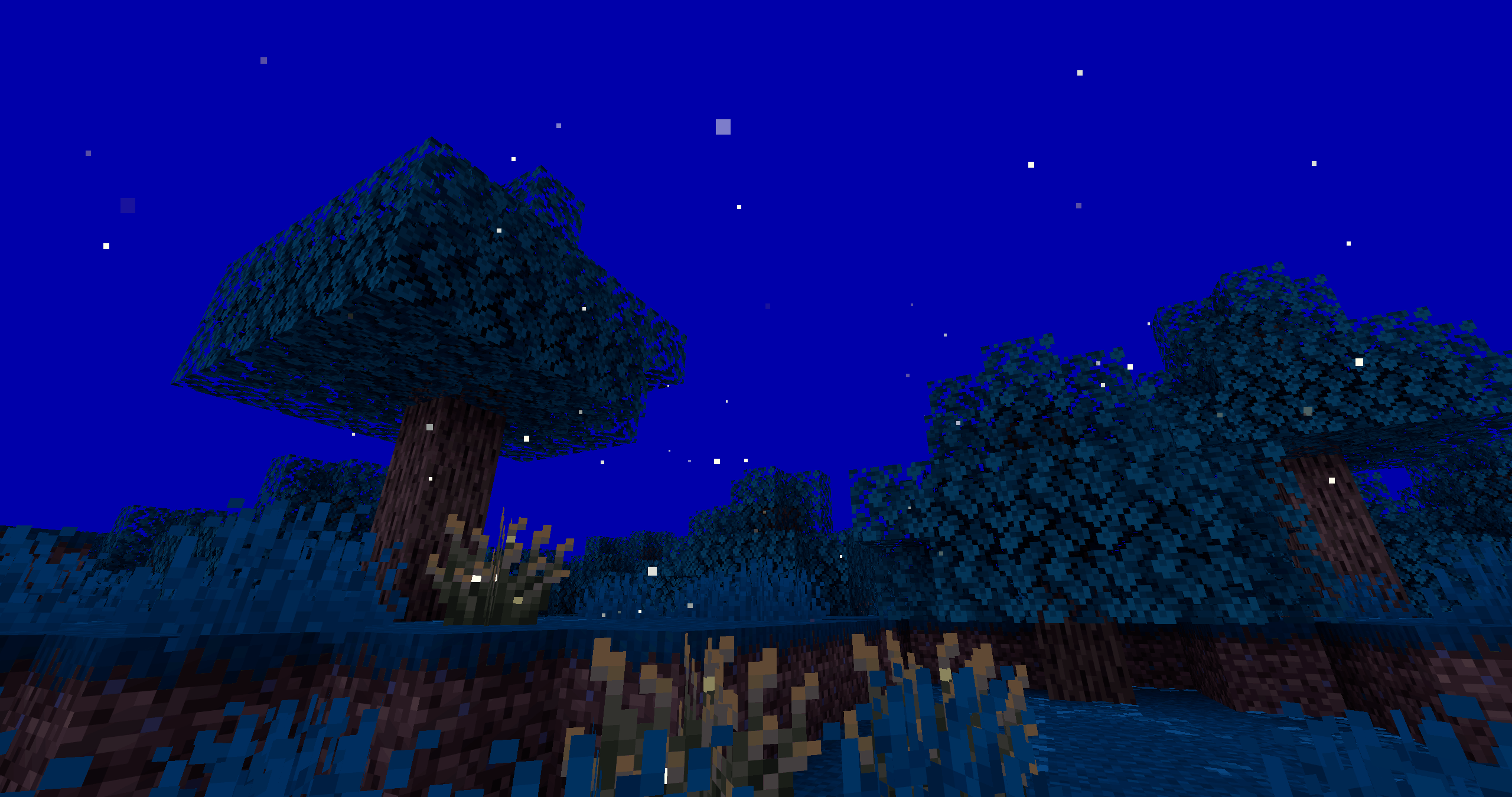
此数据包包含两个紧密交织的主要功能:口袋维度旅行和玩家心理健康。“Headspace”是一种抵御严重痛苦的心理防御机制;是你心智中的安全空间。管理你的心理健康对于维持对该空间的访问以及避免对身体健康造成危险后果至关重要。
在你的世界中访问一个口袋维度将为游戏玩法开启无限可能:
- 在 headspace 中建造一个你可以从世界任何地方进入的主基地
- 在 headspace 中设置所有实用方块(工作台、熔炉等),这样你在旅行时就不必反复放置和拾取它们
- 在 headspace 中放置额外的箱子,以便在大型生存建筑中交换物品栏内容
- 在 headspace 中建造农场,任何人都可以从任何位置使用它
- 在 headspace 中与朋友会面,并将他们与你一起传送回你当前的位置,无论你们在世界中的何处
- 如果你陷入危险境地,有一个可以跳回的安全空间
- 使用床或虚空传送在你世界的基地/出生点与 headspace 之间往返,同时使用碎片传送继续探索遥远的地方
- 还有更多玩法!
功能
口袋维度传送
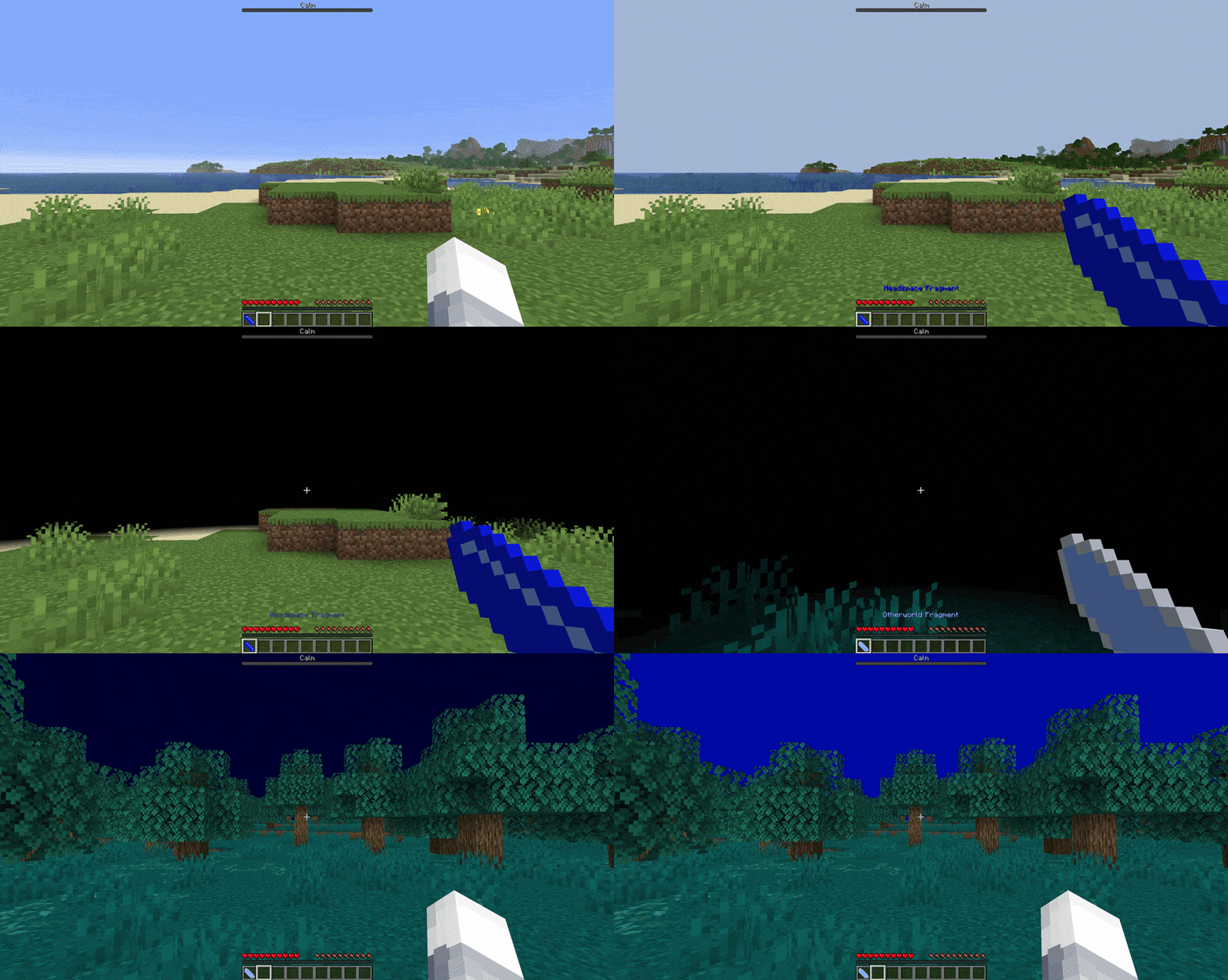
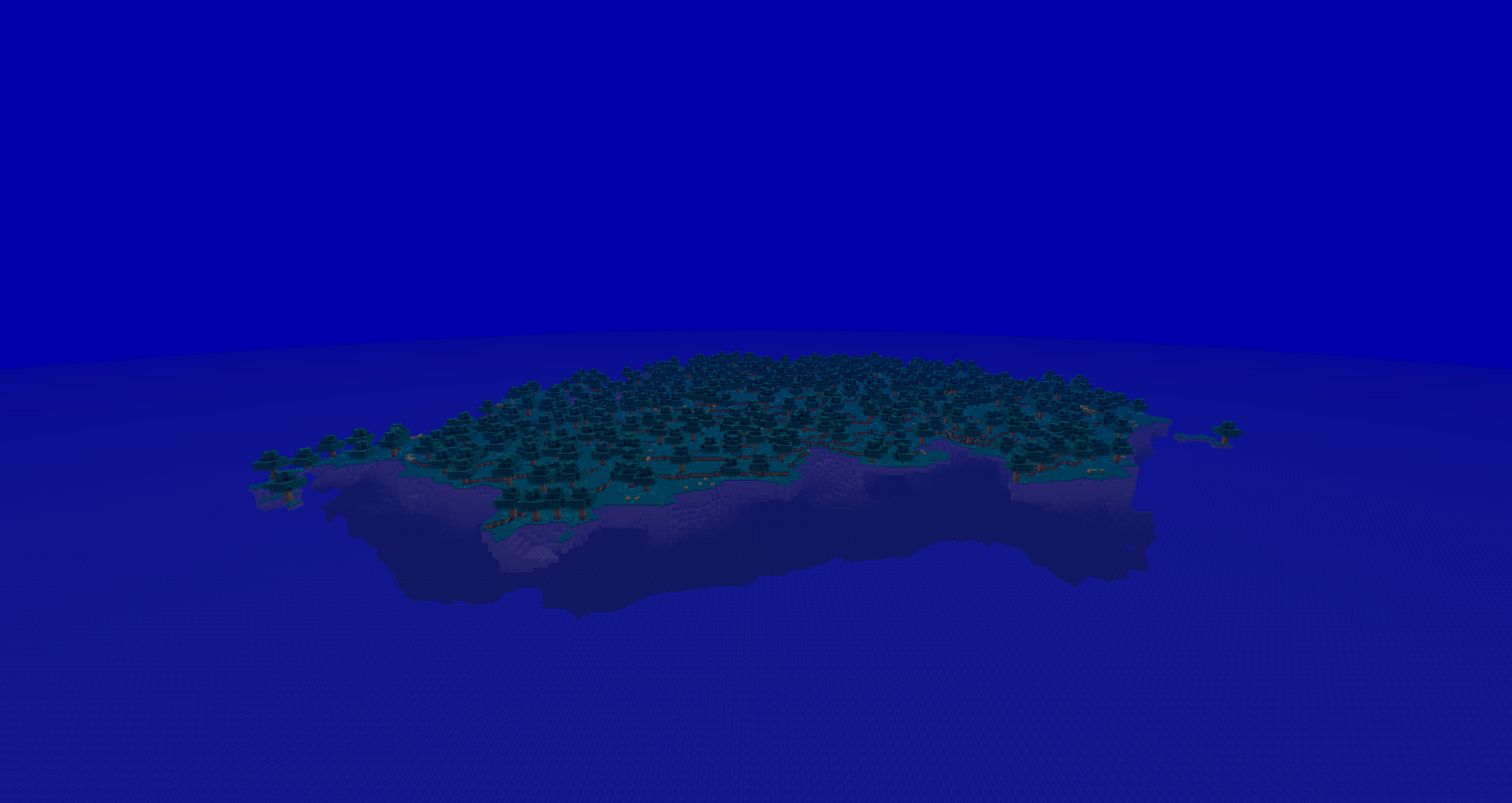
由三个独立的维度构成了 headspace 的世界:蓝屏(Bluescreen)、白屏(Whitescreen)和黑屏(Blackscreen)(致敬计算机遭遇灾难性故障时的屏幕颜色)。蓝屏是主维度,由一个被无尽海洋和无日天空环绕的单一岛屿组成。这个维度是一个空白的模板,供你在岛屿上或岛屿外自由建造。在服务器上,周围的海洋中有充足的空间,可以为每位玩家提供自己的建造区域(如果你愿意的话)。
发现 Headspace
默认情况下,headspace 通常不可访问。玩家在经历“死里逃生”而失去意识时,可以发现 headspace(并随后按需访问它)。在游戏中,这可以是以下两种情况之一:
- 掉入主世界(Overworld)的虚空
- 在生命值 ≤ 2 颗心的情况下睡过一整夜
如果满足上述任一条件,玩家的现实会“崩溃”,并被送往 headspace 以避免死亡。
碎片(Fragments)
访问过后,玩家可以使用放入其物品栏中的该维度“碎片”随意地传送至和离开 headspace。当使用时(右键点击),这块碎片会保存玩家在当前维度的位置,并且两次使用之间有 5 秒的冷却时间。只要附近的所有玩家也都处于潜行状态,玩家可以携带其他玩家通过碎片传送进行移动。未坐下的宠物会跟随玩家一起传送。
床
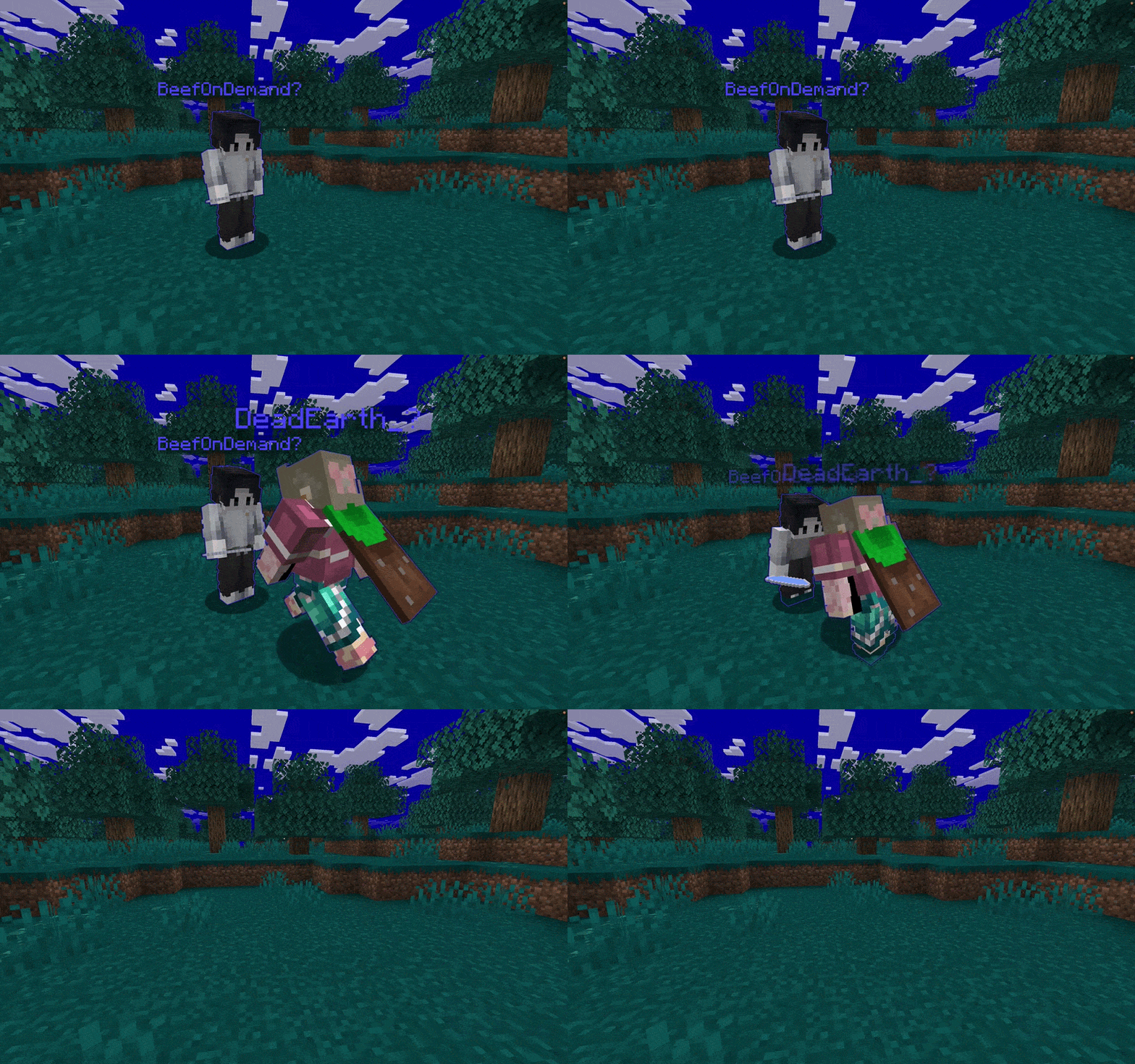
此外,玩家可以在任何深蓝色的床上按住潜行键(“Shift”键)来在 headspace 和其他维度之间传送。系统会保存最后一次在 headspace 中使用的床,以及最后一次在 headspace 之外(任何其他维度!)使用的床。如果在相反的维度中找不到已保存的床(例如从未使用过,或者上一次使用的床已被破坏),则使用默认的传送位置。只要其他玩家站在正在传送的人所在的床上(不处于潜行状态),玩家可以携带其他玩家通过床进行传送。未坐下的宠物会跟随玩家一起传送。
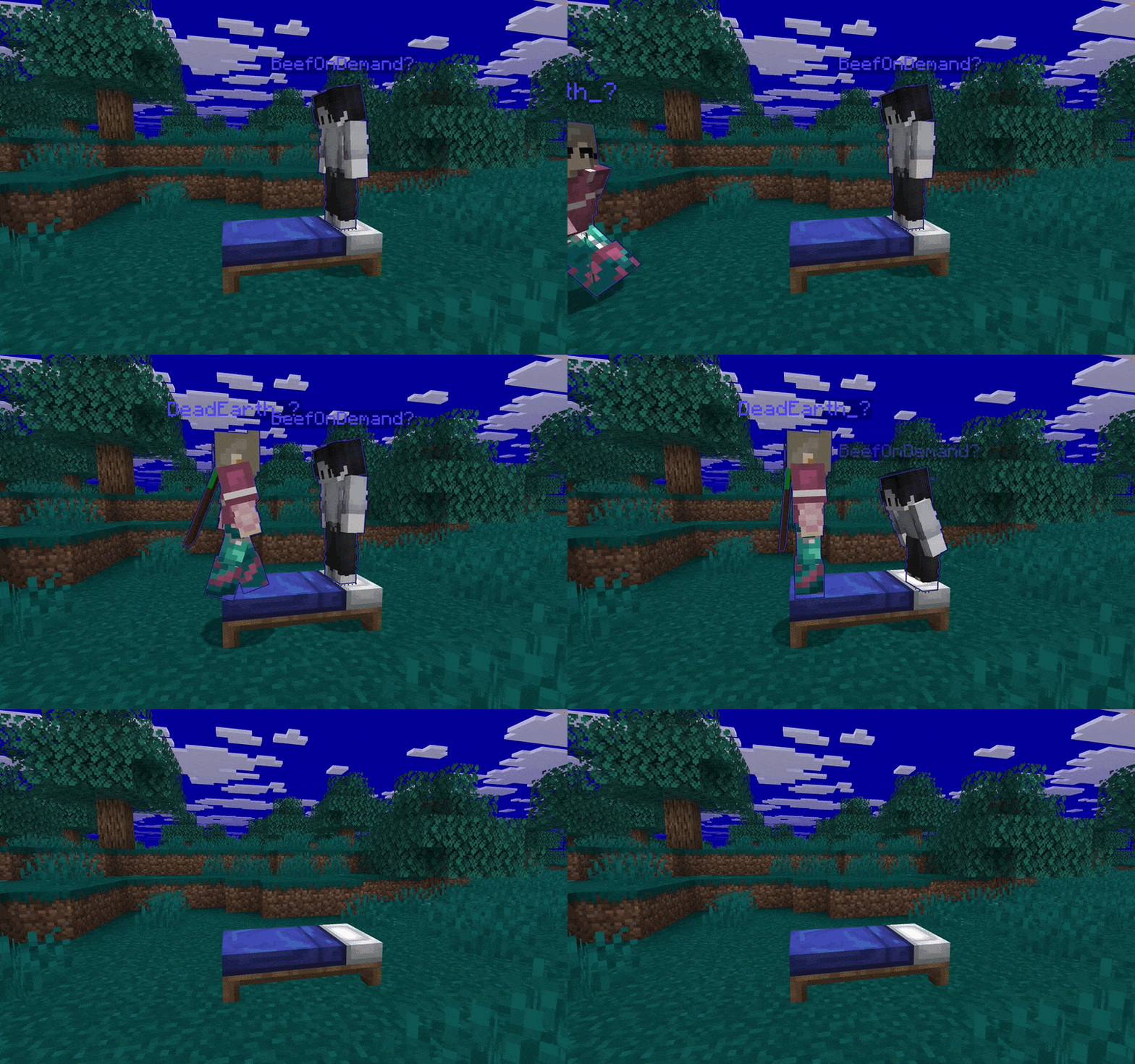
虚空
在任何时候,玩家都可以掉入主世界或蓝屏维度的虚空中,从而被传送到另一个维度的默认位置。
玩家压力管理
按需访问 headspace 的能力并非没有代价。所有玩家的精神疲劳(“压力”)会被跟踪并在全球范围内显示。玩家可以在屏幕顶部的条形图中看到自己的压力等级,其中包括其当前状态的文本标签。在较高的压力水平下,会在快捷栏上方向用户显示警告,以指示其状态的严重程度。
压力源

注意: 在 v1.0.2 版本中,目前仅考虑睡眠剥夺
系统会监控玩家的环境和身体状况,各种压力源会随着时间积累,从而增加玩家的压力等级:
- 传送至蓝屏
- 多天未睡觉
- 长时间处于低饥饿值状态
- 长时间处于低生命值状态
- 在雨中停留的时间
- 在黑暗中停留的时间
- 黑屏?
减压方式

注意: 在 v1.0.2 版本中,目前只有睡觉有效
还提供了多种减缓、降低或清除玩家压力值的方法:
- 在 Bluescreen 中睡觉
- 在主世界(Overworld)度过整夜
- 食用食物
- Whitescreen?
入门指南
安装
Headspace 可以添加到几乎任何 Minecraft: Java Edition 世界或服务器中。如果您使用的是模组版的 Minecraft,可以下载并使用 Headspace 的模组版本,就像使用其他模组一样(建议使用 Modrinth App 进行安装!)。否则,请参阅下方传统的安装方法。
要安装数据包:
- 将 "datapack" 源代码目录中的 "data"、"pack.mcmeta" 和 "pack.png" 文件压缩为单个 .zip 文件(或从 此处 下载 .zip 文件)
- 在 Minecraft 菜单中选择您的世界,然后导航至“编辑”->“打开世界文件夹”以访问您的世界文件
- 将 .zip 文件放入 "datapacks" 目录中
- 重启 / 重新进入世界
要安装资源包:
- 将 "resourcepack" 源代码目录中的 "assets"、"pack.mcmeta" 和 "pack.png" 文件压缩为单个 .zip 文件(或从 此处 下载 .zip 文件)
- 在 Minecraft 菜单中,导航至“选项...”->“资源包...”->“打开包文件夹”
- 将 .zip 文件放入打开的 "resourcepacks" 目录中,然后在菜单的“可用”资源包列表中启用它
- 重启 / 重新进入世界
要将 Headspace 添加到服务器:
- 在您的服务器文件中,按照上述描述将数据包放入世界的 "datapacks" 文件夹中
- 将资源包上传到 Minecraft 包托管网站
- 使用托管网站提供的下载链接和 SHA-1 哈希值编辑 server.properties 文件
- 重启服务器
配置
管理员/世界所有者可以使用多种配置选项来定制您世界的 Headspace 体验。这些功能可以通过游戏内聊天或服务器控制台使用函数来调用。若要重新启用/禁用某项功能,请将 "disable" 替换为 "enable",反之亦然。
禁用 Headspace
/function headspace:admin/disable_headspace
禁用 Headspace 的所有功能,并将所有玩家传送回主世界。如果您希望暂时禁用数据包(而不实际卸载它),同时让玩家继续使用,这将非常有用。
禁用心理健康追踪
/function headspace:admin/disable_player_stress
禁用任何心理健康追踪、显示或效果。如果您只想使用口袋维度功能,这将非常有用。默认情况下为启用状态。
启用所有玩家
/function headspace:admin/enable_players_by_default
允许所有玩家立即使用 Headspace 碎片和床。如果您打算让 Headspace 维度成为核心功能,而不是一个待发现的秘密,这将非常有用。默认情况下为禁用状态。
恢复默认设置
/function headspace:admin/reinitialize_datapack
强制重新运行数据包的初始化代码。这将把某些内容重置为默认值,例如默认传送位置。
设置默认 Headspace 传送位置
/function headspace:admin/set_default_headspace_location_here
将调用者的当前位置设置为没有保存碎片/床的玩家默认的 Headspace 传送位置(应在 Bluescreen Headspace 维度中调用此命令)
设置默认 Otherworld 传送位置
/function headspace:admin/set_default_otherworld_location_here
将调用者的当前位置设置为没有保存碎片/床的玩家默认的 Otherworld 传送位置(可以在任何非 Headspace 维度中调用此命令)
管理
管理员/服务器所有者可以使用提供的工具对每个玩家单独管理 Headspace 的访问权限。通过向目标玩家授予/撤销进度,可以应用或移除这些限制。
封禁玩家
/advancement grant <playername> only headspace:admin/ban
阻止玩家访问或使用 Bluescreen 口袋维度。
限制玩家访问
/advancement grant <playername> only headspace:admin/probation
允许玩家仅在冒险模式下访问 Headspace,防止他们放置或破坏方块。
重置玩家位置
/advancement grant <playername> only headspace:admin/storage_reset
将玩家的已保存床或碎片位置重置为默认值。
重置玩家追踪
/advancement grant <playername> only headspace:admin/score_fix
重置玩家内部记分板追踪器(如果传送功能出现异常,这可能很有用)。
完全重置玩家
/advancement grant <playername> only headspace:admin/full_reset
如前所述重置追踪和位置,以及未默认启用的 Headspace 访问权限。
记录玩家事件
/advancement grant <playername> only headspace:admin/event_logger
被标记为事件查看者的任何人将通过游戏内聊天看到该玩家的 Headspace 交互公告。
设置玩家查看记录的事件
/advancement grant <playername> only headspace:admin/event_viewer
玩家将通过游戏内聊天看到来自已标记玩家的所有 Headspace 交互。
其他
查看数据包信息
/function headspace:admin/get_info_of_datapack
列出数据包版本、是否启用、是否已初始化以及版本更新日志。
查看 Headspace 使用统计
/function headspace:admin/get_stats_of_headspace
显示全局 Headspace 传送次数,以及特定碎片、床和虚空的数量。进入和退出都会被计数!
查看玩家的 Headspace 使用统计
/function headspace:admin/get_stats_of_player {player:"<player_name>"}
显示玩家 headspace 传送的总次数,以及其特定的碎片、床和虚空计数。包括进入和退出!将 <player_name> 替换为玩家的用户名。
查看玩家保存的位置
/function headspace:admin/get_storage_of_player {player:"<player_name>"}
玩家保存的碎片和床位置使用 Minecraft 的数据存储命令及玩家的 UUID 进行追踪。此函数提供了一种更简便的方式,通过用户名查找玩家所有已保存的位置信息。将 <player_name> 替换为玩家的用户名。
附加信息
常见问题解答
为什么加载时这个数据包会警告我的世界不受“支持”?
从技术上讲,自定义世界生成工具(维度、维度类型、生物群系等)在 Minecraft 中仍属于“实验性”功能。这意味着如果未来更高版本的 Minecraft 停止支持这些功能,那么那些新版本将无法打开启用了此数据包或包含 headspace 维度的存档。好消息是这种情况不太可能发生,而且即使发生,该数据包也不会修改原版维度或干扰核心游戏机制。如果你想的话,可以随时删除该数据包和自定义维度文件,或者将原版游戏数据迁移到新世界中。当然,安装新内容之前备份你的世界始终是个好习惯……以防万一!
说到支持,这个数据包的长期计划是什么?
Headspace 最初是我在一个仅供朋友使用的私人服务器上,用命令方块进行的小实验。当命令方块数量达到约 ~100 个时,我意识到需要学习如何将其制作成数据包,以便继续开发并扩展核心理念。目前,headspace 的游戏玩法已成为我们服务器体验的重要组成部分,我们很难移除它。由于制作数据包已经成为我的一项爱好,且我们有计划让服务器长期运营下去,因此随着 Minecraft 新版本的发布,headspace 将持续更新。我还列出了一个长长的功能和内容清单想要添加到 headspace 中,不过我将把主要精力放在确保数据包与新版本兼容上。
未来可能会向 headspace 添加哪些内容?
数据包拥有许多我想探索的潜力,但对于 headspace,我特别感兴趣的是增加更多背景故事并完善整体体验。我正在构思一些关于(目前无法访问的)黑屏/白屏维度的绝妙想法,同时也计划添加自定义战利品、结构和生物。我还想尝试为不同的维度编写并录制一些背景音乐,因为音乐是我的另一大爱好。压力游戏机制也将得到大幅扩展,我希望它比 Minecraft 当前的饥饿值和生命值系统更加复杂。
故障排除
碎片显示为黑色和紫色的棋盘格方块,这是怎么回事?
如果你看到这种情况,说明包含的资源包未加载。在单人游戏中,请检查客户端设置中是否已启用该资源包。如果你在服务器上,请确保你的客户端接受并从服务器下载所提供的资源包!
某些玩家无法传送。在床上潜行和/或使用碎片没有任何反应!
首先,如果所有玩家都无法传送,请检查数据包或 headspace 维度是否未被禁用(通过 Minecraft 的数据包加载器或通过 headspace 的禁用功能)。在两种情况下,数据包默认都应是启用的。如果只有部分玩家在床的使用上遇到问题,请确保在传送完成前一直按住潜行键。同时,请确保碎片冷却时间(5 秒)已结束后再尝试传送。如果传送仍然无效,请在受影响玩家身上运行提供的 "score_fix" 函数;如果第一个修复无效,再运行 "full_reset" 函数(这将清除已保存的位置)。
数据包运行不正常!我不喜欢它做的某件事!啊啊啊!等等。
如果其他方法都失效了,请在此处提交错误报告 here!
作者寄语
感谢你花时间了解我的项目!我为此倾注了大量时间和热情,并且非常享受制作它的过程。如果你喜欢使用它,请告诉你的朋友和敌人!如果你有任何问题、评论、担忧,或者只是想打个招呼,你可以在 places 找到我。
headspace.
Add global pocket dimensions and mental health metrics to your world!
About Headspace
This datapack consists of two major features that are closely intertwined: pocket dimension travel and player mental health. "Headspace" is a defense mechanism against severe distress; a safe space in your mind. Managing your mental health will be important to maintaining access to this space and avoiding dangerous consequences to your physical health.
Access to a pocket dimension in your world opens up endless new possibilities for gameplay:
- Build a home base in headspace that you can access from anywhere in the world
- Set up all utility blocks (crafting tables, furnaces, etc.) in headspace so that you don't have to keep placing and picking them up while you travel
- Place extra chests in headspace to swap out your inventory for larger survival builds
- Build farms in headspace that are accessible to everyone from any location
- Meet up with a friend in headspace and teleport them back out with you to your current location, no matter where you both are in the world
- Have a safe space to jump back to if you get stuck in a dangerous situation
- Use bed or void teleports to go back and forth between your world's base/spawn and headspace while using your fragment teleport to continue exploring far away places
- and much more!
Features
Pocket Dimension Teleporting
There are three separate dimensions that make up the world of headspace: Bluescreen, Whitescreen, and Blackscreen (a nod to the colors of a computer screen during catastrophic failure). Bluescreen is the main dimension, consisting of a single island surrounded by endless ocean and a sunless sky. This dimension is a blank template for whatever you'd like to build, on or off the island. On a server, there is plenty of space in the surrounding ocean to give each player their own space to build (if you want).
Finding Headspace
By default, headspace is not normally accessible. A player may discover headspace (and subsequently be able to acces it on demand) by losing consciousness during a "brush with death". In game terms, this can be one of two things:
- Falling into the Overworld void
- Sleeping through the night with ≤ 2 hearts of health
If either of these conditions are met, the player's reality "crashes" and they are sent to headspace to avoid death.
Fragments
After visiting, players may teleport to and from headspace at will using a "fragment" of the dimension that is placed into the player's inventory. This shard saves the player's location in the current dimension when used (Right Mouse Button), and has a 5-second cooldown between uses. A player may bring other players with them through a fragment teleport by holding sneak ("Shift" Key), as long as all nearby players are also sneaking with the fragment user. Pets that are not sitting follow the player through the teleport.
Beds
Additionally, a player may hold sneak ("Shift" Key) on any dark blue bed to teleport between headspace and other dimensions. The last used bed in headspace and the last used bed out of headspace (any other dimension!) are saved. If a saved bed is not found in the opposite dimension (e.g. one has never been used or the last one used was destroyed), the default teleport lcoation is used instead. A player may bring other players with them through a bed teleport, as long as the other players are standing (not sneaking) on the bed with the person teleporting. Pets that are not sitting follow the player through the teleport.
The Void
At any time, a player may fall into the Overworld or Bluescreen dimension voids to be teleported to the other dimension's default location.
Player Stress Management
The ability to access headspace on demand does not come without a cost. The mental exhaustion ("stress") of all players is tracked and displayed globally. Players can see their own stress level in a bar at the top of the screen, which includes a text label for their curent state. At higher levels of stress, a warning will be displayed to the user above the hotbar indicating the severity of their state.
Stressors
NOTE: in v1.0.2, only sleep deprivation is considered (for now)
The environmental and physical conditions of players are monitored, and various stressors accumulate over time to increase the player's stress level:
- Bluescreen teleports
- Days without sleep
- Time with low hunger
- Time with low health
- Time spent in the rain
- Time spent in the darkness
- Blackscreen?
Relaxers
NOTE: in v1.0.2, only sleeping is effective (for now)
Several methods of slowing, reducing, or clearing the player's stress level are also provided:
- Sleeping in Bluescreen
- Sleeping through the night (in the Overworld)
- Consuming food
- Whitescreen?
Getting Started
Installation
Headspace can be added to virtually any Minecraft: Java Edition world or server. If you are using a modded version of minecraft, the mod release of headspace can be downloaded and used like any other mod (I reccomend using the modrinth app to install it!). Otherwise, see below for traditional install methods.
To install the datapack:
- Compress "data", "pack.mcmeta", and "pack.png" files from inside the "datapack" source code directory to a single .zip file (or download the .zip file here)
- Select your world in the Minecraft menus, then navigate to "Edit"->"Open World Folder" to access your world files
- place the .zip file into the "datapacks" directory
- Restart / re-enter the world
To install the resourcepack:
- Compress the "assets", "pack.mcmeta", and "pack.png" files from inside the "resourcepack" source code directory to a single .zip file (or download the .zip file here)
- In the Minecraft menus, navigate to "Options..."->"Resource Packs..."->"Open Pack Folder"
- Place the .zip file into the opened "resourcepacks" directory and then enable it from the list of "Available" resource packs in the menu
- Restart / re-enter the world
To add Headspace to a server:
- In your server files, place the datapack into the world's "datapacks" folder as described above
- Upload the resourcepack to a minecraft pack host site
- Edit your server.properties file with the download link and SHA-1 hash provided by the host site
- Restart the server
Configuration
There are several configuration options made available to admins / world owners to customize the headspace experience for your world. These can be invoked in game chat or through a server console using functions. To re-enable/re-disable a feature, replace "disable" with "enable" or vice versa.
Disable Headspace
/function headspace:admin/disable_headspace
Disables all features of headspace and teleports all players back to the overworld. Useful if you want to temporarily disable the datapack (without actually unloading it) while players are using it.
Disable Mental Health Tracking
/function headspace:admin/disable_player_stress
Disables any mental health tracking, display, or effects. Useful if you just want to use the pocket dimension features. Defaults to enabled.
Enable All Players
/function headspace:admin/enable_players_by_default
Allows all player to use headspace fragments and beds right away. Useful if you intend for headspace dimensions to be a core feature, and not a secret to be discovered. Defaults to disabled.
Restore Default Settings
/function headspace:admin/reinitialize_datapack
Forces the datapack initialization code to run again. This will reset some things back to default, such as default teleport locations.
Set Default Headspace Teleport Location
/function headspace:admin/set_default_headspace_location_here
Sets the invoker's current position to be the default headspace teleport location for players without saved fragments / beds (this should be invoked in the bluescreen headspace dimension)
Set Default Otherworld Teleport Location
/function headspace:admin/set_default_otherworld_location_here
Sets the invoker's current position to be the default Otherworld teleport location for players without saved fragments / beds (this can be invoked in any non-headspace dimension)
Administration
Access to headspace can be administered on a player-by-player basis using tools provided to admins / server owners. These can be applied or removed by granting / revoking an advancement to the target player(s).
Ban Player
/advancement grant <playername> only headspace:admin/ban
Prevents a player from accessing or using the bluescreen pocket dimension.
Restrict Player Access
/advancement grant <playername> only headspace:admin/probation
Allows a player to access headspace in adventure mode only, preventing them from placing or destroying blocks.
Reset Player Locations
/advancement grant <playername> only headspace:admin/storage_reset
Reset a player's saved bed or fragment locations back to defaults.
Reset Player Tracking
/advancement grant <playername> only headspace:admin/score_fix
Reset internal scoreboard trackers for a player (potentially useful if something with teleporting is not working quite right).
Fully Reset Player
/advancement grant <playername> only headspace:admin/full_reset
Resets tracking and location as described above, as well as access to headspace if not enabled by default.
Log Player Events
/advancement grant <playername> only headspace:admin/event_logger
Player's headspace interactions will be announced via in-game chat to anyone marked as an event viewer.
Set Player To View Logged Events
/advancement grant <playername> only headspace:admin/event_viewer
Player will see all headspace interactions from marked players via in-game chat.
Other
View Datapack Info
/function headspace:admin/get_info_of_datapack
Lists datapack version, whether it is enabled, whether it is initialized, and the version changelog.
View Headspace Usage Statistics
/function headspace:admin/get_stats_of_headspace
Display global count of headspace teleports, as well as specific fragment, bed, and void counts. Both entries and exits are counted!
View Player's Headspace Usage Statistics
/function headspace:admin/get_stats_of_player {player:"<player_name>"}
Display a player's total count of headspace teleports, as well as their specific fragment, bed, and void counts. Both entries and exits are counted! Replace <player_name> with the player's username.
View Player's Saved Locations
/function headspace:admin/get_storage_of_player {player:"<player_name>"}
A player's saved fragment and bed locations are tracked using Minecraft's data storage commands and the player's UUID. This function gives an easier way to lookup all of a player's saved location information by username. Replace <player_name> with the player's username.
Additional Info
Q&A
Why does this datapack give me a warning about my world not being "supported" when loading in?
Technically, custom world generation tools (dimensions, dimension types, biomes, etc.) are still "experimental" features in Minecraft. Essentially this means that if newer versions of Minecraft stop supporting these features, those newer versions will not be able to open worlds with this datapack enabled and/or with headpace dimensions in the files. The good news is that this is unlikely to happen, and even if it does, the datapack does not modify the vanilla dimensions or otherwise mess with the core game mechanics. You can always delete the datapack and custom dimension files, or move the vanilla game data to a new world if you'd like. And as always, it's good practice to backup your world before you install something new... just in case!
Speaking of support, what is the long-term plan for this datapack?
Headspace started as a small experiment with command blocks on a private server I run for friends. After hitting about ~100 command blocks or so, I reached the point where I needed to start learning how to make it into a datapack to be able to continue developing and expanding the core idea. At this point, headspace gameplay is essential to our experience on the server and we'd be hard-pressed to remove it. With datapacks having become a whole hobby for me, and with plans to keep our server running indefinitely, headspace will continue to be updated as newer versions of Minecraft are released. I also have a very long list of features and content that I'd like to add to headspace, though the priority for my time will be keeping the datapack compatible with newer versions.
What kind of future content might be added to headspace?
There's tons of potential with datapacks that I want to explore, but for headspace I am specifically interested in adding more lore and refining the overall experience. I have some great ideas in the works for the (currently inaccessible) blackscreen / whitescreen dimensions, as well as for custom loot, structures, and mobs to add to them. I also want to try to write and record some background music for the different dimensions, as music is another major hobby of mine. The stress game mechanic will also be expanded quite a bit, as I want it to be a bit more complex than Minecraft's hunger and health meters currently are.
Troubleshooting
Fragments are showing up as black and purple checkered cubes. What gives?
If you see this, the included resourcepack has not loaded. In singleplayer, check to see that the pack is enabled in your client's settings. If you're on a server, make sure your client is accepting and downloading the resourcepack provided by the server!
Teleporting is not working for some players. Sneaking on a bed and/or using a fragment does nothing!
First, if all players are unable to teleport, check to make sure that the datapack or headspace dimensions have not been disbled (either via minecraft's datapack loader or via headspace's disable function). The datapack should be enabled by default in both cases. If only some players are having trouble with beds, make sure that the sneak key is being held down until the teleport is completed. Also make sure the 5-second fragment cooldown is finished before trying to teleport. If teleports are still not working, use the provided "score_fix" function on the affected players, followed by the "full_reset" function (which will erase saved locations) if the first fix does not work.
The datapack is not working right! I don't like that thing it did! Ahh! etc.
If all else fails, please file a bug report here!
Author's Note
Thank you for taking the time to check out my project! I've poured a lot of my time and passion into this thing and have really enjoyed making it. If you enjoy using it, please tell all your friends and enemies about it! If you have any questions, comments, concerns, or just want to say hi, you can find me places.


 数据包

 数据包

 数据包
 数据包

 数据包

 数据包
评论 0
登录后参与评分
还没有评论,来抢沙发吧