
背包盔甲纹饰
Inventory Armor Trims 让背包中的盔甲纹饰物品图标展现出与其他渲染场景中同样丰富的细节。
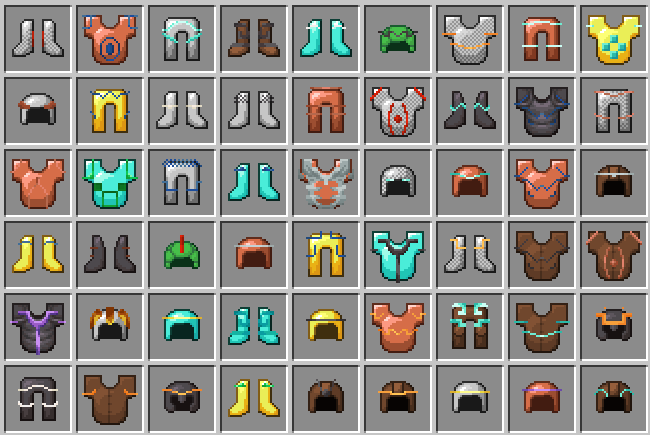
在原版 Minecraft 中,带有纹饰的盔甲物品图标主要根据盔甲材质和纹饰材质进行区分。这意味着不同的纹饰图案在背包中可能看起来相同,尽管它们在盔甲模型上是视觉上截然不同的。本资源包通过为每一种盔甲纹饰图案提供独立的背包覆盖层来解决这一问题。
功能特性
- 为每种原版盔甲纹饰图案添加独特的背包物品视觉效果。
- 支持资源包涵盖的所有盔甲部件,包括皮革、锁链、铁、金、钻石、下界合金、铜以及龟壳头盔变体。
- 支持原版纹饰材质,包括树脂(resin)。
- 保留原版的物品样式与调色板系统。
设计初衷
盔甲纹饰在穿戴状态及其他渲染场景中已经完全可见,但背包中的物品图标却丢失了部分辨识度。本资源包将缺失的图案细节带回物品本身,使得海岸(Coast)、寻路者(Wayfinder)和寂静(Silence)等纹饰不再合并为同一个通用的带纹饰盔甲图标。
兼容性
本资源包针对使用物品模型定义和物品组件的现代 Minecraft 版本设计。在下载前,请查看版本页面上列出的支持游戏版本。
它应能与其他不替换相同盔甲物品定义或纹饰物品纹理的资源包共存。重度修改盔甲物品图标的资源包可能会产生冲突。
安装方法
- 下载正确版本的资源包。
- 打开 Minecraft,进入 选项 → 资源包。
- 选择 打开资源包文件夹,并将下载的
.zip文件放入其中。 - 返回 Minecraft,将 Inventory-Armor-Trims 移入已选资源包列表中。
致谢
- 开发: EclairDeFeu360
- 原始创意: Goldawn [YouTube] [Twitch]
支持创作者
喜欢这个资源包吗?你可以通过以下方式帮助支持其创作者:
- EclairDeFeu360: 请我喝咖啡
- Goldawn: 在 YouTube 上关注或在 Twitch 上订阅

你是这个资源的作者?登录后可认领此资源。
相似资源
 数据包

Belzebuth Nether Kingdom
ALDgamer
为下界添加了名为“贝尔泽布城堡”的新闻结构,以及新的 Boss、新工具、新物品、新敌人和新音乐唱片!
物品简约
14
 数据包

Lucky Block Pink
KristenStuffs
粉色方块中的千种可能!
装备小游戏
10
 数据包

Wandering Trader Revamp
CooledBeans
扩展、调整并平衡流浪商人。包含新物品和 200+ 交易,以及可调整的生成率
装饰经济
9
 数据包

Brutal Nightmare : Insane Difficult
ScadeBlock
觉得《Minecraft》太简单了?试试这款模组,它拥有近 40 种修改选项——设置新的迷你 Boss,让《Minecraft》变得困难且疯狂。增强敌对生物的 AI,并让被动生物也变得愤怒。僵尸可以放置/破坏方块。骷髅、蜘蛛、苦力怕、末影人。
装备生物
9
 数据包

Totem of Undying Crafting Recipe
rcatlab
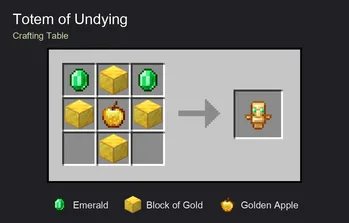
为不死图腾添加合成配方:金块、绿宝石和金苹果。
装备玩法机制
5
 数据包
Spawner Minecarts
Gamemode4
使用矿车拾取并移动刷怪笼到你想要的任何地方。
玩法机制生物
5
评论 0
登录后参与评分
还没有评论,来抢沙发吧