Inventory Sync
最新数据包版本
v1.4
兼容的 Minecraft 版本
Java 版 1.20.2 - 1.21.1
这个数据包有什么用?
你是否曾想在生存模式和创造模式之间同时游玩?但在切换到创造模式时,为了从创造模式的物品栏中获取或移除物品,却不小心删除了你辛苦获得的生存物品?
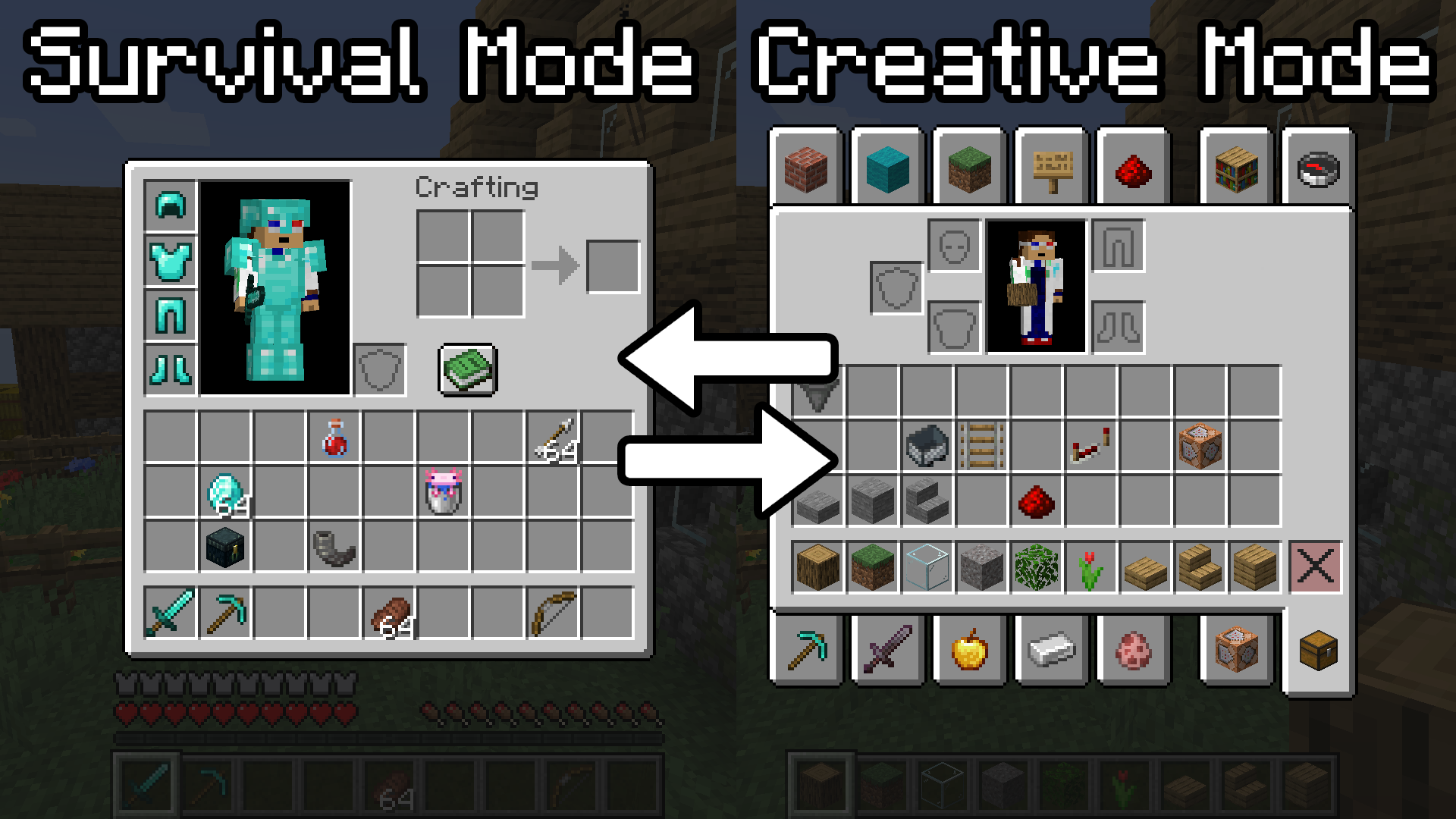
此数据包通过为每种游戏模式创建独立的物品栏来解决这个问题。现在,当你从生存模式切换到创造模式时,你将拥有一个全新的、仅用于创造模式的干净物品栏。然后,当你切换回生存模式时,你所有的生存物品都会按你离开时的状态返还给你。再也不用担心失去那些你辛辛苦苦获得的物品了。
如何使用它?
启用/禁用
安装完成后,你只需要运行以下命令:
/function invsync:toggle
⚠️ 警告:如果你在生存模式中有想要同步到生存模式的物品,请确保在生存模式下启用物品同步,以免物品被保存到错误的游戏模式中。
(即:当前物品栏将与启用时你所处的游戏模式关联,因此请确保选择的是正确的模式)
行为机制
- 现在,如果你在游戏模式之间切换,你的物品将被保存到你之前所在的游戏模式中,你的物品栏会被清空,你可以立即使用它。
- 切换回之前的游戏模式时,物品将恢复到上次离开时的状态。物品的各项数据,如耐久度、附魔、物品名称,甚至自定义数据如组件等,都将全部恢复。
- 此功能仅对 你自己的玩家 启用,如果其他玩家也希望启用此功能,他们必须自行运行该命令。
备份
你还可以备份特定的物品栏配置,以防你需要进行破坏性操作,或者只是希望获得额外的安全保障。你可以通过运行以下命令来备份所有物品栏:
/function invsync:backup
如果你希望恢复已备份的物品并覆盖当前物品栏,请使用以下命令:
/function invsync:restore
安装方法
方法 1(预置世界)
- 进入
.minecraft/saves/<worldname>/datapacks 文件夹。
- 将你下载的 .zip 文件粘贴到该文件夹中。
- 进入 Minecraft 世界并输入
/reload。
- 应该会弹出一条提示消息显示“数据包已安装”。
方法 2(创建新世界)
- 在创建新世界的界面,点击“数据包”按钮。
- 将你下载的 .zip 文件拖放到游戏窗口中。
- 应用该数据包。
- 创建新世界。
卸载
如果你希望卸载此数据包,请运行以下命令:
/function invsync:z_backend/uninstall
- 这将移除数据包的所有内部数据,并且你可以从世界存档中移除 InvSync.zip 文件。
- 如果不运行此命令而直接删除文件,数据包留下的任何数据仍将保留。如果你希望保留这些数据以便未来重新安装或更新到新版本,请勿运行此命令。
Inventory Sync
Latest Data Pack Version
v1.4
Compatible Minecraft Versions
Java Edition 1.20.2 - 1.21.1
What does this data pack do?
Have you ever wanted to play in survival mode and creative mode at the same time? But when you swap to creative mode, and you end up accidentally deleting your hard-earned survival items while grabbing and removing items from the creative invetory?
This data pack fixes that by creating separate inventories for each game mode. Now when you swap from Survival Mode to Creative Mode, you have a brand new clean inventory just for Creative Mode to use. Then when you swap back to survival mode, all your survival items are returned to you as you left them. No more fear of losing those items you worked so hard for.
How do you use it?
Enable/Disable
Once you have installed it, all you need is to run this command:
/function invsync:toggle
-
Operator permissions will be required in order to run the command.
-
You will enable the inventory syncing for your player. No other players will have it enabled until they run the command themselves.
-
Rerunning the command will disable syncing, and you will once again have one inventory that will transfer between game modes rather than staying separated.
⚠️ Warning: If you have items in Survival Mode you want synced to survival, make sure to enable Inventory Syncing in Survival Mode so that the items are not saved to the incorrect game mode.
(i.e The current inventory will be linked to the game mode you are in when enabled, so make sure it is the correct one)
Behavior
- Now if you swap between game modes, your items will be saved for the previous game mode you were in, and your inventory will be cleared and you can now use it.
- Swapping back to the previous game mode will restore the items to the state they were last in. Item data like: durability, enchantments, item names, and even custom data like components will all be restored.
- This will only be enabled for your player only, if any other players wish to have this enabled, they must run the command themselves.
Backups
You are also able to backup a specific inventory configuration in case you want to do something destructive, or just want extra security. You can backup all your inventories by running the command below:
/function invsync:backup
If you ever want to restore the items that you have backed up and override your current inventory, use this command:
/function invsync:restore
Installation
Method 1 (Pre-made world)
- Locate to your .minecraft/saves/<worldname>/datapacks folder.
- Paste the .zip file you installed into this folder.
- Enter your Minecraft world and type /reload.
- A message should pop up that says "Datapack Installed".
Method 2 (Create new world)
- In the Create new world screen, click the "Datapacks" button
- Drag and drop the .zip file you downloaded into the game window.
- Apply the datapack.
- Create new world.
Uninstalling
If you ever wish to uninstall the data pack, then run this command:
/function invsync:z_backend/uninstall
- This will remove internals of the data pack and you can remove the InvSync.zip from the world save.
- Removing file without running this command will keep any data left from the data pack. If you wish to keep the data for future reinstallation or updating to a newer version, do not run command.


 数据包

 数据包
 数据包

 数据包
 数据包

 数据包

评论 0
登录后参与评分
还没有评论,来抢沙发吧