
LeaderBoards 数据包 1.21.6+
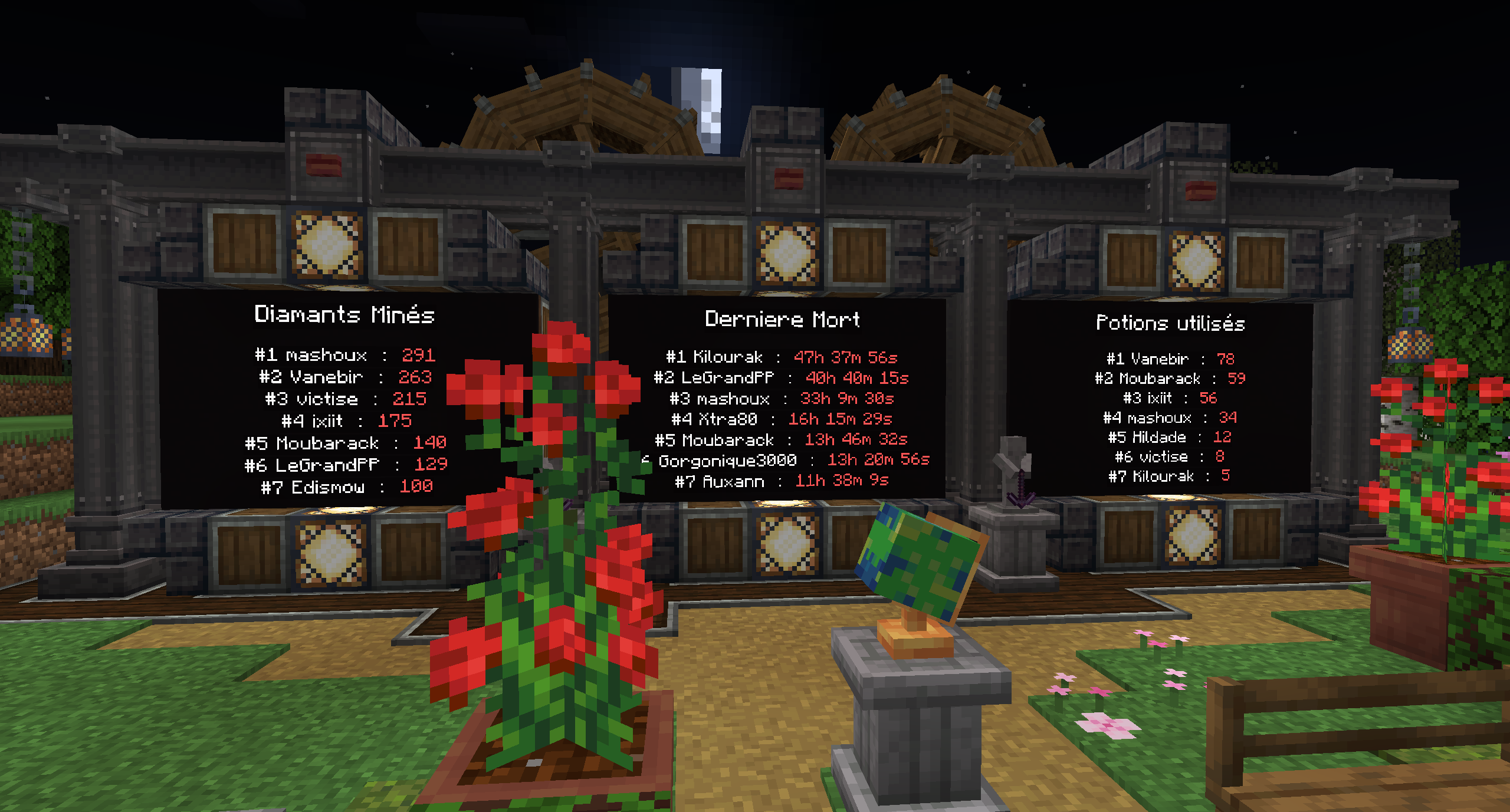
一个用于在指定记分板目标上放置服务器玩家排行榜排名的数据包。
使用方法
LeaderBoards Datapack 1.21.6+ 使用对话框功能,提供易于使用的界面来创建和编辑排行榜。
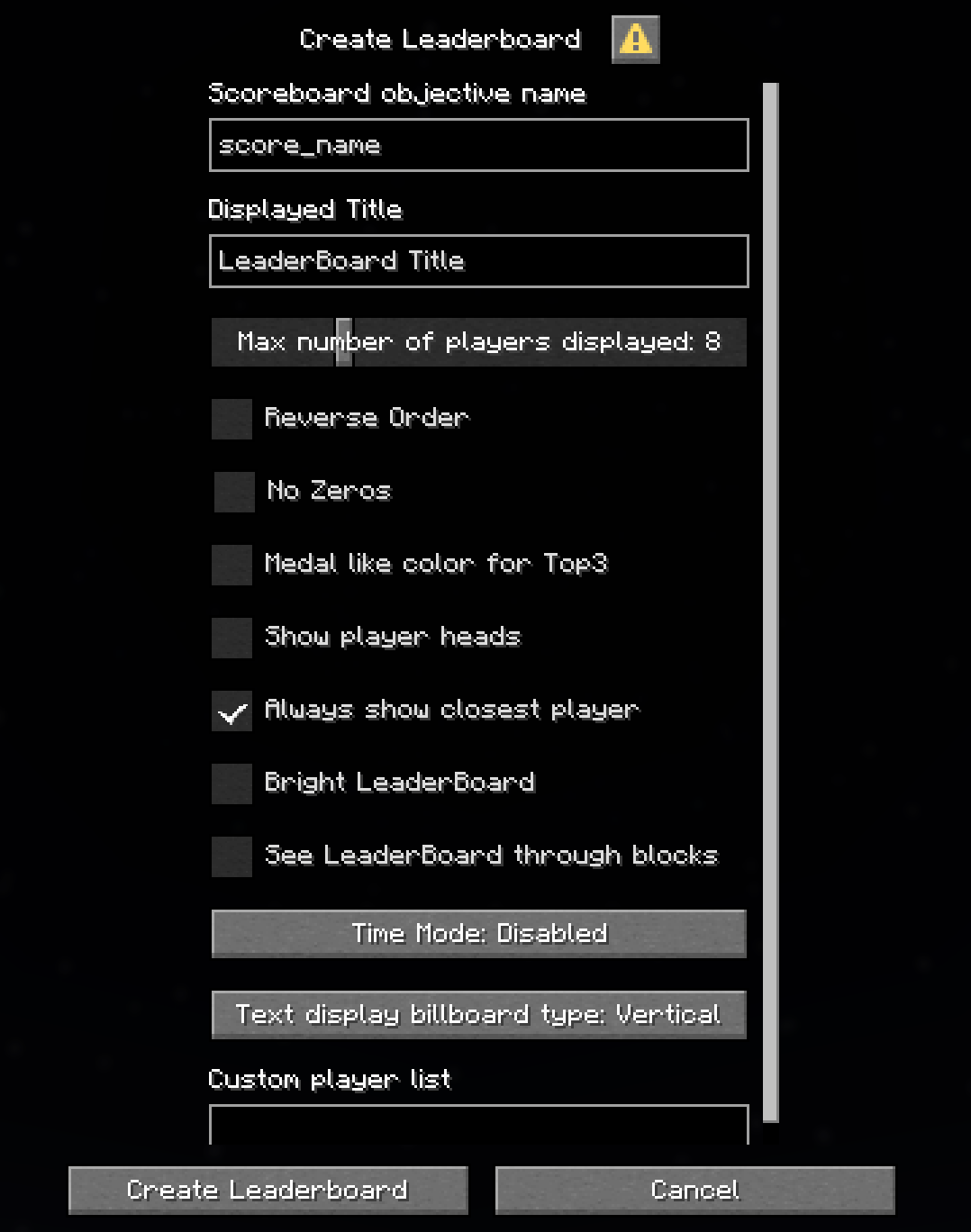
添加排行榜
/function leaderboard:_dialog/add_leaderboard_dialog
-
Scoreboard objective name(记分板目标名称) 是最重要的参数,它设置了要在排行榜中显示的记分板目标。这必须与确切的分数名称匹配。
示例:如果你使用以下命令创建记分板:/scoreboard objectives add score_name dummy "My score",则使用的 Scoreboard objective name 应为score_name,而不是My score。 -
Displayed Title(显示标题) 是显示在排行榜顶部的名称。
-
time_mode(时间模式) 选项将分数以小时、分钟、秒和 1/20 秒(刻)的时间格式显示。它要求给定的分数为以刻为单位的时间。
Extended(扩展模式),即使值超过 1 小时也保留毫秒。
Stopwatch(秒表模式),更适合 1.21.11 版本中新发布的/stopwatch命令。它要求给定的分数为以毫秒为单位的时间。要获取这样的时间,你可以使用以下示例:/execute store result score @p score_name run stopwatch query minecraft:foo 1000注意,x1000 的缩放比例允许获得以毫秒为单位的时间。 -
reverse_order(反向排序) 选项反转排行榜中玩家的顺序。将最低分数排在最前面。
-
no_zero(无零分) 选项从排行榜中移除没有分数或分数等于 0 的玩家。这在反向模式下特别有用,可以避免新玩家默认出现在排行榜顶部。
-
billboard(广告牌) 选项设置排行榜将使用的广告牌类型。
它可以设置为 vertical(垂直)、horizontal(水平)或 fixed(固定)。
当使用 fixed 广告牌类型时,方向由执行命令的玩家头部方向设定。
提示:你可以使用/tp @s ~ ~ ~ x y,将 x 和 y 设置为旋转角度,以便让排行榜对齐到特定角度。 -
medal_color(奖牌颜色) 选项为前三名排名添加类似奖牌的彩色标记。
-
show_heads(显示头像) 选项在名称旁边添加玩家头像 (仅限 1.21.9+)
-
always_show_closest_player(始终显示最近玩家) 选项高亮显示最近玩家的行。如果该玩家的排名不在基础列表中(由于 max_players 选项的原因),它将在默认列表下方添加一行额外的最近玩家分数。
-
bright(明亮) 选项设置文本显示具有恒定的全亮度。
-
Custom player list(自定义玩家列表) 这是一个高级功能,留空以获得由数据包构建的默认玩家列表。
此参数允许为特定排行榜使用不同的存储列表。这可用于显示不直接与玩家相关的记分板分数。例如,跟踪团队分数的自定义目标。
语法为<storage_name> <list_name>
例如,如果你这样创建你的列表:/data modify storage my_storage:custom_namelist names set value ["Team1","Team2","Team3"]你需要在“Custom player list”字段中使用my_storage:custom_namelist names
警告:当与always_show_closest_player以及不包含最近玩家的列表一起使用时,这可能会产生一些意外的行为。
删除排行榜
这将移除最近的排行榜。
/function leaderboard:commands/remove_leaderboard
编辑排行榜
这将编辑最近的排行榜。
/function leaderboard:_dialog/edit_leaderboard_dialog
卸载
/function leaderboard:commands/uninstall
(仅保留存储 leaderboard:namelist,以防你希望重新启用它)
向后兼容
1.21.6 之前的数据包版本仍然可用,但不会再更新。
你可以在 Github 链接 找到有关如何使用旧版本的数据包的教程。
联系方式
欢迎加入 Discord,提出任何问题、错误报告或功能请求。
Discord 邀请链接
LeaderBoards Datapack 1.21.6+
A Datapack to place LeaderBoards Ranking players of your server on a given scoreboard objective
How to use
LeaderBoards Datapack 1.21.6+ uses the Dialog feature to provide an easy to use interface to create and edit Leaderboards
Add a LeaderBoard
/function leaderboard:_dialog/add_leaderboard_dialog
-
Scoreboard objective name is the most important parameter, it sets the scoreboard objective to be displayed in the Leaderboard. This MUST match the exact score name.
Example: if you create a scoreboard with the command:/scoreboard objectives add score_name dummy "My score", the Scoreboard objective name to use will bescore_nameand NOTMy score -
Displayed Title is the name that will be displayed on top of the leaderboard
-
time_mode option displays the score as a time with hours, minutes, seconds and 1/20th of a second (ticks). It requires the given score to be a time in ticks.
Extended, keeps ms even when value is larger than 1 hour
Stopwatch, is more suited for the new/stopwatchcommand release in 1.21.11. It requires the given socre to be a time in ms. To get such a time you can use the following example:/execute store result score @p score_name run stopwatch query minecraft:foo 1000Note that the x1000 scaling allows to get a time in ms -
reverse_order option reverses the order of the players in the LeaderBoard. Puts the lowest score first
-
no_zero option removes players with either no score or a score that equals 0 from the LeaderBoard. This is especially useful in reverse mode to avoid having new players at the top of the LeaderBoard by default
-
billboard option sets the billboard type that the LeaderBoard will use
It can be set to vertical, horizontal or fixed
When using fixed billboard type, the direction is set from the head direction of the player executing the command
tips: you can use/tp @s ~ ~ ~ x y, with x and y set to the rotation if you want the leaderboard to be aligned to a specific angle -
medal_color option adds medal like colors the the top 3 ranks
-
show_heads option adds the player heads next to it's name (1.21.9+ only)
-
always_show_closest_player option highlights the line of the nearest player. If this player's rank is not present in the base list (cause of max_players option), it will add an extra line under the default one with the closest player score
-
bright option sets the text_displays with constant full brigthness
-
Custom player list this is an advanced feature, leave empty to get the default list of player built by the datapack
This parameter allows to use a different storage list for a specific Leaderboard. This can be used to display scoreboard scores that aren't directly related to a player. For example a custom objective tracking teams scores
The syntax is<storage_name> <list_name>
For example if you create your list this way:/data modify storage my_storage:custom_namelist names set value ["Team1","Team2","Team3"]you need to usemy_storage:custom_namelist namesin the Custom player list field
warning: this might have some unexpected behaviour when used withalways_show_closest_playerand a list that does not contain the nearest player
Remove a LeaderBoard
This will remove the nearest LeaderBoard
/function leaderboard:commands/remove_leaderboard
Edit a LeaderBoard
This will edit the nearest LeaderBoard
/function leaderboard:_dialog/edit_leaderboard_dialog
Uninstall
/function leaderboard:commands/uninstall
(Only keeps the storage leaderboard:namelist in case you want to re-enable it)
Back compatibility
Versions of the datapack prior to 1.21.6 are still available but won't be updated anymore
You can find tutorials on how to use legacy verisons on the Github link
Contact
Feel free to join the discord for any question, bug report or feature request
Discord invite

下载 LeaderBoards Datapack
下载 LeaderBoards Datapack
下载 LeaderBoards Datapack
下载 LeaderBoards Datapack
下载 LeaderBoards Datapack
下载 LeaderBoards Datapack
下载 LeaderBoards Datapack
下载 LeaderBoards Datapack
下载 LeaderBoards Datapack
下载 LeaderBoards Datapack
LeaderBoards 数据包:v4.1
新功能
- time_mode: Stopwatch (3) 时间格式的新模式,
使用 1 = 1ms,而不是其他时间模式的 1 = 50ms(1个游戏刻)
Bug 修复
- 修复服务器日志中的警告(与 bright 选项相关)
如何更新?
只需将旧的压缩包 LeaderBoards_1.21.9_v4.0.zip 替换为新的压缩包,然后使用 /reload 命令即可。
关于这个资源的讨论、问题反馈与使用心得
还没有讨论,来发第一帖吧
你是这个资源的作者?登录后可认领此资源。
相似资源
 数据包

此数据包添加了属于阿瓦里海盗的独特结构,将他们的独特风格带入你的 Minecraft 世界!兼容性:1.20 至 26.3
 数据包
一个 Minecraft 光线投射库,能够精确检测玩家正在查看的方块,包括像台阶和楼梯这样的特殊方块形状。
 数据包

此数据包添加了新的“祝福模式”难度。
 数据包
允许服务器管理员方便地禁用 Xaero's Map 系列模组中的实体雷达、小地图等功能,使竞技游戏更加公平。
 数据包

手持潜影盒时可直接打开,无需将其放置在地面上。只需按住 Shift 并右键点击即可访问你的潜影盒。
 数据包

粉色方块中的千种可能!
评论 0
登录后参与评分
还没有评论,来抢沙发吧