警告/注意
如果你下载的是数据包版本,必须同时下载资源包!如果你打算使用数据包版本,请手动进入“版本”选项卡,选择你需要的版本,并下载附带的两个文件!主文件是数据包本身,而“附加”文件则是必需的资源包!如果不这样做,所有画作都将没有定义的纹理,变成粉红与黑色的棋盘格图案!
侧边栏中的所有链接均为 DyoudiM! 的链接,与我没有任何关系。
DyoudiM! 创作的阈限空间风格艺术作品已作为画作加入 Minecraft!
目前共添加了 69 幅画作。
(这个数字并非特意设定,纯属巧合)
对于 1.2.30 以下 的数据包版本:
要在游戏内查看署名,你可以使用 /function tbdlp:credits。
要获取所有画作,请使用 /function tbdlp:all。
对于 1.2.30 及以上 的数据包版本:
要在游戏内查看署名,你可以使用 /function liminalpaintings:credits。
要获取所有画作,请使用 /function liminalpaintings:all。
所有艺术作品的署名权归 DyoudiM! 所有。
版本说明
- 数据包 (Datapack) 版本:包含一个数据包和一个资源包。
- 自定义画作 (Custom Paintings) 版本:包含一个需要 Custom Paintings 模组 支持的自定义画作包。
加载器可能会显示为“数据包”,但实际上并非如此。它不提供资源包选项,因为最初上传的版本是一个数据包。
安装方法
若要安装 数据包 版本,首先请进入“版本”选项卡,选择你的版本(必须标记为“Datapack”),并下载附带的两个文件:一个是数据包,另一个(标记为“Resources”且为“additional”)是资源包。
像往常一样将资源包放入你的资源包文件夹中。
将数据包放入已有世界的 datapacks 文件夹中;如果是新创建的世界,请在创建世界时添加它。
若要安装 自定义画作 版本,首先请进入“版本”选项卡,选择你的版本(必须标记为“Custom Paintings”)并下载该文件。接下来确保你已经安装了 Custom Paintings 模组。如果没有,请访问 进行下载。
要将自定义画作包添加到你的世界中,可以参考页面描述中的教程 ()。
只需在世界内按下 U 键或你设置的打开 Custom Paintings 模组菜单的其他按键。然后选择管理包,打开文件夹,并将文件放入其中。现在你可以关闭文件夹,返回游戏并选择重新加载包,确保包已列出,即可完成!
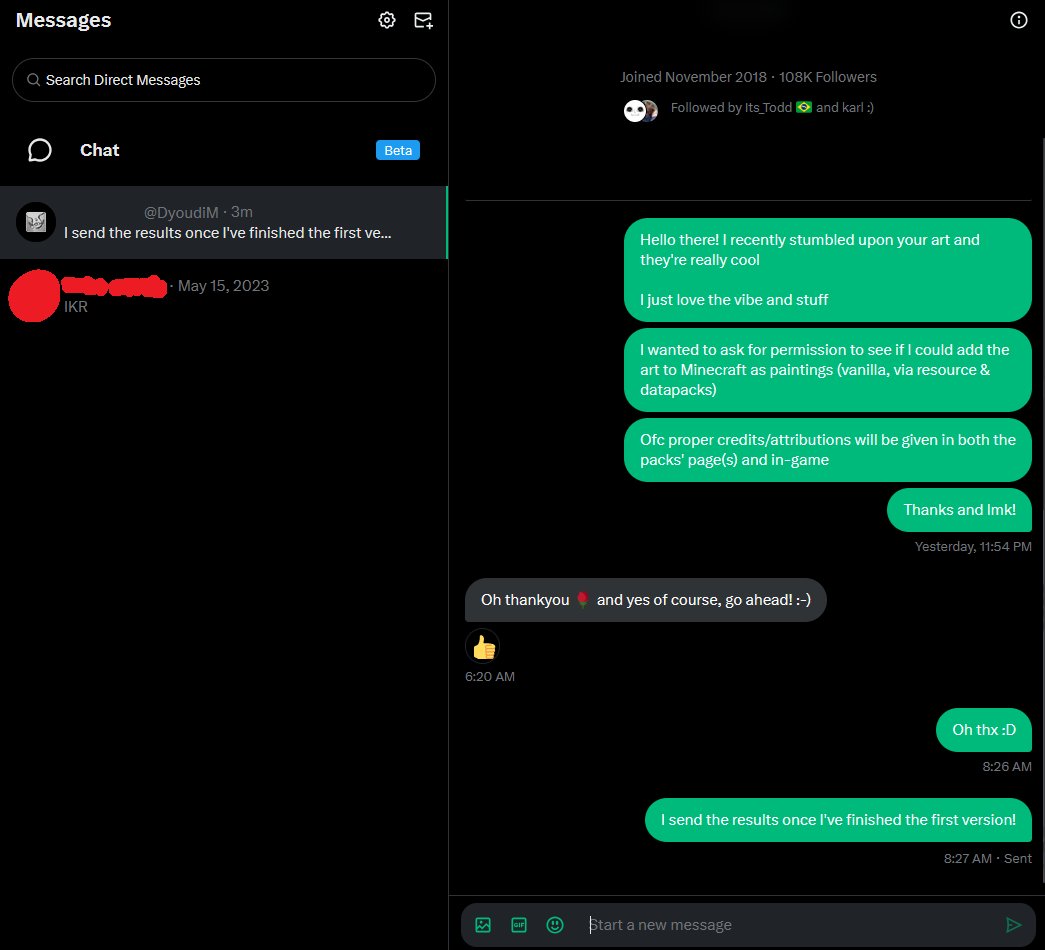
许可权限:
 (来源:)
Warning/Note
If you download the datapack version, a resourcepack is required! If you are planning to use the datapack version, please manually go into the versions tab, choose the version you want, and download BOTH of the TWO attached files! The main one will be the datapack itself, and the "additional" one is the resourcepack required! If you do not do this, all paintings will have no defined texture and turn into pink and black checkerboard patterns!
All links in the sidebar are DyoudiM!'s links, and are not related to me in any way.
DyoudiM!'s liminal-vibe artwork added to Minecraft as paintings!
Currently there are 69 paintings added.
(That number is NOT intentional, it is a coincidence)
For datapack versions below 1.2.30:
To check credits in-game, you can use /function tbdlp:credits.
To give yourself ALL the paintings, use /function tbdlp:all.
For datapack versions 1.2.30 or over:
To check credits in-game, you can use /function liminalpaintings:credits.
To give yourself ALL the paintings, use /function liminalpaintings:all.
All credits for the artworks go to DyoudiM!.
Versions
- Datapack version: Includes a Datapack & a Resourcepack.
- Custom Paintings version: Includes a Custom Paintings pack that requires the Custom Paintings mod.
Modloader will say Datapack, although it's not. It does not have a resourcepack option as the first uploaded version was a datapack.
Installation
To install the datapack version, first go into the versions tab, choose your version (must be labeled with "Datapack") and download both files attached, one is the datapack, the other (labeled "Resources" and is "additional") is a resourcepack.
Put the resourcepack in your resourcepack folder like normal.
Put the datapack in the "datapacks" folder in your already-existing world, or if it's a new world, add it during world creation.
To install the custom paintings version, first go into the versions tab, choose your version (Must be labled with "Custom Paintings") and download the file. Next make sure you have the Custom Paintings mod installed. If not, download it at .
To add the custom paintings pack to your world, you can follow the tutorial in the page's description ().
Simply press U or whatever key you have set for opening the Custom Painting's mod menu while in a world. Then choose to manage packs, open the folder, and put the file into the folder. You can now close the folder, return to the game and choose to reload packs, ensure that the pack is listed, and done!
Permission:
(Source: )


 数据包

 数据包

 数据包

 数据包

 数据包

 数据包

评论 0
登录后参与评分
还没有评论,来抢沙发吧