要访问资源包,请点击“Versions”(版本)并选择最新版本。列表中应包含所有相关文件。
使用升级道具
如果使用升级道具(右键点击),它会检查玩家视线前方 2 格处是否存在刷怪笼。如果存在刷怪笼,它将尝试应用该升级。仅当刷怪笼未被该升级完全升级时,才能应用升级。部分升级可以多次应用。如果刷怪笼检测失败,距离检测位置最近的玩家将收回该升级道具。
本模组最适合与其他允许获取刷怪蛋或使刷怪笼可挖掘的模组搭配使用。本模组肯定能与保留升级数据的刷怪笼配合:
升级列表
附近实体范围升级
(从基础值 6 提升至 10,再至 16)


玩家范围升级
(从基础值 16 提升至 48)

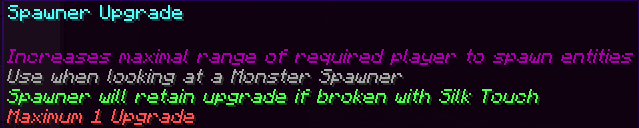
最大实体生成数量上限升级
(从基础值 4 提升至 5,再至 6,最后至 8)


最大生成范围升级
如果应用了“最大生成范围降级”,其值将重置为基础值。之后可再次应用该升级。(从基础值 4 提升至 7)


最大生成范围降级
如果应用了“最大生成范围升级”,其值将重置为基础值。之后可再次应用该升级。(从基础值 4 降至 2)


最大生成时间间隔升级
刷怪笼会在“最小生成时间”到“最大生成时间”之间随机化生成间隔 (从基础值 800 降至 750、700、650,最后至 600)


最小生成时间间隔升级
刷怪笼会在“最小生成时间”到“最大生成时间”之间随机化生成间隔 (从基础值 200 降至 100)


移除天空光照条件升级
我未能找到检测升级是否已应用的好方法,因此它可以被无限次使用,但不会产生额外效果。
覆盖自定义的天空光照等级生成规则,设置最小值为 0,最大值为 15。
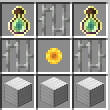

可控刷怪笼升级
覆盖自定义的方块光照等级生成规则,设置最小值为 0,最大值为 5。空气方块也被视为方块。

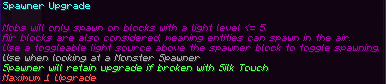
经验值奖励升级
为生成的实体添加一个小经验球作为乘客


刷怪笼重置
破坏目标刷怪笼,掉落经验值,并在原位置放置一个空白的刷怪笼
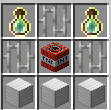

基岩版兼容性
如果您想在 Geyser 服务器上使用此数据包,请解压资源包 zip 文件,并将 "SPWR_mappings.json" 放入 Geyser 的自定义映射文件夹中,将 "SPWR Bedrock.mcpack" 放入 Geyser 的资源包文件夹中。这两个文件夹都可以容纳多个文件;无需合并。
目前 GeyserMC 存在一个 bug,导致玩家在注视刷怪笼时无法使用任何物品 ()。
我找到了一个解决方法:点击刷怪笼上方方块的底部。请参阅画廊中的 GIF 以查看演示。
To access the texture pack, click on versions and click on the newest one. There should be a list of all relevant files.
Using Upgrades
If an upgrade is used (right-click), it will check for a spawner 2 blocks in front of the players looking direction. If there is a spawner, it will try to apply the upgrade. An upgrade can be applied if the spawner was not completely upgraded by the upgrade. Some upgrades can be applied multiple times. If the spawner check failed, the player nearest to the location, which was checked, will get the upgrade item back.
This mod is best paired with other mods that make spawn eggs obtainable or make spawners minable. This mod definitely works with the spawners keeping the upgrades:
Upgrade List
Nearby Entities Upgrade
(From 6 Base to 10 to 16)
Player Range Upgrade
(From 16 Base to 48)
Maximal Possible Entity Spawns Upgrade
(From 4 Base to 5 to 6 to 8)
Maximal Spawning Range Upgrade
If a Maximal Spawning Range Downgrade is applied, it will be set to the base. The upgrade can then be applied again. (From 4 Base to 7)
Maximal Spawning Range Downgrade
If a Maximal Spawning Range Upgrade is applied, it will be set to the base. The upgrade can then be applied again. (From 4 Base to 2)
Maximal Spawning Time Upgrade
The Spawner randomizes spawning time from Minimal Spawning Time to Maximal Spawning Time (From 800 Base to 750 to 700 to 650 to 600)
Minimal Spawning Time Upgrade
The Spawner randomizes spawning time from Minimal Spawning Time to Maximal Spawning Time (From 200 Base to 100)
Remove Sky Light Condition Upgrade
I didn't find a good way to check if the upgrade was applied already, so it can be use infinitely but won't have an effect.
Overwrites the custom spawn rules for the light-level of the sky with a minimum of 0 and a maximum of 15.
Controllable Spawner Upgrade
Overwrites the custom spawn rules for the block light level with a minimum of 0 and a maximum of 5. Air blocks are also blocks.
Experience Value Upgrade
Adds a small experience orb as a passenger to spawned entities
Spawner Reset
Breaks target spawner dropping xp and placing a blank spawner at the location
Bedrock Compatability
If you want to use this datapack on Geyser servers, extract the texture pack zip file and put the "SPWR_mappings.json" inside of Geyser's custom mappings folder and the "SPWR Bedrock.mcpack" inside of Geyser's pack folder. Both of the folders can take multiple files; no merging is needed.
Currently there is a bug on GeyserMC preventing players from using any items when looking at a Spawner ().
I found a workaround to this by clicking on the bottom of a block above the spawner. Look at the gallery for a GIF showing it.


 数据包

 数据包
 数据包

 数据包

 数据包

 数据包
评论 0
登录后参与评分
还没有评论,来抢沙发吧