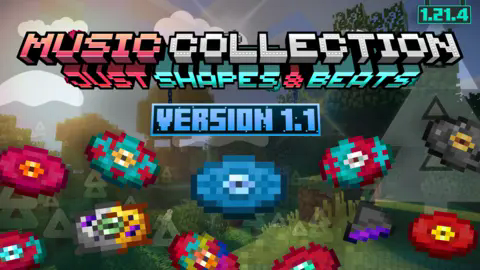
音乐合集 - Just Shapes & Beats
数据包 + 资源包 的组合,为游戏添加了... +15 张自定义唱片,以及 新闻结构、新可制作物品 等等...?
LuisterCorp © - 2025
备注? (Notes)
- 下载我们的 资源包 以获取唱片纹理。
- Music Collection 会修改游戏中已存在的纹理。?
- Music Collection 兼容世界中的任何生成类数据包。
- 不要将其添加到现有世界:请先重置你的存档或使用新世界。?️
- Music Collection 提供了用于制作你的 唱片、模具 和 音乐碎片 的配方。
- 使用耳机 以获得 更好的体验。?
描述 ? (Description)
沉浸在 Minecraft 中全新的音乐体验吧!✨
- 这个 数据包 引入了一系列与 音乐 相关的特性,丰富了你在 主世界 乃至未来更多区域的冒险旅程...
特性?️ (Features)
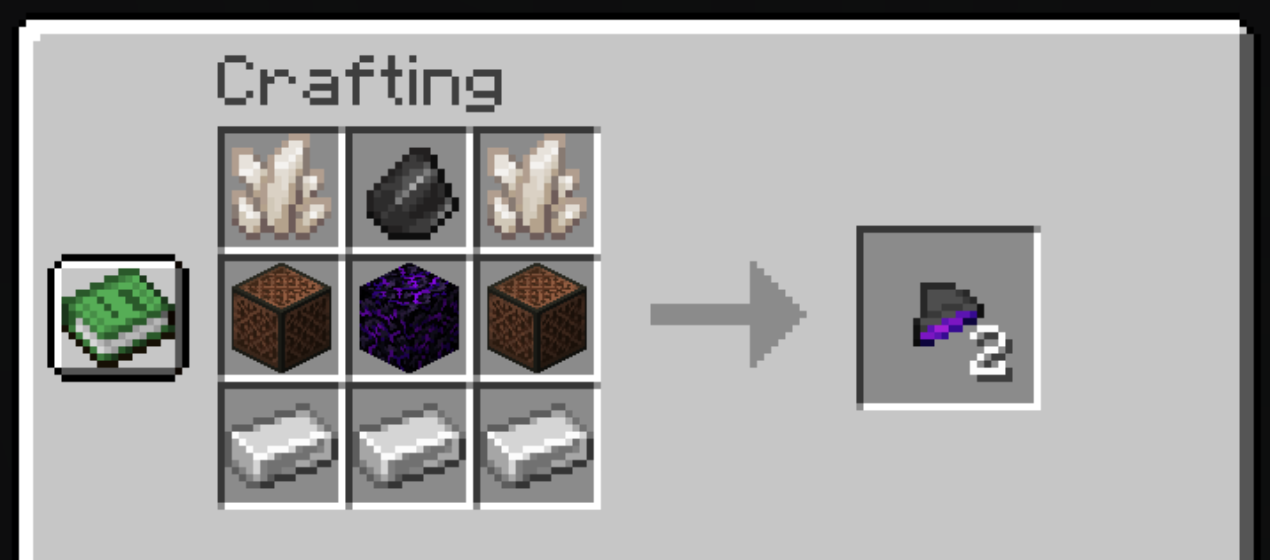
1. 音乐碎片 (Musical Fragment) ??
为了能够制作我们的 新唱片,你首先需要获得一种新的 音乐碎片,它们可以在 结构 中找到,或者在 合成台 上制造。
◾合成:
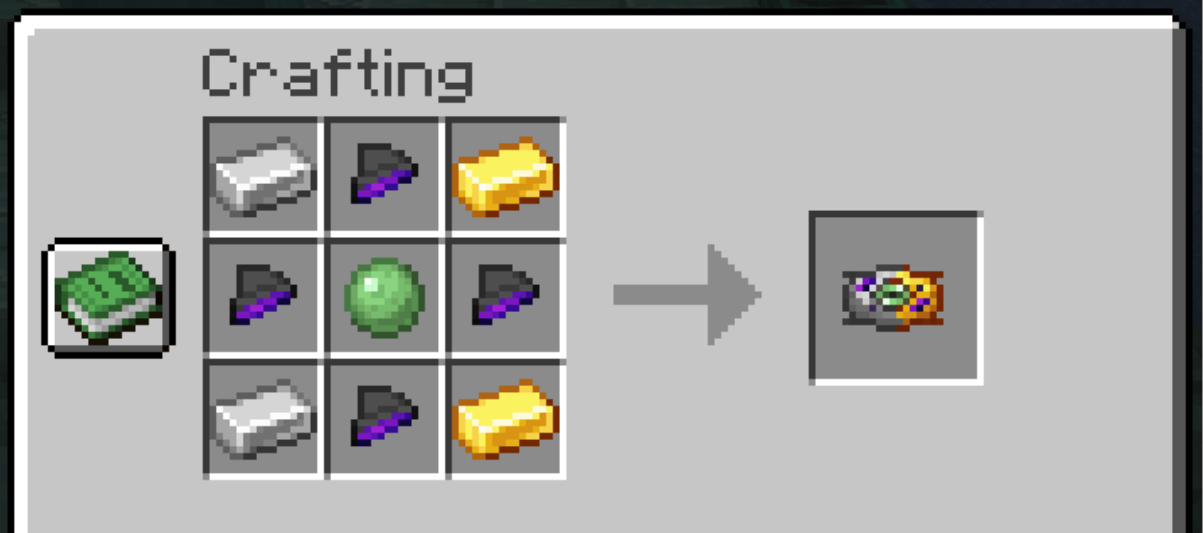
2. 唱片模具? (Disk Mold)
要制作它,你需要之前的 音乐碎片,以及其他有助于获得 唱片模具 的材料,通过该模具你将能够制作此数据包中的所有 新唱片。
◾合成:
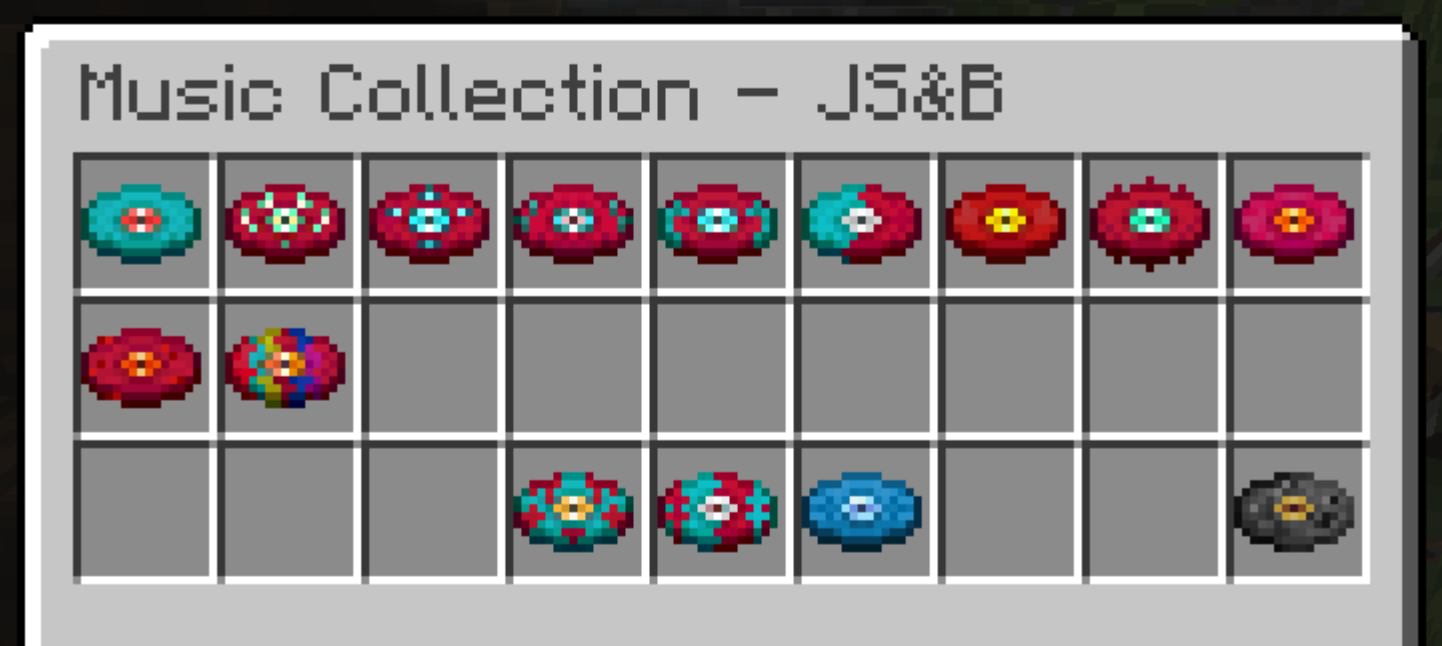
3. 全新自定义唱片? (New Personalized Discs)
使用 唱片模具,你将能够制作我们专为 Minecraft 打造的第一套 自定义音乐合集,收录来自.... Just Shapes & Beats! 的歌曲。
◾Music Collection - 版本 1.1:
3.1 ¡Just Shapes & Beats!?️
来自节奏游戏 Just Shapes & Beats 的音乐,通过本 数据包 来到了 Minecraft,源自 Monstercat 目录。
JustShapes&Beats.com | JustShapes&Beats - Steam
+10 ? 首 最受欢迎的歌曲,许多来自 Monstercat 曲库的作品已被收录,并配有 自定义唱片设计。
?可合成唱片及曲目列表:
Danimal Cannon - Long Live The New Fresh
◾合成:
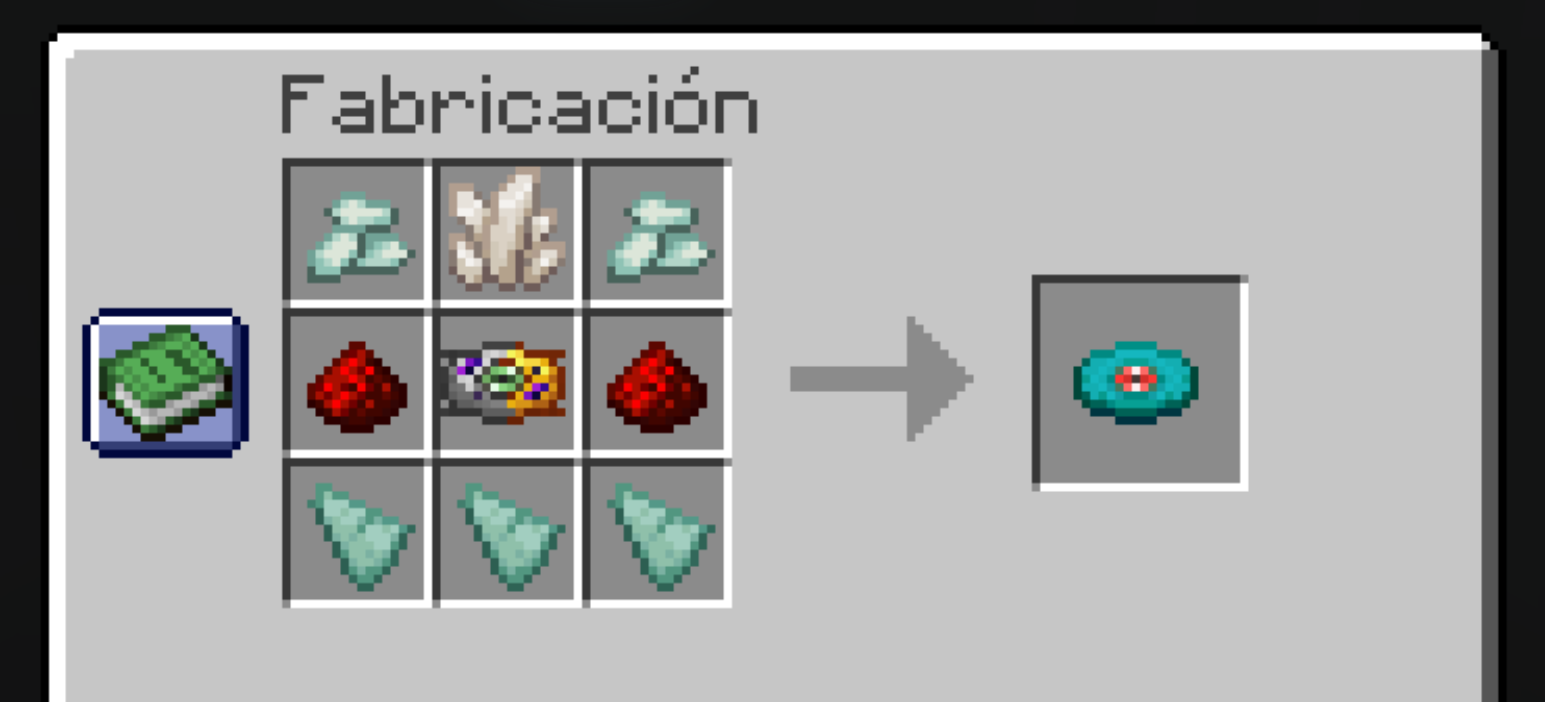
◽材料:
- 海晶碎片 x3
- 海晶砂粒 x2
- 唱片模具 x1
- 红石粉 x2
- 下界石英 x1
?音乐与艺术家:
Long Live The New Fresh
艺术家: Danimal Cannon
更多信息: YouTube - Bandcamp - Twitter - Facebook
Nitro Fun - New Game [Monstercat Release]
◾合成:
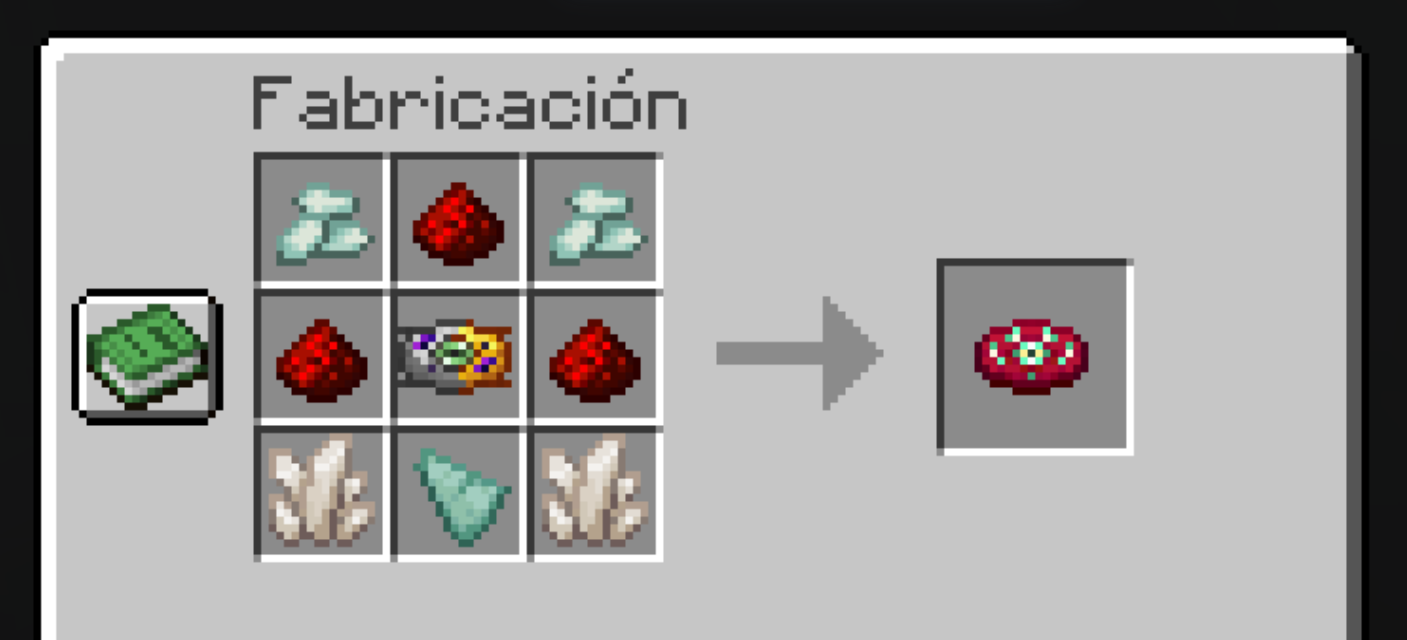
◽材料:
- 海晶砂粒 x2
- 红石粉 x3
- 唱片模具 x1
- 海晶碎片 x1
- 下界石英 x2
?音乐与艺术家:
New Game [Monstercat Release]
艺术家: Nitro Fun
更多信息: YouTube - SoundCloud - Twitter - Instagram - Facebook
Noisestorm - Barracuda [Monstercat Release]
◾合成:
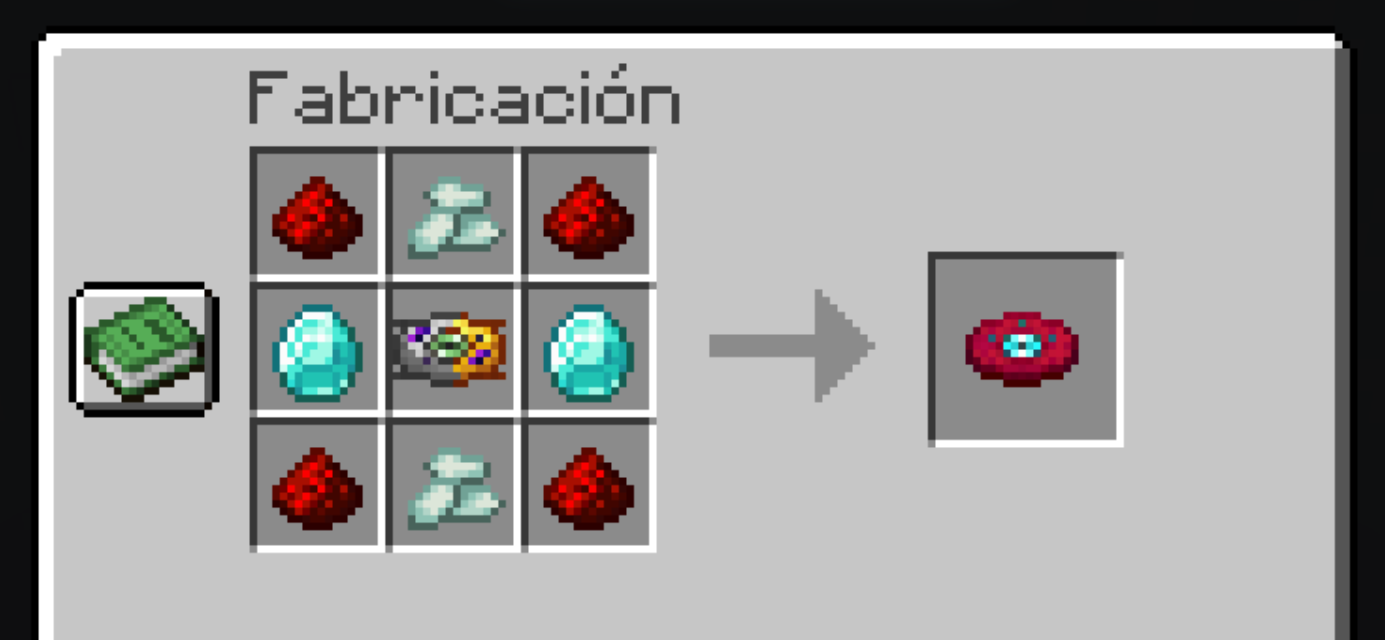
◽材料:
- 红石粉 x4
- 海晶砂粒 x2
- 唱片模具 x1
- 钻石 x2
?音乐与艺术家:
Barracuda [Monstercat Release]
艺术家: Noisestorm
更多信息: YouTube - SoundCloud - Twitter - iTunes - Facebook
Nitro Fun - Cheat Codes [Monstercat Release]
◾合成:

◽材料:
- 海晶砂粒 x2
- 紫水晶碎片 x1
- 唱片模具 x1
- 旋风棒 x2
- 红石粉 x3
?音乐与艺术家:
Cheat Codes [Monstercat Release]
艺术家: Nitro Fun
更多:YouTube - SoundCloud - Twitter - Instagram - Facebook
Cardi - Lycanthropy
◾合成 (Crafting):
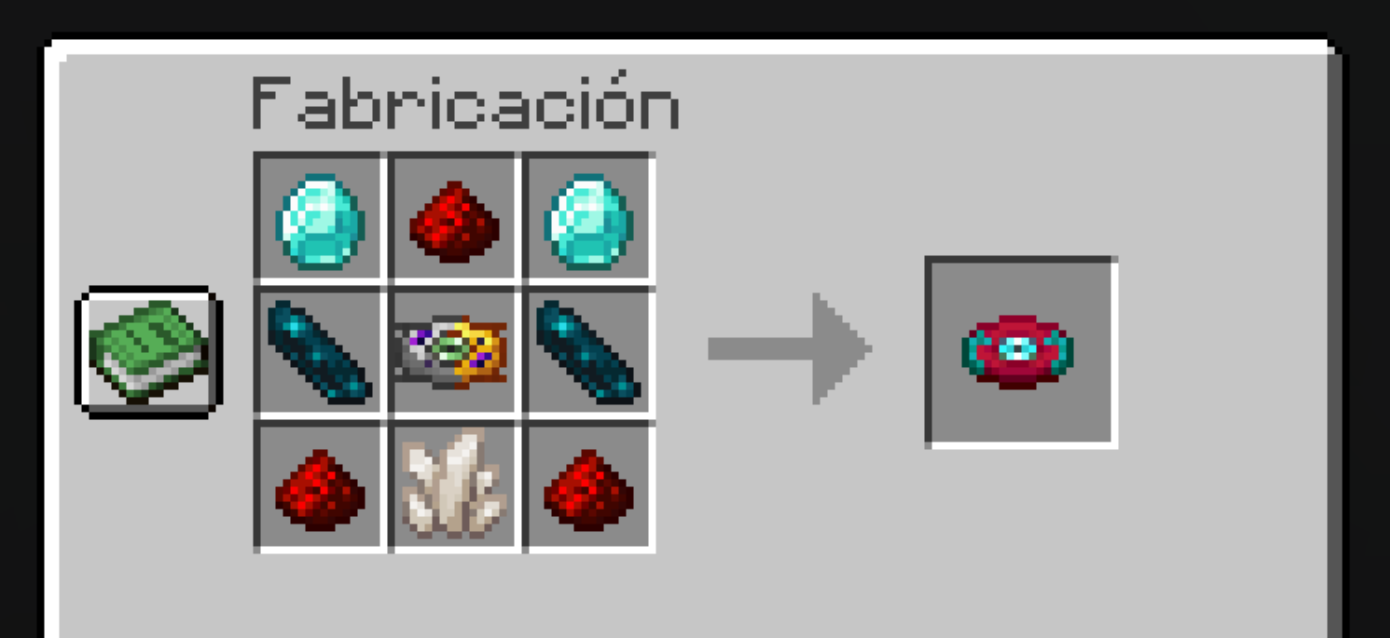
◽材料 (Ingredients):
- 钻石 x2
- 红石粉 x3
- 共振碎片 x2
- 唱片模具 x1
- 下界石英块 x1
?音乐与艺术家 (Music and Artist):
Lycanthropy
By: Cardi
更多:YouTube - Twitter - BandCamp - Facebook
Sabrepulse - Close To Me
◾合成 (Crafting):
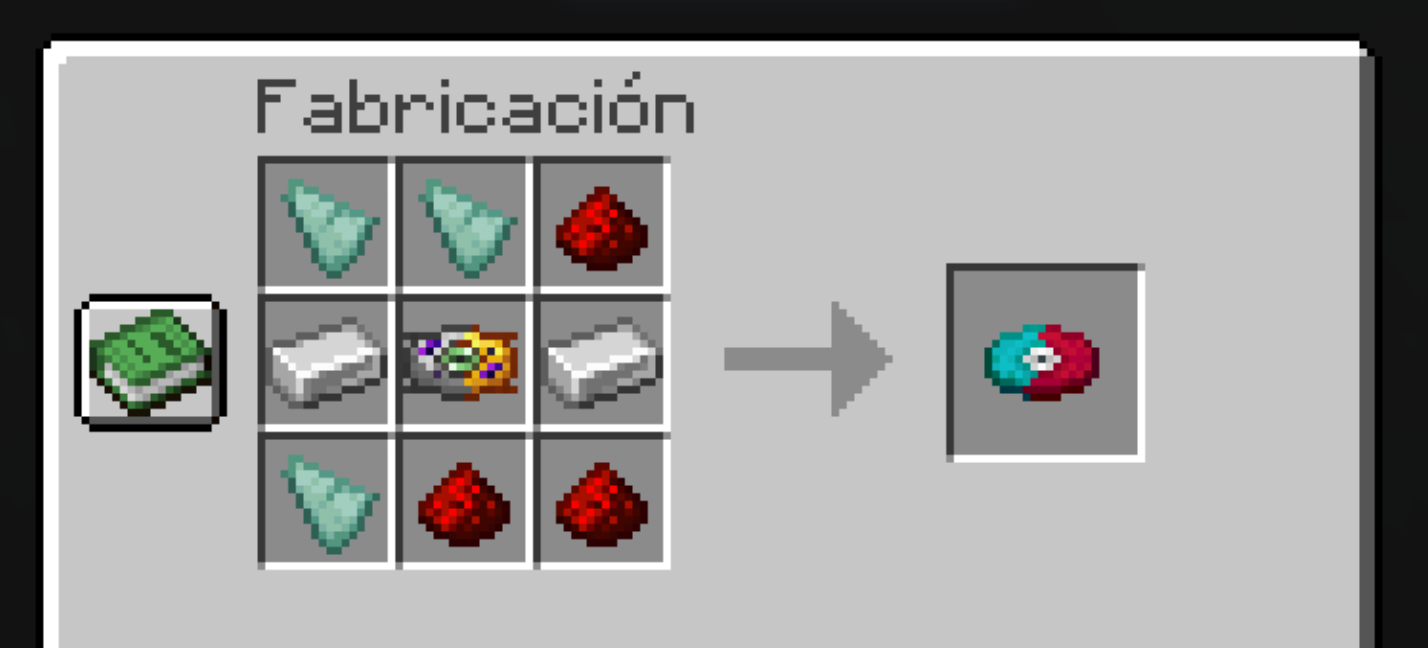
◽材料 (Ingredients):
- 海晶碎片 x3
- 唱片模具 x1
- 铁锭 x2
- 红石粉 x3
?音乐与艺术家 (Music and Artist):
Close to Me
By: Sabrepulse
更多:YouTube - SoundCloud - BandCamp - Twitter - Facebook
Nitro Fun - Final Boss [Monstercat Release]
◾合成 (Crafting):
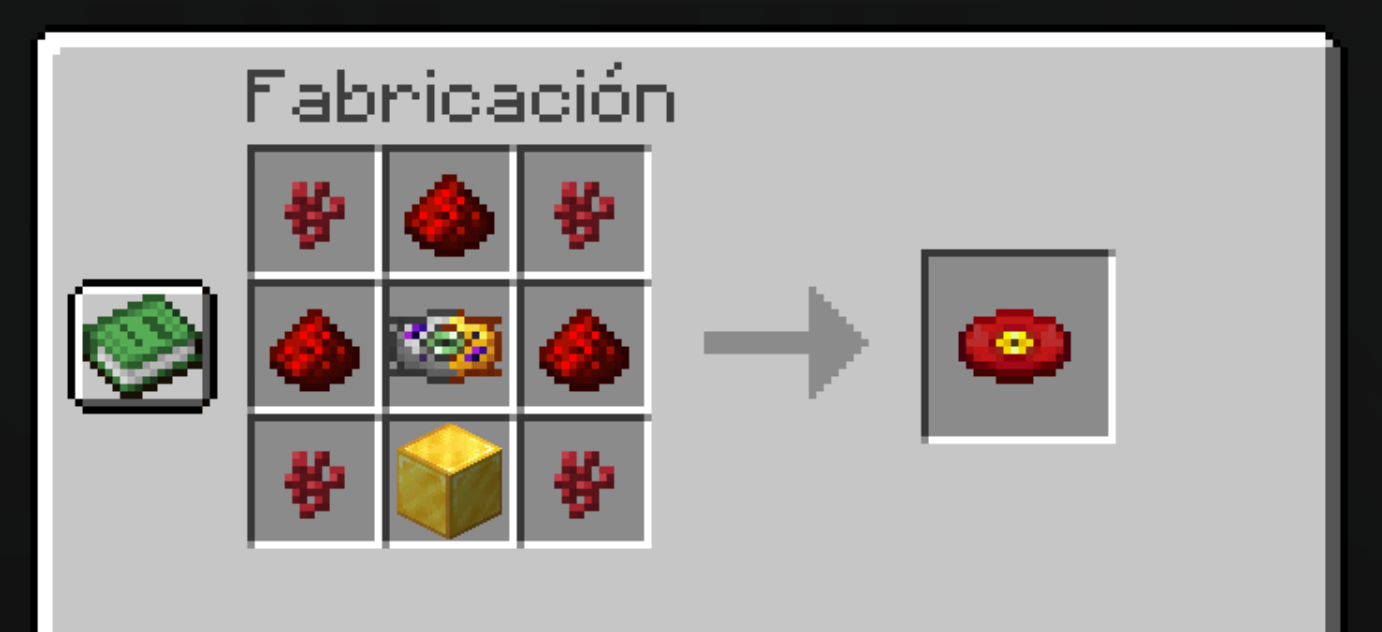
◽材料 (Ingredients):
- 下界疣 x4
- 红石粉 x3
- 唱片模具 x1
- 金块 x1
?音乐与艺术家 (Music and Artist):
Final Boss [Monstercat Release]
By: Nitro Fun
更多:YouTube - SoundCloud - Twitter - Instagram - Facebook
Excision & Far Too Loud - Destroid 8. Annihilate
◾合成 (Crafting):
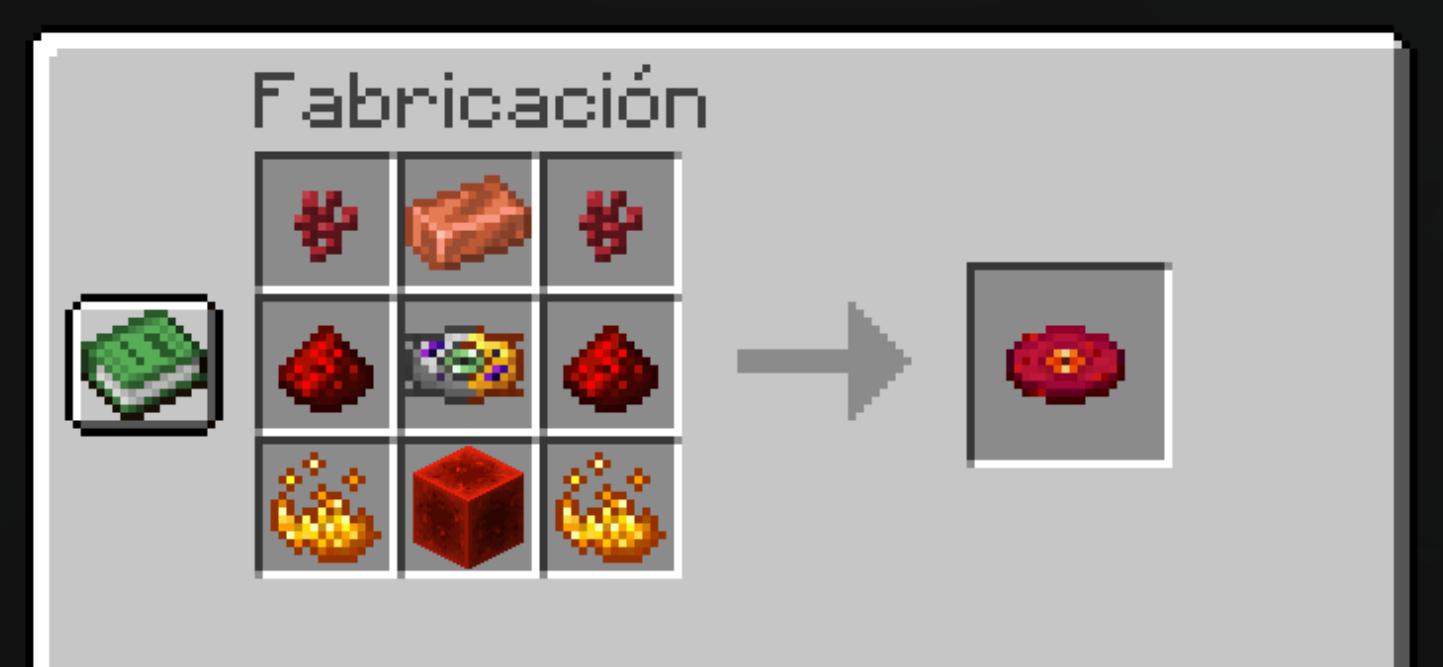
◽材料 (Ingredients):
- 下界疣 x2
- 铜锭 x1
- 红石粉 x2
- 唱片模具 x1
- 烈焰粉 x2
- 红石块 x1
?音乐与艺术家 (Music and Artist):
Destroid 8. Annihilate
By: Excision & Far Too Loud
Excision 更多:YouTube - iTunes - Twitter - Website - Instagram - Facebook
Far Too Loud 更多:YouTube - SoundCloud - iTunes - Twitter - Facebook
Undertale - Spider Dance (Shirobon Remix)
◾合成 (Crafting):
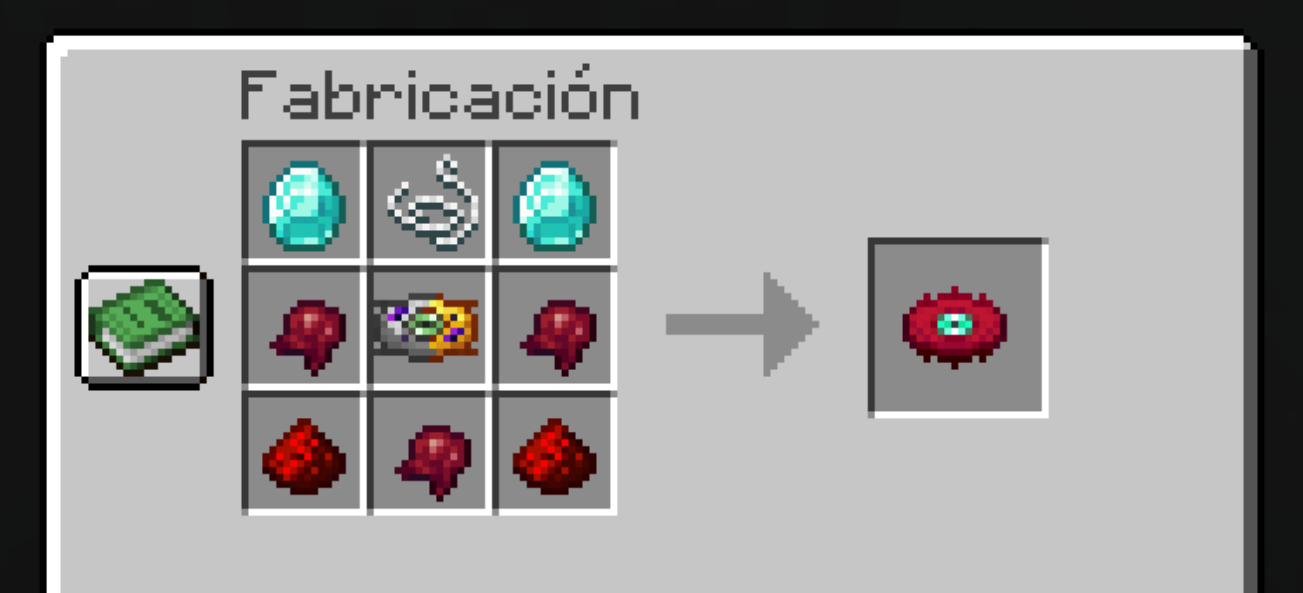
◽材料 (Ingredients):
- 钻石 x2
- 线 x1
- 唱片模具 x1
- 红石粉 x2
- 发酵蛛眼 x3
?音乐与艺术家 (Music and Artist):
Undertale - Spider Dance
By: (Shirobon Remix)
更多:YouTube - SoundCloud - BandCamp - iTunes - Twitter - Instagram - TikTok - Merch
Just Shovels & Knights - 'La Danse Macabre' (Shirobon Remix)
◾合成 (Crafting):
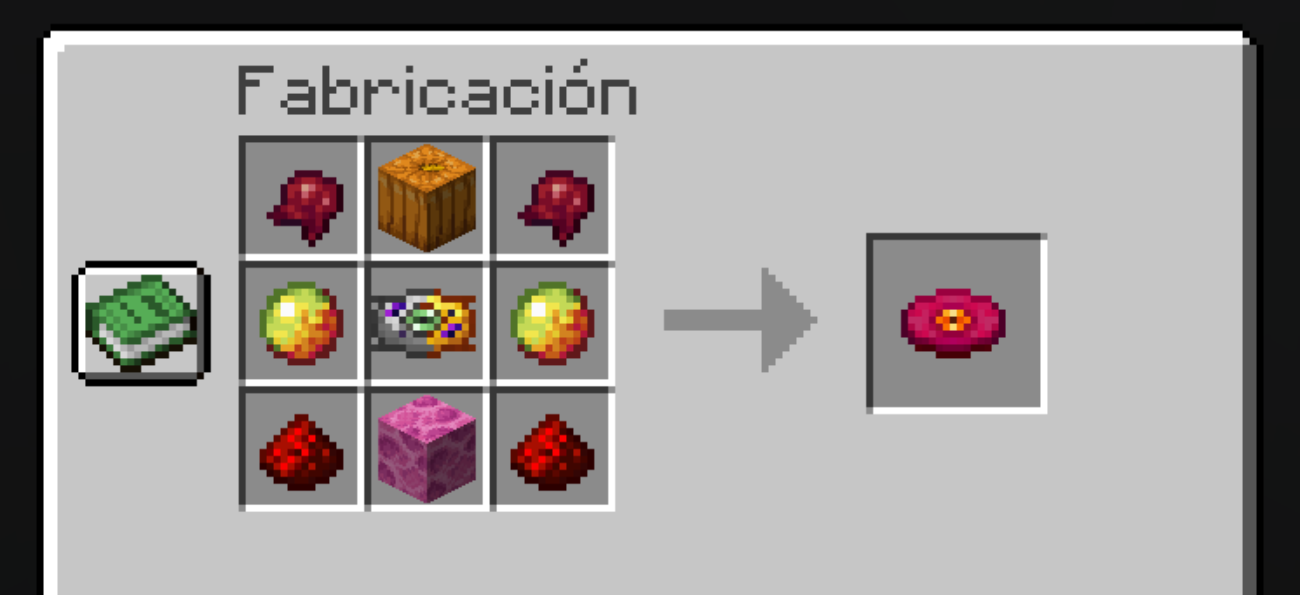
◽材料 (Ingredients):
- 发酵蛛眼 x2
- 南瓜 x1
- 岩浆膏
- 唱片模具 x1
- 红石粉 x2
- 脑珊瑚块 x1
?音乐与艺术家 (Music and Artist):
Just Shovels & Knights - La Danse Macabre'
By: (Shirobon Remix)
更多:YouTube - SoundCloud - BandCamp - iTunes - Twitter - Instagram - TikTok - Merch
Tristam - Till It's Over [Monstercat Release]
◾合成配方 (Crafting):
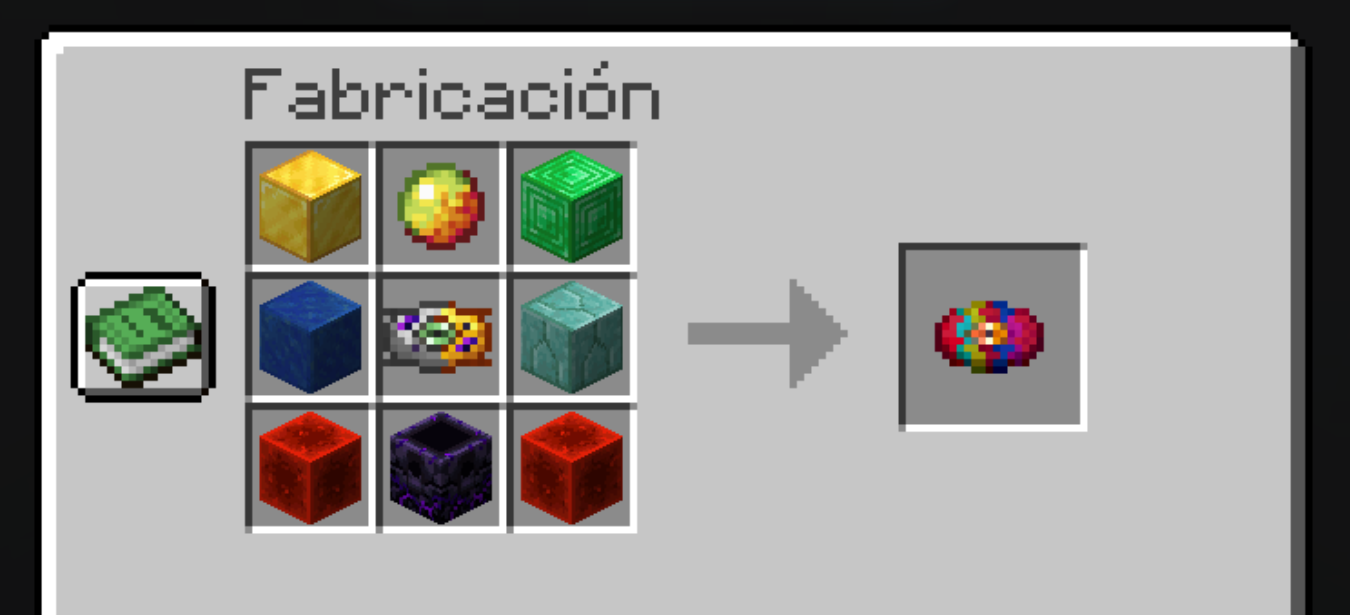
◽所需材料 (Ingredients):
- 金块 x1
- 岩浆膏 x1
- 绿宝石块 x1
- 青金石块 x1
- 唱片模具 x1
- 海晶砖 x1
- 红石块 x2
- 重生锚 x1
?音乐与艺术家 (Music and Artist):
Till It's Over [Monstercat Release]
By: Tristam
More: YouTube - SoundCloud - Website - Twitter - Instagram - Facebook
新的可合成唱片!
Silva Hound - Cool Friends (Murtagh & Veschell Remix)
◾合成配方 (Crafting):
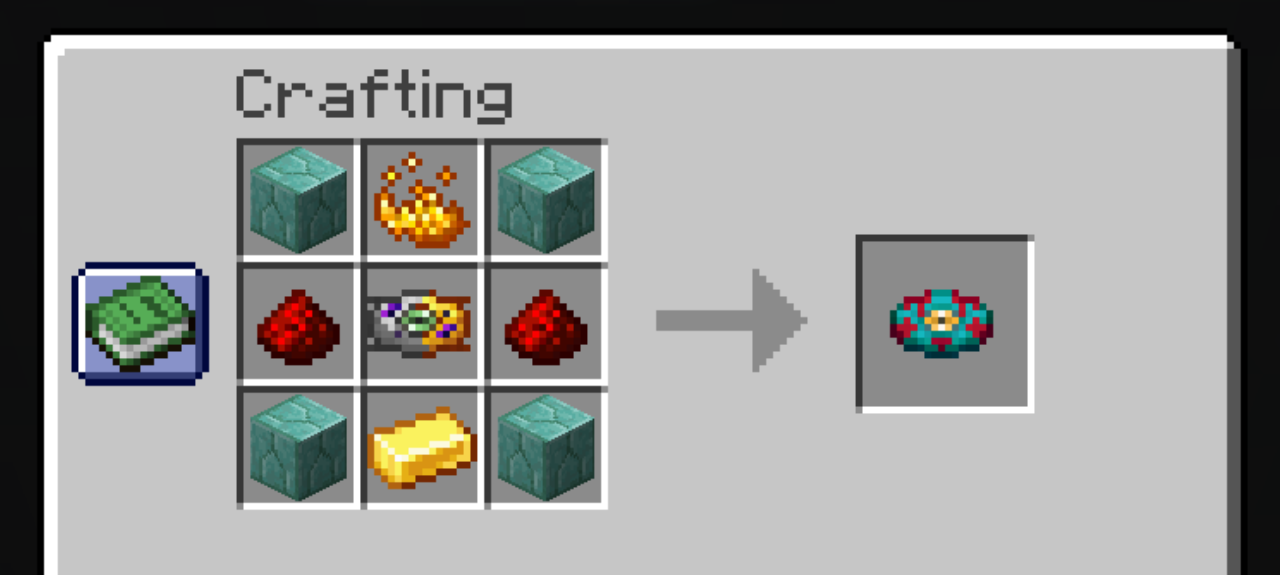
◽所需材料 (Ingredients):
- 海晶砖 x4
- 烈焰粉 x1
- 红石粉 x2
- 唱片模具 x1
- 金锭 x1
?音乐与艺术家 (Music and Artist):
Cool Friends
By: Silva Hound
Remix Made By: Murtagh & Veschell
Murtagh More: SoundCloud - Instagram - Spotify
Veschell More: Spotify
Shirobon - Granite
◾合成配方 (Crafting):
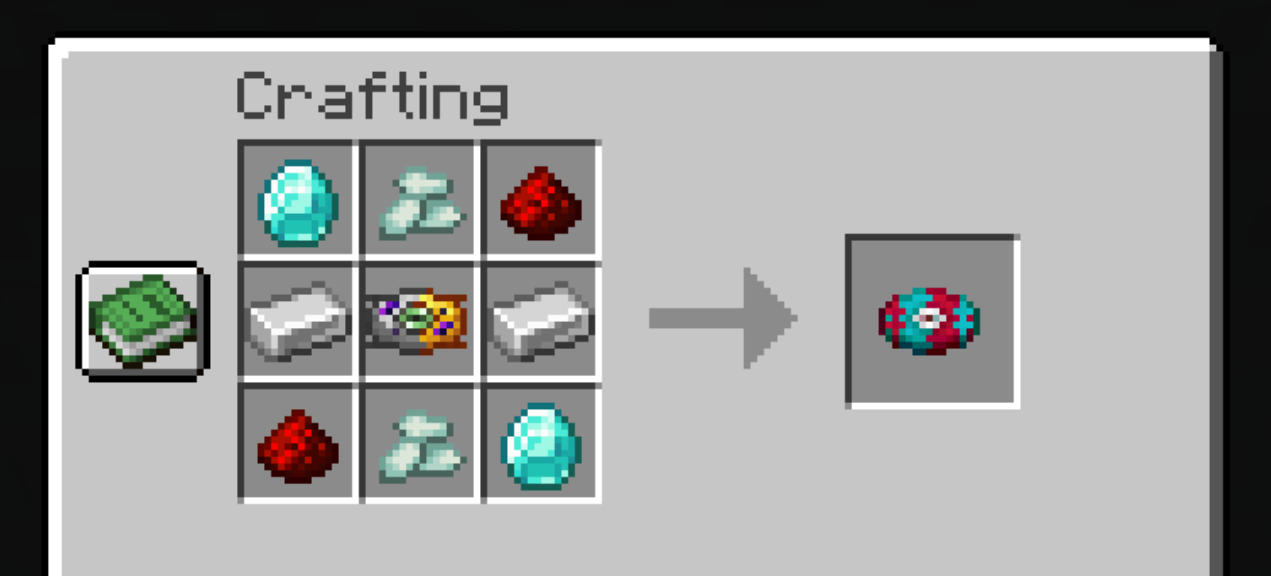
◽所需材料 (Ingredients):
- 钻石 x2
- 海晶砂粒 x2
- 红石粉 x2
- 唱片模具 x1
- 铁锭 x2
?音乐与艺术家 (Music and Artist):
Granite
By: Shirobon
More: YouTube - SoundCloud - BandCamp - iTunes - Twitter - Instagram - TikTok - Merch
Monstercat 免责声明?️
本数据包中使用的音乐****不用于商业目的,仅用于娱乐?和非营利用途,需承担艺术家及其唱片公司的风险。如果在此类平台(如我的 YouTube 频道)上传包含此数据包的內容,可能会面临版权警告 ?。
Monstercat Uncaged ©
Monstercat Uncaged
⚙️链接:
Monstercat Website
Monstercat Shop
Monstercat Licensing
Monstercat Gold
?更多链接:
YouTube - SoundCloud - Spotify - iTunes - Twitter - Reddit - Twitch - Instagram - Facebook
3.2 未来的音乐与曲目建议! ?️
即将公布新闻...?️
 你可以在以下表单?中提议未来的新歌曲:
You can propose future new songs in the following formulario:.
- Propuestas Musicales aquí - Musical Proposals here?
- (The most requested ones will be selected) ?️
结构 ✨
1. "音乐家小屋"? (Musician's Hut Structure)
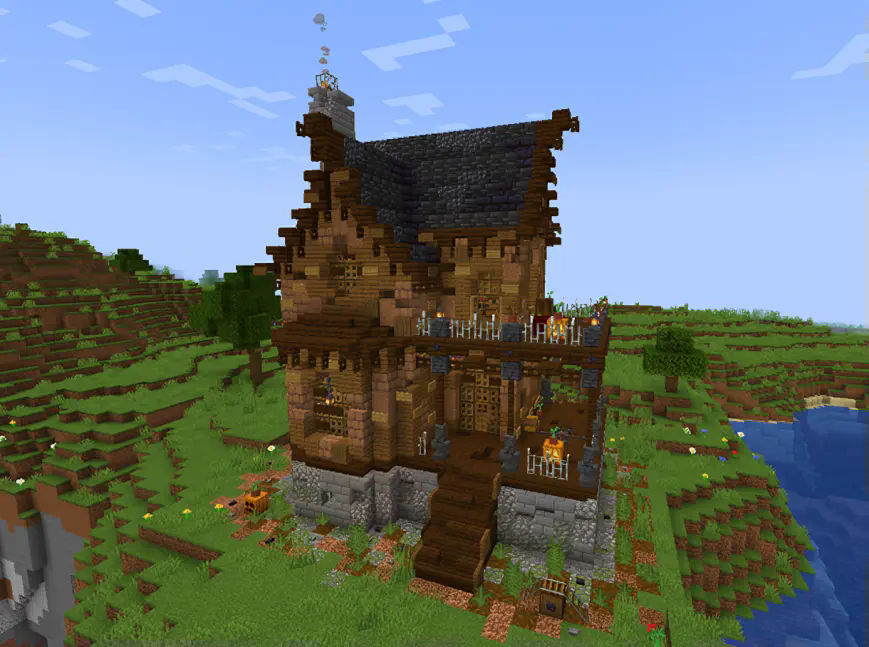
该数据包添加了这一新结构——“音乐家小屋 ?”,这是一座多年前废弃的小屋,由**云杉木、深色橡木、土坯和各种岩石 ?**建成。
◾图片:
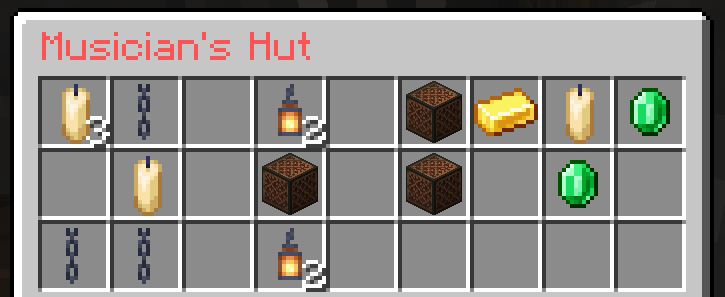
在里面你可以找到各种宝藏 ?️以及过去历史的片段,藏在**隐藏的书 ?**中...。
◾图片:
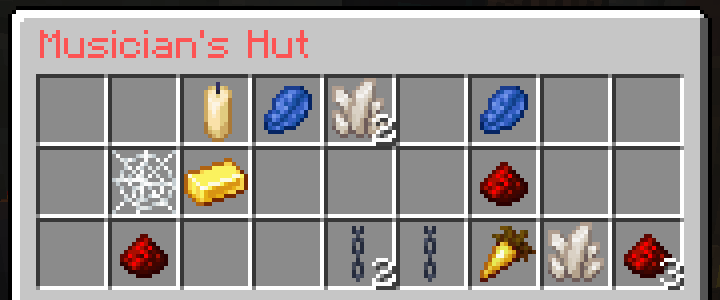
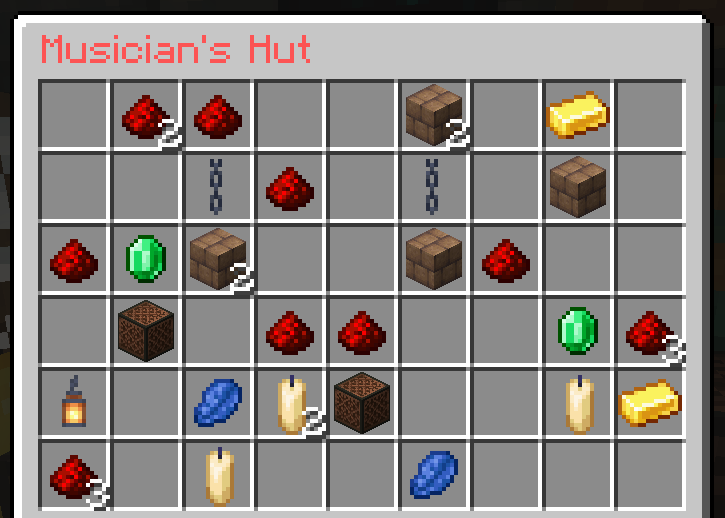
我们建议你探索这座老房子的每一个角落,它的生成地点在**平原、各种森林 ?**中,彼此之间至少相距 +750 格。?
2. "海晶船"? (Prismarine Ship Structure)
该数据包更新添加了这一新的海洋结构——“海晶船 ⛵”,这是一艘多年前沉没的船只,由海晶及其变体制成,将在主世界的所有海洋中生成 ?。
◾图片:
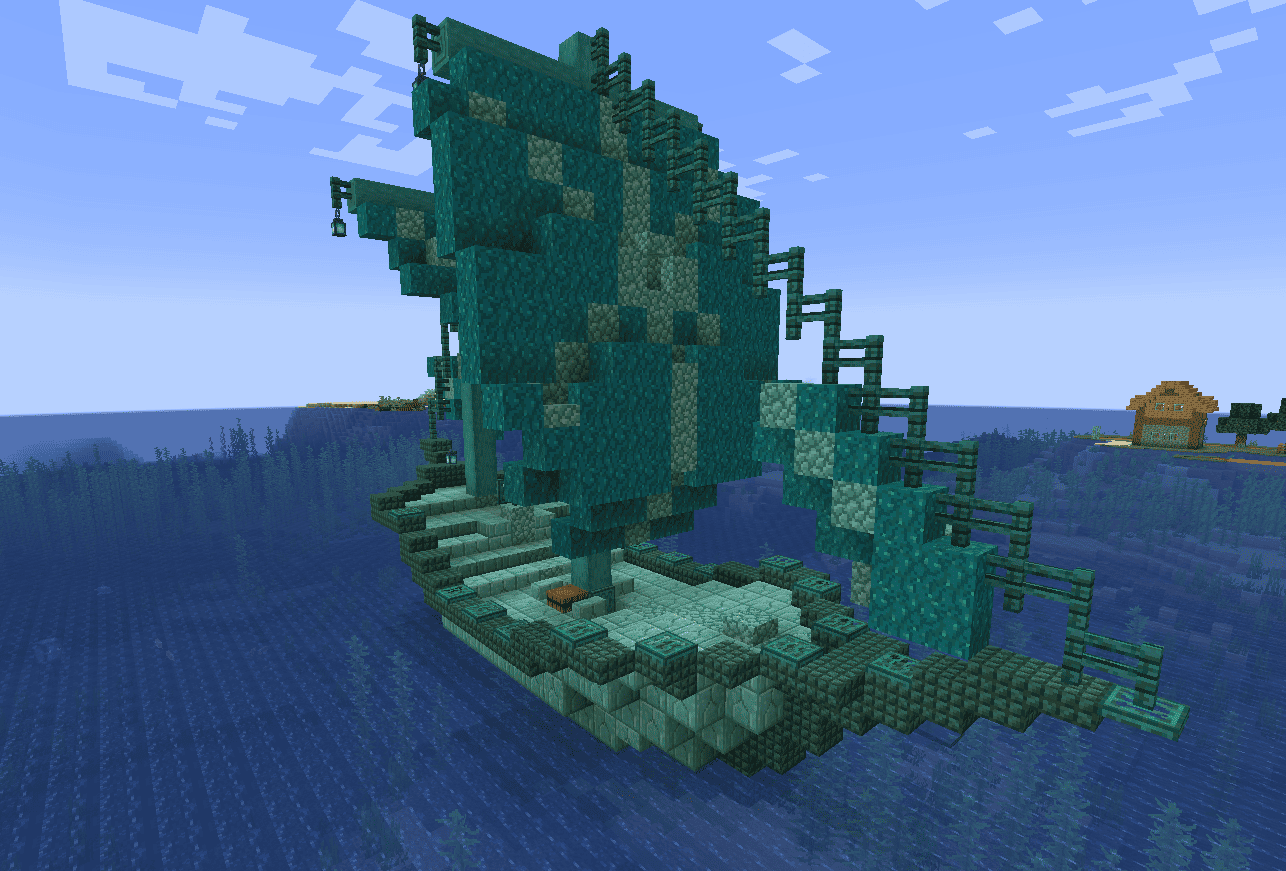
在里面你可以找到 几个 木桶 ? 和一个特殊的宝箱,以及一张新增的音乐唱片 ?,等待你去发现……
◾图片:
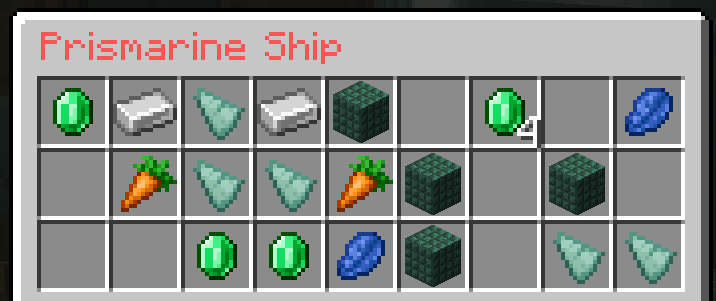
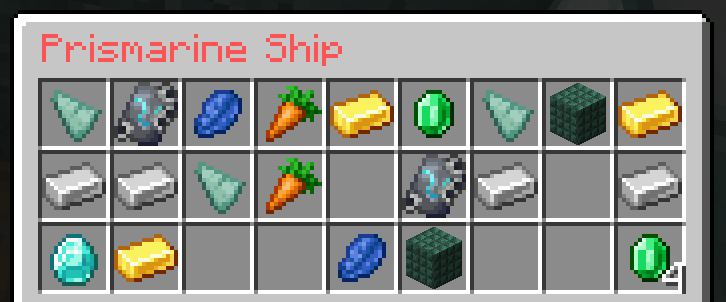
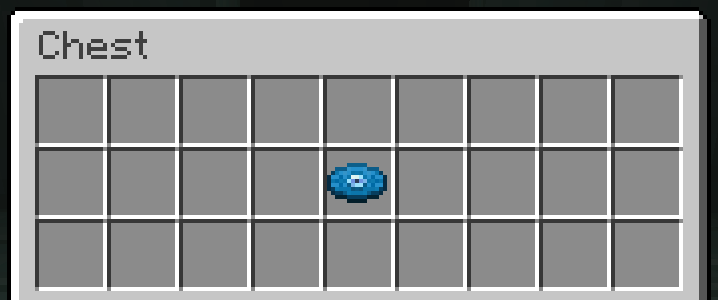
访问 画廊 以更清楚地查看该结构及其内部✨。

3 未来新增的结构!?️ (Future New Structures)
- 更多消息即将公布……?️
- 随着时间推移将陆续添加新结构,并增加新的音乐合集……
新成就 ? (New Achievements)
当你获得此数据包中的 +15 张新唱片 时,你将解锁一个全新的章节,其中包含与不同电影?、剧集?和视频游戏?️相关的个人成就。
◾图片:
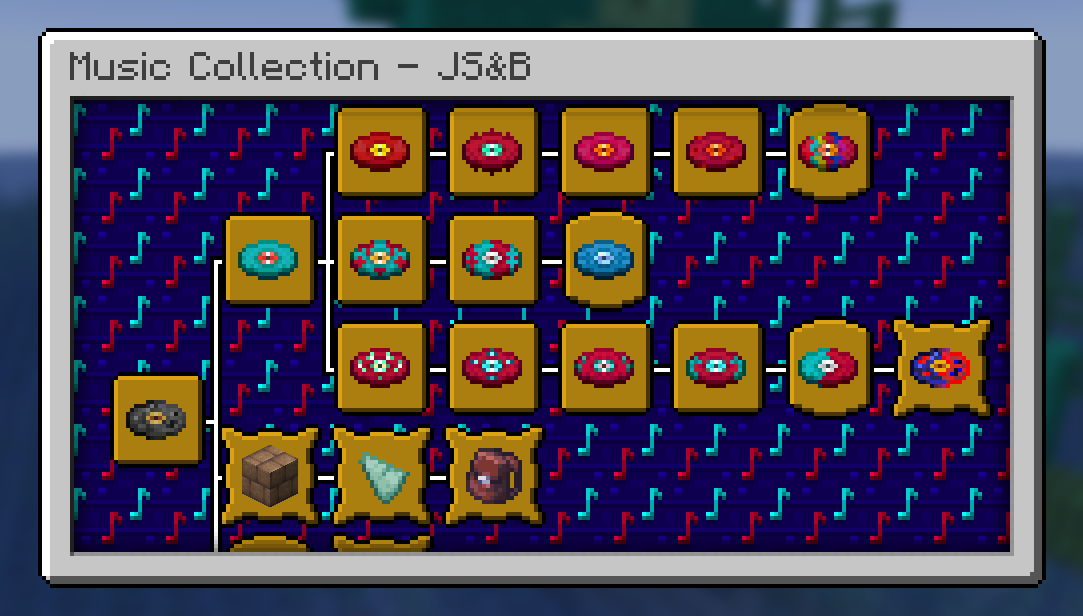
这 21 项成就 分别通过以下方式获得:获取你的第一张 音乐碎片 ?、找到 音乐家小屋 ?、“海晶船⛵” 以及合成 所有新增的唱片 ?。
安装流程 ? (Installation Processes)
下面我们邀请你按照以下类别,查看在我们的数据包中正确安装的流程 ?
单人模式 - Un Jugador
数据包安装步骤 (Steps to Install DataPack):
-
打开 Minecraft (Open Minecraft)
启动游戏(start the game)。
-
创建新世界 (Create a New World)
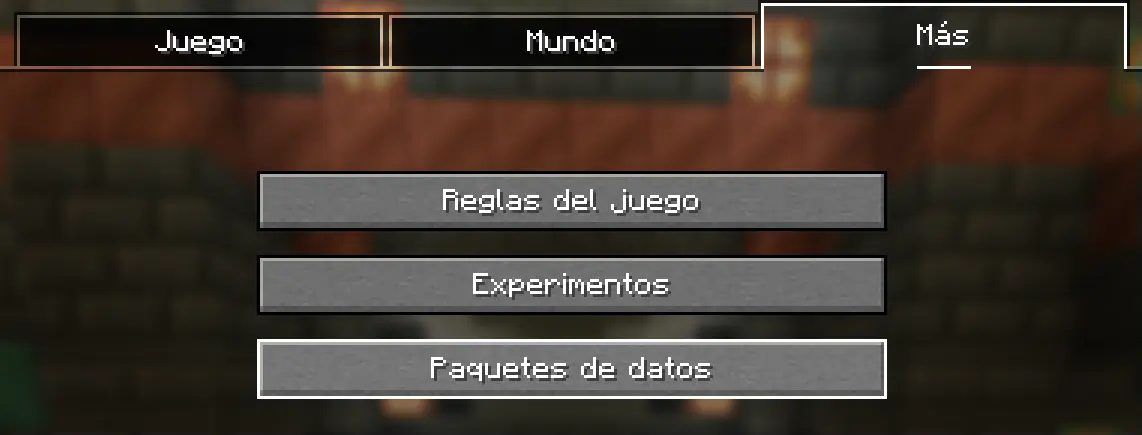
进入“更多”,然后点击 “数据包”。(go to “More” and click on "Datapacks")。
-
添加数据包 (Add Datapack)
将数据包(一个 .zip 文件或目录)拖入 Minecraft 窗口。
?(Drag the Data Package (a .zip or directory) to the Minecraft window)。

将出现确认屏幕。点击 “确认”。
?(A confirmation screen will appear. Click on "Confirm".)
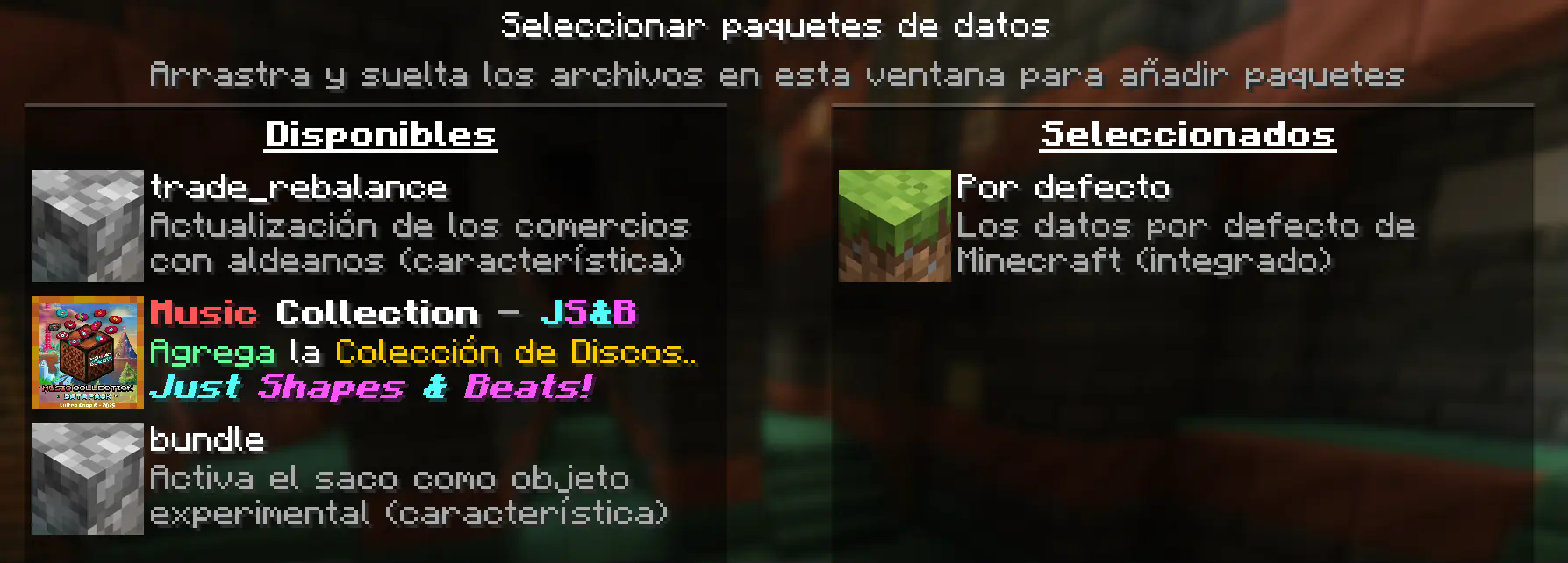
-
激活数据包 (Activate the DataPack)
将 数据包 移动到屏幕右侧,方法是 单击 其图标上的三角形(悬停时可见)。
? Move the Datapack to the right side of the screen by clicking on its triangle icon (visible when hovering over it)。
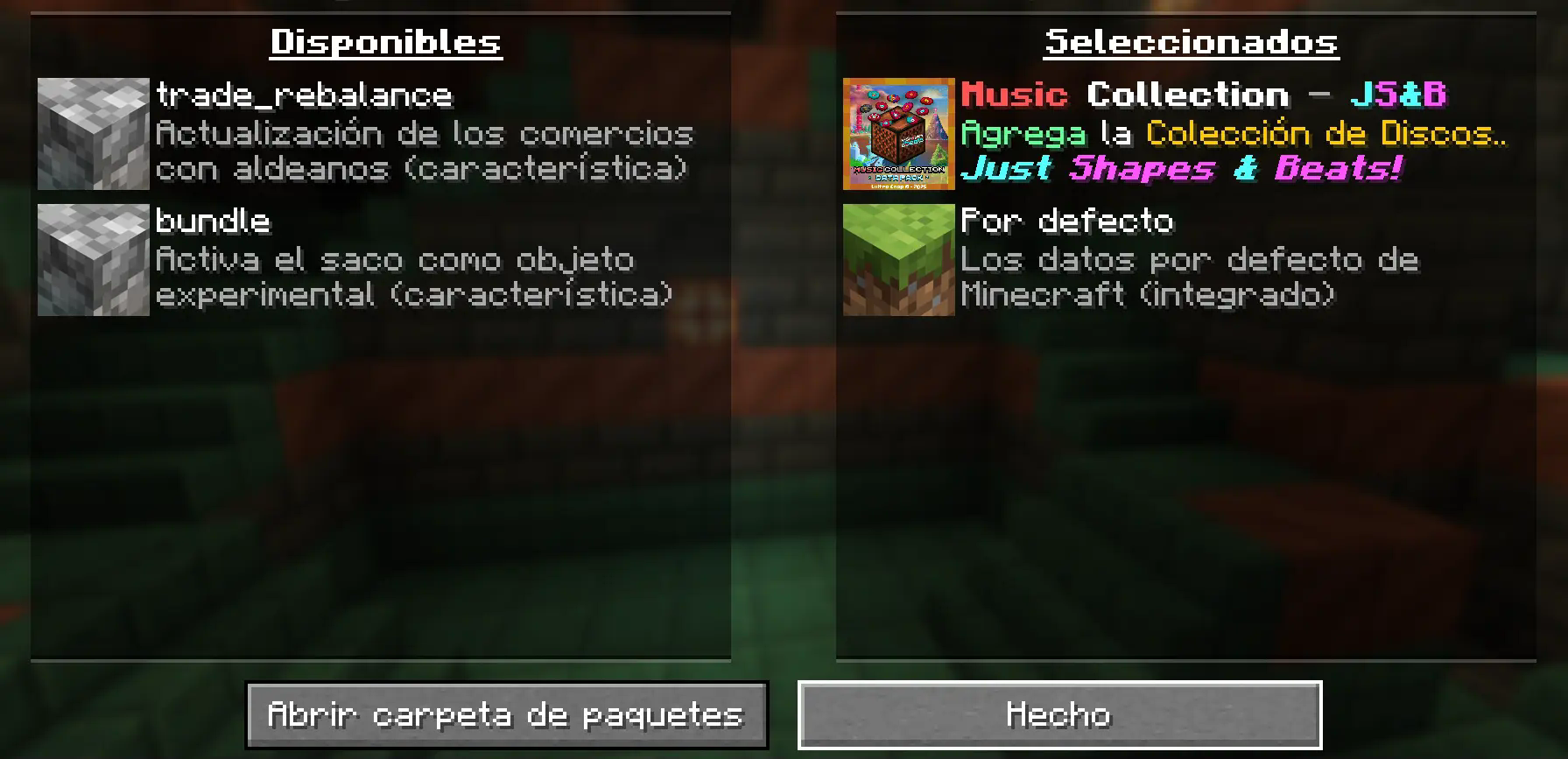
-
创建新世界 (Creation of the New World)
点击屏幕底部的 “完成”。
?(Click "Done" at the bottom of the screen)。
 继续创建你的世界,然后点击 “创建新世界”。
?(Continue creating your world and click on "Create new world")。
⚠️ 重要提示 - IMPORTANT⚠️
在创建 新世界 时会生成警告,因为这些是 实验性功能,任何类型的错误都可以反馈给我们的 官方 Discord。
? A warning will be generated when creating a new world, since these are experimental features, any kind of error can be communicated to our Official Discord。
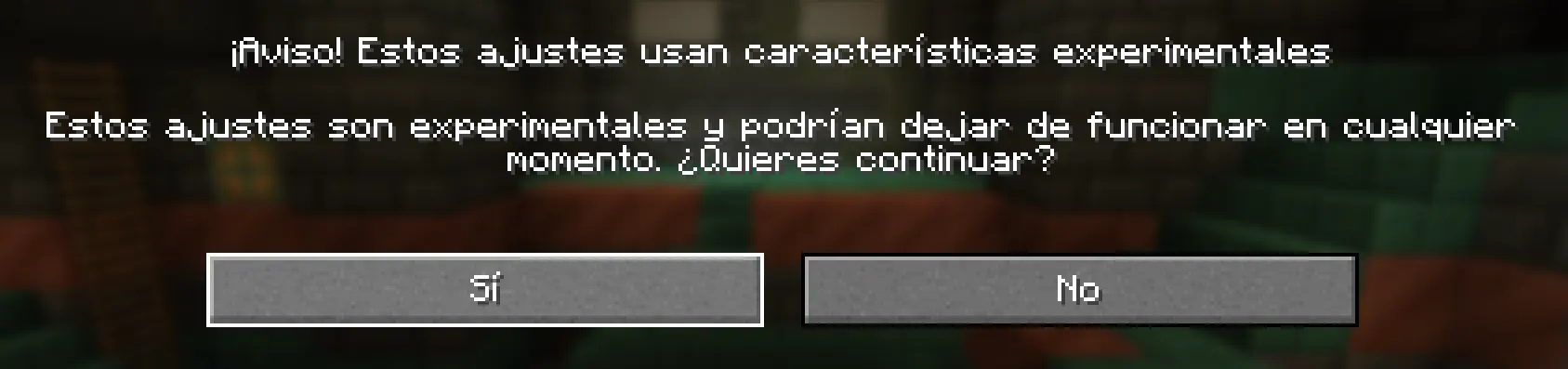
继续点击 是 按钮,享受你的冒险吧 :)
? Continue clicking the Yes button and enjoy your adventure :)
多人模式 - Multijugador
数据包安装步骤 (Steps to Install DataPack):
-
打开服务器文件夹 (Open the folder on your server)
导航到你的服务器文件夹,然后打开你要安装 数据包 的 世界文件夹(默认名称为 world)。
Navigate to your server folder and then open the world folder in which you want to install the Datapacks (default: world)。
-
添加数据包 (Add the DataPack)
数据包 必须是一个 .zip 文件。
将 数据包 放置在 world 文件夹内名为 datapacks 的文件夹中。
The DataPack must be a .zip file.
Place the DataPack in a folder named datapacks inside the world folder。
-
重新加载服务器 (reload the server)
如果服务器在安装过程中正在运行,请从控制台或作为等级 3 的操作员输入 /reload。
⚠️ 重要提示 - IMPORTANT⚠️
在创建新存档时将会显示警告,因为这些是实验性功能,任何类型的错误都可以向我们官方的 Discord 反馈
? 创建新存档时会生成警告,因为这是实验性功能,任何错误均可通过我们的 官方 Discord 进行反馈
支持我们! ?
你可以直接在我们的 Patreon 上支持我们的工作与创作过程,以帮助我们开发未来的数据包。

加入我们的 Discord 服务器

订阅我们的 YouTube 频道 - Subscribe to our YouTube Channel
Music Collection - Just Shapes & Beats
The Data Pack + Resource Pack combination that adds... +15 custom discs to the game, along with a News Structures , New Craftables and more...?
LuisterCorp © - 2025
Notas? (Notes)
- Download the Resource Pack for our disc textures.
- Music Collection modifies textures already existing in the game.?
- Music Collection is compatible with any generation Datapack in the world.
- No add this to an existing world: First reset your own or use a new world.?️
- Music Collection has recipes for your discs, mold and musical fragment.
- Use Headphones for a better experience.?
Descripción ? (Description)
¡Immerse yourself in a completely new musical experience in Minecraft!✨
- This Datapack introduces a set of music related features, enriching your adventure in the Overworld and soon beyond....
Características?️ (Features)
1. Fragmento Musical (Musical Fragment) ??
To be able to craft our new records, you must first obtain a new type of music fragments, which can be found in structures or manufactured on a crafting table..
◾Crafting:
2. Molde de Discos? (Disk Mold)
In order to make it you will need the previous musical fragments, together with other materials that will help you to get the disc mold, with which you will be able to make all the new discs of this Datapack.
◾Crafting:
3. Nuevos Discos Personalizados? (New Personalized Discs)
Using the Disc Mold, you will be able to craft our entire first Custom Music Collection for Minecraft, with songs from.... Just Shapes & Beats!
◾Music Collection - Version 1.1:
3.1 ¡Just Shapes & Beats!?️
From the rhythm game Just Shapes & Beats, music from the Monstercat catalog comes to Minecraft in this Datapack.
JustShapes&Beats.com | JustShapes&Beats - Steam
+10 ? of the most popular songs many from the Monstercat repertoire have been compiled, with a custom disc design..
?Crafteable Discs and Discography:
Danimal Cannon - Long Live The New Fresh
◾Crafteo (Crafting):
◽Ingredientes (Ingredients):
- Fragmentos de prismarina x3
- Cristales de prismarina x2
- Molde de discos x1
- Polvo de redstone x2
- Cuarzo del Nether x1
?Música y Artista (Music and Artist):
Long Live The New Fresh
By: Danimal Cannon
More: YouTube - Bandcamp - Twitter - Facebook
Nitro Fun - New Game [Monstercat Release]
◾Crafteo (Crafting):
◽Ingredientes (Ingredients):
- Cristales de prismarina x2
- Polvo de redstone x3
- Molde de discos x1
- Fragmentos de prismarina x1
- Cuarzo del Nether x2
?Música y Artista (Music and Artist):
New Game [Monstercat Release]
By: Nitro Fun
More : YouTube - SoundCloud - Twitter - Instagram - Facebook
Noisestorm - Barracuda [Monstercat Release]
◾Crafteo (Crafting):
◽Ingredientes (Ingredients):
- Polvo de redstone x4
- Cristales de prismarina x2
- Molde de discos x1
- Diamante x2
?Música y Artista (Music and Artist):
Barracuda [Monstercat Release]
By: Noisestorm
More: YouTube - SoundCloud - Twitter - iTunes - Facebook
Nitro Fun - Cheat Codes [Monstercat Release]
◾Crafteo (Crafting):
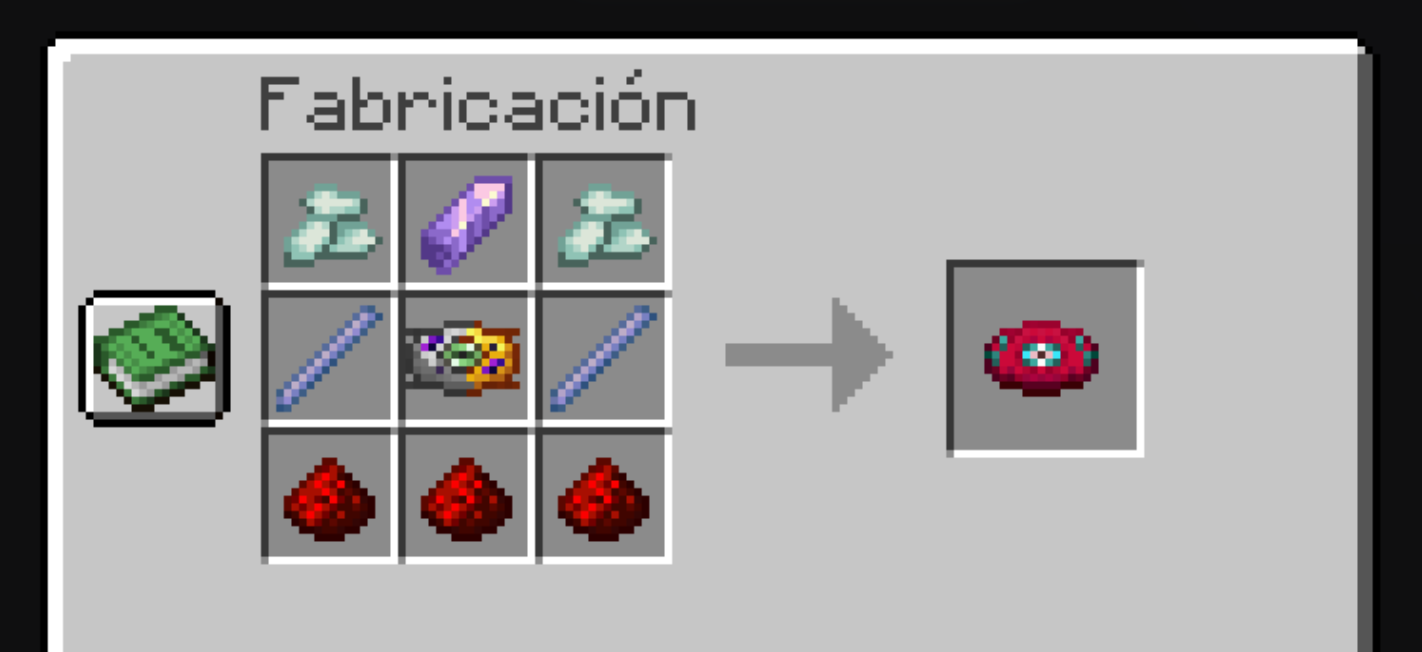
◽Ingredientes (Ingredients):
- Cristales de prismarina x2
- Fragmento de amatista x1
- Molde de discos x1
- Vara de breeze x2
- Polvo de redstone x3
?Música y Artista (Music and Artist):
Cheat Codes [Monstercat Release]
By: Nitro Fun
More: YouTube - SoundCloud - Twitter - Instagram - Facebook
Cardi - Lycanthropy
◾Crafteo (Crafting):
◽Ingredientes (Ingredients):
- Diamante x2
- Polvo de redstone x3
- Fragmento resonante x2
- Molde de discos x1
- Cuarzo del Nether x1
?Música y Artista (Music and Artist):
Lycanthropy
By: Cardi
More: YouTube - Twitter - BandCamp - Facebook
Sabrepulse - Close To Me
◾Crafteo (Crafting):
◽Ingredientes (Ingredients):
- Fragmentos de prismarina x3
- Molde de discos x1
- Lingote de hierro x2
- Polvo de redstone x3
?Música y Artista (Music and Artist):
Close to Me
By: Sabrepulse
More: YouTube - SoundCloud - BandCamp - Twitter - Facebook
Nitro Fun - Final Boss [Monstercat Release]
◾Crafteo (Crafting):
◽Ingredientes (Ingredients):
- Verruga del Nether x4
- Polvo de redstone x3
- Molde de discos x1
- Bloque de oro x1
?Música y Artista (Music and Artist):
Final Boss [Monstercat Release]
By: Nitro Fun
More: YouTube - SoundCloud - Twitter - Instagram - Facebook
Excision & Far Too Loud - Destroid 8. Annihilate
◾Crafteo (Crafting):
◽Ingredientes (Ingredients):
- Verruga del Nether x2
- Lingote de cobre x1
- Polvo de redstone x2
- Molde de discos x1
- Polvo de blaze x2
- Bloque de redstone x1
?Música y Artista (Music and Artist):
Destroid 8. Annihilate
By: Excision & Far Too Loud
Excision More: YouTube - iTunes - Twitter - Website - Instagram - Facebook
Far Too Loud More: YouTube - SoundCloud - iTunes - Twitter - Facebook
Undertale - Spider Dance (Shirobon Remix)
◾Crafteo (Crafting):
◽Ingredientes (Ingredients):
- Diamante x2
- Hilo x1
- Molde de discos x1
- Polvo de redstone x2
- Ojo de araña fermentado x3
?Música y Artista (Music and Artist):
Undertale - Spider Dance
By: (Shirobon Remix)
More: YouTube - SoundCloud - BandCamp - iTunes - Twitter - Instagram - TikTok - Merch
Just Shovels & Knights - 'La Danse Macabre' (Shirobon Remix)
◾Crafteo (Crafting):
◽Ingredientes (Ingredients):
- Ojo de araña fermentado x2
- Calabaza x1
- Crema de magma
- Molde de discos x1
- Polvo de redstone x2
- Bloque de coral de cerebro x1
?Música y Artista (Music and Artist):
Just Shovels & Knights - La Danse Macabre'
By: (Shirobon Remix)
More: YouTube - SoundCloud - BandCamp - iTunes - Twitter - Instagram - TikTok - Merch
Tristam - Till It's Over [Monstercat Release]
◾Crafteo (Crafting):
◽Ingredientes (Ingredients):
- Bloque de oro x1
- Crema de magma x1
- Bloque de esmeralda x1
- Bloque de lapislázuli x1
- Molde de discos x1
- Ladrillos de prismarina x1
- Bloque de redstone x2
- Nexo de reaparición x1
?Música y Artista (Music and Artist):
Till It's Over [Monstercat Release]
By: Tristam
More: YouTube - SoundCloud - Website - Twitter - Instagram - Facebook
New Crafteable Discs!
Silva Hound - Cool Friends (Murtagh & Veschell Remix)
◾Crafteo (Crafting):
◽Ingredientes (Ingredients):
- Prismarine Bricks x4
- Blaze Powder x1
- Redstone Dust x2
- Disk Mold x1
- Gold Ingot x1
?Música y Artista (Music and Artist):
Cool Friends
By: Silva Hound
Remix Made By: Murtagh & Veschell
Murtagh More: SoundCloud - Instagram - Spotify
Veschell More: Spotify
Shirobon - Granite
◾Crafteo (Crafting):
◽Ingredientes (Ingredients):
- Diamont x2
- Prismarine Crystals x2
- Redstone Dust x2
- Disk Mold x1
- Iron Ingot x2
?Música y Artista (Music and Artist):
Granite
By: Shirobon
More: YouTube - SoundCloud - BandCamp - iTunes - Twitter - Instagram - TikTok - Merch
Mostercat Disclamer?️
The music used in this datapack IS NOT for commercial purposes, only for entertainment? and non-profit at the expense of the Artists and their discography labels, if content is uploaded with this datapack in places like my Youtube channel, it will jump copyright ?
Monstercat Uncaged ©
Monstercat Uncaged
⚙️Links:
Monstercat Website
Monstercat Shop
Monstercat Licensing
Monstercat Gold
?More Links:
YouTube - SoundCloud - Spotify - iTunes - Twitter - Reddit - Twitch - Instagram - Facebook
3.2 ¡Future Music and Musical Suggestions! ?️
News coming soon...?️
Puedes proponer futuras nuevas canciones en el siguiente formulario?:
You can propose future new songs in the following formulario:.
- Propuestas Musicales aquí - Musical Proposals here?
- (The most requested ones will be selected) ?️
Estructures ✨
1. "Cabaña del Músico"? (Musician's Hut Structure)
The datapack adds this new structure the "Musician's Hut ?”, a cabin abandoned many years ago, made of spruce wood, dark oak, adobe and varieties of rock ?.
◾Image:
Inside you can find various booties ?️ and pieces of history from the past in hidden books ?....
◾Images:
We recommend you to explore all the corners of this old cabin, its generation takes place in plains, forests of all kinds ? and they are at least +750 blocks from each other.?
2. "Barco de Prismarina"? (Prismarine Ship Structure)
The datapack update adds this new marine structure the "Prismarine Ship⛵”, a shipwreck many years ago, made of prismarine, and its variations, will be generated in all the oceans of the Overworld?.
◾Image:
Inside youcan find several barrels ? and a special crofre, along with a new music disc added ?, waiting for you to find it....
◾Images:
Visit the Gallery to get a better look at the structure and its interiors✨.
3 ¡Futuras Nuevas Estructuras! ?️ (Future New Structures)
- News coming soon...?️
- Structures will be added as time goes by and new music collections will be added...
Nuevos Logros ? (New Achievements)
When you get any of the +15 new discs of this Datapack, you will get a new section of perzoned achievements with references to different movies?, series? and video games?️..
◾Image:
These 21 Achievements, are obtained from getting your first musical fragment ?, finding the Musician's Cabin ?, "Prismarine Ship⛵” and crafting all the added records ?.
Procesos de Instalación ? (Installation Processes)
Below we invite you to review the correct installation process of our Data Package in the following categories ?
Singleplayer - Un Jugador
Pasos Para Instalar DataPack (Steps to Install DataPack):
-
Abrir Minecraft (Open Minecraft)
Inicia el juego (start the game).
-
Crea un Nuevo Mundo (Create a New World)
Vaya a "Más" y haga clic en "Paquetes de Datos". (go to “More” and click on "Datapacks”).
-
Añadir el Datapack (Add Datapack)
Arrastre el Paquete de Datos (un archivo .zip o directorio) a la ventana de Minecraft.
? (Drag the Data Package (a .zip or directory) to the Minecraft window).
Aparecerá una pantalla de confirmación. Haga clic en "Confirmar".
? (A confirmation screen will appear. Click on "Confirm ”).
-
Activar el DataPack (Activate the DataPack)
Mueva el Paquete de Datos al lado derecho de la pantalla haciendo clic en el triángulo de su ícono (visible al pasar el cursor sobre él).
? Move the Datapack to the right side of the screen by clicking on its triangle icon (visible when hovering over it).
-
Creación del Mundo Nuevo (Creation of the New World)
Haz clic en "Hecho" en la parte inferior de la pantalla.
? (Click "Done ” at the bottom of the screen).
Continúa creando tu mundo y haz clic en "Crear nuevo mundo".
? (Continue creating your world and click on "Create new world ”).
⚠️ IMPORTANTE - IMPORTANT⚠️
Se generará un aviso al momento de crear un mundo nuevo, ya que son características experimentales, cualquier tipo de error puede ser comunicado a nuestro Discord Oficial
? A warning will be generated when creating a new world, since these are experimental features, any kind of error can be communicated to our Discord Oficial
Continue dandole al boton Sí y disfrute de su Aventura :)
? Continue clicking the Yes button and enjoy your adventure :)
Multiplayer - Multijugador
Pasos Para Instalar DataPack (Steps to Install DataPack):
-
Abrir la carpeta de tu servidor (Open the folder on your server)
Navega hasta la carpeta de tu servidor y luego abre la carpeta del mundo en el que deseas instalar el Paquete de Datos (predeterminado: world).
Navigate to your server folder and then open the world folder in which you want to install the Datapacks (default: world).
-
Agrega el DataPack (Add the DataPack)
El Paquete de Datos debe ser un archivo .zip.file.
Coloca el Paquete de Datos en una carpeta llamada datapacks dentro de la carpeta world.
The DataPack must be a .zip file.
Place the DataPack in a folder named datapacks inside the world folder.
-
Vuelve a cargar el servidor (reload the server)
Escribe /reload desde la consola o como operador de nivel 3, si el servidor estaba ejecutándose durante la instalación.
Type /reload from the console or as a level 3 operator, if the server was running during installation.
⚠️ IMPORTANTE - IMPORTANT⚠️
Se generará un aviso al momento de crear un mundo nuevo, ya que son características experimentales, cualquier tipo de error puede ser comunicado a nuestro Discord Oficial
? A warning will be generated when creating a new world, since these are experimental features, any kind of error can be communicated to our Discord Oficial
Apoyanos - Support us! ?
Puedes Apoyar nuestro trabajo y proceso creativo para desarrollar futuros Datapacks directamente (You can Support our work and creative process to develop future Datapacks directly in our) Patreon
Únete a nuestro - Join our Discord Server
Suscribete a nuestro Canal de YouTube - Subscribe to our YouTube Channel


 数据包

 数据包

 数据包
 数据包

 数据包

 数据包

评论 0
登录后参与评分
还没有评论,来抢沙发吧