
1.3 版本更新:请查阅你所下载版本的说明文档,以获取关于此次更新的详细信息。对用户而言,最重要的变化是数据包的结构更新——这改变了用于配置数据包的一些命令。新命令如下所示。
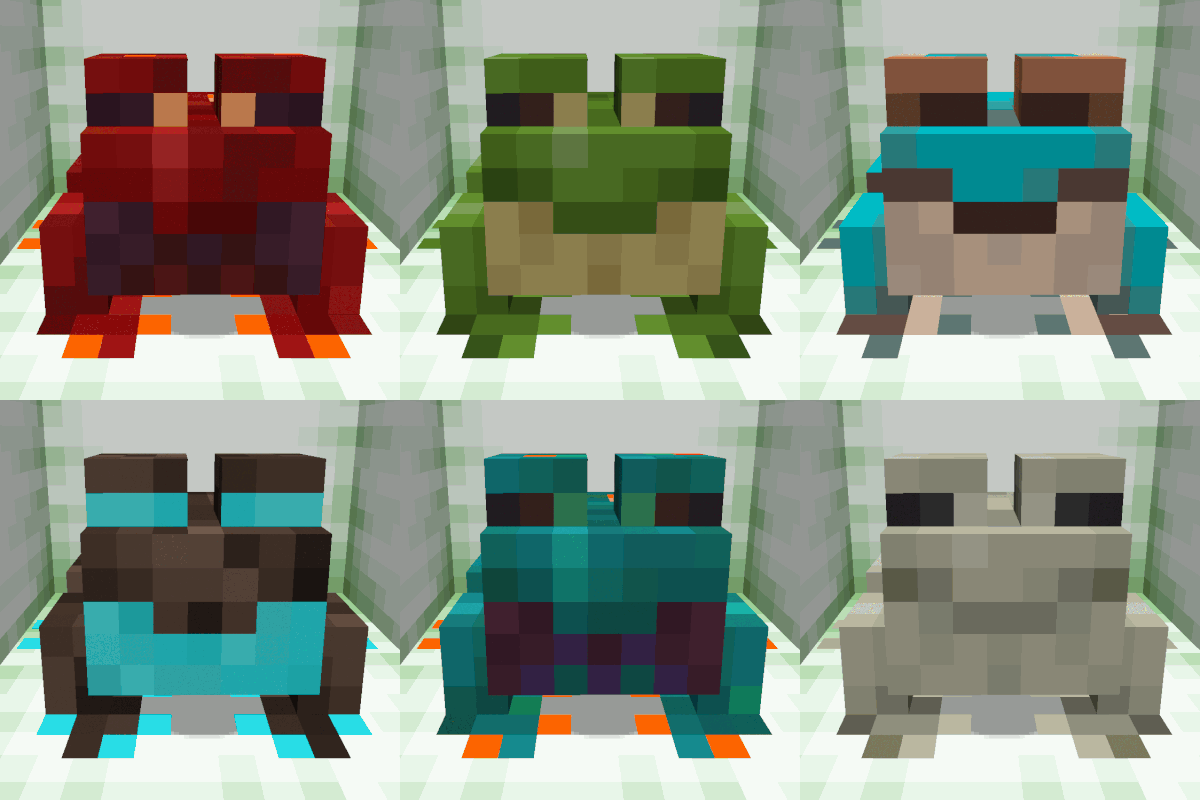
你是否曾希望改变青蛙的颜色/类型?现在你只需使用命名牌即可实现!此功能支持原版游戏,并与 More Frogs 2 模组的自定义青蛙变种兼容(运行此数据包不需要安装该模组)。由于 More Frogs 2 尚未发布适用于 Minecraft 1.20.1 之后版本的更新,因此在该更高版本中不安装模组而仅运行此数据包时,你将只能访问标准的原版青蛙。
生存模式
命名牌机制 在生存模式中,使用命名牌将青蛙重命名为以下变种名称之一(cold、crimson、ender、infernal、poison、purpur、sculk、spirit、temperate、warm、warped、wood、random)时,需在主手操作的同时在副手中持有“支付物品”(详见下文)。如果副手中没有支付物品,青蛙不会变为新的变种。
进度锁定 默认情况下,玩家被进度系统锁定,无法重新分配青蛙变种,直到玩家在世界中遇到该青蛙变种并喂食它一个粘液球。这是一种迫使玩家探索或专门繁殖特定青蛙变种的巧妙方式,同时也为玩家提供了一种便捷的方法,让他们在完成至少一次流程后能够制造更多相同类型的青蛙。创造模式玩家和服务器管理员可以使用命令 /function frog_variant_changer:advancement_unlock/all_grant 授予玩家所有必要的进度,从而覆盖此锁定。
特殊随机化功能 你还可以随机化青蛙的变种类型——只需将青蛙重命名为 'random',每隔几秒它就会切换变种类型,循环遍历你拥有进度的所有变种(即你至少喂食过一次粘液球的类型,见上文)。使用命令 /function assign_frog_variant:_set_random_frog_loop_length 可以设置随机青蛙在循环切换变种之前跳转到下一个变种类型的时间长度(默认为 2 秒)。
支付物品 在生存模式中重新分配青蛙变种的默认支付物品为:原版变种 1 个钻石,More Frogs 2 变种 1 个钻石块,随机变种 1 下界合金锭。要更改支付物品的类型,首先需获得服务器管理员权限或切换到创造模式。在副手持有支付物品时,输入命令 /function frog_variant_changer:payment/set/ 后接你想要设定支付的青蛙变种(例如:/function frog_variant_changer:payment/set/temperate)。如果你的副手为空,则支付为免费。此外,你可以使用 /function frog_variant_changer:payment/set_all 为所有青蛙变种设定支付物品;还有类似的功能可以为仅原版变种设定支付,以及为仅来自 More Frogs 2 的变种设定支付。
即将推出无需允许作弊/命令即可设定支付的选项。
创造模式快捷方式
对于创造模式玩家,你可以站在想要改变的青蛙旁边,然后输入命令 /function assign_frog_variant: 后接青蛙变种类型来更改其变种类型。当你输入此命令时,会看到可用的变种列表;例如,使用 /function assign_frog_variant:cold 可以将青蛙变为寒冷变种类型。如果你区域内有多只青蛙,离玩家最近的那只将被转换为所选变种,重复使用该函数会将区域内的每只青蛙逐一转换为新变种,影响半径为 20 格。
你可以使用命令 /function frog_variant_changer:advancement_unlock/all_grant 让自己获得所有用于随机青蛙的变种权限,或使用 /function frog_variant_changer:advancement_unlock/all_reset 重置锁定状态。
故障排除
- 支付物品只能是单个物品,所以如果你希望支付物品多于比如 1 个绿宝石,你可以将支付物品设置为绿宝石块。如果你想阻止访问特定变种类型,只需在设定该变种的支付物品时使用一个在生存模式下无法获得的方块,例如屏障方块。
Version 1.3 Update: check notes of the version you download for details about the update. The most important change for users is an update to the structure of the datapack - this changes some of the commands used to configure the datapack. New commands are shown below.
Have you ever wished you could change a frog's color/type? Well now you can just by using a name tag! This works with vanilla and is compatible with the More Frogs 2 mod's custom frog variants (this mod is not required for the datapack to function). Since More Frogs 2 hasn't been released for Minecraft versions later than 1.20.1, running this datapack on these later versions without the mod will only give you access to the standard vanilla frogs.
Survival Mode
Name Tag Mechanics For survival mode, hold the 'payment' in your off-hand (more on that later) while using a name tag to rename the frog with one of the following variant names: cold, crimson, ender, infernal, poison, purpur, sculk, spirit, temperate, warm, warped, wood, random. If you don't have the payment in your off-hand, the frog will not change to the new variant.
Advancement Lockouts By default, players are locked out through advancements from being able to reassign a frog variant until the player has encountered that frog variant in the world and fed it a slime ball. This is a nice way to force the player to explore or work on breading specific frog variants but gives players a convenient way to make more of the same type of frog after they've gone through the process at least once. Creative players and server admins can override this lockout by giving players all needed advancements using the command /function frog_variant_changer:advancement_unlock/all_grant.
Special Randomize Feature You can also randomize a frog's variant type - just rename a frog 'random' and every couple of seconds it will change variant type, cycling through all the variants you have advancements for (i.e., the types you've fed a slime ball to at least once, see above). Use command /function assign_frog_variant:_set_random_frog_loop_length to set the length of time before the random frog jumps to the next variant type as it cycles through variants (default is 2 secs).
Payment The default payment for reassigning a frog variant in survival is 1 diamond for vanilla variants, 1 diamond block for More Frogs 2 variants, and 1 netherite ingot for a random variant. To change the payment type, first get server op status or switch to creative. While holding the payment item in your off-hand, type command /function frog_variant_changer:payment/set/ followed by the frog variant you want to set the payment for (example: /function frog_variant_changer:payment/set/temperate). If your off-hand is empty, then the payment is free. Also, you can use /function frog_variant_changer:payment/set_all to set the payment for all frog variants; there is a similar function to set payment for just the vanilla variants and a function to set just the variants from More Frogs 2.
An option to set payments without needed to allow cheats/commands is coming soon.
Creative Mode Shortcuts
For creative mode players, you can change a frog's variant type by standing next to the frog you want to change, then type the command /function assign_frog_variant: followed by the frog variant type. You'll see the available variants when you type out this command; for example use /function assign_frog_variant:cold to change the frag to the cold variant type. If you have multiple frogs in the area, the one closest to the player will be converted to the variant you choose, and repeated use of the function will change each frog in the area one-by-one to the new variant out to a radius of 20 blocks.
You can give yourself access to all frog variants for the randomized frog using the command /function frog_variant_changer:advancement_unlock/all_grant or reset the lockout with /function frog_variant_changer:advancement_unlock/all_reset.
Troubleshooting
- The payment can only be a singular item, so if you want the payment to be more than say 1 emerald, you can make the payment an emerald block instead. If you want to block access to a specific variant type, just use a block that's impossible to get in survival like a barrier block when you set the payment type for that variant.
下载 SpaceFrog's Frog Variant Changer
下载 SpaceFrog's Frog Variant Changer
下载 SpaceFrog's Frog Variant Changer
下载 SpaceFrog's Frog Variant Changer
下载 SpaceFrog's Frog Variant Changer
下载 SpaceFrog's Frog Variant Changer
下载 SpaceFrog's Frog Variant Changer
下载 SpaceFrog's Frog Variant Changer
下载 SpaceFrog's Frog Variant Changer
下载 SpaceFrog's Frog Variant Changer
重大更新:
- 为重命名操作添加了音效
- 在创造模式下,现在可以绕过支付和进度限制
- 兼容性更新,修复了导致整合包无法在 Minecraft 26.2 上运行的问题
- 修复了随机青蛙循环的时间错误
- 修复了因重命名青蛙而导致主功能多次触发的问题
- 整合包已重新整理,部分命令有所更改,详见主要说明
关于这个资源的讨论、问题反馈与使用心得
还没有讨论,来发第一帖吧
你是这个资源的作者?登录后可认领此资源。
相似资源
 数据包

此数据包添加了属于阿瓦里海盗的独特结构,将他们的独特风格带入你的 Minecraft 世界!兼容性:1.20 至 26.3
 数据包

此数据包添加了新的“祝福模式”难度。
 数据包

添加了基于官方概念图的蓝蛙和红眼树蛙变体。
 数据包

为模组生物群系添加原版回溯特性!
 数据包

手持潜影盒时可直接打开,无需将其放置在地面上。只需按住 Shift 并右键点击即可访问你的潜影盒。
 数据包

来自 Dungeons and Taverns 的掠夺者前哨站全面改造独立拆分版本
评论 0
登录后参与评分
还没有评论,来抢沙发吧