
Textures++ 以生存友好、原汁原味的方式,为 Minecraft 添加了超过 20,000 种纹理组合。如果你尝试将多种纹理叠加到同一个方块上,组合数量甚至可达超过一古戈尔(googol)。

描述
Textures++ 添加了78 种新纹理,它们像树脂团块一样附着在方块的侧面,为你的建筑增添风采(或者更准确地说,是增加苔藓感)。使用该资源包非常简单:只需手持有效物品并右键点击方块的侧面即可应用纹理。不喜欢你放置的纹理?只需破坏该纹理所在的方块,或用剑刮除纹理即可。
以下纹理可以添加到任何完整方块上:
- 苔藓
- 苍白苔藓
- 粉色花瓣
- 野花
- 丁香藤蔓
- 玫瑰丛藤蔓
- 牡丹藤蔓
- 垂滴藤蔓
- 扭曲藤蔓
- 猪笼草藤蔓
- 蜘蛛网
- 粘液球
- 蜂蜜块
- 硫磺尖刺
- 岩浆膏
- 悬挂根须
- 泥土
- 砂砾
- 沙子
- 红沙
- 泥巴
- 粘土
- 雪
- 灵魂沙
- 远古残骸
- 煤
- 粗铁
- 粗铜
- 粗金
- 金粒
- 绿宝石
- 青金石
- 钻石
- 红石粉
- 石英
- 紫水晶碎片
- 所有珊瑚/死亡珊瑚(x10)
- 所有混凝土粉末(x16)
- 所有羊毛变体(x16)
说明
放置纹理

右键点击方块的任意面应会将纹理应用到该方块面上。
- 如果纹理没有出现在你预期的位置,请确保你正精确地朝向你希望放置纹理的方向。例如,垂直向下看以便在方块的顶部侧面放置纹理。
- 如果纹理被放置在你预期方块的后方,请确保你瞄准的是一个完整方块。纹理无法放置在半砖或楼梯等方块上。
- 如果手中的物品被当作方块放置而不是作为纹理,请靠近该方块。部分物品本身具有放置功能,因此你需要调整站位,使方块无法被正常放置。
移除纹理
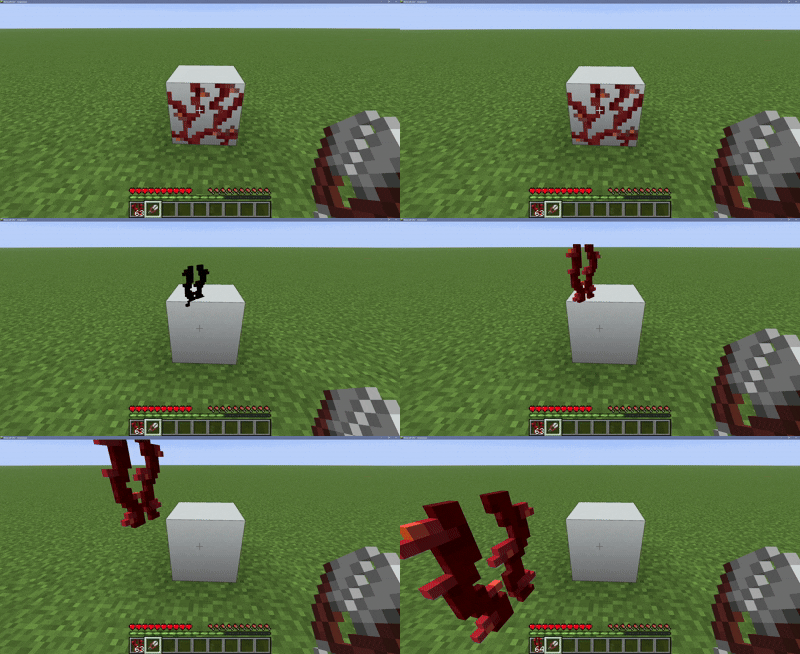
破坏纹理所在的方块会移除该方块上的所有纹理。如果你想要更精准地操作,可以使用剪刀右键点击方块的任意面,仅刮除附近的纹理。
副手
从版本 1.1.0 开始,当你在副手持有盾牌或其他具有右键功能的工具时,将无法放置或移除纹理。这是为了防止玩家在手持剑时无法使用盾牌格挡。
性能
将此数据包添加到你的世界中会影响性能吗?其实不会!只有当大约同时渲染 250,000 个纹理,或者当所有纹理都相同时达到约 60,000 个纹理时,才会出现性能问题。虽然此数据包提供了大量装饰潜力,但很难触及这个上限!安装其他数据包会降低纹理数量的限制。
Textures++ adds over 20,000 combinations of textures to Minecraft in a survival-friendly, true-to-vanilla way. If you try adding multiple textures to a single block, the number of combinations reaches over one googol.
Description
Textures++ adds 78 new textures that work like resin clumps—placed on the sides of a block—to spruce up (or, more accurately, moss up) your builds. Using the pack couldn't be easier: just hold a valid item and right click the side of a block to apply a texture. Don't like the texture you placed? Just break the block the texture is sitting on or scrape the texture off with your sword.
The following textures can be added to any full block:
- Moss
- Pale moss
- Pink petals
- Wildflowers
- Lilac vines
- Rose bush vines
- Peony vines
- Weeping vines
- Twisting vines
- Pitcher plant vines
- Cobweb
- Slime ball
- Honey block
- Sulfur spike
- Magma cream
- Hanging roots
- Dirt
- Gravel
- Sand
- Red sand
- Mud
- Clay
- Snow
- Soul Sand
- Ancient debris
- Coal
- Raw iron
- Raw copper
- Raw gold
- Gold nugget
- Emerald
- Lapis lazuli
- Diamond
- Redstone dust
- Quartz
- Amethyst shard
- All corals/dead corals (x10)
- All concrete powders (x16)
- All wool variants (x16)
Notes
Placing Textures
Right clicking any face of a block should apply its texture to that face of the block.
- If the texture isn't placed where you expected, make sure you're facing exactly in the direction you'd like the texture to be placed. For example, look straight down to place a texture on the top side of the block.
- If the texture is being placed behind the block you expected, make sure the block you're targeting is a full block. Textures can't be placed on things like slabs or stairs.
- If the item in your hand is being placed as a block instead of a texture, get closer to the block. Some of the items already have place functionality, so you'll need to put yourself in a position where the block can't be placed.
Removing Textures
Breaking the block a texture is sitting on will remove all textures from that block. If you want to be more specific, right click any face of a block with shears to scrape only nearby textures off.
Offhand
As of version 1.1.0, you are no longer able to place/remove textures while holding a shield or any other tool with right-click functionality in your offhand. This is to prevent the player from being unable to shield while holding a sword.
Performance
Will adding this datapack to your world impact performance? Not really! Issues begin occuring when roughly 250,000 textures are being rendered at once, or at roughly 60,000 textures if every texture is the same. While this pack offers a lot of potential for decoration, it's hard to reach the limit! Having other datapacks installed will lower the texture limit.

下载 Textures++
需要联机服务器吗?
稳定流畅、一键部署,几分钟即可和朋友联机开服
最低仅需 8 元/月 即可畅快联机
下载 Textures++
需要联机服务器吗?
稳定流畅、一键部署,几分钟即可和朋友联机开服
最低仅需 8 元/月 即可畅快联机
下载 Textures++
下载 Textures++
下载 Textures++
需要联机服务器吗?
稳定流畅、一键部署,几分钟即可和朋友联机开服
最低仅需 8 元/月 即可畅快联机
下载 Textures++
下载 Textures++
下载 Textures++
下载 Textures++
需要联机服务器吗?
稳定流畅、一键部署,几分钟即可和朋友联机开服
最低仅需 8 元/月 即可畅快联机
新增
- 整合包已更新,适用于 26.3 版本
- 改用宏函数替代 Python 生成的函数
- 将物品修改代码移至辅助整合包,以提升与未来整合包的兼容性
关于这个资源的讨论、问题反馈与使用心得
还没有讨论,来发第一帖吧
你是这个资源的作者?登录后可认领此资源。
相似资源
 数据包

此数据包添加了属于阿瓦里海盗的独特结构,将他们的独特风格带入你的 Minecraft 世界!兼容性:1.20 至 26.3
 数据包

为下界添加了名为“贝尔泽布城堡”的新闻结构,以及新的 Boss、新工具、新物品、新敌人和新音乐唱片!
 数据包

数据包:逐体素雕刻自定义 3D 南瓜!
 数据包

扩展、调整并平衡流浪商人。包含新物品和 200+ 交易,以及可调整的生成率
 数据包

用于制作发光方块的数据包
 数据包

一个添加了宝可梦村落/城市变体村庄的模组——最初是为 Brocraft 服务器制作的。 这也会在村庄内生成各种结构。我们计划添加稀有结构!
评论 0
登录后参与评分
还没有评论,来抢沙发吧