TurtleCraft
这个 Minecraft 数据包添加了可以编程以自动执行任务的海龟,灵感来源于 "ComputerCraft" 模组。你可以使用聊天菜单来创建自己的程序或加载一些示例!
TurtleCraft 可以安装在服务器上,并包含专为多人游戏交互设计的功能。它支持在小规模服务器上同时运行多个海龟,而对于更大规模的应用,还有多种性能选项可以在游戏中进行调整。
如果你发现问题或有建议,可以提交问题或加入 Discord 服务器。你也可以使用该服务器分享程序或只是聊天!你还可以通过在 GitHub 上创建拉取请求直接贡献代码。
功能
- 可编程以实现任务自动化的海龟
- 支持多个海龟协同工作
- 使用聊天菜单的游戏内程序编辑器
- 采矿、种田、建造等基础指令
- 条件、循环和变量的高级指令
- 导出并与他人分享你的程序
- 一个物品栏系统,允许海龟与物品和方块交互
- 支持装备工具,允许海龟在任务中使用它们
- 自定义海龟的外观和行为选项
- 性能优化选项,可根据你的使用情况调整数据包
- 详细的 wiki,包含示例和教程
入门指南
要开始使用此数据包,你需要一只海龟。你可以使用以下配方合成一个蛋:
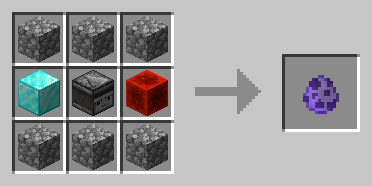
点击(左键)海龟打开其菜单,你可以在这里创建自己的程序:
海龟菜单
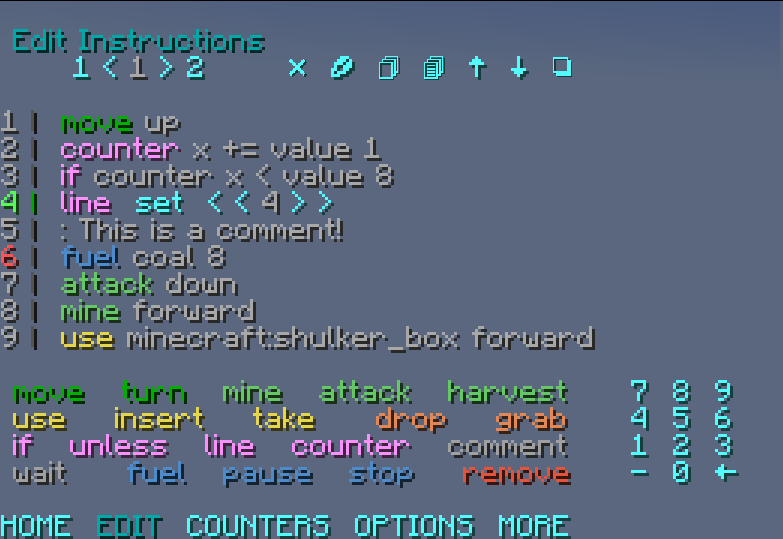
你可以在 GitHub Wiki 和本介绍视频中找到示例和教程。
兼容性说明
- 适用于 Minecraft Java Edition,版本从 1.19.4 到 1.21.8
- 所有的记分板目标、标签和数据存储均使用
turtlecraft前缀 - 当数据包需要使用某些方块时,每个原版维度中位于
10028 0 10028和10028 1 10028的方块会被基岩替换。这些区块会被强制加载 - 不兼容自定义维度
TurtleCraft
This Minecraft data pack adds turtles that can be programmed to automate tasks, inspired by the "ComputerCraft" mod. You can use a chat menu to create your own programs or load some of the examples!
TurtleCraft can be installed in servers and includes features designed for multiplayer interactions. It supports multiple turtles running simultaneously on a small server and, for larger scales, there are multiple performance options that can be adjusted in-game.
If you find an issue or have a suggestion, you can create an issue or join the Discord server. You can also use this server to share programs or just chat! You can contribute directly by creating a pull request on GitHub.
Features
- Turtles that can be programmed to automate tasks
- Support for multiple turtles working together
- In-game program editor using chat menus
- Basic instructions for mining, farming, building, etc.
- Advanced instructions for conditions, loops and variables
- Export and share your programs with others
- An inventory system, allowing turtles to interact with items and blocks
- Support for equipped tools, allowing turtles to use them in their tasks
- Customization options for the turtle's appearance and behavior
- Performance options to optimize the data pack for your use
- A detailed wiki with examples and tutorials
Getting Started
To start using the data pack, you'll need a turtle. You can craft an egg using the recipe below:

Hit the turtle (left-click) to open its menu, where you can create your own programs:
Turtle Menu

You can find examples and tutorials on the GitHub Wiki and this Introduction video.
Compatibility Notes
- Made for Minecraft Java Edition, from 1.19.4 to 1.21.8
- Every scoreboard objective, tag and data storage uses the
turtlecraftprefix - Blocks at
10028 0 10028and10028 1 10028in every vanilla dimension are replaced with bedrock when the data pack needs to use them. These chunks are force loaded - Not compatible with custom dimensions
下载 TurtleCraft
下载 TurtleCraft
下载 TurtleCraft
下载 TurtleCraft
下载 TurtleCraft
下载 TurtleCraft
- 更新至 1.21.8
- 修复了一个允许物品复制的问题
关于这个资源的讨论、问题反馈与使用心得
还没有讨论,来发第一帖吧
你是这个资源的作者?登录后可认领此资源。
相似资源
数据包
此数据包添加了属于阿瓦里海盗的独特结构,将他们的独特风格带入你的 Minecraft 世界!兼容性:1.20 至 26.3
数据包
一个 Minecraft 光线投射库,能够精确检测玩家正在查看的方块,包括像台阶和楼梯这样的特殊方块形状。
数据包
此数据包添加了新的“祝福模式”难度。
数据包
允许服务器管理员方便地禁用 Xaero's Map 系列模组中的实体雷达、小地图等功能,使竞技游戏更加公平。
数据包
手持潜影盒时可直接打开,无需将其放置在地面上。只需按住 Shift 并右键点击即可访问你的潜影盒。
数据包
为你的 Minecraft 世界添加了超过 900 个新的进度
评论 0
登录后参与评分
还没有评论,来抢沙发吧