Fetchr - Bingo v5
Fetchr 是一款自定义游戏模式,你在生存模式的 Minecraft 中游玩,并附带一个 5x5 的宾果(Bingo)棋盘。
尝试尽快完成任意一行、一列或对角线上的全部 5 个物品以快速达成“宾果”,或者收集全部 25 个物品进行更长时间的“清空(Blackout)”模式!
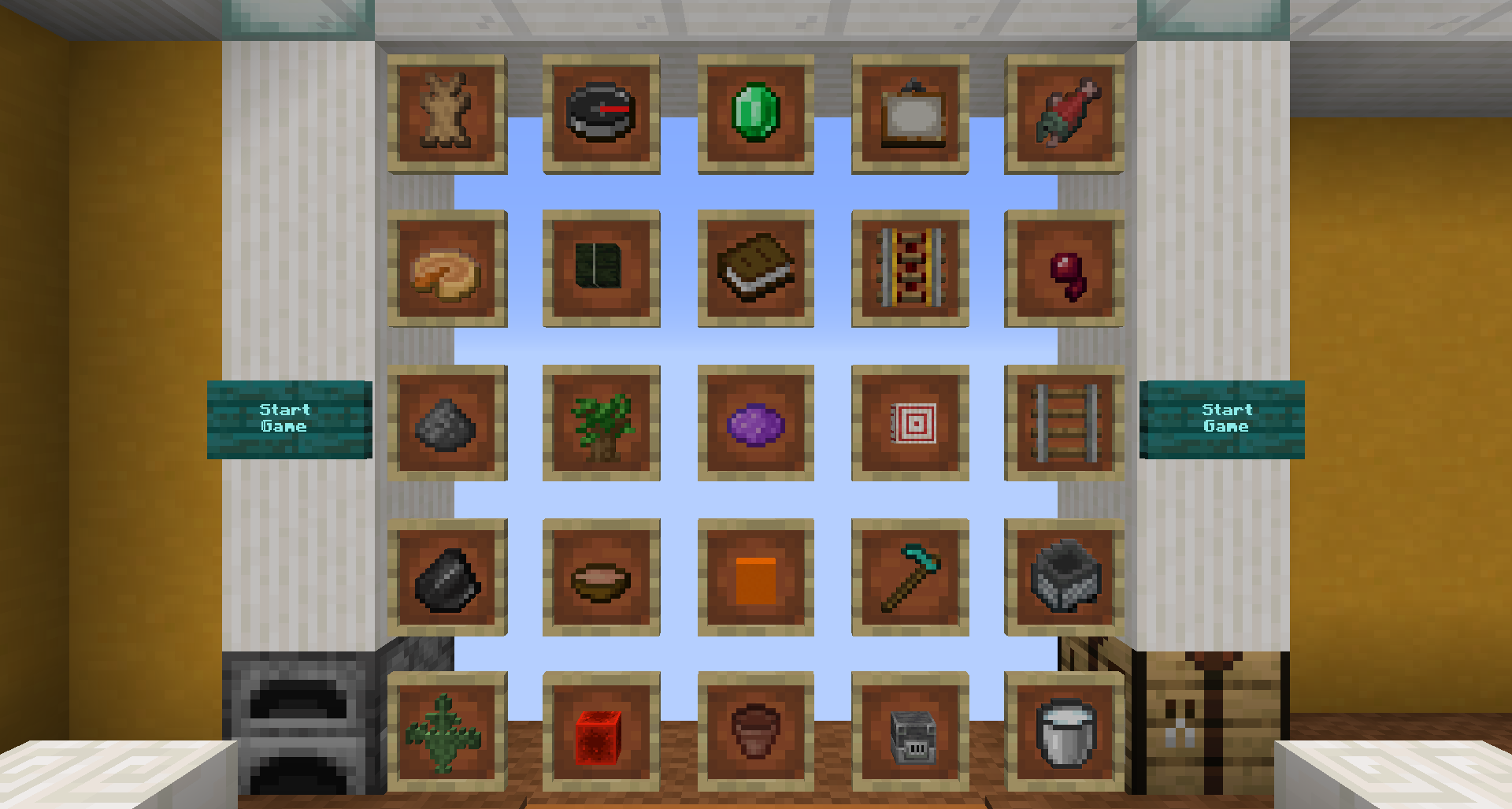
Fetchr 大厅中展示的宾果卡示例:
通用信息
Fetchr / Minecraft Bingo 的概念相当简单,因为它建立在原版生存玩法之上。你将以空背包开始,在世界中随机且未知的出生点重生,获得类似于开启新生存世界的体验。
你的目标是从宾果棋盘上获取物品。整合包会检测多种目标:
- Bingo:任意行、列或对角线上的全部 5 个物品
- Blackout:棋盘上的全部 25 个物品
- 20 No Bingo:在避免触发任何 Bingo 的情况下获取 20 个物品。这是在不触发 Bingo 的前提下能获取的最大物品数量,需要精心规划。
- Multi Bingo:同时获得多个 Bingo。这可以通过获取两条交叉线路的物品,并将交叉点的物品留到最后来获取,从而一次性解锁 2-4 条行、列和/或对角线的组合。
你可以选择以下一种或两种模式(同时使用):
- Lockout Mode(锁定模式):每个物品只能被一个队伍获取,其他队伍将无法计分。一旦某个队伍拥有的物品数量超过任何其他队伍可能达到的上限,该队伍即获胜。
- Blind Mode(盲盒模式):棋盘不可见,只有当任何玩家获取物品时才会揭示。此模式预期玩家了解可能的物品以及分类宝箱中的互斥关系。
地图始终会检测所有目标。当你追求 Blackout 时如果广播了 Bingo 不要担心——继续玩下去即可,没有自动机制会在你希望结束之前强制结束游戏。
下载与安装
单人游戏
- 下载附件中的发布文件。(直接点击“download”,不要使用 CurseForge 安装器)
- 将其解压到 Minecraft 存档目录。(如何找到你的存档文件夹)
- 确保你使用的是正确的 Minecraft 版本(如你所下载的发布文件中所示)
- 启动 Minecraft 后,你应该能在世界列表顶部看到 Fetchr 地图。现在打开它即可。你不需要其他任何东西。
多人游戏
- 下载附件中的发布文件(直接点击“download”,不要使用 CurseForge 安装器)。
- 确保你使用的是受支持版本(如你所下载的发布文件中所示,原版或带有 Lithium 的 Fabric。Paper/Spigot 不受支持。)
- 将其解压到你
server.jar 文件所在的同一目录中。
- 确保
server.properties 文件按照 此文件 进行设置(如果你使用的是先前版本或测试版,请使用更新日志中的链接)
- 如果你已经有自定义的 server.properties,请确保该文件中提到的所有设置均已正确配置。
- 如果你没有自定义的
server.properties,请用该文件覆盖它。服务器启动时,所有缺失的设置将填充默认值。
- 启动服务器——一切已设置完毕。
目标
所有目标始终会被检测。例如,在追求 Blackout 时,当你满足条件时会广播 Bingo,但你只需继续游戏即可。
Bingo
要达成 Bingo,你需要在任意行、列或对角线上获取全部 5 个物品。
Blackout
Blackout 要求获取棋盘上的全部 25 个物品。
20 No Bingo
在 20 No Bingo 模式中,你需获取 20 个物品,同时小心避免达成 Bingo。这是在不达成 Bingo 的前提下能获取的最大物品数量。
Multi Bingo
在 Multi Bingo 模式中,你将一次性获得多个 Bingo。这意味着获取相交的行、列或对角线上的物品,并将交叉点的物品留到最后获取。有可能获得双连 Bingo、三连 Bingo 和四连 Bingo。
详细功能概览
自定义 HUD
在游戏中,你会在快捷栏周围看到一堆自定义 HUD 元素。这使用了自定义字体,不需要任何模组。
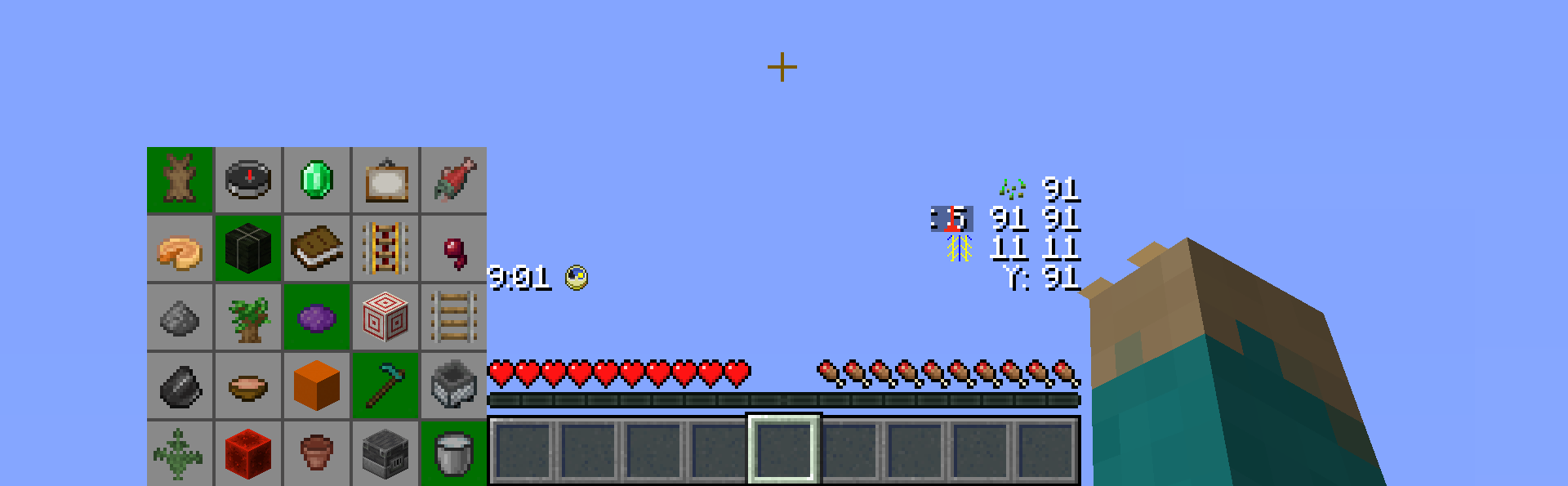
HUD 可以在大厅中进行自定义,元素可以按你喜欢的布局移动,或者移除各个组件。
宾果卡
宾果卡显示当前游戏的所有物品,以及各队伍已获取物品的摘要。你自己队伍获取的物品显示得稍暗一些。根据队伍数量的不同,此显示会自动调整以适应所有队伍。
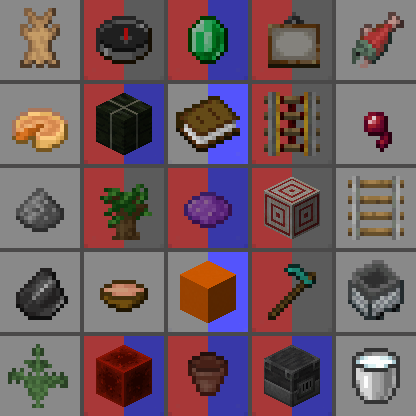
在大厅中,有 10 种独特的队伍颜色可供选择。
计时器
内置一个实时递增的计时器。无需任何第三方软件即可轻松追踪游戏时间。地图本身不设时间限制,但你可以自行设定目标。计时器图标同时也是一个功能性的 Minecraft 时钟,显示当前游戏日的时间。

玩家位置
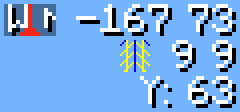
界面上会显示相对于重生点(spawn point)的玩家坐标。由于重生点是随机生成的,你的 F3 调试屏幕显示的坐标数值会非常大且难以解读或交流。该图标还兼具普通指南针的功能,并且可以在大厅的设置中更改外观,使其显示为 Minecraft 原版指南针的图标。
在常规坐标下方,默认还会显示区块坐标。这在某些情况下非常有用。例如,当跟随藏宝图时,宝藏始终位于区块坐标 9, 9 处;或者当你想要使用 [青金石技巧]() 来追踪区块边界时。
在其下方还有一个独立的 Y 轴坐标显示,方便你在不打开 F3 界面的情况下向下挖掘时使用。
Fetchr 种子
最后,还有一个用于显示 Fetchr 种子的区域。类似于 Minecraft 世界中使用相同种子会生成相同的世界,使用相同的 Fetchr 种子也会生成相同的宾果棋盘和相同的重生点。在生成卡片时,你可以选择手动设置种子,而不是使用随机种子。

自定义世界生成
Fetchr 使用了自定义的世界生成逻辑,以确保在宾果游戏中能更可靠地获取特定物品。
压缩世界
生物群系尺寸被缩小,使寻找群系专属物品变得更加有趣和可靠,同时增加了结构的生成频率。
下界禁用
由于自定义世界的技术限制,下界(Nether)已被禁用。
禁用 -ite 变种石头
所有以“-ite”结尾的石块变种已禁止自然生成。这包括闪长岩、安山岩和花岗岩。这是为了提升便利性(QoL),减少背包杂乱并使挖掘石块的过程更加一致。
花岗岩仍可能作为铜矿脉的一部分生成。
环境光照
主世界中存在持续的环境光照因子,类似于原版下界的光照效果。这使得你可以在洞穴中无需火把也能清晰地看清周围。
游戏规则更改
- 天气始终晴朗
- 幻翼、流浪商人和巡逻队(这些实体都基于全服全局计时器生成)的生成已被禁用
致谢
原始创意及 1.11 版本实现由 Lorgon111 完成:
代码贡献者
NeunEinser - 主要/首席开发者
Kri5t0fK
UnlucksMcGee
翻译人员
德语:NeunEinser, gbegerow 和 LawrenceB
波兰语:Kri5t0fK
意大利语:Loweredgames
荷兰语:ThomasToSpace
葡萄牙语(巴西):Draacoun
法语:Aurélien
西班牙语:Alvaro Orrego 和 HolaSoyElmo
简体中文:雨夢 YoMon 和 Sora
参与贡献
本项目在 Github 上开源。
翻译
翻译工作托管在 Crowdin 平台上。欢迎任何形式的贡献。
如果你使用的语言尚未提供,请联系我们,我们可以添加该语言的支持。
有关更多信息,请参阅 翻译帮助与指南 。
Fetchr - Bingo v5
Fetchr is a custom gamemode where you play in survival Minecraft with a 5x5 Bingo board.
Try to collect all 5 items in a line for a quick Bingo or all 25 items for a longer Blackout game as quickly as possible!
Example of a Bingo Card as shown in the Fetchr lobby:
General Information
Fetchr / Minecraft Bingo is quite a simple concept as it builds ontop of the vanilla survival gameplay. You will start with an empty inventory at a random, unknown spawn point within the world and get an experience similar to starting a new survival world.
Your goal is to get items from the Bingo Board. There are multiple goals that are detected by the pack:
- Bingo: All 5 items in any of the rows, columns, or diagonals
- Blackout: All 25 items on the board
- 20 No Bingo: Get 20 items while avoiding any Bingo. This is the maximum number of items that can be obtained without triggering a Bingo and requires careful planning
- Multi Bingo: Obtain multiple Bingos at once. This can be accomplished by obtaining items of two intersecting lines and getting the item at the intersection last, effectively unlocking a combination of 2-4 rows, columns and/or diagonals at once.
You may also play in either (or both at the same time):
- Lockout Mode: Only one team can obtain each item, locking other teams out from scoring it. Once a team has obtained more items than any other team still can, this team will win.
- Blind Mode: The card is not visible and items get revealed as any player gets them. Knowing possible items and mutual exclusivity from the category chests is expected for this mode.
The map will always detect all goals. Don't worry when a Bingo is announced while you want to go for a blackout - just keep going, there is no automatic mechanism that ends the game before you desire to do so.
Download and Installation
Singleplayer
- Download the attached release file. (Just press "download", and do not use the CurseForge installer)
- Extract/unzip it to your Minecraft saves directory. (how to find your save folder)
- Make sure you are using the correct Minecraft Version (as indicated at the release you are downloading)
- When you start Minecraft, you should now find the Fetchr map right at the top of your worlds. Just open the map now. You do not need anything else.
Multiplayer
- Download the attached release file (Just press "download", and do not use the CurseForge installer).
- Make sure you are using a supported version (as indicated at the release you are downloading, vanilla, or Fabric with Lithium. Paper/Spigot are not supported.)
- Extract/unzip it in the same directory as your
server.jar file is located.
- Make sure the
server.properties file is set according to this file (or use the link in the changelog in case you are using a previous version or a beta)
- If you already have a custom server.properties, make sure all the settings mentioned in that file are set correctly.
- If you don't have a custom
server.properties override it with that file. When the server starts, all missing settings will be filled with default values
- Start the server - everything is setup now.
Goals
All goals are always detected. For instance, when going for a blackout, Bingo will be announced when you fulfill the requirement, but you can just keep playing.
Bingo
For getting Bingo you need to obtain all 5 items in any of the rows, columns, or diagonals.
Blackout
A blackout requires getting all 25 items on the board.
20 No Bingo
In a 20 no Bingo, you get 20 items while carefully avoiding obtaining a Bingo. This is the maximum number of items that can be obtained without getting Bingo.
Multi Bingo
For multi-Bingo, you get multiple Bingos at once. That means, obtaining items of intersecting rows, columns or diagonals, while getting the item at the intersection last. It is possible to obtain a double Bingo, triple Bingo, and quadruple Bingo.
Detailed Feature Overview
Custom HUD
While in-game you will have a bunch of custom HUD elements around your hotbar. This utilizes a custom font and does not require any mods.
The HUD can be customized in the lobby and elements can be moved however you prefer them to be layed out, or individual components can be removed.
Bingo Card
The Bingo card shows all items of the current game and a summary of which team obtained which item so far. Items obtained by your own team appear a little bit darker. Depending on the amount of teams, this display will be adjusted to fit all teams.
From the lobby, 10 unique team colors are available.
Timer
There is a timer that counts up in real time. This allows you to keep track of your time without any third party software. There is no time limit imposed by the map, but you can of course set your own goal. The timer icon also represents a functional Minecraft clock, showing the time within the current day.
Player position
There is a player position visible which shows the coordinates relative to the spawn point. The coordinates on your F3 screen will be extremely high and hard to parse / communicate, due to the random spawn point. The icon also functions as a regular compass and can be changed to appear like the Minecraft compass icon via the preference settings in the lobby.
Below the regular coordinates, there is by default a chunk coordinate display. This is useful during certain times. For example when following a treasure map, the treasure will always be located at chunk coordinates 9 9, or to keep track of chunk borders if you want to use the [Lapis Trick]()
And below that, there is a separated Y coordinate display, which is useful when digging down without requiring F3.
Fetchr Seed
Finally, there is a display for the Fetchr seed. Similar to a Minecraft world, where the same seed will generate the same world, the same Fetchr seed will generate the same Bingo board and the same spawn point. When generating a card, you can choose to manually set a seed instead of using a random one.
Custom Worldgen
Fetchr uses custom Worldgen to make certain items more reliable in a Bingo run.
Compressed World
Biome sizes are decreased to make finding biome-specific items more fun and reliable, and structure frequencies are increased.
No Nether
Owing to technical limitations with custom worlds, the Nether is disabled.
No Ites
All stone variants that end in -ite have been disabled from generating. This includes diorite, andesite and granite. This was done as a qol change to reduce inventory clutter and make digging for stone consistent.
Granite may still generate as part of copper ore veins.
Ambient lighting
There is a constant lighting factor in the overworld, similarly to the vanilla Nether. This allows seeing in caves clearly without torches.
Game Rule changes
- Weather is always sunny
- Phantoms, wandering traders and patrol spawns (which all work on a world-global timer) are disabled
Credits
Original idea and 1.11 implementation by Lorgon111:
Code Contributors
NeunEinser - Main / Lead developer
Kri5t0fK
UnlucksMcGee
Translators
German by NeunEinser, gbegerow and LawrenceB
Polish by Kri5t0fK
Italian by Loweredgames
Dutch by ThomasToSpace
Portuguese (Brazil) by Draacoun
French by Aurélien
Spanish by Alvaro Orrego and HolaSoyElmo
Chinese (simplified) by 雨夢 YoMon and Sora
Contributing
This project is open source on Github.
Translating
Translations are hosted on Crowdin. Any contributions are appreciated.
If your language is missing, get in touch, and it can be added.
See Translation Help & Guidelines for more information.

 地图

 地图

 地图

 地图

 地图

 地图

评论 0
登录后参与评分
还没有评论,来抢沙发吧