
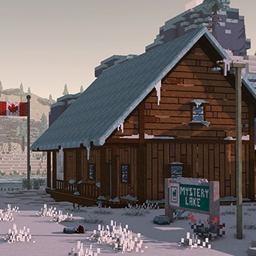
《漫漫长夜》遇上 Chisel & Bits:利用 Chisel & Bits 模组复刻《漫漫长夜》中的场景。需要安装 Chisel & Bits 模组以及 Java 1.12.2 版本。建议你在和平模式下游玩。探索愉快!
---------------------------------------------------------------------------------
该模组目前尚未完工,缺少部分功能/内容。我将继续致力于向模组中添加新的地点/区域,直到我认为它达到完整状态。
---------------------------------------------------------------------------------
Chisel and Bits (同时还需要 Forge & Java 1.12.2 版本)
下载链接
Chisel & Bits
---------------------------------------------------------------------------------
1. 导航至你的 Minecraft 世界存档文件夹
1.a 按住 Windows 键并按下 R 键以打开“运行”程序
1.b 在“运行”程序中输入 %appdata%
1.c 双击 .minecraft 文件夹
2. 将“The Long Dark Chisel and Bits”复制到存档文件夹中
3. 将“TheLongDarkTexturePackChiselandBits”的压缩包拖入资源文件夹
4. 通过启动器下载 Minecraft 1.12.2 版本
5. 为 Minecraft 1.12.2 版本安装 Forge
5.a. 网上有许多关于如何操作的教程
6. 将 Chisel and Bits 模组安装到 .minecraft 目录下的 mods 文件夹中
6.a. 如果该文件夹不存在,请新建一个文件夹并将其命名为“mods”
7. 在游戏中加载一次材质包,然后进入世界
---------------------------------------------------------------------------------
如果你的地图出现卡顿,你可以通过启动器增加 Minecraft 使用的 RAM/内存量
1. 打开 Minecraft 启动器
2. 点击“安装”
3. 点击带有 (1.12.2-forge) 的版本
4. 点击“更多选项”
5. 找到 JVM 参数并查找 "-Xmx#G" (# 代表一个数字)
6. 将 "-Xmx#G" 中的数字改为比当前更高的值(这将更改 Minecraft 使用的吉字节数 RAM 量)
我个人使用的是 8,所以我的 JVM 参数如下:-Xmx8G -XX:+UnlockExperimentalVMOptions -XX:+UseG1GC -XX:G1NewSizePercent=20 -XX:G1ReservePercent=20 -XX:MaxGCPauseMillis=50 -XX:G1HeapRegionSize=32M
1 = 1024mb
2 = 2048mb
4 = 4096mb
8 = 8192mb
16 = 16384mb
渲染距离也会显著影响内存使用,我不建议超过 16(远),但这取决于你自己和你的电脑配置。
无论怎样,该模组地图对性能要求都很高,除非你拥有更强大的电脑,否则能做的调整是有限的
---------------------------------------------------------------------------------
每个区域都隐藏着 5 座未标记的坟墓,以及一些其他秘密等待你去发现。
你可以参考随下载文件一同提供的区域地图,以帮助你进行导航。
我在图片和视频中使用了 Kuda's Shader 并对其进行了大量修改,因此它与默认效果看起来有很大不同。
---------------------------------------------------------------------------------
Bluesky
你是这个资源的作者?登录后可认领此资源。
相似资源
 地图

Spiral Parkour Challenge
TryzzMC
在这个巨大的螺旋跑酷挑战中测试你的跳跃技巧!你能到达顶部吗?
跑酷冒险
29
 地图

World Trick
noxgame1230
在这款令人兴奋的 Minecraft 地图中挑战你的跳跃技巧!你必须从高处跃下,并精准落入水桶中以完成每个任务,从而提升你的跳跃能力。
建筑小游戏
21
 地图

SkyBlock - Hardcore By PeakMC6725
PeakMC6725
在一座漂浮的小岛上开始你的冒险,岛上有一棵树和一个箱子。在极限模式下生存:一次死亡就意味着游戏结束!收集资源,搭建桥梁前往沙岛获取黑曜石,探索下界 5x5 的红石岛,并最终击败末影龙。每一步都至关重要,请时刻保持警惕!
冒险小游戏
16
 地图

Prison Escape 2 - 中世纪
Yoltick
一座中世纪监狱,你必须逃脱以解开谜题
建筑小游戏
15
 地图

where is the button?
HEY150944
你好!这张地图是由 HEY150944 设计的“寻找按钮”解谜地图。它总共包含 24 个创意关卡,每个关卡都有独特的挑战。你接受挑战吗?你能找到并完成所有按钮吗?
冒险跑酷
13
 地图
Midtown Manhattan City [NY]
RealNight
在 Minecraft 尺度上非常美丽的城市。
冒险建筑
13
评论 0
登录后参与评分
还没有评论,来抢沙发吧