基岩版现已推出


整合包鸣谢
衷心感谢在描述中提及Absolute AFK Cinema的整合包作者。这对我们意义重大 <3
- ReallyGoodModpack by HotSawce
- Cozy & Chill by tokyobear
1.7 版本现已推出
现已发布:摄像机将你的挂机时间剪辑成电影 · 为你保留最佳镜头 · 专为载具设计的十种运镜方式 · 为下界、末地和深暗之域打造的镜头 · 跟随昼夜更替的播放列表 · 支持任意格式的自定义音乐 · 41种带滑条调节的运镜方式 · 十四种语言 · 游戏内设置菜单 · 打开物品栏挂机(说明末尾有 Wiki 链接)
你离开了,但摄像机没有。
你是否经历过那种在赛车游戏中放下手柄,让游戏替你欣赏爱车的时刻?缓慢的环绕、平滑的摇摄,镜头在夕阳西下时缓缓推进至车灯前?
而在你的 Minecraft 世界中——也是如此。
只需离开几秒钟,AFK Cinema 便会接管导演席位。摄像机从你的肩头抬起,围绕角色漂移,发现山坡上的牛群,跟随村民穿过广场,驻足于营火的微光之中,然后拉远直至你的基地化作风景中的一粒微尘。黑边字幕条滑入画面,HUD 逐渐隐去,一段宁静的配乐悄然响起。
鼠标轻动,瞬间回归。
未来规划
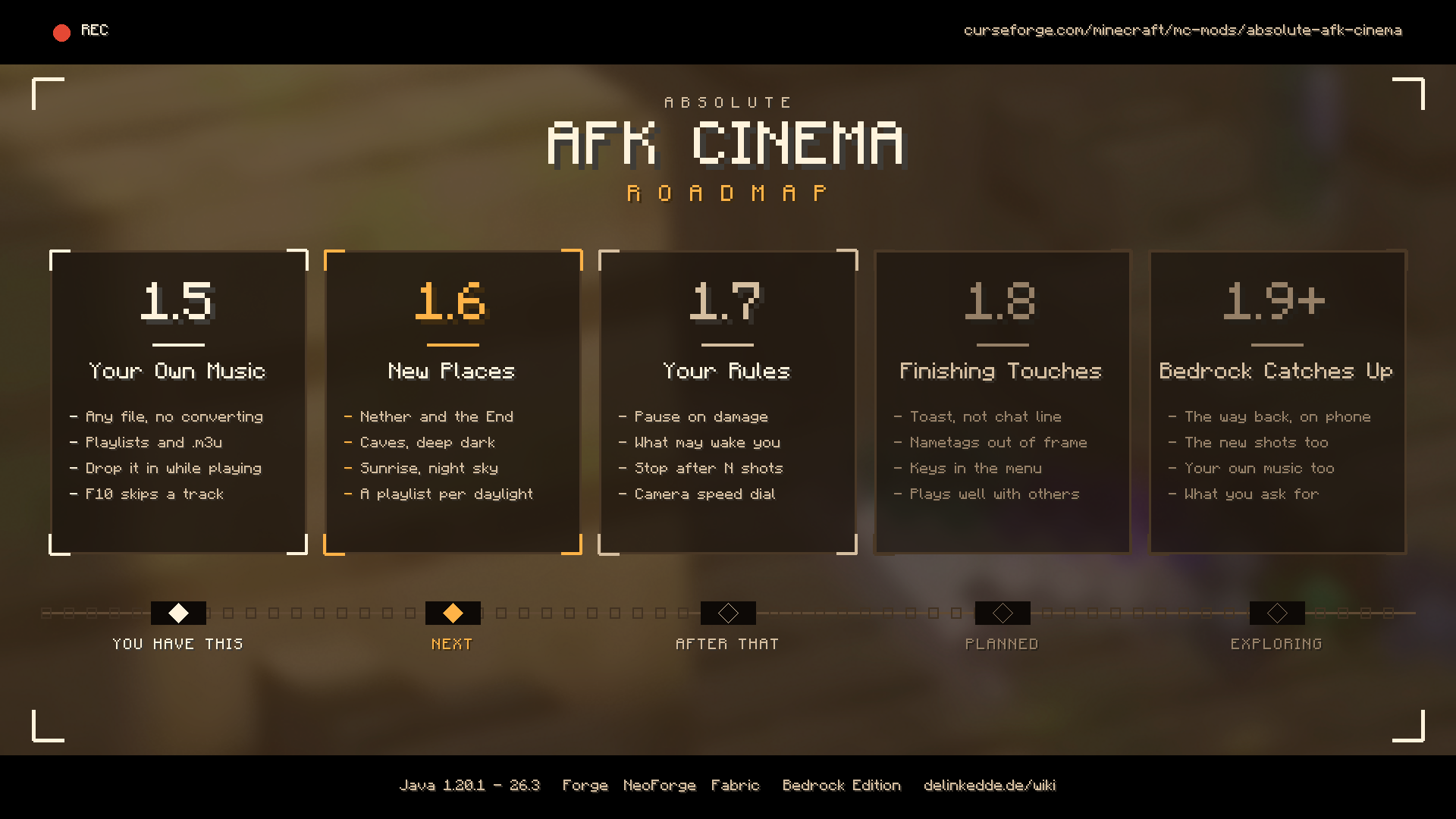
1.8 版本即将到来:完善细节——以致敬提示替代聊天行,移除画框内的名称标签,将按键绑定整合进模组专属菜单,并添加支持手柄操作的设置界面。
随后是 1.9 版本 Your Gallery:摄像机保留的镜头将获得专属存放空间——在游戏中浏览它们,生成整个会话的缩略图,一键打开文件夹。
以及 2.0 版本 Moments:摄像机不再盲目拍摄眼前的一切,而是开始等待精彩瞬间——例如夕阳落在基地后方、初雪降临、或稀有生物路过——并配合配乐节奏进行剪辑。
此后:Bedrock 版将跟进更新,并实现评论区提出的各种需求。这份清单中有一半的想法正来自那里。
1.7 版本新特性:它是在剪辑电影,而非随机播放
在此之前,每个镜头都独立存在。连续十二个精彩的瞬间——但它们之间毫无关联理由。
摄像机现在采用弧线式规划,如同场景剪辑般运作。它首先抵达一个开阔且高处的视角,让你明确方位;接着聚焦于它所发现的主体;然后靠近——深入草丛、越过肩头、模拟手持感。最后它离开,重新融入广阔风景,弧线在黑屏中结束,而下一个弧线将在别处开启。
它不会自行选择镜头:它只依赖那些原本就可行的镜头。洞穴依然会阻止摄像机移动,滑杆值为 0 时仍不会出现该效果,关闭 Director 即可恢复旧版行为。
开头一行文字,结尾一张卡片。当镜头接管画面时显示:第342天 · 向日葵平原 · 黄昏——当你回来时显示:距离14分钟 · 23个镜头 · 包含:村民、狼、骷髅。
并且能保留最佳帧。 若干静帧会保存在 screenshots/afk-cinema 中,这些画面是在动作稳定后、带有黑边且无字幕时截取的。二十分钟后再回来,你会发现自己从未亲手拍过的六张基地照片——因为你当时并不在键盘前。它们只是普通的截图文件;没有任何数据被发送出去。
只需一个旋钮,而非九个。 主体混合(Subject mix) 涵盖你的世界——地点、景观、机器——直至生物。在中间状态下它不会改变任何内容,九种权重保持与你设定的一致。摄像机速度(Camera speed) 是对所有镜头移动的一个乘数:庄重缓慢的动作使用半速,躁动不安的动作则使用双倍速度。
规则由你掌控。 伤害可以被忽略,可以结束演出,也可以暂停游戏,这样你在离开时就不会被吃掉。演出可以在拍摄一定数量的镜头后自动停止。如果附近有敌对生物或另一个玩家走近,你也可以选择让它们来结束演出。你自己的输入始终会结束演出,且无法关闭此功能——这是唯一一件不应该让用户将自己锁在外面的事情。
1.6.1 新增:为你的载具拍摄
坐上任何你可以骑行的东西——汽车、卡车、飞机、船——然后挂机(AFK),摄像机将不再拍摄你,而是开始拍摄载具,就像汽车广告中的剪辑手法那样。从后轮后方掠过并沿车身侧面移动。越过引擎盖升至挡风玻璃上方。低角度横穿前大灯。在车顶高度缓慢旋转。从车尾向车顶后方远离。十种专为载具存在的镜头,且连续两次绝不会重复相同的镜头。
无需安装任何东西,也没有支持模组的列表。 这里所谓的“载具”是指:体型较大、非生物、且你可以坐进去的东西——因此 Immersive Vehicles 及其衍生构建的模组都包含在内,船只、矿车以及明年你添加的任何载具模组也都在其中。此功能应 KiuCfu1211 在评论中的要求而添加。
当你坐在其中时,它就是电影本身——不会在半途切到山坡上的一只绵羊。
1.6.1 中还修复了以下问题: 启动时与携带相同音频库的其他模组(包括 Ad Astra)一起导致的崩溃,以及摄像机在游戏以第三人称视角呈现或 HUD 隐藏时接管游戏的问题。
1.6 新增:摄像机会知道你在哪里
走进洞穴,影片风格就会改变。这不是因为你设置了什么——而是因为摄像机在选择镜头之前,现在会先询问自己所处的位置。
在地下,镜头保持贴近,起重机式仰拍、冲向天空和飞掠镜头都会停用:因为那里没有空气可供利用。在下界天花板下,低角度镜头取而代之。在末地,所有依赖距离感的镜头都会优先出现,因为那里只有距离可言。你自己的滑块仍然在此基础上进行倍增,0 仍意味着永不使用。
还有六种仅存在于特定位置的镜头:
- 熔岩扫过(Lava sweep)——低空掠过熔岩并从你身边经过,光芒填满画面底部。主要在下界,但深坑底部的熔岩瀑布也会触发此镜头。
- 天花板坠落(Ceiling drop)——猛烈撞击头顶的岩石并向你落下。它会先测量头部空间:在两格高的隧道中无处可坠,因此它不会尝试。
- 虚空边缘(Void edge)——从边缘后退并沉入其下方,直到你脚下空无一物。适用于末地,以及任何下方有真实落差的悬崖。
- 爬行(Crawl)——沿着隧道向你逼近,墙壁在镜头旁滑过。它对自己的判断比其他镜头更为宽松:在那种环境下,一半被岩石填充的画面就是画面本身。
- 星野(Starfield)——将镜头转向你之外的星空。晴朗的夜空,以及任何时段的末地。
- 日出(Sunrise)——保持天际线构图,太阳横穿其间,你位于画面下方并处于逆光状态。黎明和黄昏时分,它会等待太阳真正出现在地平线上。
游戏自带的三个世界通过名称识别。其他所有内容——这意味着整合包自定义的世界——则是根据其环境特征来判断的:是否有天花板?日光能否照射进来?头顶是否有地面?这就是摄像机所需的全部信息。
根据你的位置播放歌单。 Soundtrack from 增加了一个第五个设置项 SCENE(场景)——无需任何配置。名为 night 的歌单会在夜间播放,同样还有 dawn、day、dusk、cave、deep dark、nether 和 end。将音乐按明显命名的文件夹分类整理,这大概是你本来就在做的事情。如果你的某个列表使用了其他名称,只需一行代码指向它:night = Dark Ambient。如果没有匹配项,所有曲目都有机会参与——在地下变得安静将是更糟糕的选择——而且切换总是发生在两首曲子之间,绝不会在曲目中途打断。
1.5 新增:任意格式的个人音乐
将文件放入 config/absoluteafkcinema/music,影院便会播放它们。
无需转换任何内容。 .mp3、.ogg、.wav、.flac、.opus、.weba、.aiff、.au —— 所有格式均可直接播放,包括从网页保存音频时浏览器提供的 .weba 文件。模组自行解码文件并将样本直接交给 Minecraft,因此你的音轨会被视为游戏自带音效一样处理:你的 Music 滑块仍然有效,暂停游戏时它也会暂停,返回时它会淡出。
在游戏运行时将文件放入,即可立即生效。 文件夹会被实时监听,因此新加入的曲目会自动作为下一首播放。无需重启游戏,也无需点击按钮——即使是一个仍在复制中的长文件,也会在完成后被正确加载,而不会被误判为损坏。
播放列表。 子文件夹也算一个——比如 music/night、music/building。.m3u 文件也是,而且更优秀,因为它的每一行可以指向你电脑上的任意位置:你已有的音乐库可以直接播放,无需将任何文件复制到游戏文件夹中。Music → Playlists → Edit(音乐 → 播放列表 → 编辑) 可在游戏内创建一个播放列表——左侧是你的播放列表,右侧是每首曲目,每首曲目旁都有 + 或 – 按钮;它生成的是纯文本 .m3u 文件,你可以手动继续编辑。
音源来自:你自己的文件、模组自带的三个曲目,两者兼有或仅选择其一。若选择两者兼有,每条曲目(无论是你的还是模组的)都有相同的随机播放几率。游戏自带的音乐唱片也可以加入播放列表,如果你更希望在夜晚于基地中聆听 Pigstep 的话。
按 F10 可跳到下一首曲目,且故意不计为返回,因此你正在观看的镜头会继续播放。
什么都不放,你依然能获得模组带来的三首原版环境音乐:Evening Meadow、Slow Fields、Lantern Light——温暖的铺底音色、轻柔的卡林巴琴、缓慢的低音以及悠长的混响尾音。与此同时,原版音乐则会安静地等待。
三十一种审视世界的方式
不是定时旋转的镜头——而是一支品味出众的小型摄制组。
缓慢的运镜手法
固定变焦(Static zoom)——镜头静止,焦距呼吸 希区柯克式变焦(Dolly zoom)——眩晕效果;身后的世界被拉伸 拉远(Pull-away)——越来越远,直至你融入风景之中 特写(Close-up)——人像肖像,停留的时间略长了一瞬 呼吸感画面(Breathing frame)——手持般的稳定,仅有几厘米的轻微晃动 上升变焦、平移变焦、弧形变焦(Rise zoom, slide zoom, arc zoom)——攀升、滑过、环绕,同时镜头逐渐推进 黄金时刻(Golden hour)——你的剪影映衬在低垂的太阳或月亮前 跟拍(Tracking)——路边的摄像机转向跟随任何经过的事物 远景揭示与地平线摇摄(Vista reveal & horizon pan)——当景色值得展现时,镜头会将它呈现给你
经典运镜:
环绕 · 推进 / 拉远 · 低角度摇摄并略带荷兰角倾斜 · 飞掠 · 升降台上下 · 鸟瞰 · 过肩视角
1.4 新增内容
Sky climb——镜头离开地面并持续上升,视野逐渐变宽,直到你的基地变成一个小点,而整个景观如同一幅画卷。有时它会反向运行,从天空俯冲到你身上。Helix——兼具环绕与升降的效果:围绕你旋转的同时向上攀升,并在过程中不断拉近。Ground level——镜头置于草丛中,仰视着你与天空的背景,将通常处于画面下方的景物纳入前景。
还有三种刻意罕见的镜头,因为它们需要特定的世界条件才能触发:Moon——仅在晴朗夜晚出现,使用长焦镜头向上倾斜,掠过你的剪影,直到月亮填满整个画面。Reflection——仅在有开阔水域的地方触发,镜头紧贴水面(约一手宽的高度)滑行。Whip pan——起初指向空白处,随后迅速转向你,略微过冲后稳定下来。
每个运镜都像真实轨道车般平滑过渡,剪辑则如真实影片般利落——硬切为主,偶尔淡出至黑屏,且绝不会连续两次使用相同的模式。
它知道什么值得拍摄
邻近建造的其他玩家、巡回活动的村民、牛群、小马驹、拥有名称的宠物。悄悄接近你的僵尸(是的,真的存在)。篝火、岩浆、信标、传送门、钟、黑暗中的灯笼——以及你基地里任何正在嗡嗡作响的机器。镜头会对周围的一切进行评分,检查视线角度,并且永远不会穿墙或躲在树后。
设置位置及选项功能
按 F9 键。或者按 Esc 打开 Options(选项)和 Mods(模组)之间的 AFK Cinema 按钮,或在模组列表中点击该模组旁边的 Config(配置)按钮。包含多个标签页、搜索框、每个设置下的详细说明、一个 Preview now(立即预览)按钮用于启动镜头以观看刚才修改的效果,以及在你把自己调教进死胡同时使用的 Reset tab(重置标签页)。关闭时自动保存。如果你更喜欢手动管理,配置文件依然存在:config/absoluteafkcinema-client.json
Transition(转场方式)——前一个镜头如何变为下一个:
|
|
| CUT |
硬切。前一帧是奶牛,下一帧是村庄,如同电影剪辑。 |
| FADE |
所有切换都经过黑色过渡。更平静,更具纪录片风格。 |
| MIXED |
以硬切为主,每第三个镜头插入一次淡入淡出。默认选项:全淡入会显得慵懒,全硬切则会显得躁动不安。 |
Coming back(回归视角)——当你按下任意键时发生的情况:
|
|
| INSTANT |
旧版行为:你的视角在下一帧立即恢复。简单直接,不干扰你的操作。 |
| FADE |
画面渐变为黑色,所有元素都融入那片漆黑之中,随后以你自己的视角重新显现。 |
| FLY |
镜头以弧线绕着你旋转,同时逐渐拉近,最终停在你的头部后方并缓慢向前滑入你的视野。在此过程中,镜头会从之前拍摄的对象转向你,而在结束时,它已经对准了你正在注视的方向。这是默认设置。 |
| DIVE |
角色切换效果源自 GTA V:镜头迅速冲向天空,镜头拉宽,短暂地悬停在世界上方——随后又迅速回落至你的视角中。 |
飞行模式会跟随你:当你再次奔跑时,镜头会追上你,而不是落在你之前的位置。这一延迟时间可以通过一个独立的滑块进行调整,范围从即时到八秒不等。
每个镜头片段都有各自的滑块。 1.4 版本新增功能:Shots(镜头片段)选项卡列出了所有镜头移动方式,每种对应一个旋钮。在 1.0 版本中,镜头片段保持原样;设置为 0 表示你将永远不再看到该片段;设置为 2.0 则使其出现频率加倍。厌倦了手持晃动吗?将呼吸感帧率调至 0,它就会消失。只想看到纯仰拍镜头?这也完全可以实现。
音乐也在这里管理:包括其来源、播放列表、是否加入音乐唱片,以及一个打开音乐文件夹的按钮和播放列表编辑器。
其他所有设置也都位于同一界面:镜头片段时长、黑边条及其高度、隐藏 HUD、隐藏聊天框、荷兰角倾斜、缩放、镜头距离、优先使用缩放还是移动的倾向,以及各类主体的权重——玩家、村民、动物、怪物、方块、远景和你自己。将某个类别的权重设为 0,则该类别将不再被捕捉。
多语言支持
共十四种:英语、德语、法语、西班牙语、葡萄牙语(巴西)、意大利语、荷兰语、波兰语、俄语、乌克兰语、土耳其语、日语、韩语和简体中文。 不仅标签被翻译,解释各项设置功能的句子也会被翻译,因此整个界面可以统一显示为一种语言。Minecraft 会自动根据游戏语言选择对应的语言包,对于尚未完成翻译的部分,则会回退显示为英文,而非留白。
每项设置的详细说明:delinkedde.de/wiki
MP3、FLAC 和 Opus 格式通过 JLayer/mp3spi、jFLAC 和 Concentus 进行解码,这些库随 JAR 包一起分发,并受各自许可协议约束。得益于它们,“无需转换”成为本模组真正能够承诺的功能。
Bedrock Edition out now
Modpack Shoutouts
A big thank you to the modpack creators who give Absolute AFK Cinema a shoutout in their descriptions. It means a lot <3
- ReallyGoodModpack by HotSawce
- Cozy & Chill by tokyobear
Version 1.7 out now
Out now: the camera cuts your idle time into a film · it keeps the best frames for you · ten camera moves made only for vehicles · shots made for the Nether, the End and the deep dark · a playlist that follows the daylight · your own music in any format · 41 camera moves with a slider each · fourteen languages · INGAME settings menu · AFK with the inventory open (wiki at the end of the description)
You walked away. The camera didn't.
You know that moment in a racing game when you put the controller down and the game starts admiring the car for you? Slow orbits, glossy pans, the lens creeping in on a headlight while the sun goes down?
That – but for your Minecraft world.
Step away for a few seconds and AFK Cinema takes the director's chair. The camera lifts off your shoulder, drifts around your character, finds the herd of cows on the hill, follows a villager across the square, lingers on the campfire glow, and pulls back until your base is a speck in the landscape. Letterbox bars slide in, the HUD fades away, a calm soundtrack rises.
Touch the mouse. You're back. Instantly.
Where this is going
1.8 is next: the finishing touches – a toast instead of a chat line, nametags out of frame, key bindings in the mod's own menu, and a settings screen you can drive with a controller.
Then 1.9, Your Gallery: the frames the camera keeps get a place of their own – browse them in game, get a contact sheet of a whole session, open the folder with one key.
And 2.0, Moments: the camera stops filming whatever is there and starts waiting for the good one – the sun going down behind your base, the first snow, something rare walking past – and cuts on the beat of the soundtrack.
After that: Bedrock catches up, and whatever you ask for in the comments. Half of this list came from there.
New in 1.7: it cuts a film, it does not shuffle one
Until now every shot stood on its own merits. Twelve good moments in a row – and no reason for any of them to follow the one before.
The camera now plans in arcs, the way a scene is cut. It arrives wide and high, so you know where you are. It looks in towards whatever it has found. It gets close – down in the grass, over your shoulder, hand-held. Then it leaves, back out into the landscape, and the arc ends on black before the next one begins somewhere else.
It never picks a shot by itself: it only leans on the ones that were already possible. A cave still forbids the crane, a slider at 0 is still never seen, and Director off gives you exactly the old behaviour back.
A line at the start, a card at the end. Day 342 · Sunflower Plains · Dusk as the camera takes over – and when you come back: 14 min away · 23 shots · With: villager, wolf, skeleton.
And it keeps the best frames. A few stills land in screenshots/afk-cinema, taken mid-shot once the move has settled, with the bars in and the writing out. Come back after twenty minutes and there are six pictures of your base you would never have taken yourself, because you were not at the keyboard. They are ordinary screenshot files; nothing is sent anywhere.
One dial instead of nine. Subject mix runs from your world – places, vistas, machines – to the living. In the middle it changes nothing and the nine weights stay exactly as you wrote them. Camera speed is one multiplier over every move: half speed for something stately, double for something restless.
And the rules are yours. Damage can be ignored, can end the show, or can pause the game so you are not eaten while you are away. The show can stop by itself after so many shots. A hostile mob nearby or another player walking up can end it, if you want them to. Your own input always ends it and that cannot be switched off – it is the one thing nobody should be able to lock themselves out of.
New in 1.6.1: it films your car
Sit in anything you can ride – a car, a truck, a plane, a boat – go AFK, and the camera stops filming you and starts filming the vehicle, the way a car advert is cut. In behind the rear wheel and along the flank. Up over the bonnet and onto the glass. Low across the headlights. A slow turn at roof height. Away over the roof from the tailgate. Ten moves that exist only for vehicles, and never the same one twice in a row.
Nothing to install for it, and no list of supported mods. What counts as a vehicle here is that it is big, it is not alive, and you can sit in it – so Immersive Vehicles and everything built on it are in, and so are boats, minecarts and whatever vehicle mod you add next year. Asked for in the comments by KiuCfu1211.
While you are sitting in one, it is the film – no cutting away to a sheep on the hill halfway through.
Also fixed in 1.6.1: the startup crash next to any other mod that carries the same audio library – Ad Astra among them – and the camera handing your game back in third person or with the HUD hidden.
New in 1.6: the camera knows where you are
Walk into a cave and the film changes. Not because you set anything – because the camera now asks where it is standing before it picks a move.
Underground the lens keeps close, and the crane, the sky climb and the fly-by stand down: there is no air up there to use. Under a Nether ceiling the low shots take over. In the End everything that uses distance comes forward, because distance is all there is. Your own slider still multiplies on top of all of it, and 0 still means never.
And six shots that only exist in their own place:
- Lava sweep – skims low across lava and past you, the glow filling the bottom of the frame. The Nether mostly, but a lava fall at the bottom of a ravine gets it too.
- Ceiling drop – opens hard against the rock overhead and falls away from it onto you. It measures the headroom first: in a two block tunnel there is nothing to drop from, and it does not try.
- Void edge – backs off the rim and sinks below it, until there is nothing at all underneath you. The End, and any cliff with a real drop under it.
- Crawl – creeps along the tunnel towards you with the walls sliding past the lens. It judges itself more loosely than the other shots on purpose: down there a frame half filled with rock is the picture.
- Starfield – turns the lens up off you into the stars. A clear night sky, and the End at any hour.
- Sunrise – holds the skyline while the sun crosses it, you low in the frame and backlit. Dawn and dusk, and it waits until the sun is really on the horizon.
The three worlds the game ships with are recognised by name. Everything else - and that means a modpack's own world - is judged by what it is like: has it got a ceiling, does daylight reach it, is there ground over your head. That is all the camera needs to know.
A playlist for where you are. Soundtrack from has a fifth setting, SCENE – and there is nothing to set up. A playlist called night is played at night, and so are dawn, day, dusk, cave, deep dark, nether and end. Sorting music into folders with obvious names is a thing you were probably doing anyway. If a list of yours is called something else, one line points at it: night = Dark Ambient. Where nothing fits, everything is in the running – going quiet underground would be the worse answer – and the change always lands between two pieces, never mid-track.
New in 1.5: your own music, in any format
Drop files into config/absoluteafkcinema/music and the cinema plays them.
There is nothing to convert. .mp3, .ogg, .wav, .flac, .opus, .weba, .aiff, .au – all of them play as they are, including the .weba a browser hands you when you save audio off a web page. The mod decodes the file itself and gives the samples straight to Minecraft, so your track is treated exactly like a sound the game shipped with: your Music slider still works, it pauses when you pause, and it fades out when you come back.
Drop a file in while the game is running and it is simply there. The folder is watched, so the new track joins in and plays as the next one. No restart, no button – and a long file that is still copying is picked up once it has finished instead of being written off as broken.
Playlists. A subfolder is one – music/night, music/building. An .m3u file is one too, and the better kind, because its lines may point anywhere on your computer: the music collection you already have gets played where it lies, without copying a single file into a game folder. Music → Playlists → Edit builds one in game – your playlists on the left, every track on the right, a + or a – on each – and what it writes is a plain .m3u you can keep editing by hand.
Soundtrack from: your own files, the three that come with the mod, both, or one playlist. With both, every single track has the same chance of coming up, yours and mine alike. The game's own music discs can join in too, if you would rather hear Pigstep over your base at night.
F10 skips to the next track – and on purpose does not count as coming back, so the shot you are watching carries on.
Drop in nothing at all and you still get the three original ambient pieces the mod brings: Evening Meadow, Slow Fields, Lantern Light – warm pads, soft kalimba, a slow bass, a long reverb tail. Vanilla music waits politely meanwhile.
Thirty-one ways to look at your world
Not one spinning camera on a timer – a small film crew with taste.
The slow lens work
Static zoom – the camera rests, the lens breathes in Dolly zoom – the Vertigo shot; the world stretches behind you Pull-away – further and further, until you're part of the scenery Close-up – a portrait, held just a little too long Breathing frame – hand-held stillness, a few centimetres of sway Rise zoom, slide zoom, arc zoom – climbing, gliding, circling while the lens closes in Golden hour – your silhouette against the low sun or moon Tracking – a roadside camera that turns to follow whatever walks past Vista reveal & horizon pan – when the view is worth it, the camera shows you
The classic moves:
Orbit · Push-in / pull-out · Low-angle pan with a touch of dutch angle · Fly-by · Crane up / down · Bird's eye · Over the shoulder
New in 1.4
Sky climb – the camera leaves the ground and keeps going, the lens widening, until your base is a speck and the landscape is the picture. Sometimes it runs the other way and drops out of the sky onto you. Helix – an orbit and a crane at once: around you and climbing, pulling in as it goes. Ground level – the lens down in the grass, looking up at you against the sky, with everything that is normally below the frame in front of it.
And three that are rare on purpose, because they need the right world: Moon – only at night under a clear sky, a long lens that tilts up off your silhouette until the moon fills the frame. Reflection – only where there is open water, the camera skimming a hand's width above the surface. Whip pan – pointed at nothing, then it snaps round onto you, overshoots by a hair and settles.
Every move is eased like a real dolly, cut like a real edit – hard cuts, the occasional fade to black, never the same pattern twice in a row.
It knows what's worth filming
Other players building next to you. Villagers on their rounds. Herds, foals, named pets. The zombie creeping up behind you (yes, really). Campfires, lava, beacons, portals, bells, lanterns in the dark – and any machine humming away in your base. The camera scores everything around you, checks the sightlines, and never ends up inside a wall or behind a tree.
Where you set it, and what the options do
Press F9. Or Esc and the AFK Cinema button between Options and Mods, or the Config button next to the mod in the mod list. Tabs, a search box, an explanation under every setting, a Preview now button that starts the camera so you can watch what you just changed, and Reset tab for when you have tuned yourself into a corner. Saved the moment you close it. The file is still there if you prefer it: config/absoluteafkcinema-client.json
Transition – how one shot becomes the next:
|
|
| CUT |
A hard cut. One frame the cows, the next the village, like a film edit. |
| FADE |
Every change goes through black. Calmer, more documentary. |
| MIXED |
Mostly cuts, a fade every third shot. The default: all fades gets sleepy, all cuts gets restless. |
Coming back – what happens the moment you touch a key:
|
|
| INSTANT |
The old behaviour: your view is back on the very next frame. Nothing fancy, nothing in your way. |
| FADE |
The picture goes to black, everything is handed back inside that black, and the picture comes back up in your own view. |
| FLY |
The camera swings around you on an arc, pulling in as it goes, ends up behind your head and glides slowly forward into your eyes. On the way it turns from whatever it was filming to you, and at the end it is already looking where you are looking. The default. |
| DIVE |
The character switch from GTA V: the camera shoots up into the sky, the lens pulls wide, it hangs over the world for a moment – and then drops back down into your head. |
Either flight follows you: start running again and the camera catches up with you instead of landing where you used to be. How long it takes is a slider of its own, from instant to eight seconds.
Every shot has its own slider. New in 1.4: the Shots tab lists every camera move, one dial each. 1.0 leaves a shot as it is, 0 means you never see it again, 2.0 brings it twice as often. Tired of the hand-held sway? Breathing frame to 0 and it is gone. Want nothing but sky climbs? You can do that too.
The music lives there too: where it comes from, which playlist, whether music discs join in, a button that opens the music folder, and the playlist editor.
Everything else lives in the same screen: shot length, letterbox bars and their height, hide HUD, hide chat, dutch angle, zooms, camera distance, how much it prefers zooms over moves, and a weight per subject category – players, villagers, animals, monsters, blocks, vistas, yourself. Set a weight to 0 and that category is gone.
In your language
Fourteen of them: English, German, French, Spanish, Portuguese (Brazil), Italian, Dutch, Polish, Russian, Ukrainian, Turkish, Japanese, Korean and Simplified Chinese. Not only the labels – the sentence that explains what a setting does is translated as well, so the whole screen reads in one language. Minecraft picks it from your game language on its own, and anything a translation has not caught up with falls back to English instead of going blank.
Every single setting, explained: delinkedde.de/wiki
MP3, FLAC and Opus are decoded with JLayer/mp3spi, jFLAC and Concentus, which ride along inside the jar under their own licences. Thanks to them, "no converting needed" is a sentence this mod can actually say.
 模组

 模组
 模组

 模组
 模组
 模组
评论 0
登录后参与评分
还没有评论,来抢沙发吧