
AdaptiveTooltips
高度可配置的提示框渲染,让你始终都能看清它们!
为什么制作这个模组?
原版提示框并不够智能:本模组旨在解决这一问题。在原版中(尤其是在加载模组时),经常会出现因为提示框过长而无法在屏幕上完整显示的情况,导致你根本无法阅读。这里有许多解决方案!
AdaptiveTooltips 致力于将这些解决方案构思并实现到 Minecraft 中,提供接近原版的提示框体验,同时消除那些令人沮丧的问题。
功能
AdaptiveTooltips 提供了多种方法让你的提示框摆脱屏幕边缘的困扰;以下是所有用于修复此问题的(可切换)选项列表。
文本换行
解决提示框水平溢出屏幕的最明显修复方法是文本换行!如果某一行太长而无法适应你的屏幕,AdaptiveTooltips 会智能地将其分割成所需的行数,并使用单词作为截断点,以免打断你的阅读流畅性。
有多种换行方式:
屏幕宽度 - 模组以屏幕宽度(减去 15)为最大行宽进行换行。建议与基岩版居中选项配合使用。剩余宽度 - 允许提示框行填充直到屏幕尽头剩余的宽度,根据哪种方式需要更少的换行来选择左侧或右侧。半屏宽度 - 仅允许提示框宽度为屏幕的一半。智能 - 对明显比其他行长的行进行换行,硬性限制为屏幕宽度的 3/4。
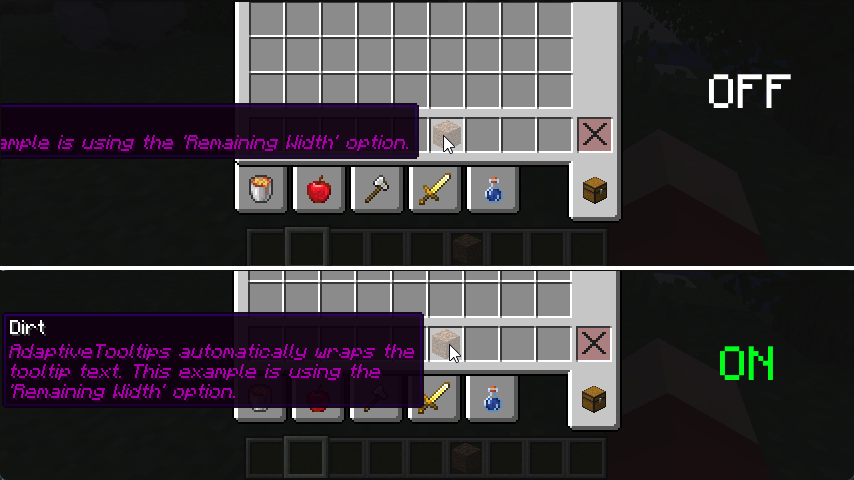 截图使用的是
Remaining Width 换行方式
优先显示提示框顶部
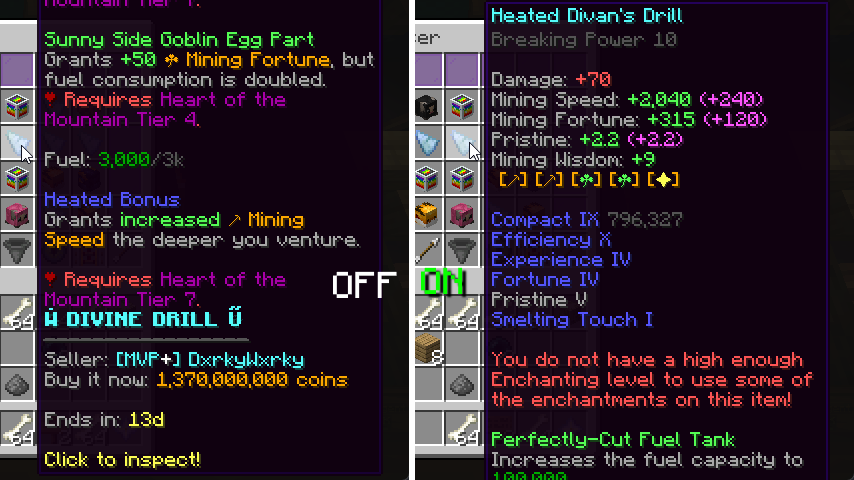
我甚至惊讶于 Mojang 默认没有添加这一功能:对于高度超过屏幕限制的提示框,默认情况下其底部会被限制在屏幕边缘,而不是顶部。这导致你能读到(通常不太重要的)提示框底部,而不是顶部。此修复解决了这个问题。
基岩版居中
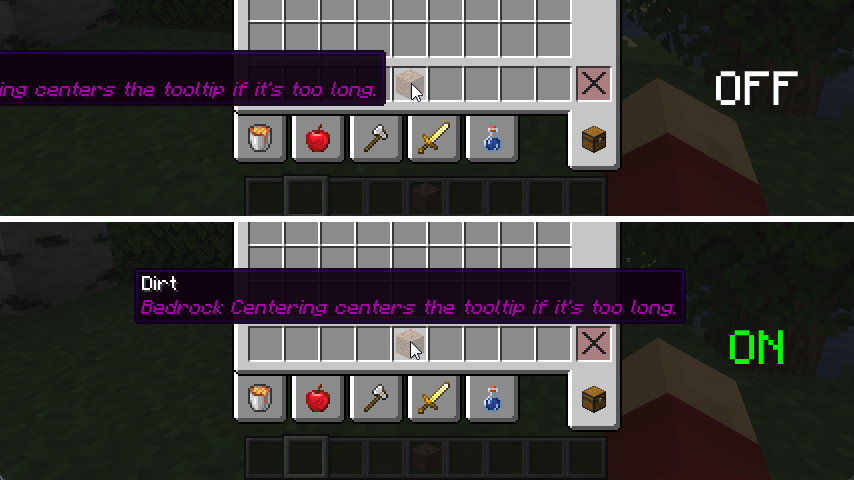
此功能实现了 Java 版与基岩版之间的行为对齐。默认情况下,基岩版会自动将过长的提示框居中放置(无论是在左侧还是右侧),本模组添加了该功能。为了获得最佳体验,建议将此功能与屏幕宽度文本换行配合使用。
对齐到角落
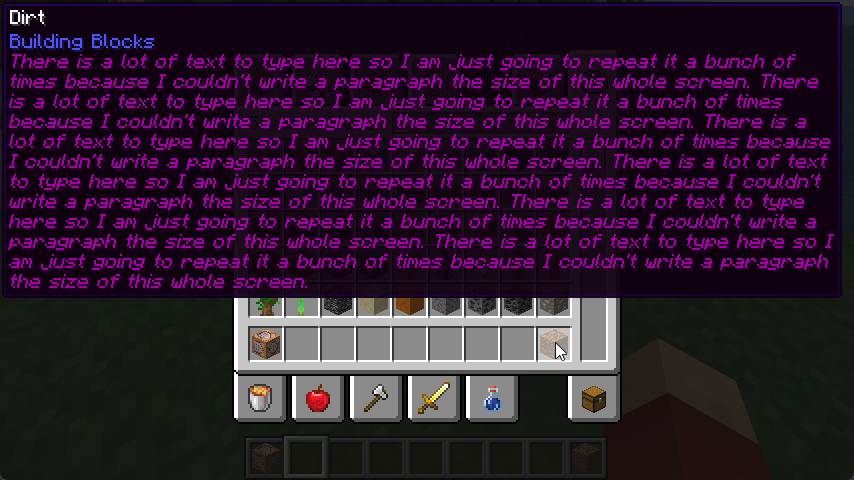
当其他方法都失效时,此功能是一个很好的后备方案。如果在上述所有功能都无法保持提示框在屏幕内时,AdaptiveTooltips 会将提示框放置在窗口的四个角中的任意一个,具体取决于哪个位置对鼠标指针的遮挡最少。
提示框滚动
是的,你没看错,就是滚动。在 Fabric 上曾多次尝试实现滚动功能,但往往因恼人的边缘情况和 bug 而效果不佳,使得滚动变得令人头疼,但我已修复了所有问题!你可以垂直和水平滚动,并拥有平滑的动画以及从滚动方向到灵敏度的精细调节。AdaptiveTooltips 也很智能,能区分不同的提示框,并在必要时丢弃滚动数据。
透明度修改
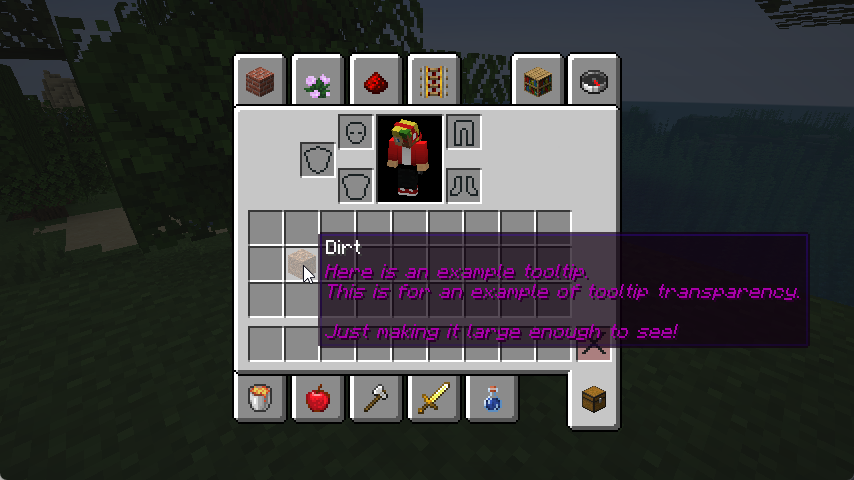
你可能被提示框遮挡物品栏中后续几个物品的视图所困扰,此修复旨在通过允许你调整提示框的透明度来缓解这一问题,让你可以在可见性和透明度之间决定最适合的设置。
YACL 风格 GUI 提示框
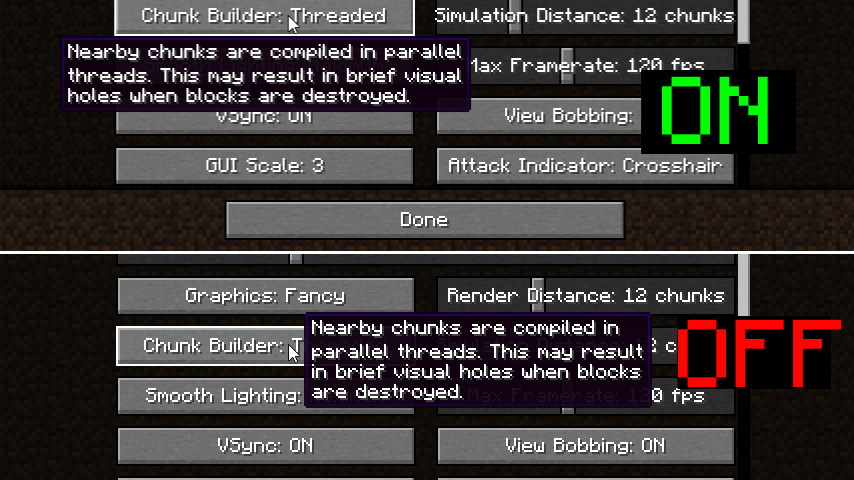
通过将提示框放置在悬停按钮的上方或下方,模仿 YetAnotherConfigLib 的提示框定位风格。
许可证
本模组遵循 Mozilla Public License 2.0。
AdaptiveTooltips
Highly configurable tooltip rendering, so you can always read them!
Why was this mod created?
Vanilla tooltips are not very smart: this mod aims to fix that. In vanilla, there are a lot of
situations (especially when modded) where you just cannot read a tooltip due to it being just too long
to fit on the screen. There are many solutions!
AdaptiveTooltips aims to dream up and implement these solutions into Minecraft for a vanilla-like
tooltip experience without the frustrations.
Features
There are many methods in which AdaptiveTooltips can save your tooltips from the clutches of the bezels;
below are a list of all the (toggleable) options to fix this.
Text Wrapping
There is one very obvious fix to tooltips going off-screen horizontally: text wrapping! If a line
is too long to fit on your screen, AdaptiveTooltips intelligently splits it into however many
necessary, using words as cut-offs to not interrupt your reading.
There are multiple methods of wrapping:
Screen Width - The mod wraps with a max line width of the width of your screen (minus 15). Intended to be paired
with Bedrock Centering option.Remaining Width - Allows tooltip lines to fill a maximum of what's left until the tooltip reaches the end of the
screen, picking either the left or the right depending on which would require less wrapping.Half Screen Width - Only allows tooltips to have a width of half of the screen.Smart - Wraps lines that are considerably longer than the others, with a hard limit of 3/4 of the screen width.
screenshot is using Remaining Width wrapping method
Prioritize Tooltip Top
I'm actually surprised even Mojang didn't think of adding this one, by default, tooltips that are taller than
your screen limit their bottom to the edge of the screen, not the top. This results in you being able to read
the (often less important) bottom of the tooltip instead of the top. This fix addresses that.
Bedrock Centering
This feature grants parity between Java and Bedrock Edition. By default, Bedrock automatically centers
the tooltip if it is too long to fit on either the left or the right, this adds that. For the best
experience, it is best to pair this with Screen Width Text Wrapping.
Align To Corner
When all else fails, this feature is a good fallback. If after all the above features fail to keep the
tooltip on the screen, AdaptiveTooltips just places the tooltip in any of the 4 corners of the window,
determining that based on the least obstruction of the mouse cursor.
Tooltip Scrolling
Yes, that's right, scrolling. It's been tried on Fabric many a times with little success with annoying
edge-cases and bugs that make using scrolling annoying, but I've fixed all grievances! You can scroll
vertically and horizontally with smooth animations and fine-tuning from the scroll direction to the
sensitivity of the scrolling. AdaptiveTooltips is also smart and knows the difference between two different
tooltips and discards scrolling data when necessary.
Transparency Modification
You may be bothered that tooltips may obstruct the view of the next few items in your inventory, this
fix aims to mitigate that by allowing you to adjust the transparency of the tooltip, allowing you to
decide what's best for in terms of visibility and transparency.
YACL-style GUI Tooltips
Capture the style of YetAnotherConfigLib's tooltip positioning
by placing tooltips above or below a hovered button.
License
This mod is under the Mozilla Public License 2.0.


 模组

 模组
 模组

 模组
 模组
 模组
评论 0
登录后参与评分
还没有评论,来抢沙发吧