
AdiCrafter
本模组仅添加一个方块:自动合成器。
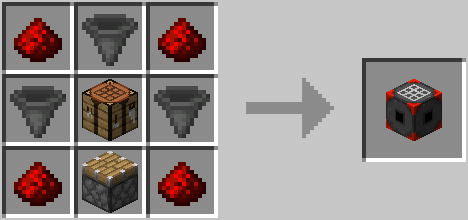
自动合成器会从相邻的容器和背包中抽取原料,包括箱子、漏斗和其他自动合成器,以及任何实现了 Fabric 传输 API 的方块。
合成器配置
您可以通过打开配置界面来选择要合成的配方。只需右键点击(使用)该方块即可。
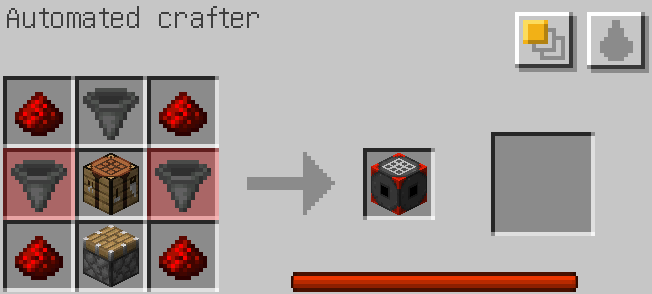
配方
编辑左侧的合成网格。任何有效配方的结果都会显示在中间栏位,右侧栏位可用于手动合成该配方。
请注意,如果可用原料不足,右侧栏位将不会显示任何内容。缺失的原料会在合成网格中高亮显示。
模糊模式
默认情况下,自动合成器会尝试在其合成网格中找到完全匹配的物品,但“模糊”选项允许使用任何兼容的物品,例如使用任意种类的木板来合成箱子。
流体替换
还有一个选项可以将任何流体容器物品(桶、瓶子等)替换为从相邻储罐(如锅)中抽取流体。
这在原版 Minecraft 中用处有限,但如果第三方模组添加了大量新流体和配方,则会变得非常实用。
内部能源
自动合成器拥有内部能源存储,并会随时间稳定恢复。合成物品会消耗部分能源。按照默认配置,满载状态的合成器可以连续合成 10 个物品。
这可以在配置文件中禁用或调整。
激活
除非您尝试从其抽取物品,否则自动合成器不会进行任何合成操作。您可以手动操作,或使用其他物品提取方块(如漏斗)来实现。
模组配置
该模组从 config/adicrafter.json 文件读取其配置。如果文件不存在,它会自动创建。
AdiCrafter
This mod adds only one block: the automated crafter.
The automated crafter pulls ingredients from neighboring containers and inventories, including chests, hopper and other automated crafters, and any other blocks that implements the Fabric transfer API.
Crafter configuration
You can select the recipe to craft by opening the configuration screen. Simply right-click (use) the block.
Recipe
Edit the crafting grid on the left. The result of any valid recipe will show on the middle slot, and the right slot can be used to manually craft the recipe.
Note that the right slot will not show anything if there is no enough ingredients available. Missing ingredients are highlighted in the crafting grid.
Fuzzy mode
By default, the automated crafter tries to find the exact items used in its crafting grid, but the "fuzzy" option allows to use any compatible items, e.g. using any kind of plank to craft a chest.
Fluid substitution
There is also an option to replace anything fluid container items (buckets, bottles, ...) by pulling fluids from neighboring tanks, like cauldrons.
This is of limited use with vanilla minecraft, but it can become handy with third-party mods that add a lot of new fluids and recipe.
Internal power
The automated crafter has an internal storage of power that steadily refills over time. Crafting an object consumes some of this power. With the default configuration, a fully-loaded crafter can craft 10 items in a row.
This can be disabled or tweaked in the configuration file.
Activation
The automated crafter will not craft anything unless you try to pull some items from it. You can do so manually, or by using other item extracting blocks, like the hopper.
Mod configuration
The mod reads its configuration from the file config/adicrafter.json. It creates it if it does not exist.

下载 AdiCrafter
下载 AdiCrafter
下载 AdiCrafter
下载 AdiCrafter
下载 AdiCrafter
下载 AdiCrafter
新增
更改
- 自动合成器现在更容易被破坏。
已弃用
移除
修复
- 每次重载时配置会被重置。
安全
关于这个资源的讨论、问题反馈与使用心得
还没有讨论,来发第一帖吧
你是这个资源的作者?登录后可认领此资源。
相似资源
 模组

显示你正在注视的方块的信息。(适用于 Minecraft 1.16+ 的 Hwyla/Waila 分支)
 模组
在游戏画面角落显示附近世界地形、玩家、生物和实体的地图。可创建路径点,帮助你找到标记过的位置。
 模组

查看物品与配方
 模组
使用 JavaScript 编辑配方、添加自定义物品、编写世界事件!
 模组
AE2:一款流行的自动化与存储模组
 模组
那是什么?一个 Waila/Hwyla 的分支。
评论 0
登录后参与评分
还没有评论,来抢沙发吧