
Advanced Creation 是一个旨在让建筑变得更容易、更快速且更有趣的模组,适用于休闲玩家和硬核 Minecraft 玩家。
了解更多关于此模组的信息,并在以下地址分享你的模板:
如果你觉得这个想法很酷,但实现方式简直烂透了!那就来 Discord 当面怼我吧!我每天等着被你痛骂我的东西有多差。请温柔一点:
想了解我正在开发的内容并获取最新的开发更新?在 Twitter 上关注我:
Twitter handle: GraphiteGames_C
快速概览
这里有一个简短的预告片,快速展示了部分功能。
新闻
MC 1.12.2 Beta1.2 版本公开发布,包含来自 MC 1.16.5 的功能(发布于 2023/07/26)
在仅面向 Patreon 支持者两个月后,现在已在此处向公众发布。
重要功能包括 EDIT 模式下的新地形编辑工具:LEVEL(平整)、DIG/RAISE(挖掘/抬升)、SMOOTH/SHARPEN(平滑/锐化)。模板库存界面中还增加了删除桶,以及 FPS 优化工具等!当然,也修复了各种错误和崩溃问题。
我现在有了自己的 Discord 服务器和 Twitter 账号!(发布于 2022/10/25)
加入服务器以获取最新开发动态、提供您的意见或反馈,或者与他人和我一起讨论该模组。
或者您可以 在 Twitter 上关注我,查看我的工作进展并获取最新的开发更新。
移植到 1.16.5 终于完成了!(发布于 2022/10/25)
除了拥有 MC 1.12.2 的所有功能外,它还具备一些崭新的功能,例如 EDIT 模式下用于地形编辑的新 DIG/RAISE(挖掘/抬升)、SMOOTH/SHARPEN(平滑/锐化)和 LEVEL(平整)工具(见下方功能列表),以及一些基础功能和修复,老实说,这些本该从一开始就包含在该模组中。
未来这些功能也将添加到 MC 1.12.2 中。
时间线
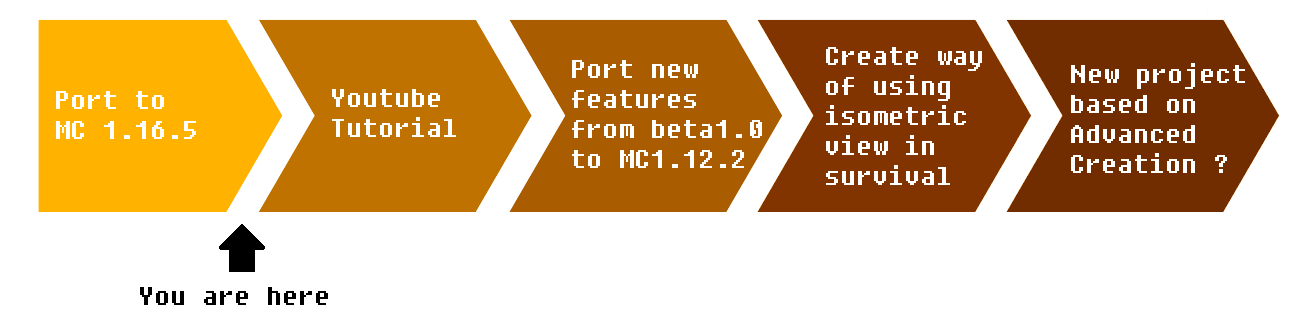
(免责声明:这仅仅是我目前计划的大致构想。我可能会随时更改时间线,并且无法保证我会完全按照此处描述的那样执行。)发布于 2022/10/27
想知道时间线上的进度如何?请在 Twitter 上关注我:
功能
如果预告片引起了您的兴趣,那么您可以在下方找到该模组功能的更详细概述。
类等距视角摄像机
类等距视角摄像机可以缩放、围绕焦点旋转,并使用常规移动键进行移动。它甚至提供了显示世界剖面的选项,允许您观察建筑物内部。
当然,等距视角需要自由的鼠标光标。这使得 HUD 叠加层中的按钮可以点击。
丰富的建造工具集
提供了一系列灵活的工具,只需几次点击即可构建结构和编辑世界。
当前可用的工具有:单块、直线、矩形、曲线、圆形、拉伸、复制、移动/删除、填充间隙、画笔、油漆桶、放置/删除植物
您可以选择是否填充矩形和圆形区域。
每个工具都会清晰地预览将被添加或删除的方块。
额外的设置允许在不依赖更高地形的情况下垂直建造。
当前可用的方向设置包括:自由模式、在垂直 XY 平面/ZY 平面建造、在水平 XZ 平面建造、跟随地面模式。
这些工具和设置可以通过快速选择轮盘菜单访问,也可以通过切换热键使用。
创建、放置与分享模板
您可以使用易于使用的选择机制为现有结构创建模板。
这些模板可以放置在世界中,并带有额外的设置,如生成的地基。
您可以在我的网站上分享您的创作,也可以下载其他玩家的创作并立即加载到您的当前游戏中。
使用易用工具编辑地形
自 beta1.0 起,EDIT 模式中提供了可用于挖掘或抬升地形,以及将整个区域平整到所需高度的工具。为了对现有地形进行更细微的调整,您可以将其平滑以形成可通行的斜坡,或将其锐化以形成悬崖。
其他功能
其他生活质量提升功能包括:重做/撤销功能和集成帮助屏幕,其中包含动画示例。
已知模组兼容性
1.12.2
Litematica:一种用于在世界中放置结构图的模组
MaLiLib :包含所有配置选项、按键绑定内容、大部分 GUI 代码以及为该模组提供支持的其他实用程序。
WorldEdit :用于世界编辑的聊天命令。
Llibrary :(自 alpha2.0 起)GUI 框架和其他在许多模组中使用的功能。
这些模组未经过全面测试。如果您在使用这些模组时遇到崩溃或其他错误,可以将描述或/和崩溃报告发送至 chryonicwolf@gmail.com
感谢 Joe21 对这些模组的测试。如果任何其他人在成功运行 Advanced Creation 与其他模组方面有经验,如果您能在评论中提及,或在 Youtube、Discord 上提及,或发送给我的邮箱:chryonicwolf@gmail.com,那将非常有帮助。
Advanced creation is a mod dedicated to making building easier, faster and more fun for both casual and hardcore minecraft players.
Find out more about this mod and share your templates on:
Do you think this is a cool idea but the implementation s*cks! Come say that to my face on Discord! I'm waiting every day to get scolded by you on how much my stuff s*cks. Please be gentle:
Want to see what I'm working on and get the latest development updates? Follow me on twitter:
Twitter handle: GraphiteGames_C
Quick overview
Here is a little trailer that shows of some of the features quickly.
News
Public release of the MC 1.12.2 Beta1.2 version with the features from MC 1.16.5(posted on 26/07/2023)
After being Patreon only for 2 month it is now released to the public here.
Important features are the new terrain editing tools in the EDIT mode: LEVEL, DIG/RAISE, SMOOTH/SHARPEN. There's also the delete bucket in the template inventory screen and FPS optimization tool and more! It also has various bug and crash fixes, ofcourse.
I have my own discord server and twitter account now! (posted on 25/10/2022)
Join the server do be up to date with new developments, give me your opinion or feedback or just discuss the mod with me and others.
Or you can follow me on twitter to see what I'm working on and get the latest updates on the development.
Port to 1.16.5 is finally complete! (posted on 25/10/2022)
Besides all the features from MC 1.12.2, it also has shiny new features, such as the new DIG/RAISE, SMOOTH/SHARPEN and LEVEL tools in EDIT mode for terrain editing (see feature list below) but also some basic features and fixes that, honestly, needed to be in the mod from the beginning.
In the future these features will also be added to MC1.12.2.
Timeline
(Disclaimer: this is a rough idea of what I'm planning on doing right now. I might change the timeline at anytime and I cannot promise I will do things exactly as I've described here.) Posted on 27/10/2022
Want to know how the progress on the timeline is going? Follow me on twitter:
Twitter handle: GraphiteGames_C
Features
If the trailer has piqued your interest, then below you can find a more detailed overview of the features in this mod.
Isometric-Like Camera
Isometric-like camera that can zoom in and out, rotate around a focus point and move around with the normal move keys. It even has the option to show a cut-through of the world that allows you to look into buildings.
Ofcourse an isometric perspective necessitates a free mouse cursor. This in turn allows the HUD Overlay to have clickable buttons.
An expansive set of building tools
An array of flexible tools are available to build structures and edit the world with only a few clicks.
Current available tools are: Single block, Line, Rectangle, Curve, Circle, Pull, Copy, Move/Delete, FillGap, Paint Brush, PaintBucket, Place/Delete Plants
You can choose whether you want the rectangle and circle filled up or not.
Each tool gives a clear preview of the blocks that are added or deleted.
Additional settings give the ability to build vertically without relying on higher terrain.
Current available directional settings are: Free, build in vertical XY plane/ZY plane, build in horizontal XZ plane, follow ground mode.
These tools and settings are available via a quick-selection wheel menu, but also via toggle hotkeys.
Create, Place & Share templates
You can create templates of existing structures with an easy to use selection mechanism.
These templates can be placed into the world with additional settings such as a generated foundation.
You can share your own creation on my website or download other player's creations and load them immediately into your current game.
Edit terrain with easy-to-use tools
Since beta1.0, there are tools available in the EDIT mode that allow you to dig or raise the terrain as well as level entire areas to the desired height. To make more subtle changes to the existing terrain you can smooth it to make a traversable slope or sharpening a slope to make cliffs.
Additional features
Additional quality of life features are: Redo/Undo functionality and an integrated help screen with animated examples.
Known Mod Compatibility
1.12.2
Litematica : A Mod for placing schematics in the world
MaLiLib : Contains all the configuration options, keybind stuff, most of the GUI code and a bunch of other utility stuff for the mods that use it.
WorldEdit : Chat commands for world editing.
Llibrary : (as of alpha2.0) GUI framework and other features used in many mods.
Theses mods were not tested exhaustively. If you experience crashes or other bugs when using these mods you can send descriptions or/and crash reports to chryonicwolf@gmail.com
Thank you to Joe21 for testing out these mods. If anybody else has experience running advanced creation with other mods successfully. It would help a lot if you could mention them in a comment here or on Youtube, Discord or send it to my email: chryonicwolf@gmail.com

下载 Advanced Creation: a mod for easy building
下载 Advanced Creation: a mod for easy building
下载 Advanced Creation: a mod for easy building
下载 Advanced Creation: a mod for easy building
下载 Advanced Creation: a mod for easy building
下载 Advanced Creation: a mod for easy building
下载 Advanced Creation: a mod for easy building
下载 Advanced Creation: a mod for easy building
下载 Advanced Creation: a mod for easy building
下载 Advanced Creation: a mod for easy building
详情:
- 将所有核心模组(coremods)切换为 Mixin,以提升与其他模组的兼容性。感谢 Vladimir4757 的反馈。
- 修复了在 GUI 覆盖层按钮上空左键点击时导致的崩溃问题。
关于这个资源的讨论、问题反馈与使用心得
还没有讨论,来发第一帖吧
你是这个资源的作者?登录后可认领此资源。
相似资源
 模组

显示你正在注视的方块的信息。(适用于 Minecraft 1.16+ 的 Hwyla/Waila 分支)
 模组
使用 JavaScript 编辑配方、添加自定义物品、编写世界事件!
 模组

查看物品与配方
 模组
在游戏画面角落显示附近世界地形、玩家、生物和实体的地图。可创建路径点,帮助你找到标记过的位置。
 模组
AE2:一款流行的自动化与存储模组
 模组
那是什么?一个 Waila/Hwyla 的分支。
评论 0
登录后参与评分
还没有评论,来抢沙发吧