是否曾对 Minecraft 背包那可怜兮兮的小容量感到恼火,对仅 64 个物品的堆叠上限感到愚蠢至极,以及因背包迅速填满而无法在大型整合包中正常游戏而感到疲惫不堪?
那么,这个模组正是为你准备的!
适用于 Minecraft Forge 1.20.1
该模组的代码由 Zanckor 通过 Arcane Studios 作为定制委托开发,虽然我不是程序员,但该项目完全由我出资资助,且概念由我原创。
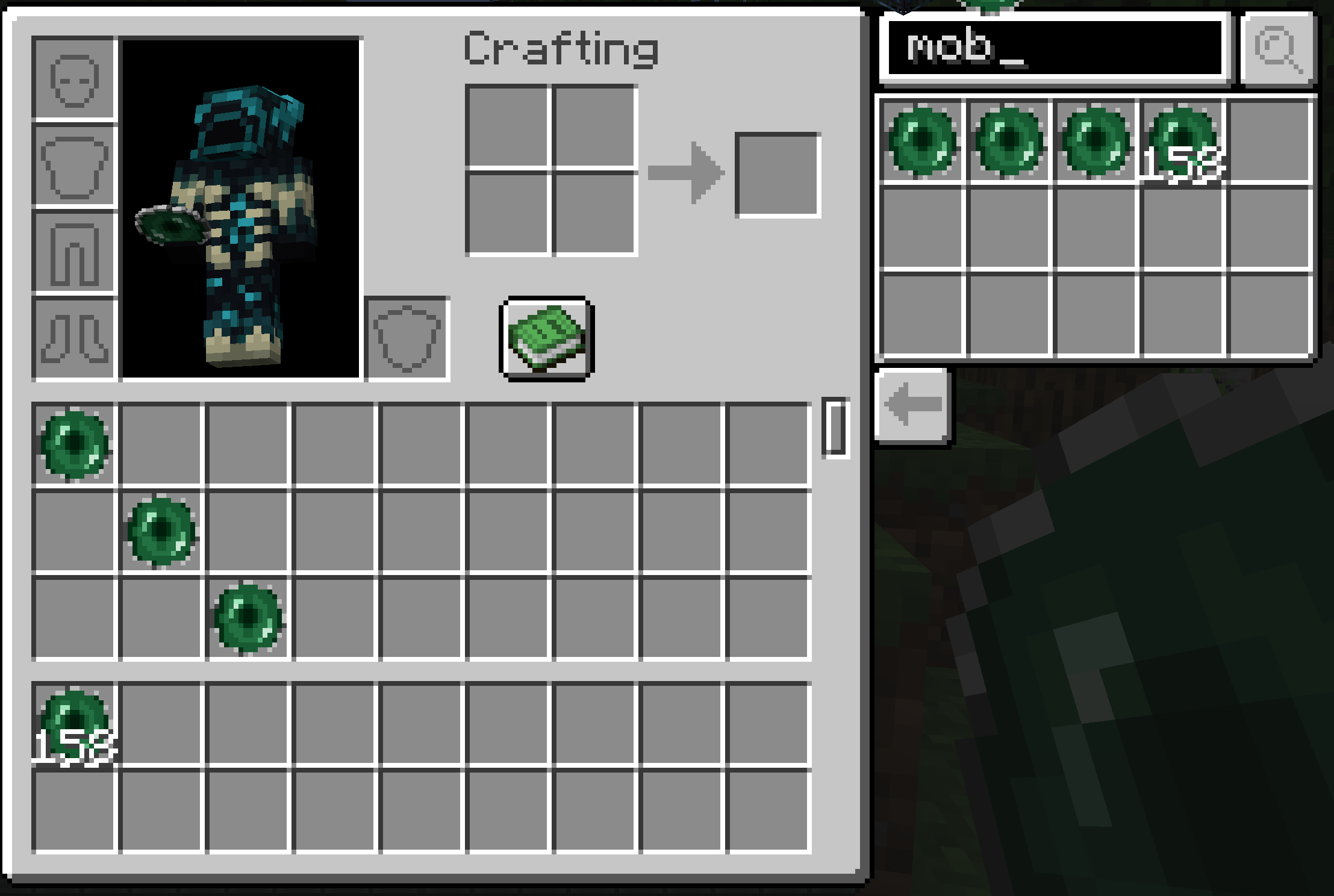
上述截图展示了一些功能。
1 - 堆叠数量大于 64!默认情况下,该模组将堆叠上限设置为 50,000 个物品。请注意,原有的 64 个堆叠不会自动合并为单个大堆叠,你需要通过移动它们或使用背包整理器来进行合并。这是一个已知问题,如果我们能找到解决方法,可能会修复它。另外请注意,在创造模式下,超过 64 的堆叠存在错误,可能会消失或无法正常工作。因此在创造模式中,只需选择单个方块而不是整个堆叠即可。不过这不是个问题,因为在创造模式下,你只需要一个方块就可以放置它。
要增加或减少此堆叠大小,请关闭你的世界,打开存档文件,进入 ServerConfig(服务器配置),找到名为 limitStackSize 的字段并将其设置为你想要的数值,然后保存。之后你可以重新打开你的世界,堆叠上限就会变成你设置的值。
2 - 一个新物品!捕获怪物的道具 Capture Mob。它的设计看起来像是一颗被铁环绕的末影珍珠。左键点击怪物以捕获它,右键点击以将其重新生成。这适用于任何实体,所以如果你愿意,甚至可以用这个装置来捕获船只或矿车!请注意, crafting 配方尚未编码完成,当里面有怪物时,我可能会添加纹理变化以更清晰地显示这一点。
3 - 搜索栏
拥有大背包后,寻找物品可能会很困难!因此,你可以输入你想要的物品名称,当你滚动时,它会出现在侧边栏中供你抓取并放入快捷栏!
4 - 副快捷栏
虽然在使用带有背包的物品(如箱子)时不显示此功能,但这是你可以放置那些不想丢失追踪的物品的位置!它们不受滚动操作的影响,并且随时方便抓取。这也可以用作额外的背包槽位,但对于整理大背包、建造或经常使用但不介意其占用背包空间的工具来说,它极其有用。没有任何物品会自动进入这个副快捷栏。
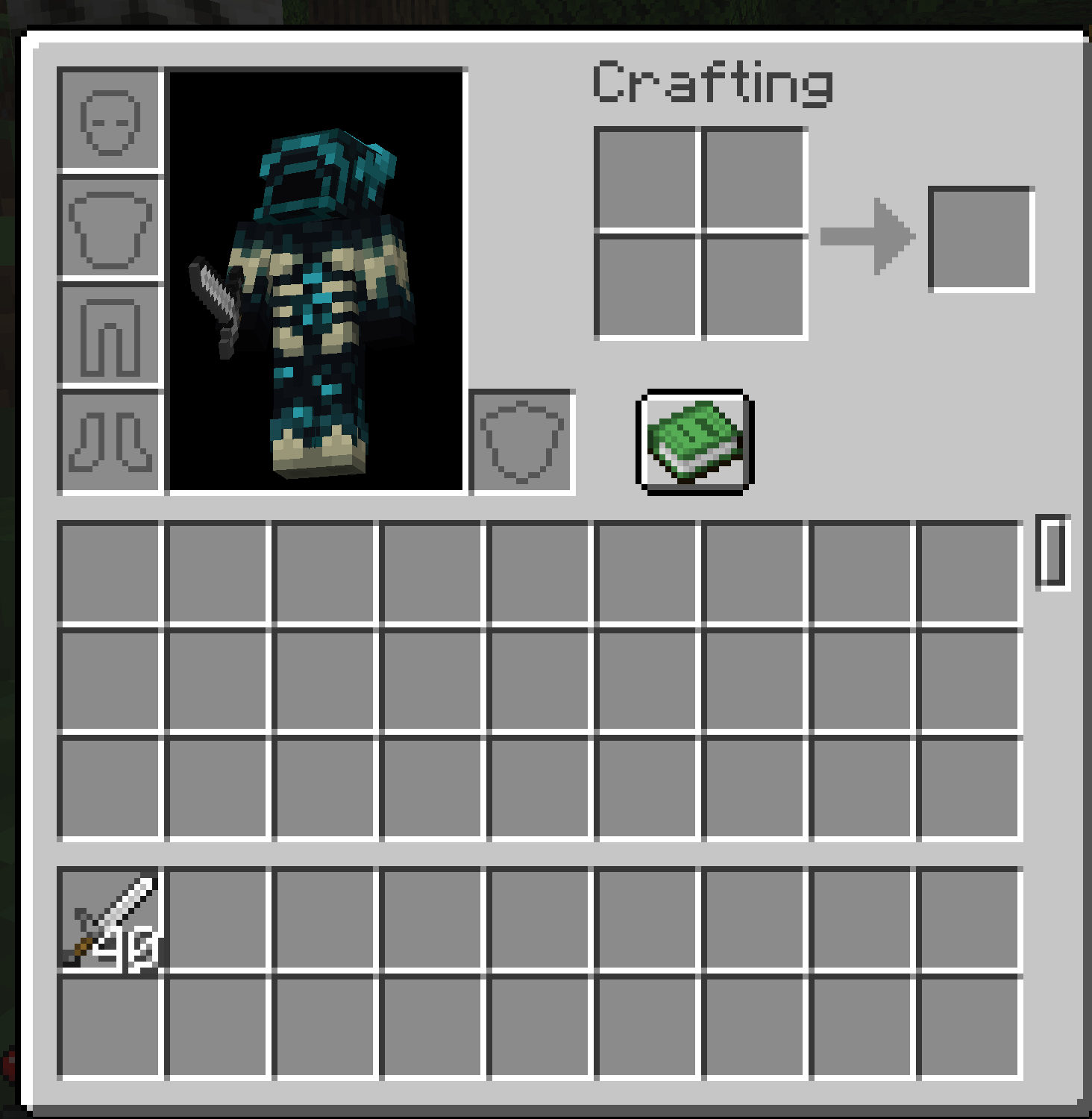
下一张截图展示了该模组在处理工具和武器时的另一个极其有用的功能!同类型的武器现在可以堆叠了!但这还不是最棒的部分。当你的堆叠中的一个工具损坏时,堆叠数量会减一!所以如果你有一堆 40 把剑,如上图所示,你用其中一把砍碎了僵尸的头颅,现在你就剩下 39 把剑的堆叠,可以继续随心所欲地砍杀那些讨厌的僵尸!这对所有工具都有效!盔甲也可以这样堆叠,但它不会堆叠在盔甲槽位中,但你仍然可以在背包中堆叠几套盔甲以备更换,而不会占用太多空间!
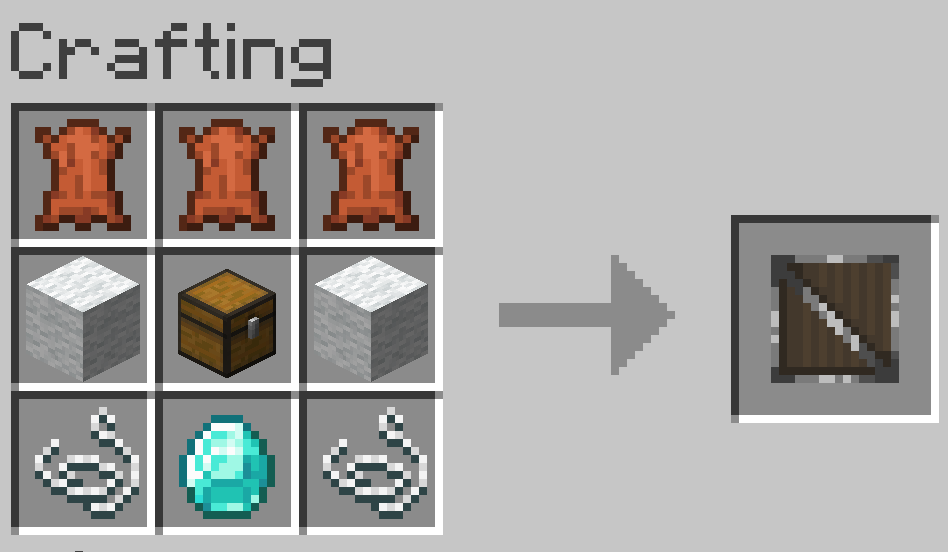
最后,有一个物品你可以在箱子里找到、向村民购买或自己制作,它可以为你的背包增加更多槽位!合成配方如下:
*注意,Capture Mob 的合成配方将在该物品完全加入模组后添加
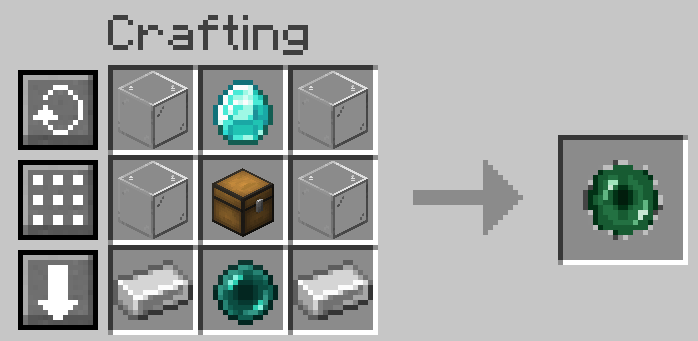
欢迎向我反馈任何错误或提出改进建议!
你可以在你的整合包中使用此模组,即使整合包本身不在 CurseForge 上(该模组也将发布在 Modrinth 上)
已知问题
- 最新版本因模组冲突导致崩溃,尚未确定是哪个模组引起的
- 前一个版本有时会在堆叠超过一组时删除火把,但更新版与某个模组存在冲突(仍在排查是哪个模组)
Ever gotten annoyed with how pathetically small the Minecraft inventory is, and how stupid stacks of just 64 is, and gotten tired of your inventory filling up SO fast you can't even play the game in larger modpacks?
Then this is the mod for you!
For Minecraft Forge 1.20.1
The mod code was done for me by Zanckor through Arcane Studios as a commission, so while I am not a coder, this was fully funded by me and the concept created by me.
The above screenshot shows a few things.
1 - Stacks are larger than 64! By default, the mod is set to a stack size of 50,000 items. Note that the stacks of 64 do not automatically turn into a single stack, and you have to combine them by moving them or using an inventory sorter. This is a known bug, and may be fixed if we can figure out a waye. Also note stacks bigger than 64 are bugged in Creative mode, and may disappear or not work so in creative just pick a single block instead of the whole stack. This, however, isn't a problem since, in creative, you only need one of a block to place it anyway.
To increase or decrease this possible this stack size, close your world, open your save file, go to ServerConfig and find the field that says limitStackSize and set it to whatever you want, and save. You can then re open your world, and that'll be whatever you want it to be.
2 - A new item! The Capture Mob. It's designed to look like an ender pearl surrounded by iron. Left click the mob to capture it, right click to spawn it back in. This works on any entity so you can even use this device on a boat or a mine cart if you want! Note that the crafting recipe is not coded in yet, and I may add a texture change when it has a mob in it to make it more clear that there is.
3 - Search Field
With a big inventory, finding items may be hard! So, you can type in the thing you want, and as you scroll it will appear in that side thing for you to grab and put in your hot bar!
4 - Secondary Hot Bar
While this does not show when you are in an item with an inventory like a chest, this is where you can put items you do not want to lose track of! They will not be effected by scrolling, and are right there for ease of grabbing. This can also be used as some extra inventory slots, but is insanely useful for sorting your big inventory or when you are building or if there are tools you use frequently but not enough that you don't mind them not clogging your inventory. No items go into this second hot bar automatically.
This next screenshot displays something extremely useful this mod does with tools and weapons! Weapons of the same type will now stack! But that isn't the best thing. When one tool in your stack breaks, the stack goes down by one! So if you have a stack of 40 swords, like shown above, and you break one against a zombie's skull, you now have a stack of 39 swords, and can keep hacking away at those pesky zombies to your heart's content! This works for all tools! Armor can stack like this as well, however, it does not stack in the armor slot, but you can still have a few sets of armor stacked for replacing when armor breaks in your inventory without using up too much space!
And finally, there is an item you can find in chests, buy from villagers, or craft yourself that allows you to add more slots to your inventory! The crafting recipe is seen below:
*Note that the crafting recipe for the Capture Mob item will be added once that is in the mod fully
Feel free to comment any bugs to me, or even suggestions for improvements!
You MAY use this in your modpacks, even if the modpack itself is not on CurseForge (This mod will be on Modrinth too)
Known Issues
-Crashes due to a mod conflict in the newest version, have not figured out which mod yet
-The previous version sometimes deletes torches if you have over a stack, but the update has a conflict with a mod (Still working out which mod)


 模组

 模组
 模组

 模组
 模组
 模组
评论 0
登录后参与评分
还没有评论,来抢沙发吧