PvP Toggle
为 NeoForge 服务器提供可控的玩家对战(PvP)功能。
源代码
·
Brassworks SMP
PvP Toggle 是一款轻量级的 Minecraft 模组,让玩家能够自主控制自己的 PvP 状态,而无需引入不必要的复杂性。玩家可以启用或禁用 PvP、管理针对特定玩家的例外情况,并通过紧凑的姓名牌图标立即查看谁可以被攻击。
该模组专为基于 NeoForge 的 Minecraft 1.21.1 设计。所有核心功能均由服务器端控制,并通过指令提供访问权限。图形化的 BrassUI 管理菜单完全是可选的。
特性
- 使用简单指令启用或禁用 PvP。
- 可配置 PvP 保护生效前的延迟时间。
- 针对个别玩家阻断或允许 PvP。
- 小型姓名牌图标显示其他玩家是否可被攻击。
- 可选的防击退和防玩家推挤保护。
- 用于强制设置玩家 PvP 状态的后台指令。
- 可配置的受保护交互被阻断时的反馈信息。
- PvP 数据持久化存储,每个世界或服务器独立保存。
- 与 Simple Voice Chat 集成,防止姓名牌图标重叠。
- 可选的 BrassUI 管理菜单,无需服务器端 UI 依赖。
- 兼容使用原始图标协议的传统 PvP Toggle 客户端。
可选 PvP 管理菜单
运行 /pvp menu 打开可选的 BrassUI 管理界面。
该菜单:
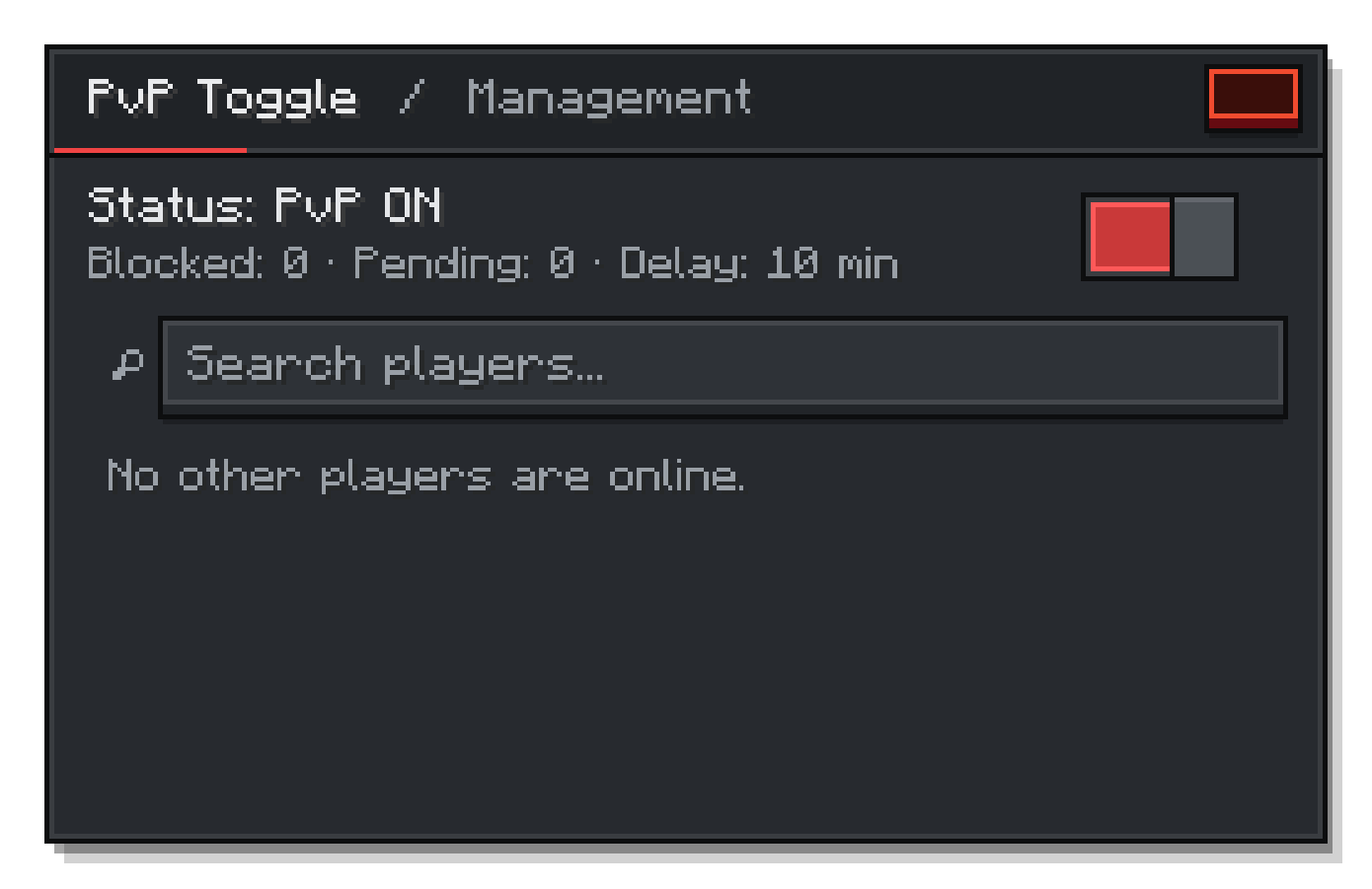
要使用此 UI,仅在想要使用此菜单的客户端上需要安装兼容的 KotlinForForge。如果缺少这些依赖项,/pvp menu 将显示可用性提示,同时所有常规 PvP 指令仍可正常工作。
图标
PvP Toggle 会在玩家姓名牌旁渲染小型图标:
 PvP On — 该玩家可被攻击。
 PvP Off — 对该玩家的 PvP 已被阻断。
玩家指令
| 指令 |
描述 |
/pvp on |
立即启用 PvP。 |
/pvp off |
在配置的延迟后禁用 PvP。 |
/pvp block <player> |
阻断你与该玩家之间的 PvP。 |
/pvp unblock <player> |
恢复与之前被阻断玩家的 PvP。 |
/pvp status |
显示你当前的 PvP 状态。 |
/pvp menu |
打开可选的 BrassUI 管理菜单。 |
/pvp help |
列出可用的 PvP 指令。 |
管理员指令
管理员指令需要 2 级权限。
| 指令 |
描述 |
/pvpadmin forceon <player> |
强制某玩家开启 PvP。 |
/pvpadmin forceoff <player> |
强制某玩家关闭 PvP。 |
/pvpadmin reload |
重新加载已存储的 PvP 数据。 |
配置
PvP Toggle 会创建服务器端配置文件以控制保护行为。
| 选项 |
描述 |
默认值 |
one-sided-toggle |
仅当 /pvp off 激活时,保护玩家免受 incoming PvP。 |
false |
take-effect-time |
/pvp off 生效前的延迟时间(分钟)。 |
10 |
cancel-pending-off-on-attack |
当玩家攻击其他玩家时,取消待处理的保护。 |
true |
send-action-messages |
当 PvP 伤害、击退或推挤被阻断时发送反馈消息。 |
false |
block-knockback |
在受保护交互期间阻断仅造成击退效果的武器和技能。 |
true |
block-player-pushing |
防止受保护的玩家被其他玩家物理推挤。 |
true |
安装
服务端
- 为 Minecraft 1.21.1 安装 NeoForge。
- 将 PvP Toggle 放入服务器的
mods 目录。
- 启动服务器一次以生成配置文件。
服务端不需要安装 KotlinForForge。
客户端
在客户端安装 PvP Toggle 以显示姓名牌图标。
若要使用图形化管理菜单,还需额外安装:
- BrassUI(自动包含在模组中)
- 兼容版本的 KotlinForForge
未安装 PvP Toggle 或缺少可选 UI 依赖的客户端仍然可以连接,因为网络通道是可选的。使用版本 1 协议的传统客户端仍保留图标支持。
Simple Voice Chat 支持
当 Simple Voice Chat 的姓名牌图标可见时,PvP Toggle 会自动移动其图标以防止重叠。当语音聊天图标隐藏时,PvP 图标会恢复至正常位置。Simple Voice Chat 保持可选。
许可证
PvP Toggle 根据 MIT License 许可。您可以根据该许可证的条款使用、修改和重新分发本软件。
致谢
链接
PvP Toggle
Controlled player-versus-player combat for NeoForge servers.
Source Code
·
Brassworks SMP
PvP Toggle is a lightweight Minecraft mod that gives players control over their PvP status without adding unnecessary complexity. Players can enable or disable PvP, manage exceptions for individual players, and immediately see who can be attacked through compact nametag icons.
The mod is designed for Minecraft 1.21.1 with NeoForge. All core functionality is server-controlled and remains available through commands. The graphical BrassUI management menu is entirely optional.
Features
- Enable or disable PvP with simple commands.
- Configurable delay before PvP protection becomes active.
- Block or allow PvP with individual players.
- Small nametag icons showing whether another player can be attacked.
- Optional protection against knockback-only attacks and player pushing.
- Administrative commands for forcing player PvP states.
- Configurable feedback when a protected interaction is blocked.
- Persistent PvP data stored separately for each world or server.
- Simple Voice Chat integration that prevents nametag icons from overlapping.
- Optional BrassUI management menu with no required server-side UI dependency.
- Compatibility with legacy PvP Toggle clients using the original icon protocol.
Optional PvP Management Menu
Run /pvp menu to open the optional BrassUI management screen.
The menu:
For the UI a compatible KotlinForForge installation are required only on clients that want to use this menu. If they are missing, /pvp menu displays an availability message while every regular PvP command continues to work.
Icons
PvP Toggle renders small icons beside player nametags:
- PvP On — The player can be attacked.
- PvP Off — PvP against the player is blocked.
Player Commands
| Command |
Description |
/pvp on |
Enables PvP immediately. |
/pvp off |
Disables PvP after the configured delay. |
/pvp block <player> |
Blocks PvP between you and another player. |
/pvp unblock <player> |
Allows PvP with a previously blocked player again. |
/pvp status |
Shows your current PvP status. |
/pvp menu |
Opens the optional BrassUI management menu. |
/pvp help |
Lists the available PvP commands. |
Admin Commands
Administrative commands require permission level 2.
| Command |
Description |
/pvpadmin forceon <player> |
Forces PvP on for a player. |
/pvpadmin forceoff <player> |
Forces PvP off for a player. |
/pvpadmin reload |
Reloads the stored PvP data. |
Configuration
PvP Toggle creates a server-side configuration for controlling protection behavior.
| Option |
Description |
Default |
one-sided-toggle |
Only protects the player from incoming PvP when /pvp off is active. |
false |
take-effect-time |
Delay in minutes before /pvp off becomes active. |
10 |
cancel-pending-off-on-attack |
Cancels pending protection when the player attacks another player. |
true |
send-action-messages |
Sends feedback when PvP damage, knockback, or pushing is blocked. |
false |
block-knockback |
Blocks knockback-only weapons and effects during protected interactions. |
true |
block-player-pushing |
Prevents protected players from being physically pushed by other players. |
true |
Installation
Server
- Install NeoForge for Minecraft 1.21.1.
- Place PvP Toggle in the server's
mods directory.
- Start the server once to generate the configuration.
KotlinForForge is not required on the server.
Client
Install PvP Toggle on the client to display nametag icons.
To use the graphical management menu, additionally install:
- BrassUI (Automatically included in the Mod)
- A compatible KotlinForForge version
Clients without PvP Toggle or without the optional UI dependencies may still connect because the network channels are optional. Legacy clients using protocol version 1 retain icon support.
Simple Voice Chat Support
When Simple Voice Chat nametag icons are visible, PvP Toggle automatically moves its icons to prevent overlap. The PvP icons return to their normal position when voice chat icons are hidden. Simple Voice Chat remains optional.
License
PvP Toggle is licensed under the MIT License. You may use, modify, and redistribute the software under the terms of that license.
Credits
Links


 模组

 模组
 模组

 模组
 模组
 模组
评论 0
登录后参与评分
还没有评论,来抢沙发吧