AFK Guardian 允许你在游戏过程中离开电脑,而不会回到死亡画面。当你处于 AFK(挂机)状态时,一旦你的角色受到伤害,它会立即截取一张截图、断开与服务器的连接,并通过 Telegram 将截图发送到你的手机上——这样无论是苦力怕、其他玩家、岩浆还是饥饿,都不会悄无声息地结束你的游戏会话。
而且它是双向交互的:通过 Telegram,你可以查看自己的状态、获取实时截图,或者将自己从服务器踢出——所有这些操作都可以从手机上的任意服务器进行。
?️ 仅客户端。你只需在你的客户端安装即可;服务器端无需任何配置。适用于你加入的任何服务器——无需管理员权限。
功能介绍
- AFK 检测 — 在你设定的时间内没有键盘/鼠标输入 → 开始监控。
- 伤害监控 + 自动断开 — 在 AFK 状态下受到伤害时,它会截取一张截图,立即离开服务器,然后上传该截图。(顺序为 捕获 → 断开 → 上传,因此退出永远不会被网络阻塞。)
- 向 Telegram 发送实时截图 — 在危险发生时,或随时请求时。
- 状态更新 — 在 AFK 开始时以及按你设定的时间间隔,报告生命值、饥饿度和坐标。
- 饥饿与断开警报 — 当饥饿值较低时发出警告,如果在你离开期间服务器将你踢出,也会通知你。
通过手机控制
在任何地方给机器人发消息:
/status — 生命值、饥饿度、位置、AFK 时间/screenshot — 立即获取实时截图/leave — 从服务器断开自己/id — 获取你的聊天 ID(用于设置阶段)/help — 列出所有可用命令
支持有或无 Telegram 使用
将机器人令牌留空,你仍然可以获得受伤时自动断开的安全保障。Telegram 仅在此基础上增加警报和远程控制功能。
设置步骤(Telegram,约 2 分钟)
- 在 Telegram 中,向 @BotFather 发送消息
/newbot,并复制它提供的机器人令牌——这是免费的。
- 在 Minecraft 中,打开 Mods → AFK Guardian → Config(或编辑
config/afkguardian-client.toml),并将令牌粘贴到 telegram.botToken 字段中。
- 加入一个世界并向你的机器人发送
/id ——它会回复你的聊天 ID。(你必须处于游戏中才能执行此操作。) 将该数字填入 telegram.chatId。
- 完成。等待达到 AFK 阈值(默认为 5 分钟),你就会收到 "检测到 AFK" 的消息。
可调整的设置
在游戏内配置界面或配置文件中:可以调整 AFK 延迟、被视为危险的最低生命值阈值、是否附带截图、低饥饿警报级别、定期更新间隔,以及是否启用自动断开。
诚实的限制——请务必阅读
- 爆发击杀(例如一把锋利的剑)可以在一秒钟内将你从满血打到死亡——比任何模组反应都要快。这能可靠地保护你免受怪物、岩浆、坠落、溺水和饥饿的伤害,但对于 PvP 而言,它是一种 快速警报 + 部分防御,而非无敌护盾。
- 截图需要游戏正在渲染——在 AFK 期间,请以窗口化或无边框模式运行 Minecraft。在独占全屏模式下,某些 GPU 在窗口失去焦点时会停止更新帧,可能导致截图变黑或过时。
- 一些 PvP/混乱服务器会将“受伤瞬间登出”视为 “战斗日志记录” 并可能对此进行惩罚——在这些服务器上关闭自动断开功能,转而依赖警报功能。
要求
Minecraft 1.21.1 · NeoForge 21.1.x · 仅限客户端 · MIT 许可证。
? 发现错误或有任何想法?请在源码仓库提交 Issue——非常欢迎反馈。![The token can be put into the config file ]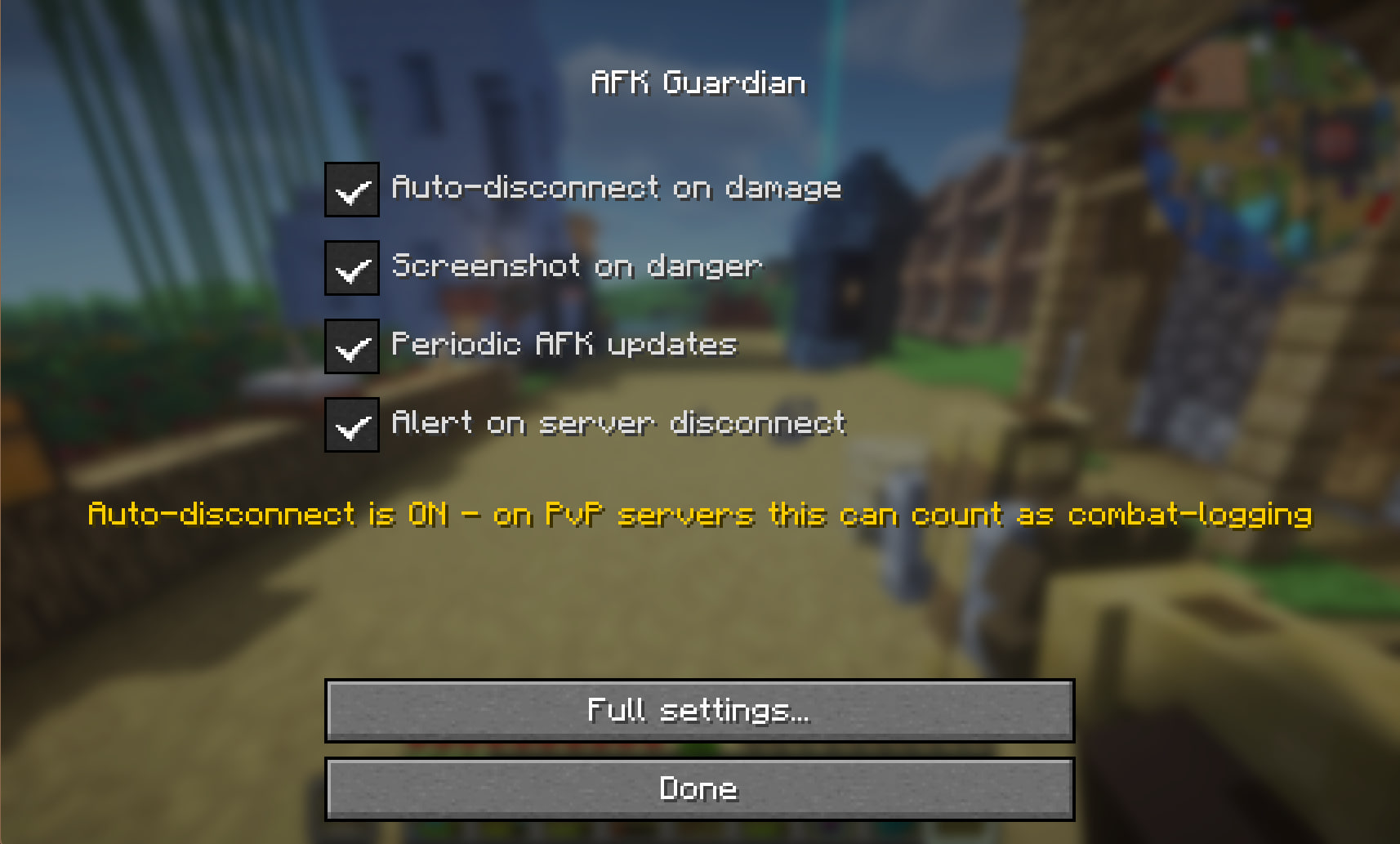
AFK Guardian lets you walk away from your PC mid-game without coming back to a death screen. The moment something starts hurting your character while you're AFK, it grabs a screenshot, disconnects you from the server, and sends the screenshot straight to your phone over Telegram — so a creeper, another player, lava, or starvation never quietly ends your session.
And it's two-way: from Telegram you can check your status, pull a live screenshot, or yank yourself off the server — all from your phone, on any server you join.
?️ Client-side only. You install it on your client; nothing goes on the server. Works on every server you join — no admin needed.
What it does
- AFK detection — no keyboard/mouse input for a time you choose → monitoring starts.
- Damage watch + auto-disconnect — take damage while AFK and it captures a screenshot, leaves the server instantly, then uploads the shot. (Order is capture → disconnect → upload, so leaving is never blocked by the network.)
- Live screenshots to Telegram — on danger, or any time you ask for one.
- Status updates — health, hunger and coordinates when AFK starts and on a schedule you set.
- Hunger & disconnect alerts — a heads-up when hunger runs low, and if the server drops you while you're away.
Control it from your phone
Message your bot from anywhere:
/status — health, hunger, position, AFK time/screenshot — pull a live screenshot right now/leave — disconnect yourself from the server/id — get your chat id (used during setup)/help — list the commands
Works with or without Telegram
Leave the bot token empty and you still get the auto-disconnect-on-damage safety net. Telegram only adds the alerts and remote control on top.
Setup (Telegram, ~2 minutes)
- In Telegram, message @BotFather, send
/newbot, and copy the bot token it gives you — it's free.
- In Minecraft, open Mods → AFK Guardian → Config (or edit
config/afkguardian-client.toml) and paste the token into telegram.botToken.
- Join a world and send your bot
/id — it replies with your chat id. (You must be in-game for this.) Put that number into telegram.chatId.
- Done. Walk away for the AFK threshold (default 5 min) and you'll get the "AFK detected" message.
Settings you can tune
In the in-game config screen or the config file: AFK delay, the health-drop threshold that counts as danger, whether to attach a screenshot, the low-hunger alert level, periodic-update interval, and whether to auto-disconnect at all.
Honest limitations — please read
- A burst kill (e.g. a sharp sword) can drop you from full to dead in under a second — faster than any mod can react. This reliably saves you from mobs, lava, fall, drowning and starvation, and is a fast alert + partial defense against PvP — not an invincibility cloak.
- Screenshots need the game to be rendering — run Minecraft windowed or borderless while AFK. In exclusive fullscreen some GPUs stop updating the frame when the window isn't focused, which can produce a black or stale screenshot.
- Some PvP/anarchy servers treat an instant logout-on-damage as "combat logging" and may punish it — turn auto-disconnect off on those servers and rely on the alerts instead.
Requirements
Minecraft 1.21.1 · NeoForge 21.1.x · client-side · MIT licensed.
? Found a bug or have an idea? Open an issue on the source repo — feedback very welcome.![The token can be put into the config file ]


 模组

 模组
 模组

 模组
 模组
 模组
评论 0
登录后参与评分
还没有评论,来抢沙发吧