
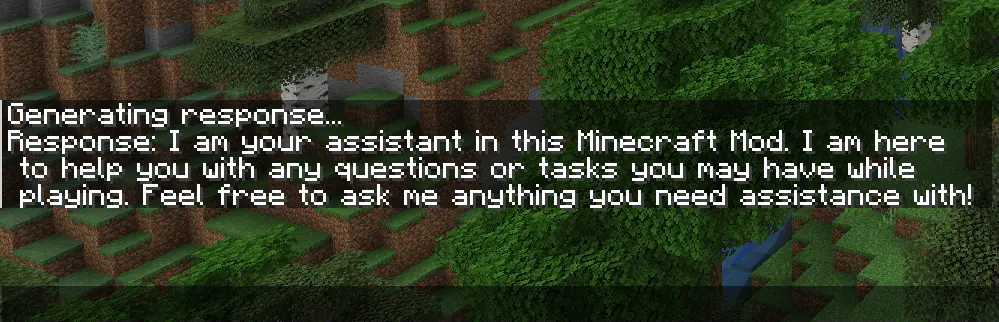
这款完全客户端模组的命令允许你在游玩 Minecraft 时与 ChatGPT 进行对话。它在你加入服务器时也有效。通过新增的 /ask 命令,你可以提出任何问题并在 Minecraft 聊天栏中接收回答:

在最新版本中,你现在还可以向 ChatGPT 上传图片。当你截取屏幕截图时,你会看到一个名为“Send to OpenAI”(发送到 OpenAI)的按钮。接着输入你的问题并回车。请确保使用能够处理图片的模型,例如 gpt-4o-mini。如果你是在最新版本的模组发布之前使用的,则需要将你的模型从 gpt-3.5-turbo 更改为 gpt-4o-mini。


设置指南
要使用该模组,首先你需要不带任何参数输入 /config 以打开配置界面。在那里粘贴你的 OpenAI API 密钥并按保存。你也可以使用 /config OPENAI_API_KEY <Your API key> 将你的客户端连接到 OpenAI API。你的 API 密钥可以在 这里 获取。

请确保你的 OpenAI 账户中有余额。默认模型(gpt-4o-mini)实际上不需要花费太多钱,但你仍然需要至少 $0.01 的余额才能使用 API。你可以在 这里 为你的账户充值。
配置
如果你想使用除 gpt-4o-mini 以外的模型(例如 gpt-4o),你可以通过在配置界面中更改模型名称来配置它,或者输入 /config AI_MODEL <AI model you want to use>。请记住,更好的模型也更昂贵。你可以在此处查看所有可用模型 here。

要更改 ChatGPT 的角色,你必须在配置界面的 role 字段中更改句子,或者输入 /config ROLE_OF_THE_AI <Role the AI should play>。
默认角色是:
"You are an assistant implemented in a Minecraft mod to help players. You provide short answers with a maximum length of 4 short sentences."

This fully client side mod adds a command that allows you to communicate with ChatGPT while playing Minecraft. It also works while you are playing on a Server. With the added /ask command, you can ask any question you want and receive an answer in the Minecraft chat:
With the newest Version, you can now also upload pictures to ChatGPT. When you take a screenshot, you can see a button called "Send to OpenAI". Now you type in your question an hit enter. Make sure you use a model wich can process pictures like gpt-4o-mini if you have used the mod before the latest version, you have to change your model from gpt-3.5-turbo to gpt-4o-mini.
Setup Guide
To use the mod, you first need to type /config without any arguments to open the config screen. There you have to paste your OpenAI API Key and hit save. You can also use /config OPENAI_API_KEY <Your API key> to connect your client to the OpenAI API. Your API key is obtainable here.
Make sure you have some funds in your OpenAI account. The default model (gpt-4o-mini) doesn’t really require any money, but you still need a minimum balance of $0.01 to use the API. You can add funds to your account here
Configuration
If you want to use a model other than gpt-4o-mini (e.g., gpt-4o), you can configure it by changing the name of the model in the config screen or you type /config AI_MODEL <AI model you want to use>. Keep in mind that better models are also more expensive. You can view all available models here.
To change the role of ChatGPT, you have to change the sentance in the role field at the config screen or you type /config ROLE_OF_THE_AI <Role the AI should play>
. The default role is:
"You are an assistant implemented in a Minecraft mod to help players. You provide short answers with a maximum length of 4 short sentences."

下载 AIChat
下载 AIChat
下载 AIChat
下载 AIChat
下载 AIChat
下载 AIChat
下载 AIChat
下载 AIChat
下载 AIChat
下载 AIChat
抱歉,上一个 1.21.5 版本偶尔会导致崩溃。现在应该已经修复了 :)
关于这个资源的讨论、问题反馈与使用心得
还没有讨论,来发第一帖吧
你是这个资源的作者?登录后可认领此资源。
相似资源
 模组

显示你正在注视的方块的信息。(适用于 Minecraft 1.16+ 的 Hwyla/Waila 分支)
 模组
使用 JavaScript 编辑配方、添加自定义物品、编写世界事件!
 模组

查看物品与配方
 模组
在游戏画面角落显示附近世界地形、玩家、生物和实体的地图。可创建路径点,帮助你找到标记过的位置。
 模组
AE2:一款流行的自动化与存储模组
 模组
那是什么?一个 Waila/Hwyla 的分支。
评论 0
登录后参与评分
还没有评论,来抢沙发吧