注意!我正在开发一个名为 Guardian 的模组,它将整合 Alfred 的功能,并包含其他用于服务器管理的工具。目前我正在为其制作稳定版,因为它当前正在我的 Minecraft 服务器上进行测试。
本模组目前处于 ALPHA(早期测试)阶段。在达到稳定版本之前,将会发生破坏性更新。更改版本前请务必查看更新日志!!!
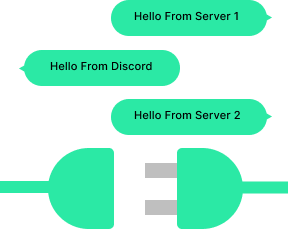
Alfred 是 Minecraft 游戏体验的一项突破性新增内容,旨在无缝增强玩家跨多个 Minecraft 服务器的连接性与沟通能力。该模组引入了一套强大的系统,促进不同 Minecraft 服务器之间的玩家聊天信息交换,并与 Discord 无缝集成,从而创建一个统一且充满活力的社区。
主要功能:
多服务器通信:
Forge 联盟、协调策略,或轻松与不同 Minecraft 服务器上的朋友聊天。我们的模组打破了服务器之间的壁垒,允许玩家无论身处哪个服务器,都能进行对话并分享体验。
实时同步:
享受实时聊天同步带来的便利,确保消息在不同服务器之间即时转发。
Discord Bot 集成:
通过 Minecraft 服务器与 Discord 之间的无缝集成,将社区的沟通提升至新高度。此模组允许自动将在游戏内的聊天信息转发至指定的 Discord 频道,使两个平台保持同步。Discord 成员也可以与游戏内玩家互动,创造一个统一的沟通环境。
兼容性与性能:
专为 Fabric 设计,我们的模组轻量、高效,并且与广泛的 Minecraft 服务器配置兼容。在享受增强型通信功能的同时,体验流畅的性能和对服务器资源的最小影响。
示例配置文件:alfred.json
{
  "Bot": {
    "token": "YOUR_DISCORD_BOT_TOKEN",
    "channel": "YOUR_DISCORD_CHANNEL_ID"
  },
  "WebSocket": {
    "host": "192.168.1.1",
    "port": 9090
  },
  "Generic": {
    "name": "Your Minecraft Server",
    "mode": "STANDALONE"
  }
}
各选项说明:
Bot:
token:在此处提供你的 Discord Bot 令牌。将 "YOUR_DISCORD_BOT_TOKEN" 替换为你的 Discord Bot 生成的实际令牌。这允许模组连接到指定的 Discord Bot 以进行通信。仅在 WebSocket 类型设置为 "SERVER" 时设置此项。
channel:将 "YOUR_DISCORD_CHANNEL_ID" 替换为你希望在游戏内聊天信息被转发的 Discord 频道 ID。模组将在此频道中发送和接收消息。
WebSocket:
host:提供你的 WebSocket 服务器的 IP 地址或完全限定域名 (FQDN)。
port:设置你的 WebSocket 服务器使用的端口号。在此示例中为 9090。请根据你的 WebSocket 服务器配置的端口进行调整。
Generic:
name:自定义你的 Minecraft 服务器名称。将 "Your Minecraft Server" 替换为你想要的名称。此名称将用于各种通信中,便于识别消息来源。
mode:指定 WebSocket 连接的模式。将其设置为 "SERVER" 时,它将成为所有 "CLIENT" 的主要通信中心,Bot 将从此处运行。使用 "STANDALONE" 则作为通用的 Discord Bot 运行。
NOTICE! There is a mod that I am working on that incorperates Afreds features into it while having other tools for server administration called Guardian. I am working on a stable release for it as it is currently in testing on my minecraft server.
THIS MOD IS CURRENTLY IN ALPHA. THERE WILL BE BREAKING CHANGES UNTIL STABLE. CHECK CHANGELOGS BEFORE CHANGING VERSIONS!!!
Alfred is a groundbreaking addition to the Minecraft gaming experience, designed to enhance player connectivity and communication across multiple Minecraft servers seamlessly. This mod introduces a robust system that facilitates the exchange of player chats among various Minecraft servers while also integrating seamlessly with Discord, creating a unified and dynamic community.
Key Features:
Multi-Server Communication:
Forge alliances, coordinate strategies, or simply chat with friends across different Minecraft servers effortlessly. Our mod breaks down the barriers between servers, allowing players to engage in conversations and share experiences regardless of the server they are currently on.
Real-Time Synchronization:
Enjoy the benefits of real-time chat synchronization, ensuring that messages are instantly relayed between servers.
Discord Bot Integration:
Take your community's communication to the next level with seamless integration between Minecraft servers and Discord. This mod allows for the automatic relay of in-game chats to specified Discord channels, keeping both platforms in sync. Discord members can also interact with players in-game, creating a unified environment for communication.
Compatibility and Performance:
Designed specifically for Fabric, our mod is lightweight, efficient, and compatible with a wide range of Minecraft server setups. Experience smooth performance and minimal impact on server resources while enjoying enhanced communication features.
Example Config: alfred.json
{
  "Bot": {
    "token": "YOUR_DISCORD_BOT_TOKEN",
    "channel": "YOUR_DISCORD_CHANNEL_ID"
  },
  "WebSocket": {
    "host": "192.168.1.1",
    "port": 9090
  },
  "Generic": {
    "name": "Your Minecraft Server",
    "mode": "STANDALONE"
  }
}
Explanation of Each Option:
Bot:
token: This is where you provide the token for your Discord bot. Replace "YOUR_DISCORD_BOT_TOKEN" with the actual token generated for your Discord bot. This allows the mod to connect to the specified Discord bot for communication. Only set this if you are running the mod with WebSocket type set to "SERVER"
channel: Replace "YOUR_DISCORD_CHANNEL_ID" with the Discord channel ID where you want in-game chats to be relayed. The mod will send and receive messages in this channel.
WebSocket:
host: Provide the IP address or fully qualified domain name(FQDN) of your WebSocket server.
port: Set the port number your WebSocket server is using. In this example, it's 9090. Adjust it to match the port your WebSocket server is configured to use.
Generic:
name: Customize the name of your Minecraft server. Replace "Your Minecraft Server" with the desired name. This name will be used in various communications, making it easier to identify the origin of messages.
mode: Specify the mode of WebSocket connection. Setting this to "SERVER" it will act as the main communication hub for all "CLIENT"s and is where the bot will run from. Use "STANDALONE" to act as a generic discord bot.

 模组

 模组
 模组

 模组
 模组
 模组
评论 0
登录后参与评分
还没有评论,来抢沙发吧