

适用于 Minecraft 的物品、实体和村民交易的客户端编辑器。
支持 Minecraft 1.21–1.21.11 和 26.1–26.2 的 Fabric 和 NeoForge 加载器。
功能特性
编辑模式: 提供用于常见操作的「可视化简易模式」和用于完整 NBT 树编辑的「高级模式」。
物品编辑: 可编辑主手物品或鼠标悬停在背包栏位上的物品,包括名称、数量、耐久度、附魔、描述(Lore)、属性、药水、外观及其他组件。
实体编辑: 可编辑刷怪蛋和存活中的实体,包括名称、生命值、常见状态、撤销操作、异步保存以及服务器回读。
村民编辑: 管理交易报价、买卖物品、交易属性、职业、等级、类型、实时保存以及服务器回读。
界面: 重新设计的标签页、分组字段、可搜索的本地化选择器、实时预览、一致的位图图标,支持中文或英文语言。
配置: 自定义按键绑定、编辑器尺寸、独立缩放、不透明度、主题色、属性备注、实体实时预览以及可配置的导出路径。
物品编辑器
在主手中持有物品时按下配置的编辑器按键,或在背包栏位上悬停鼠标后按下该按键,即可编辑物品。
常规属性: 物品名称、数量、耐久度、最大堆叠数、修复成本、稀有度、防火抗性、不可破坏状态、营养值、饱和度和版本专属组件。
附魔: 通过本地化名称或标识符进行搜索;添加、移除和清除附魔;编辑等级;为当前物品过滤条目。
描述(Lore): 支持多行编辑、行重排序、颜色与格式化代码、内置调色板、实时预览、Ctrl+A 全选、光标移动、Shift 多选、鼠标拖拽选择以及中文输入法支持。
属性: 搜索本地化属性;添加或移除修饰符;编辑数值、操作方式和装备栏位;显示可选备注;支持版本专属格式。
药水和外观: 基础药水、自定义颜色、多种效果、持续时间、增强等级、粒子效果、效果图标、附魔光效、染料颜色、物品名称颜色、工具提示可见性以及受支持时的自定义模型数据。
工具: 复制 NBT、复制 /give 指令、重置物品、导入或导出 NBT 文件,并通过分类和别名组织已保存的数据。
实体编辑器
通过专用的可视化界面编辑刷怪蛋和存活中的实体。
实体属性: 自定义名称、当前及最大生命值、生命恢复、常见实体状态以及其他支持的属性。
操作: 撤销未保存的更改、异步保存,并从服务器读取最终的实体状态。
村民交易编辑器
通过可视化界面创建和管理完整的村民交易报价。
交易操作: 添加、复制、移动、删除和撤销交易报价;配置两个购买物品和一个出售物品;通过本地化名称或标识符搜索物品;编辑物品数量和支持的组件。
报价属性: 当前及最大使用次数、村民经验值、价格乘数、需求、特殊价格、经验奖励以及其他支持的字段。
村民属性: 职业、等级、类型、实时报价保存以及服务器回读。
简易模式
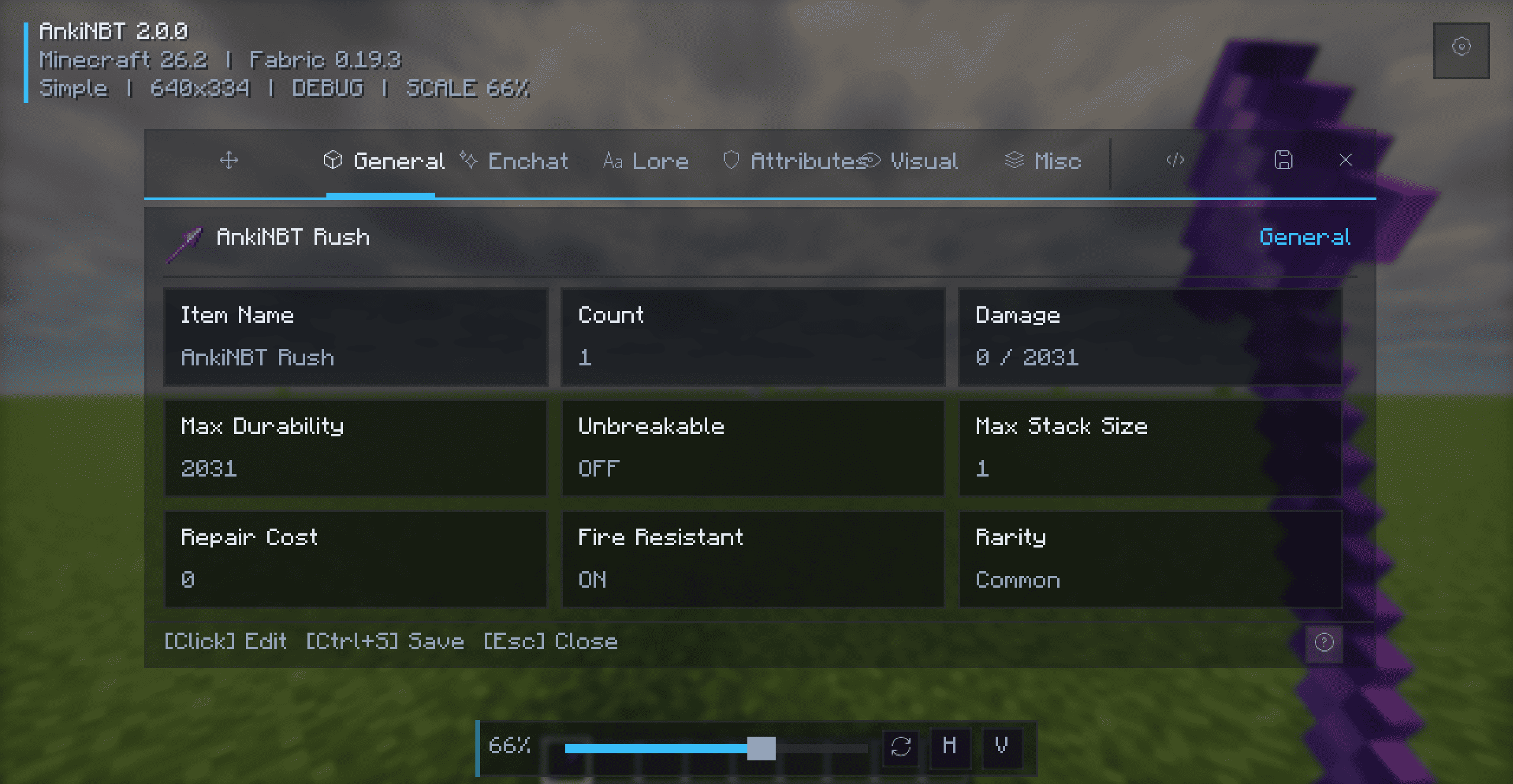
简易模式将常见的物品属性组织到专注的标签页中,配备可搜索的选择器、分组字段、行操作和即时视觉反馈。无需直接了解 NBT 知识。
高级模式
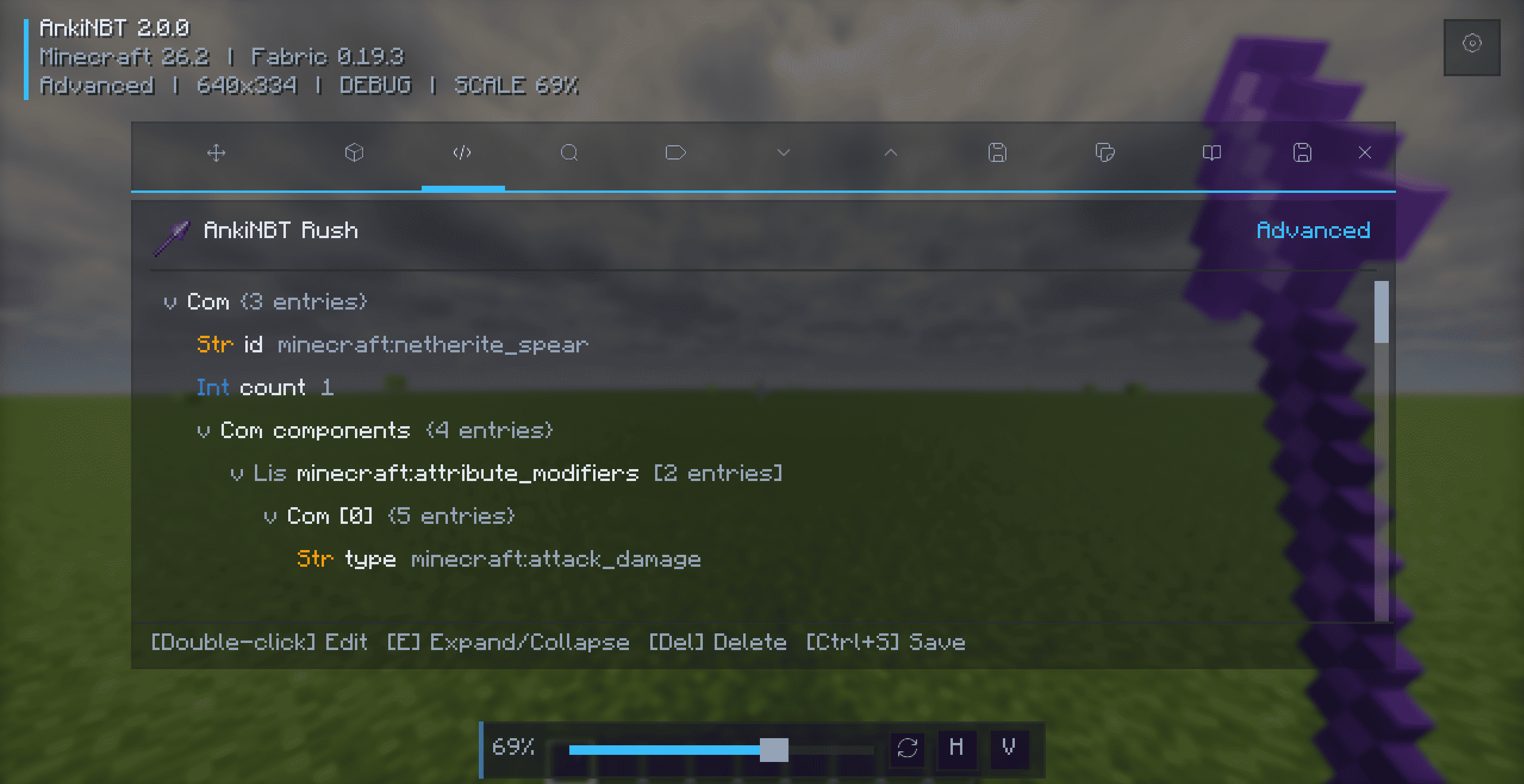
高级模式提供对完整物品数据树的直接访问权限。
树形编辑: 层级树状视图、按数据类型着色、键/值/类型搜索、展开与折叠控制、支持的 NBT 标签创建、自动类型验证、节点移除以及物品组件信息。
控件: 双击或按 Enter 进行编辑,按 E 展开或折叠,按 Delete 移除标签,并使用方向键进行导航。
安装方法
- 安装匹配的 Fabric 或 NeoForge 加载器。
- 使用 Fabric 时,请安装 Fabric API。
- 下载与你的加载器和 Minecraft 版本匹配的 JAR 文件。
- 将 JAR 文件放入
.minecraft/mods/目录。 - 启动游戏。
请勿同时安装 Fabric 和 NeoForge 版本。
使用方法
- 按住物品并按下
N,或在背包物品上悬停并按下N。 - 对于支持的实体和村民,使用游戏内编辑器操作。
- 按
Ctrl+S保存,按Esc关闭。
保存物品更改需要创造模式。在创造模式之外,物品编辑仅支持查看。
快捷键
| 按键 | 操作 |
|---|---|
N |
打开物品编辑器 |
Ctrl+S |
保存更改 |
Esc |
关闭编辑器 |
Ctrl+A |
全选文本 |
E |
展开或折叠选定的 NBT 节点 |
Enter |
编辑选定的 NBT 值 |
Delete |
移除选定的 NBT 标签 |
| 方向键 | 移动光标或导航列表和树形结构 |
编辑器按键可在 Controls → AnkiNBT 中更改。
配置
界面: 默认编辑器模式、宽度、高度、独立缩放、不透明度和主题色。
编辑: 实体实时预览、智能实体编辑快捷键、属性备注、NBT 导出路径以及可配置的按键绑定。
兼容性
| 加载器 | 支持的 Minecraft 版本 |
|---|---|
| Fabric | 1.21–1.21.11, 26.1, 26.1.1, 26.1.2, 和 26.2 |
| NeoForge | 1.21–1.21.11, 26.1, 26.1.1, 26.1.2, 和 26.2 |
Java: Minecraft 1.21–1.21.11 需要 Java 21,Minecraft 26.1–26.2 需要 Java 25。
始终下载与你的加载器和 Minecraft 版本匹配的 JAR 文件。
A client-side Minecraft editor for items, entities, and villager trades.
Supports Fabric and NeoForge for Minecraft 1.21–1.21.11 and 26.1–26.2.
Features
Editing Modes: Visual Simple Mode for common operations and Advanced Mode for complete NBT tree editing.
Item Editing: Edit main-hand or inventory-hover items, including names, counts, durability, enchantments, Lore, attributes, potions, appearance, and other components.
Entity Editing: Edit spawn eggs and live entities, including names, health, common states, undo, asynchronous saving, and server readback.
Villager Editing: Manage offers, buy and sell items, trade properties, profession, level, type, live saving, and server readback.
Interface: Redesigned tabs, grouped fields, searchable localized selectors, live previews, consistent bitmap icons, and Chinese or English language support.
Configuration: Custom key bindings, editor dimensions, independent scaling, opacity, theme color, attribute notes, live entity preview, and configurable export paths.
Item Editor
Edit the item in your main hand or hover over an inventory slot and press the configured editor key.
General: Item name, count, durability, maximum stack size, repair cost, rarity, fire resistance, unbreakable state, nutrition, saturation, and version-specific components.
Enchantments: Search by localized name or identifier; add, remove, and clear enchantments; edit levels; filter entries for the current item.
Lore: Multi-line editing, line reordering, color and formatting codes, built-in palette, live preview, Ctrl+A, cursor movement, Shift selection, mouse drag selection, and Chinese IME support.
Attributes: Search localized attributes; add or remove modifiers; edit values, operations, and equipment slots; display optional notes; support version-specific formats.
Potions and Appearance: Base potions, custom colors, multiple effects, duration, amplifier, particles, effect icons, enchantment glint, dye color, item-name color, tooltip visibility, and custom model data where supported.
Tools: Copy NBT, copy a /give command, reset the item, import or export NBT files, and organize saved data with categories and aliases.
Entity Editor
Edit spawn eggs and live entities through a dedicated visual interface.
Entity Properties: Custom name, current and maximum health, health restoration, common entity states, and other supported properties.
Operations: Undo unsaved changes, save asynchronously, and read the final entity state back from the server.
Villager Trade Editor
Create and manage complete villager offers through a visual interface.
Trade Operations: Add, copy, move, delete, and undo offers; configure two buy items and one sell item; search items by localized name or identifier; edit item counts and supported components.
Offer Properties: Current and maximum uses, villager XP, price multiplier, demand, special price, experience rewards, and additional supported fields.
Villager Properties: Profession, level, type, live offer saving, and server readback.
Simple Mode
Simple Mode organizes common item properties into focused tabs with searchable selectors, grouped fields, row actions, and immediate visual feedback. No direct NBT knowledge is required.
Advanced Mode
Advanced Mode provides direct access to the complete item data tree.
Tree Editing: Hierarchical tree view, color-coded data types, key/value/type search, expand and collapse controls, supported NBT tag creation, automatic type validation, node removal, and item component information.
Controls: Double-click or press Enter to edit, press E to expand or collapse, press Delete to remove a tag, and use the arrow keys to navigate.
Installation
- Install the matching Fabric or NeoForge loader.
- Install Fabric API when using Fabric.
- Download the JAR matching your loader and Minecraft version.
- Place the JAR in
.minecraft/mods/. - Launch the game.
Do not install Fabric and NeoForge builds together.
Usage
- Hold an item and press
N, or hover over an inventory item and pressN. - Use the in-game editor action for supported entities and villagers.
- Press
Ctrl+Sto save andEscto close.
Saving item changes requires Creative Mode. Item editing is view-only outside Creative Mode.
Shortcuts
| Key | Action |
|---|---|
N |
Open the item editor |
Ctrl+S |
Save changes |
Esc |
Close the editor |
Ctrl+A |
Select all text |
E |
Expand or collapse the selected NBT node |
Enter |
Edit the selected NBT value |
Delete |
Remove the selected NBT tag |
| Arrow keys | Move the cursor or navigate lists and trees |
The editor key can be changed under Controls → AnkiNBT.
Configuration
Interface: Default editor mode, width, height, independent scaling, opacity, and theme color.
Editing: Live entity preview, smart entity-editing shortcut, attribute notes, NBT export path, and configurable key bindings.
Compatibility
| Loader | Supported Minecraft versions |
|---|---|
| Fabric | 1.21–1.21.11, 26.1, 26.1.1, 26.1.2, and 26.2 |
| NeoForge | 1.21–1.21.11, 26.1, 26.1.1, 26.1.2, and 26.2 |
Java: Java 21 for Minecraft 1.21–1.21.11 and Java 25 for Minecraft 26.1–26.2.
Always download the JAR matching your loader and Minecraft version.

下载 AnkiNBT
下载 AnkiNBT
下载 AnkiNBT
下载 AnkiNBT
下载 AnkiNBT
下载 AnkiNBT
下载 AnkiNBT
下载 AnkiNBT
下载 AnkiNBT
下载 AnkiNBT
暂无更新日志
关于这个资源的讨论、问题反馈与使用心得
还没有讨论,来发第一帖吧
你是这个资源的作者?登录后可认领此资源。
相似资源
 模组

显示你正在注视的方块的信息。(适用于 Minecraft 1.16+ 的 Hwyla/Waila 分支)
 模组
使用 JavaScript 编辑配方、添加自定义物品、编写世界事件!
 模组

查看物品与配方
 模组
在游戏画面角落显示附近世界地形、玩家、生物和实体的地图。可创建路径点,帮助你找到标记过的位置。
 模组
AE2:一款流行的自动化与存储模组
 模组
那是什么?一个 Waila/Hwyla 的分支。
评论 0
登录后参与评分
还没有评论,来抢沙发吧