
?️ AnonChat Mod
适用于 Minecraft 1.21.1 – 1.21.5、26.1.2 & 26.2 的高级聊天自定义模组
全面掌控你的聊天体验。将消息组织到独立的窗口中,过滤噪音,高亮显示玩家提及,保存聊天记录,并在完整的配置配置文件之间切换——所有操作均无需退出游戏。
✨ 功能特性
? 多窗口聊天
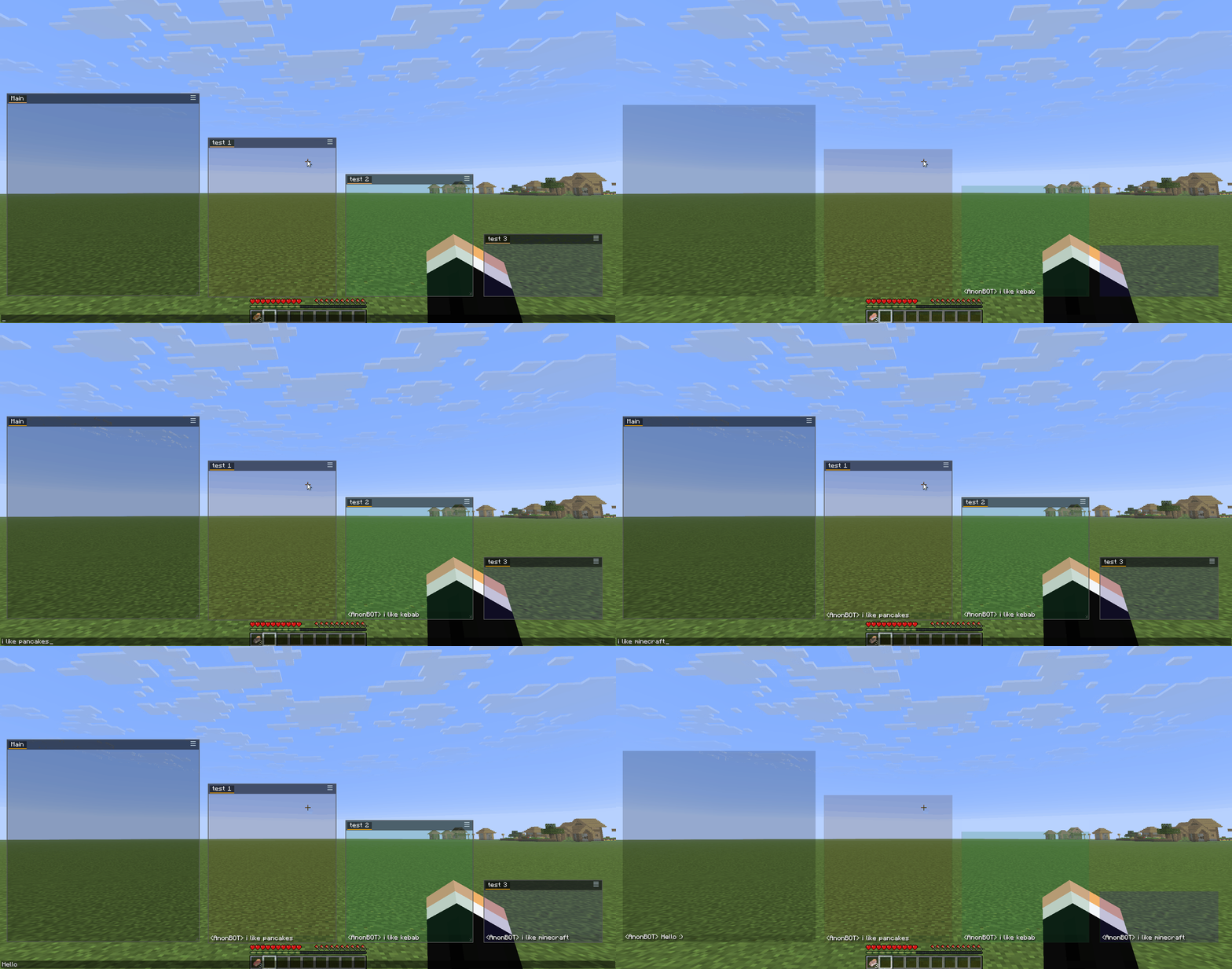
- 创建无限数量的聊天窗口——可拖拽、调整大小、放置在屏幕任意位置
- 每个窗口支持多个标签页,用于组织不同的聊天话题
- 每个标签页拥有独立的字体设置(大小、间距、对齐方式、阴影)
- 智能边缘吸附——当窗口被拖拽至屏幕边缘附近时自动吸附
? 高级过滤器
为每个标签页定义**包含(Include)和排除(Exclude)**标签,将消息精确路由到你想要的位置:
- 包含标签——仅包含这些关键词的消息才会出现在此标签页
- 排除标签——包含这些关键词的消息将被从此标签页屏蔽
- 过滤器兼容 LabyMod 的 JSON 格式——你可以迁移现有的过滤器设置
- 可选功能:匹配时播放声音、更改背景色或高亮显示
? 玩家提及(Ping)
- 当有人提及你时,自动在聊天消息中高亮显示你的用户名
- 选择高亮颜色和通知音效(提供 6 种音效可供选择)
- 你自己的消息不会触发 ping——仅其他人提及你时才会触发
? 配置配置文件
- 将整个设置(窗口、标签页、过滤器、宏、字体设置)保存为命名配置文件
- 即时切换配置文件——非常适合不同服务器或玩法风格
- 通过复制
profiles/文件夹中的配置文件进行导出/导入 - “default”配置文件始终可用且受保护,不可删除
⌨️ 自动文本(宏)
- 分配键盘快捷键以发送消息或执行命令
- 非常适合常用命令或聊天回复
? 聊天记录
- 自动将所有聊天消息保存为每日文本文件
- 位于配置文件旁边的
chatlog/文件夹中 - 可在设置中启用/禁用切换
? 国际化
- 完整支持英文和波兰文
- 语言根据 Minecraft 游戏设置自动检测
? 安装方法
- 安装 Fabric Loader —— 1.21.1–1.21.5 版本需
0.16.9+,26.1.2/26.2 版本需0.19.3+ - 安装 Fabric API —— 1.21.x 版本需
0.110.0+1.21.1,26.x 版本需0.154.2+26.1.2/0.154.2+26.2 - 确保你拥有所需的 Java 版本 —— 1.21.x 版本需
Java 21+,26.x 版本需Java 25+ - 下载对应版本的 AnonChat Mod JAR 文件
- 将 JAR 文件放入你的
mods/文件夹 - (可选)安装 ModMenu 以获取额外的配置入口点
? 辅助工具:过滤器编辑器
AnonChat Filter Editor 是一个独立的 Windows 应用程序,允许你在游戏外管理过滤器标签。
它解决的问题: Minecraft 的游戏内文本字段会剥离 § 颜色代码,因此无法输入像 Money§8 这样精确的标签。该编辑器直接写入带有字面量 § 的 JSON,从而实现颜色精确的标签正常工作。
它能做什么:
- 浏览
%APPDATA%/AnonChatMC/profiles/中的配置文件(主chat.json受保护) - 加载每日聊天记录或原始 Minecraft 日志(
latest.log),并查看带有出现次数统计的唯一消息 - 一键将任何日志消息添加为过滤器的标签
- 双语界面(英文/波兰文)—— 语言自动检测并记住选择
➡️ 下载最新版本: GitHub Releases → 下载 AnonChatFilterEditor-0.2.4.exe(无需 Python)
? 使用方法
首次启动
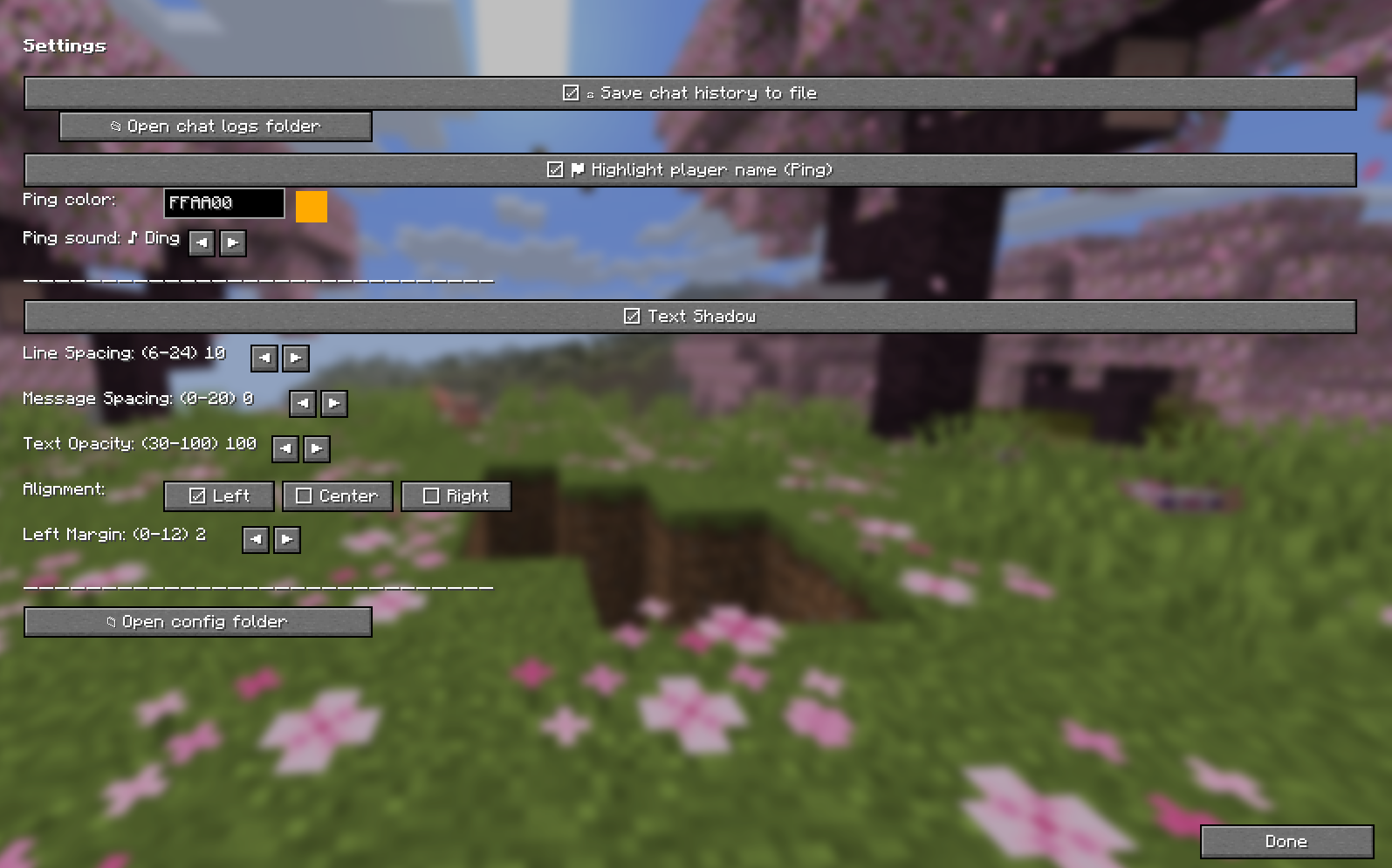
- 按任意聊天窗口上的汉堡菜单图标 (☰)
- 点击 > Settings 打开配置界面
- 或者按下键绑定(如果通过 ModMenu 设置)
创建窗口与标签页
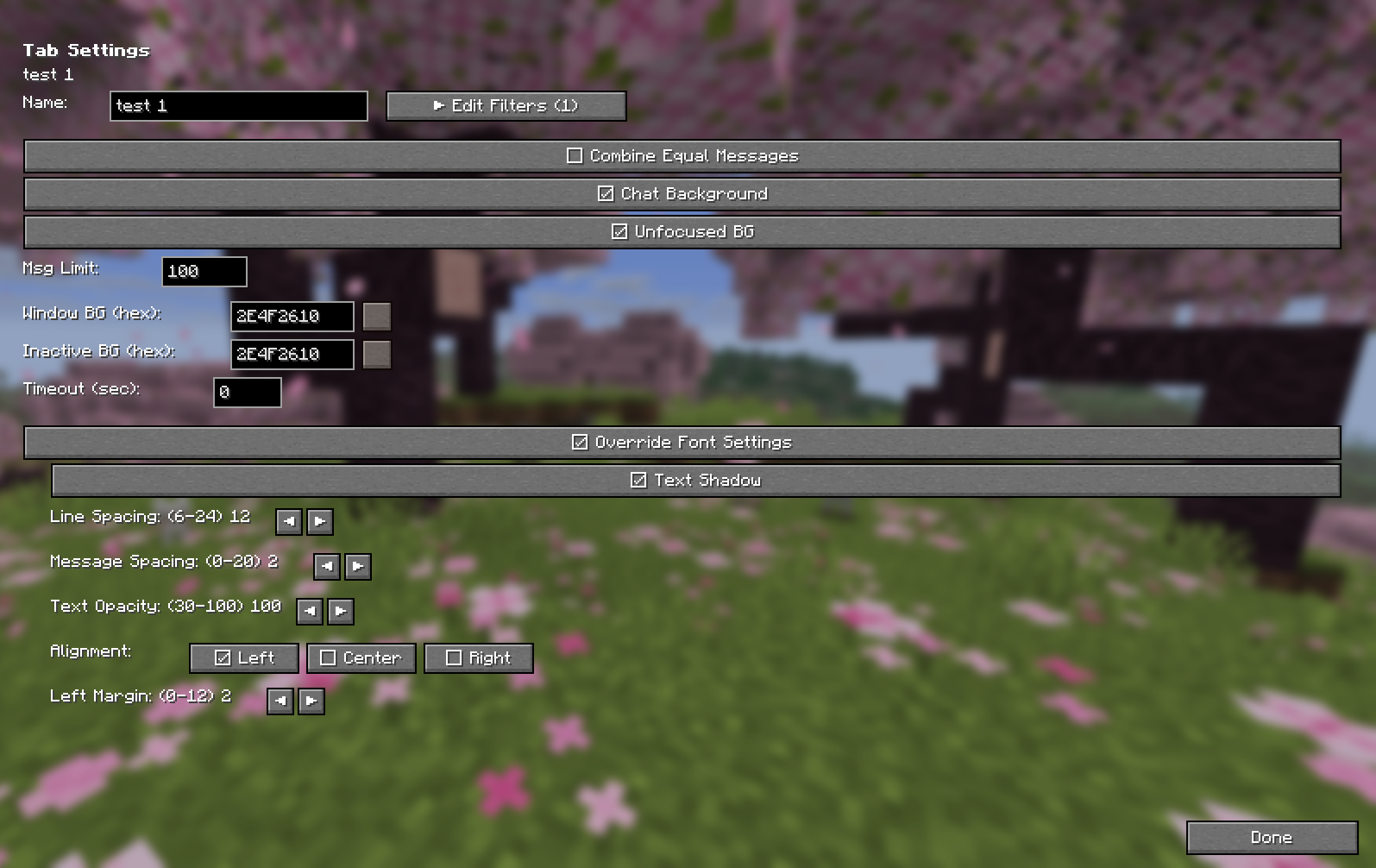
- 使用任意窗口的汉堡菜单来添加/移除标签页或创建新窗口
- 在设置 → 左侧面板中,展开/折叠窗口并管理各个标签页
设置过滤器
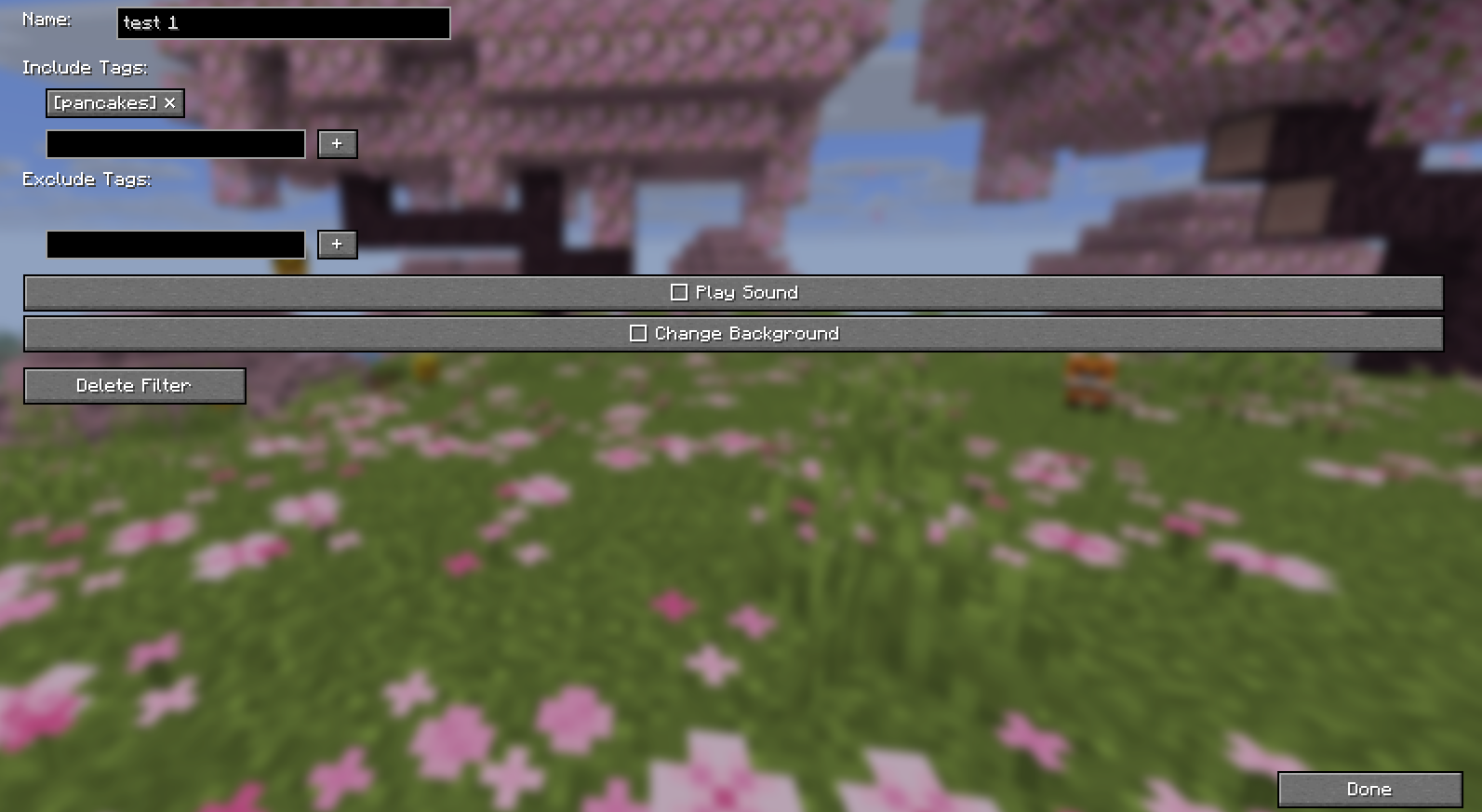
- 在左侧面板中选择标签页
- 点击 ▶ Edit Filters
- 添加**包含(Include)**标签——含有这些词的消息仅进入此标签页
- 添加**排除(Exclude)**标签——含有这些词的消息将在各处被屏蔽
- 配置其他操作:播放声音、更改背景等
使用配置文件
- 在设置 → ☰ Profiles
- 点击 ■ Save 将当前设置保存为配置文件
- 点击 ▶ Load 切换到不同的配置文件
- 使用 ✕ 按钮删除自定义配置文件
从 LabyMod 迁移
来自 LabyMod 的现有 chat.json 完全兼容。只需:
- 将你的
chat.json复制到%APPDATA%/AnonChatMC/chat.json(Windows) - 或使用 profiles 功能导入特定的过滤器配置
- 所有过滤器、窗口和设置将立即生效
?️ 配置文件位置
| 操作系统 | 路径 |
|---|---|
| Windows | %APPDATA%/AnonChatMC/chat.json |
| macOS | ~/Library/Application Support/AnonChatMC/chat.json |
| Linux | ~/.local/share/AnonChatMC/chat.json |
提示: 在设置 → 外观中使用 “Open config folder” 按钮快速访问你的文件。
? 许可证
本项目遵循 GNU Affero General Public License v3.0 (AGPL-3.0) 许可。
TL;DR: 你可以自由使用、修改和分发此模组。如果你对其进行了修改并提供基于它的服务(例如服务器或启动器),则必须向用户提供你的修改后的源代码。
? 致谢
- 作者: AnonBOTpl
- 构建工具: Fabric Loom、Minecraft 映射表
- 特别感谢: LabyMod 团队,他们出色的聊天过滤系统启发了本模组的开发。AnonChat 完全兼容 LabyMod 的
chat.json格式,便于迁移。
?️ AnonChat Mod
Advanced chat customization for Minecraft 1.21.1 – 1.21.5, 26.1.2 & 26.2
Take full control of your chat experience. Organize messages into separate windows, filter out noise, highlight player mentions, save chat history, and switch between complete configuration profiles — all without leaving the game.
✨ Features
? Multi-Window Chat
- Create unlimited chat windows — drag, resize, position anywhere on screen
- Each window holds multiple tabs for organizing different chat topics
- Independent font settings per tab (size, spacing, alignment, shadow)
- Smart edge snapping — windows snap to screen edges when dragged close
? Advanced Filters
Define include and exclude tags for each tab to route messages exactly where you want them:
- Include tags — only messages containing these words appear in this tab
- Exclude tags — messages with these words are blocked from this tab
- Filters work with LabyMod's JSON format — you can migrate your existing filter setup
- Optional: play a sound, change background color, or highlight on match
? Player Mention (Ping)
- Automatically highlights your username in chat messages when someone mentions you
- Choose your highlight color and notification sound (6 sounds to pick from)
- Your own messages never trigger a ping — only others mentioning you
? Configuration Profiles
- Save your entire setup (windows, tabs, filters, macros, font settings) as named profiles
- Switch between profiles instantly — great for different servers or playstyles
- Export/import by copying profile files from
profiles/folder - "default" profile is always available and protected from deletion
⌨️ Autotext (Macros)
- Assign keyboard shortcuts to send messages or execute commands
- Perfect for frequently used commands or chat responses
? Chat Log
- Automatically saves all chat messages to daily text files
- Located in the
chatlog/folder next to your config - Enable/disable toggle in Settings
? Internationalization
- Full English and Polish language support
- Language auto-detects from your Minecraft game settings
? Installation
- Install Fabric Loader —
0.16.9+for 1.21.1–1.21.5,0.19.3+for 26.1.2/26.2 - Install Fabric API —
0.110.0+1.21.1for 1.21.x,0.154.2+26.1.2/0.154.2+26.2for 26.x - Make sure you have the required Java version —
Java 21+for 1.21.x,Java 25+for 26.x - Download the AnonChat Mod JAR for your version
- Place the JAR in your
mods/folder - (Optional) Install ModMenu for an additional config entry point
? Companion Tool: Filter Editor
The AnonChat Filter Editor is a standalone Windows app that lets you manage your filter tags outside the game.
The problem it solves: Minecraft's in-game text field strips the § color code, so you can't type precise tags like Money§8. The editor writes the JSON directly with literal §, so color-precise tags work.
What it does:
- Browse your profiles from
%APPDATA%/AnonChatMC/profiles/(the mainchat.jsonis protected) - Load daily chat logs or raw Minecraft logs (
latest.log) and see unique messages with occurrence counters - Add any log message as a tag to a filter with one click
- Bilingual UI (English/Polish) — language auto-detected and remembered
➡️ Download the latest version: GitHub Releases → download AnonChatFilterEditor-0.2.4.exe (no Python required)
? How to Use
First Launch
- Press the hamburger icon (☰) on any chat window
- Click > Settings to open the configuration screen
- Or press the keybind (if set via ModMenu)
Creating Windows & Tabs
- Use the hamburger menu on any window to add/remove tabs or create new windows
- In Settings → left panel, expand/collapse windows and manage individual tabs
Setting Up Filters
- Select a tab in the left panel
- Click ▶ Edit Filters
- Add Include tags — messages with these words go to this tab only
- Add Exclude tags — messages with these words are blocked everywhere
- Configure additional actions: play sound, change background
Using Profiles
- In Settings → ☰ Profiles
- Click ■ Save to save your current setup as a profile
- Click ▶ Load to switch to a different profile
- Use the ✕ button to delete custom profiles
Migrating from LabyMod
Your existing chat.json from LabyMod is fully compatible. Simply:
- Copy your
chat.jsonto%APPDATA%/AnonChatMC/chat.json(Windows) - Or use the profiles feature to import specific filter configurations
- All your filters, windows, and settings will work immediately
?️ Configuration File Location
| OS | Path |
|---|---|
| Windows | %APPDATA%/AnonChatMC/chat.json |
| macOS | ~/Library/Application Support/AnonChatMC/chat.json |
| Linux | ~/.local/share/AnonChatMC/chat.json |
Tip: Use the "Open config folder" button in Settings → Appearance to quickly access your files.
? License
This project is licensed under the GNU Affero General Public License v3.0 (AGPL-3.0).
TL;DR: You are free to use, modify, and distribute this mod. If you modify it and provide a service using it (e.g., a server or launcher), you must make your modified source code available to users.
? Credits
- Author: AnonBOTpl
- Built with: Fabric Loom, Minecraft mappings
- Special thanks to: The LabyMod team for their excellent chat filter system which inspired this mod's design. AnonChat is fully compatible with LabyMod's
chat.jsonformat for easy migration.

下载 Anon Chat
下载 Anon Chat
下载 Anon Chat
需要联机服务器吗?
稳定流畅、一键部署,几分钟即可和朋友联机开服
最低仅需 8 元/月 即可畅快联机
下载 Anon Chat
下载 Anon Chat
下载 Anon Chat
需要联机服务器吗?
稳定流畅、一键部署,几分钟即可和朋友联机开服
最低仅需 8 元/月 即可畅快联机
下载 Anon Chat
下载 Anon Chat
下载 Anon Chat
需要联机服务器吗?
稳定流畅、一键部署,几分钟即可和朋友联机开服
最低仅需 8 元/月 即可畅快联机
下载 Anon Chat
更新日志
[0.2.4] — 2026-08-01
✨ 新功能
- 重新加载配置按钮 — 在「设置 → 配置」中,↻ 重新加载按钮会从磁盘重新读取当前配置。无需再因外部编辑文件而重启游戏或在不同配置间来回切换。
? 辅助工具
- AnonChat Filter Editor — 一款独立的 Windows 应用程序,用于在游戏外编辑过滤标签。解决了 Minecraft 游戏内文本框会剥离
§颜色代码的问题,导致无法在游戏中输入如Money§8这样精确的标签。该编辑器还能分析聊天日志,并通过一键操作将消息添加为标签。- 语言自动检测(波兰语/英语)并在会话之间记住所选语言
- 默认聊天日志文件夹:
%APPDATA%/AnonChatMC/chatlog+ 支持原始 Minecraft*.log文件 - 关闭窗口时会警告存在未保存的更改
- 主配置文件
chat.json受到保护 — 仅可编辑配置文件
关于这个资源的讨论、问题反馈与使用心得
还没有讨论,来发第一帖吧
你是这个资源的作者?登录后可认领此资源。
相似资源
 模组

显示你正在注视的方块的信息。(适用于 Minecraft 1.16+ 的 Hwyla/Waila 分支)
 模组
使用 JavaScript 编辑配方、添加自定义物品、编写世界事件!
 模组

查看物品与配方
 模组
在游戏画面角落显示附近世界地形、玩家、生物和实体的地图。可创建路径点,帮助你找到标记过的位置。
 模组
AE2:一款流行的自动化与存储模组
 模组
那是什么?一个 Waila/Hwyla 的分支。
评论 0
登录后参与评分
还没有评论,来抢沙发吧