

AntiWeakChat
个人推荐版本:
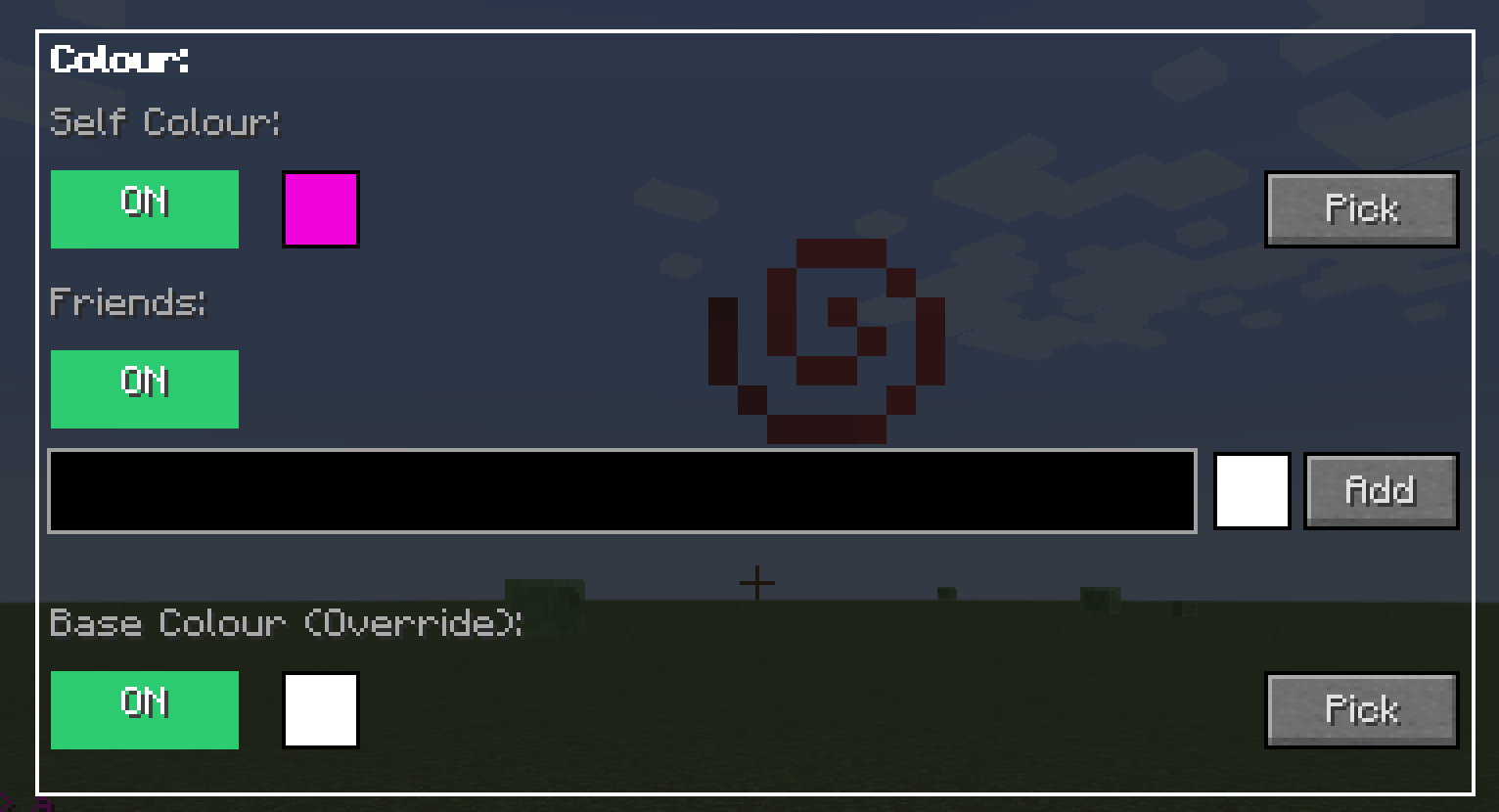
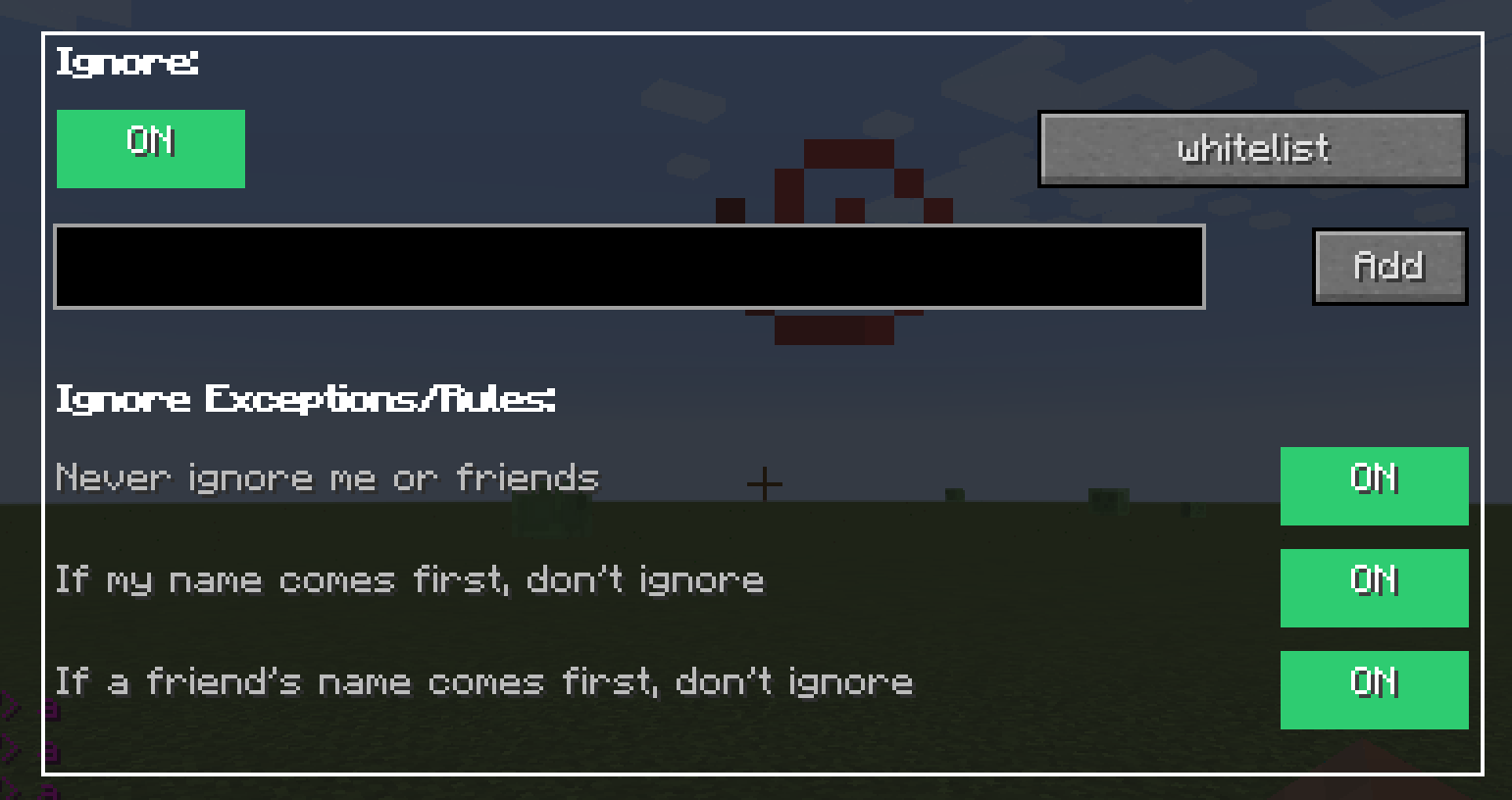
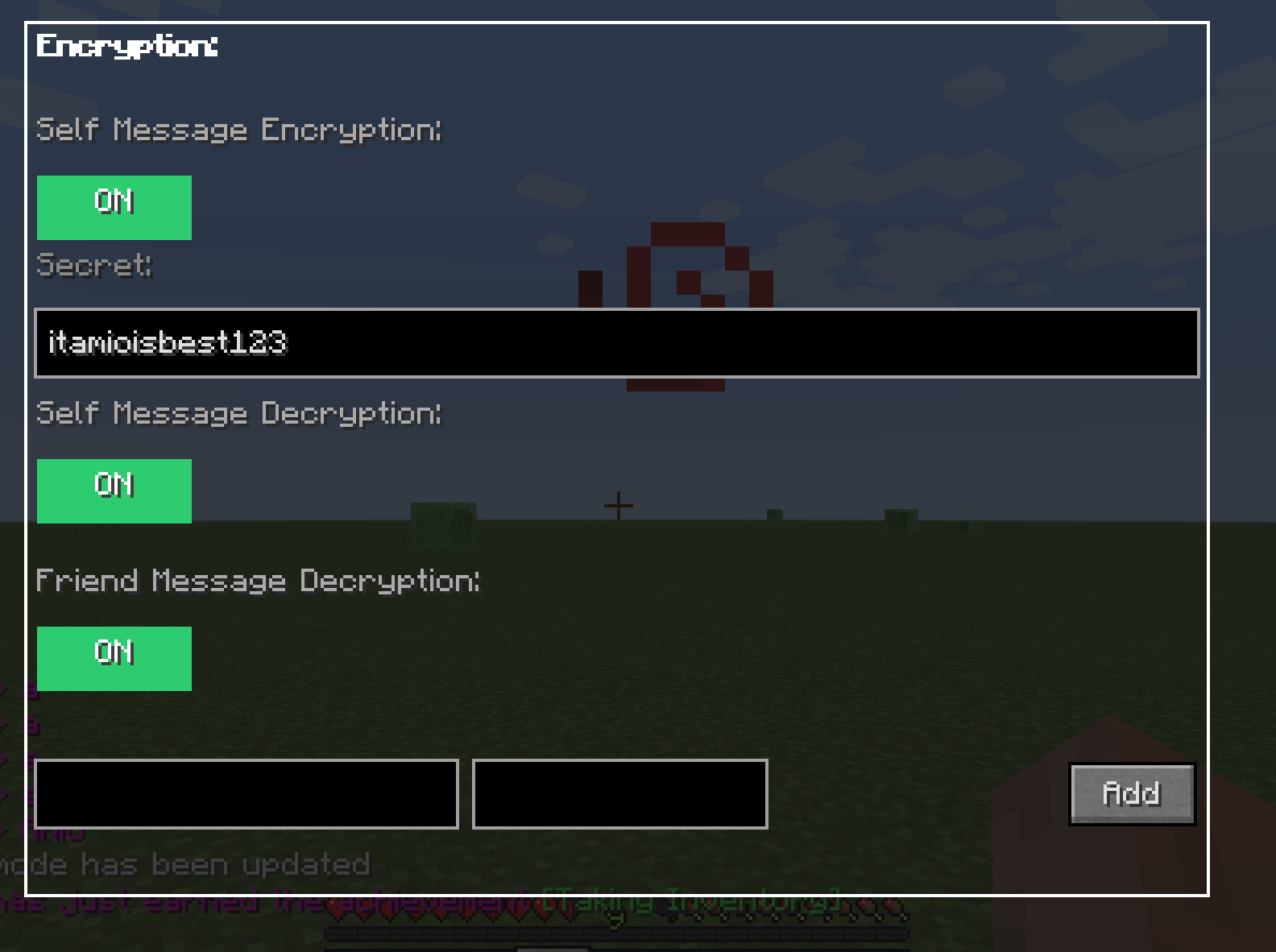
概述
- 添加自定义颜色,让你和朋友拥有彩色文字,让聊天栏全部变色,这样所有 VIP 都是灰色的,只有你和你朋友有颜色。
- 添加加密 + 解密,以只有你朋友能理解的方式说话(前提是他知道密钥)
- 添加忽略 + 反垃圾信息功能,忽略烦人的玩家 + 防止服务器错误消息刷屏
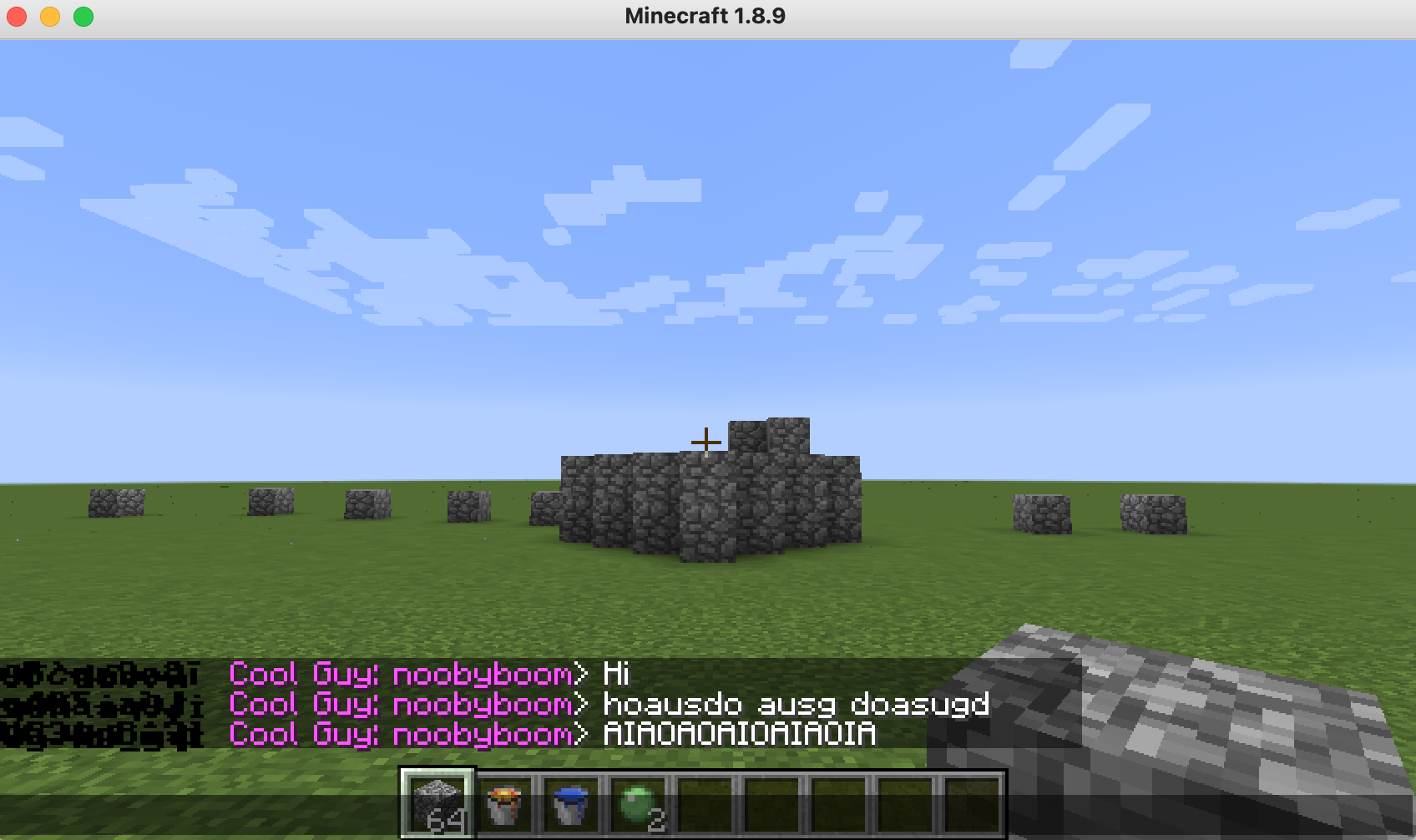
- 添加自定义玩家标签,自定义你的标签,让你看起来像 VIP 玩家,你也可以去除 VIP 玩家的标签,让他们在聊天栏中不占太多空间。
示例配置:
我太懒了,懒得做视频演示如何使用这个模组,但这里有一个我常用的配置文件,只需将 noobyboom 改成你的名字,然后你就会看到效果……
剧透
# AntiWeakChat 配置文件
# ==============================

# 聊天记录设置
# ---------------------
# 保留在历史记录中的最大聊天行数
maximum_chat_line_history=1000

# 全局聊天颜色设置
# --------------------------
# 应用于所有消息的聊天颜色(使用 § 后跟 0-9 或 a-f)
# 示例:§0(黑色)、§1(深蓝色)、§2(深绿色)、§3(深青色)、§4(深红色)、§5(深紫色)、§6(金色)、§7(灰色)、§8(深灰色)、§9(蓝色)、§a(绿色)、§b(青色)、§c(红色)、§d(浅紫色)、§e(黄色)、§f(白色)
# 例如,通过使用灰色颜色可以全局禁用服务器的颜色
cover_full_chat_colour=§7

# 使用自定义颜色渲染完整聊天(true/false)
# 当为 true 时:将 cover_full_chat_colour 应用于所有消息
# 当为 false 时:保留原始服务器颜色和格式
render_full_chat_with_custom_colour=true

# 玩家消息自定义
# ----------------------------
# 玩家识别模式(使用 PLAYER 作为玩家名称的占位符)
# 示例:"PLAYER: " 对应 "bob: Hello","<PLAYER>" 对应 "<bob> Hello"
player_identification=PLAYER

# 启用特定玩家的消息着色(true/false)
colour_specific_player_messages=true

# 玩家颜色列表,格式为 [playername,colour,playername2,colour2]
# 示例:[bob,yellow,alice,green]
player_colour_list=[noobyboom,yellow]

# 玩家标签更改器设置
# ---------------------------
# 启用自定义玩家标签(true/false)
enablecustomplayertags=true

# 玩家标签列表,格式为 {
# playername -> "taginfront"
# bob -> "§khhh §r §0 COOL: "
# }
tagplayerlist={
noobyboom -> "§0§l§khhhhhhhh §r §d Cool Guy: "
}

# 将标签应用于列表中未列出的其他玩家(true/false)
otherplayersalltag=true

# 应用于其他玩家的标签(使用 PLAYER 作为占位符)
otherplayers=

# 消息加密设置
# --------------------------
# 启用自身消息加密(true/false)
enable_self_message_encryption=false

# 自身加密密钥
self_encryption_secret=itamioisbestmodmaker

# 启用自身消息解密(true/false)
enable_self_message_decryption=false

# 启用好友消息解密(true/false)
enable_friend_message_decryption=false

# 好友密钥列表,格式为 [playername,secret]
# 示例:[bob,secret]
friend_secret_list=[]

# 玩家忽略设置
# ---------------------
# 启用忽略玩家功能(true/false)
enable_ignoring_players=false

# 要忽略的玩家列表,格式为 [playername1,playername2]
# 示例:[bob,alice]
players_to_be_ignored=[]

# 反垃圾信息设置
# -----------------
# 启用反垃圾信息保护(true/false)
# 启用后,在检测窗口内出现次数超过阈值的消息将被过滤
enable_antispam=true

# 一条消息在被视为垃圾信息之前可以出现的次数
# 示例:2 表示消息出现 3 次及以上将被过滤
spam_threshold=2

# 每 X 条新消息检查一次垃圾信息
# 示例:3 表示每 3 条新消息检查一次垃圾信息
spam_check_interval=3
功能
自定义玩家标签
- 允许你为自己创建自定义标签,替换旧标签。例如,如果在服务器中你看起来像这样:
DEFAULT CoolGuy123 > yey!
你可以让自己看起来像这样:
SUPER-EPIC-FANTASTIC CoolGuy123 > yey!
- 我还实现了移除 VIP 标签的功能,使它们看起来没有标签,这非常棒。
私人消息加密
(非常适合无政府状态服务器 <- 我将很快更新模组到新版本)
例如,我第一次发送 Hello 时未启用加密,第二次启用后,发送到服务器的内容如下所示:
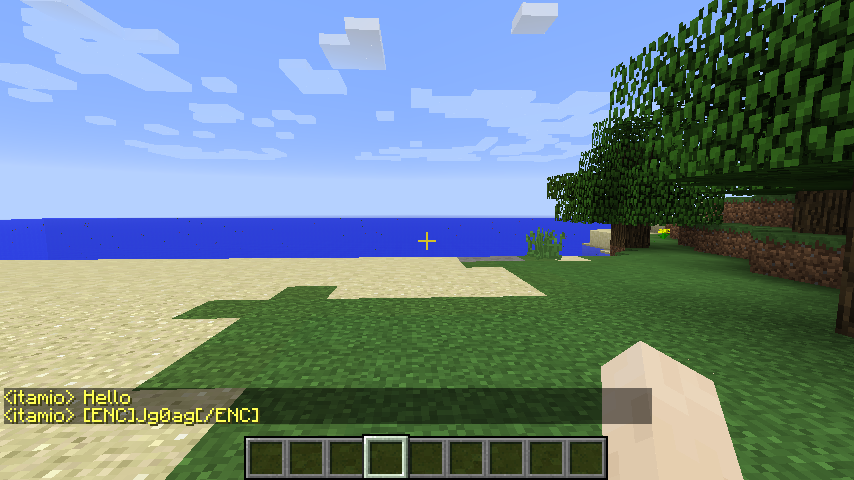
- 自身消息解密:解密你自己的消息,这样当你发送消息时,你自己看到的是原文,但其他人看到的是加密后的内容
当开启“解密自身消息”时,你可以查看自己的原始消息
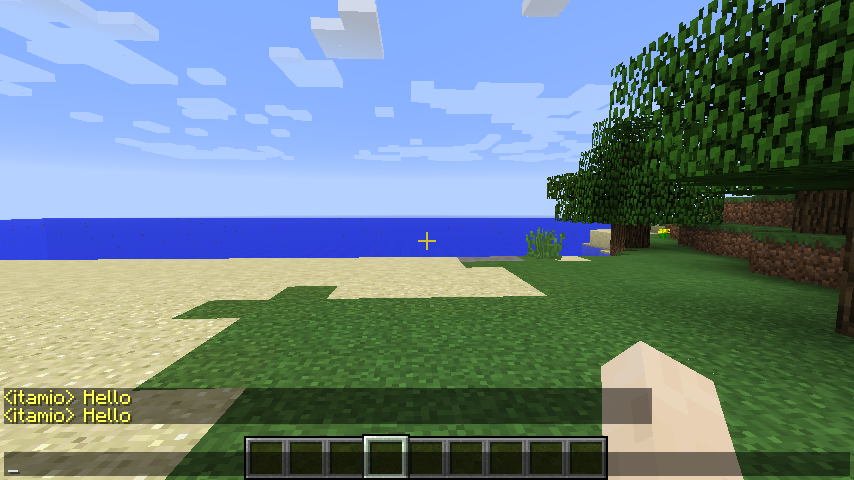
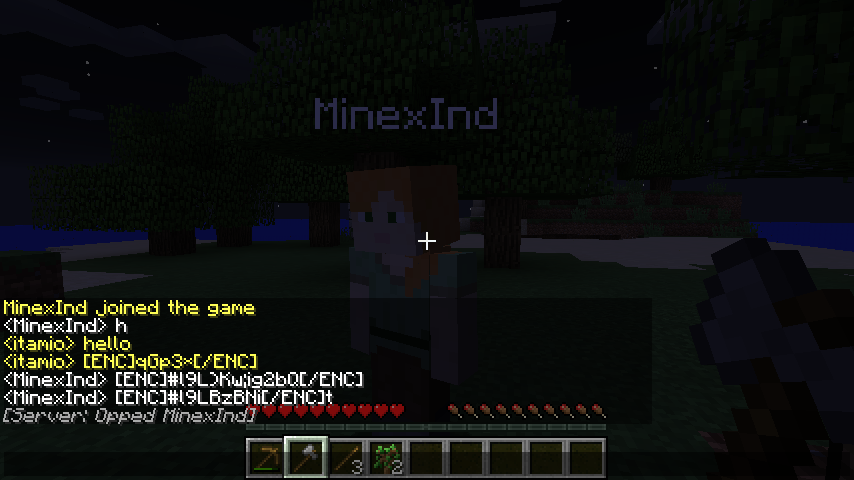
- 好友消息加密/解密:与好友分享密钥,创建私密通信渠道
加密的好友消息
输入好友密钥后:
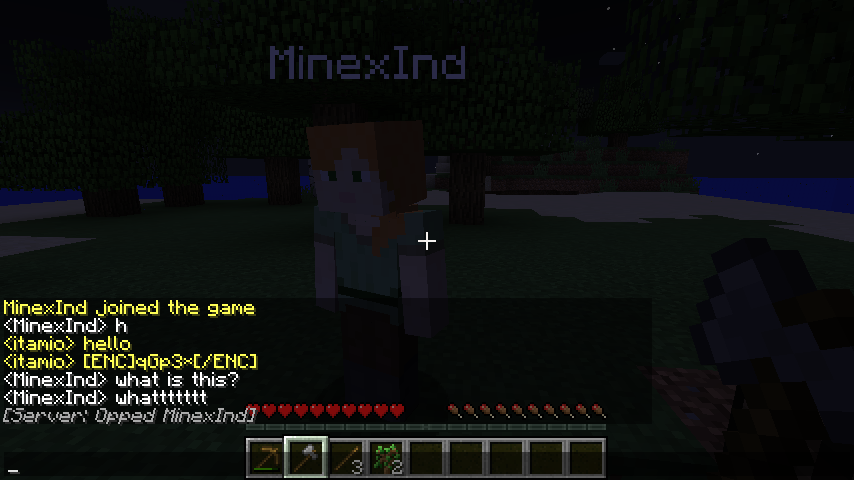
- 自定义凯撒密码:基于字符的高级加密方式,支持任意长度的消息
(不过服务器可能不允许你发送过多的内容,我尝试过其他加密方式,但它们都会使消息变长,这是效果最好的唯一一种)
- 对服务器安全:使用简单的字符替换,不太可能被服务器屏蔽
自定义聊天颜色
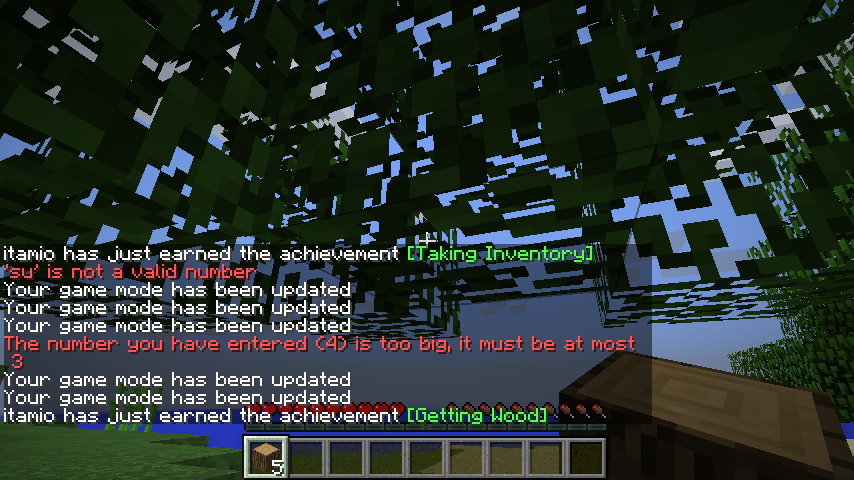
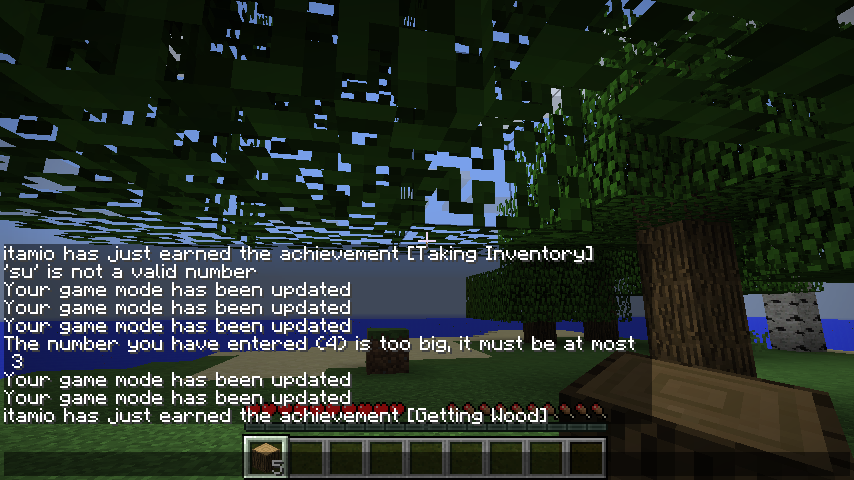
- 覆盖所有聊天消息:为整个聊天设置背景色,例如将所有聊天颜色设为灰色,然后添加玩家专属颜色,例如你自己,这样你的消息就会以彩色显示
(为此请使用颜色代码)
启用前
启用后
- 玩家专属颜色:为每个玩家在聊天中分配独特的颜色
(为此请使用颜色名称)
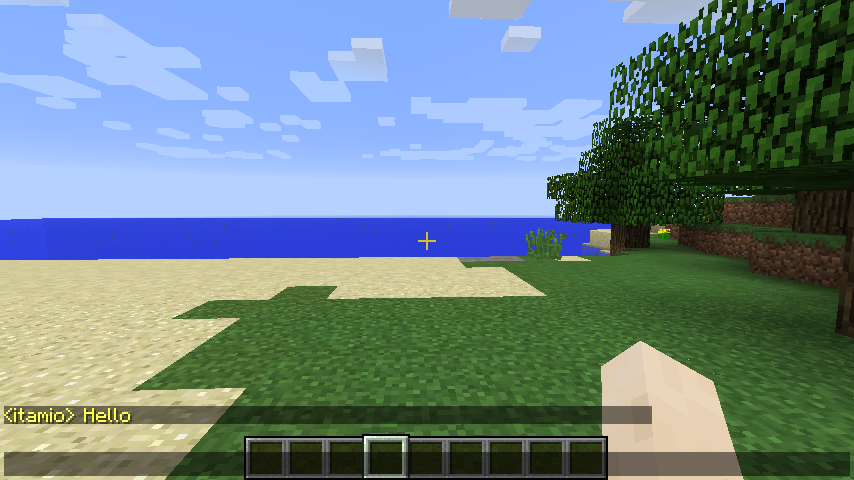
- 仅好友着色:只有你和你的朋友的名字会有颜色——其他人保持默认
(为此请使用颜色名称)
忽略玩家
- 选择性忽略:选择完全忽略的特定玩家
- 干净的聊天:被忽略玩家的消息会被完全过滤掉
Minecraft 颜色代码
| 颜色名称 |
Minecraft 颜色代码 |
| black |
§0 |
| dark_blue |
§1 |
| dark_green |
§2 |
| dark_aqua |
§3 |
| dark_red |
§4 |
| dark_purple |
§5 |
| gold |
§6 |
| gray |
§7 |
| dark_gray |
§8 |
| blue |
§9 |
| green |
§a |
| aqua |
§b |
| red |
§c |
| light_purple |
§d |
| yellow |
§e |
| white |
§f |
配置指南
| 设置项 |
描述 |
示例 |
默认值 |
| enable_self_message_encryption |
启用对自己消息的加密 |
true |
false |
| self_encryption_secret |
你的个人加密密钥 |
"mysecret123" |
"" |
| enable_self_message_decryption |
启用对自己消息的解密 |
true |
false |
| enable_friend_message_encryption |
启用对好友消息的加密 |
true |
false |
| enable_friend_message_decryption |
启用对好友消息的解密 |
true |
false |
| friend_secret_list |
好友及其密钥列表 |
["friend1,secret1", "friend2,secret2"] |
[] |
| player_colour_list |
玩家及其颜色列表 |
["player1,§c", "player2,§9"] |
[] |
| enable_ignoring_players |
启用忽略玩家功能 |
true |
false |
| players_to_be_ignored |
要忽略的玩家列表 |
["player1", "player2"] |
[] |
| player_identification_pattern |
用于识别玩家名称的模式 |
"<PLAYER>" |
"<PLAYER>" |
使用方法
设置与好友的加密
- 启用加密:将
enable_self_message_encryption 设置为 true
- 选择你的密钥:将
self_encryption_secret 设置为你想要的任何文本
- 分享给好友:告诉你的好友你的密钥
- 添加好友:在
friend_secret_list 中添加你的好友及其密钥
- 启用解密:将两个解密选项都设置为 true
配置示例:
self_encryption_secret = "mysecret123"
friend_secret_list = ["alex,alexsecret456", "sarah,sarahsecret789"]
设置自定义颜色
- 添加玩家:将玩家名称和颜色代码添加到
player_colour_list
- 使用 Minecraft 颜色代码:使用如 §c、§9、§a、§e 等代码
配置示例:
player_colour_list = ["alex,§c", "sarah,§9", "mike,§a"]
忽略玩家
- 启用忽略:将
enable_ignoring_players 设置为 true
- 添加玩家:将玩家名称添加到
players_to_be_ignored
配置示例:
players_to_be_ignored = ["spammer1", "annoying_player"]
非常适合好友群组
- 私密对话:使用加密进行只有你们群组能阅读的私密聊天
- 轻松识别:为好友指定颜色代码,以便瞬间识别他们的消息
- 干净体验:忽略不需要的玩家,让你的聊天专注于好友
- 兼容服务器:在大多数服务器上均可正常工作,不会引起问题
安装
- 下载适用于 Minecraft 1.8.9 的模组
- 放入你的 mods 文件夹
- 在配置文件(位置:minecraft/config/antiweakchat/config/config.txt)中配置设置
- 加入你喜欢的服务器,享受增强的聊天体验!
AntiWeakChat
Personal Recommended Version:
Overview
- Adds custom colouring, colour urself and ur friends, discolour the entire chat, so all the vips are gray, only u and ur friend have colours.
- Adds encryption + decryption, talk in a way only ur friend can understand (if he has secret)
- Adds Ignore + anti Spam, ignore annoying players + prevent server bug messages from spamming chat
- Adds Custom player tags, customize your tag as if your a vip player, you can also distag vip players so they dont take so much space in chat.
Sample Config:
Im too lazy to make a video on how to use this mod, but here is a config i use regularly, just change the name noobyboom to your name and then u'll see effects...
Spoiler
# AntiWeakChat Configuration File
# ==============================

# Chat History Settings
# ---------------------
# Maximum number of chat lines to keep in history
maximum_chat_line_history=1000

# Global Chat Color Settings
# --------------------------
# Chat color to apply to all messages (use § followed by 0-9 or a-f)
# Examples: §0 (black), §1 (dark_blue), §2 (dark_green), §3 (dark_aqua), §4 (dark_red), §5 (dark_purple), §6 (gold), §7 (gray), §8 (dark_gray), §9 (blue), §a (green), §b (aqua), §c (red), §d (light_purple), §e (yellow), §f (white)
# Useful for disabling colour from server globally for example by using the gray colour
cover_full_chat_colour=§7

# Render full chat with custom colour (true/false)
# When true: applies cover_full_chat_colour to all messages
# When false: keeps original server colors and formatting
render_full_chat_with_custom_colour=true

# Player Message Customization
# ----------------------------
# Player identification pattern (use PLAYER as placeholder for player name)
# Examples: "PLAYER: " for "bob: Hello", "<PLAYER>" for "<bob> Hello"
player_identification=PLAYER

# Enable player-specific message coloring (true/false)
colour_specific_player_messages=true

# Player color list in format [playername,colour,playername2,colour2]
# Example: [bob,yellow,alice,green]
player_colour_list=[noobyboom,yellow]

# Player Tag Changer Settings
# ---------------------------
# Enable custom player tags (true/false)
enablecustomplayertags=true

# Player tag list in format {
# playername -> "taginfront"
# bob -> "§khhh §r §0 COOL: "
# }
tagplayerlist={
noobyboom -> "§0§l§khhhhhhhh §r §d Cool Guy: "
}

# Apply tag to all other players not in list (true/false)
otherplayersalltag=true

# Tag to apply to other players (use PLAYER as placeholder)
otherplayers=

# Message Encryption Settings
# --------------------------
# Enable self message encryption (true/false)
enable_self_message_encryption=false

# Self encryption secret
self_encryption_secret=itamioisbestmodmaker

# Enable self message decryption (true/false)
enable_self_message_decryption=false

# Enable friend message decryption (true/false)
enable_friend_message_decryption=false

# Friend secret list in format [playername,secret]
# Example: [bob,secret]
friend_secret_list=[]

# Player Ignore Settings
# ---------------------
# Enable ignoring players (true/false)
enable_ignoring_players=false

# Players to be ignored in format [playername1,playername2]
# Example: [bob,alice]
players_to_be_ignored=[]

# Anti-Spam Settings
# -----------------
# Enable anti-spam protection (true/false)
# When enabled, messages that appear more than the threshold times within the detection window will be filtered
enable_antispam=true

# Number of times a message can appear before being considered spam
# Example: 2 means a message appearing 3+ times will be filtered
spam_threshold=2

# Check for spam every X new messages
# Example: 3 means check for spam every 3 new messages
spam_check_interval=3
Features
Custom Player Tags
- Makes it so that you can make yourself a custom tag, replacing the old tag for example if in a server you look like this:
DEFAULT CoolGuy123 > yey!
you can make urself look like this instead:
SUPER-EPIC-FANTASTIC CoolGuy123 > yey!
- I also made it so that you can remove vip tags so then they look tagless, which is awesome.
Private Message Encryption
(great for anarchy servers <- i will update mod to newer versions very soon)
- Self Message Encryption: Encrypt your own messages with a secret
For example i sent Hello first without encryption, then second time i enabled, and this is what is sent to server
- Self Message Decryption: Decrypt your own messages, so when you send messages, u see the original, but others see encrypted
when decrypt self is on you can see your orignal messages
- Friend Message Encryption/Decryption: Share secrets with friends to create private communication channels
Encrypted friend messages
After typing in the friend secrets:
- Custom Caesar Cipher: Advanced character-based encryption that works with any message length
(however the server might not allow you to send to much, i've tried using other ways of encrypting, but they all make the message longer, this is the only one that works best)
- Server-Safe: Uses simple character substitution that probably won't get blocked by servers
Custom Chat Colors
- Overlay all chat messages: Set a background colour to the entire chat, for example all chat colours gray, then add a player specific color, for example yourself, then ur message will appear colored
(use a color code for this one)
Before enabling
After enabling
- Player-Specific Colors: Give each player their own unique color in chat
(use a color name for this one)
- Friend-Only Coloring: Only you and your friends get colored names - others stay default
(use a color name for this one)
Player Ignoring
- Selective Ignoring: Choose specific players to ignore completely
- Clean Chat: Ignored players' messages are filtered out entirely
Minecraft Color Codes
| Color Name |
Minecraft Color Code |
| black |
§0 |
| dark_blue |
§1 |
| dark_green |
§2 |
| dark_aqua |
§3 |
| dark_red |
§4 |
| dark_purple |
§5 |
| gold |
§6 |
| gray |
§7 |
| dark_gray |
§8 |
| blue |
§9 |
| green |
§a |
| aqua |
§b |
| red |
§c |
| light_purple |
§d |
| yellow |
§e |
| white |
§f |
Configuration Guide
| Setting |
Description |
Example |
Default |
| enable_self_message_encryption |
Enable encryption for your own messages |
true |
false |
| self_encryption_secret |
Your personal encryption secret |
"mysecret123" |
"" |
| enable_self_message_decryption |
Enable decryption of your own messages |
true |
false |
| enable_friend_message_encryption |
Enable encryption for friend messages |
true |
false |
| enable_friend_message_decryption |
Enable decryption of friend messages |
true |
false |
| friend_secret_list |
List of friends and their secrets |
["friend1,secret1", "friend2,secret2"] |
[] |
| player_colour_list |
List of players and their colors |
["player1,§c", "player2,§9"] |
[] |
| enable_ignoring_players |
Enable player ignoring feature |
true |
false |
| players_to_be_ignored |
List of players to ignore |
["player1", "player2"] |
[] |
| player_identification_pattern |
Pattern to identify player names |
"<PLAYER>" |
"<PLAYER>" |
How to Use
Setting Up Encryption with Friends
- Enable Encryption: Set enable_self_message_encryption to true
- Choose Your Secret: Set self_encryption_secret to any text you want
- Share with Friends: Tell your friends your secret
- Add Friends: Add your friends to friend_secret_list with their secrets
- Enable Decryption: Set both decryption options to true
Example Config:
self_encryption_secret = "mysecret123"
friend_secret_list = ["alex,alexsecret456", "sarah,sarahsecret789"]
Setting Up Custom Colors
- Add Players: Add player names and color codes to player_colour_list
- Use Minecraft Color Codes: Use codes like §c, §9, §a, §e, etc.
Example Config:
player_colour_list = ["alex,§c", "sarah,§9", "mike,§a"]
Ignoring Players
- Enable Ignoring: Set enable_ignoring_players to true
- Add Players: Add player names to players_to_be_ignored
Example Config:
players_to_be_ignored = ["spammer1", "annoying_player"]
Perfect for Friend Groups
- Private Conversations: Use encryption to have private chats that only your group can read
- Easy Identification: Color-code your friends so you can spot their messages instantly
- Clean Experience: Ignore unwanted players to keep your chat focused on your friends
- Server Compatible: Works on most servers without causing issues
Installation
- Download the mod for Minecraft 1.8.9
- Place in your mods folder
- Configure the settings in the config file(location: minecraft/config/antiweakchat/config/config.txt)
- Join your favorite server and enjoy enhanced chat!


 模组
 模组

 模组

 模组

 模组
 模组

评论 0
登录后参与评分
还没有评论,来抢沙发吧