Mach9Games Studio

Attuned Anchors!

Attuned Anchors 为 Minecraft 添加了可建造的路标神龛。
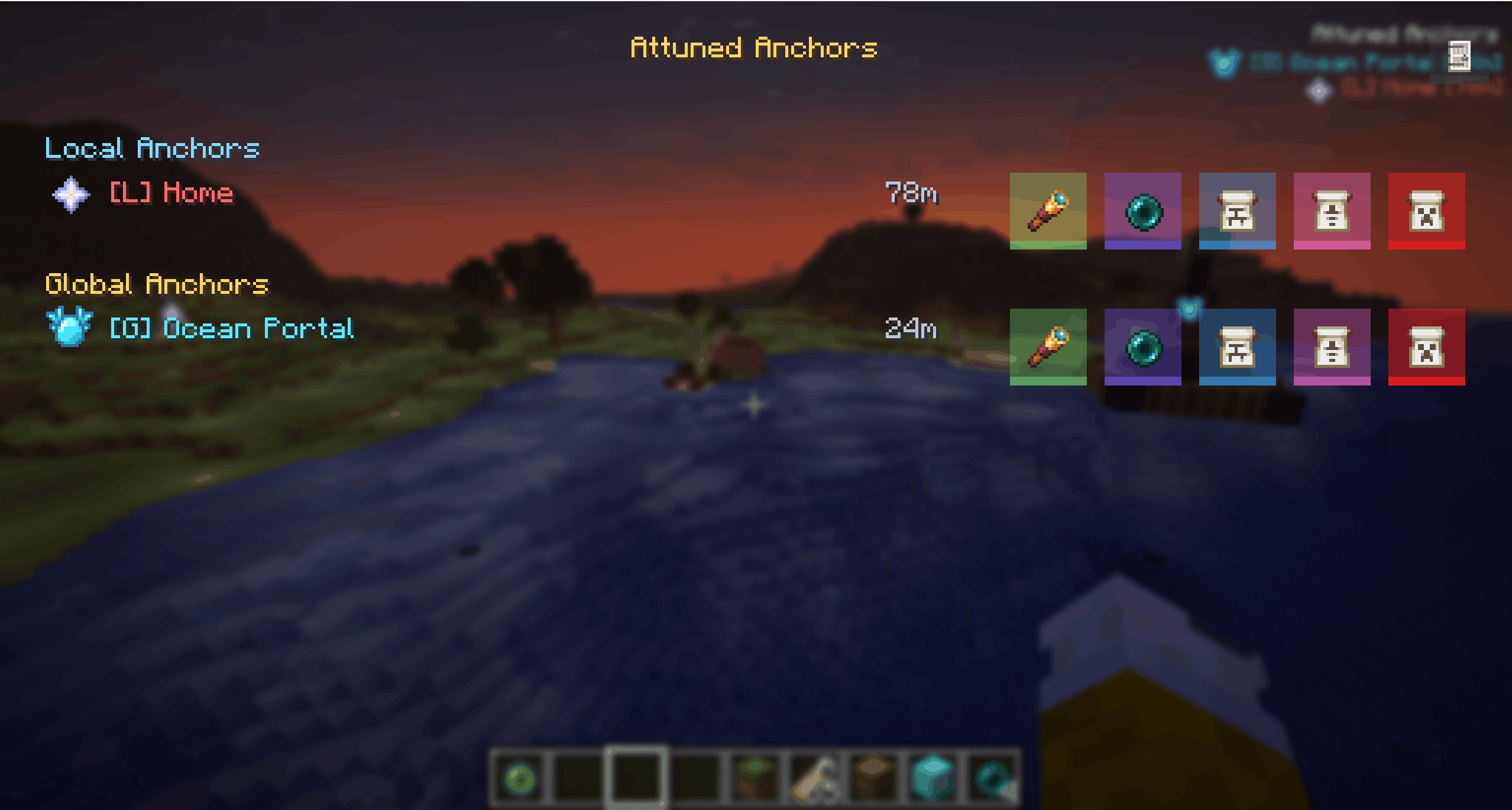
玩家无需在地图界面放置路标,而是在世界中建造一个“锚点”结构并激活它,随后通过游戏内的路标菜单和 HUD 使用它。
安装
在客户端和服务端安装相同的 jar 文件。
功能
- 可建造的本地锚点和全局锚点
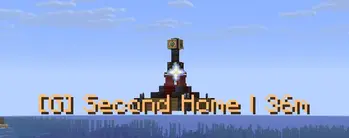
- 带有距离标记的游戏内路标 HUD
N 菜单用于查看、编辑、传送和管理锚点- 管理员快速传送按钮
- 基于命名牌(Name Tag)的访问控制
- 公开锚点、私有锚点和指定用户锚点
- 自动结构验证
- 损坏的锚点会自动禁用,并在修复后重新激活
- 完全移除的锚点会从存储中清理
- 持久化世界存储
锚点类型
Attuned Anchors 拥有两种具有不同可见范围的锚点类型。
| 类型 |
可见范围 |
核心方块 |
物品展示框 |
| 本地锚点 |
< 256m |
铁块 |
末影珍珠 |
| 全局锚点 |
> 256m |
钻石块 |
末影之眼 |
本地锚点是短程路标。默认情况下,它们在 256米 范围内可见。
全局锚点是远程路标。它们可以在 超过 256米 的距离外看到,并且在同一维度中的任何位置都可用。
访问控制
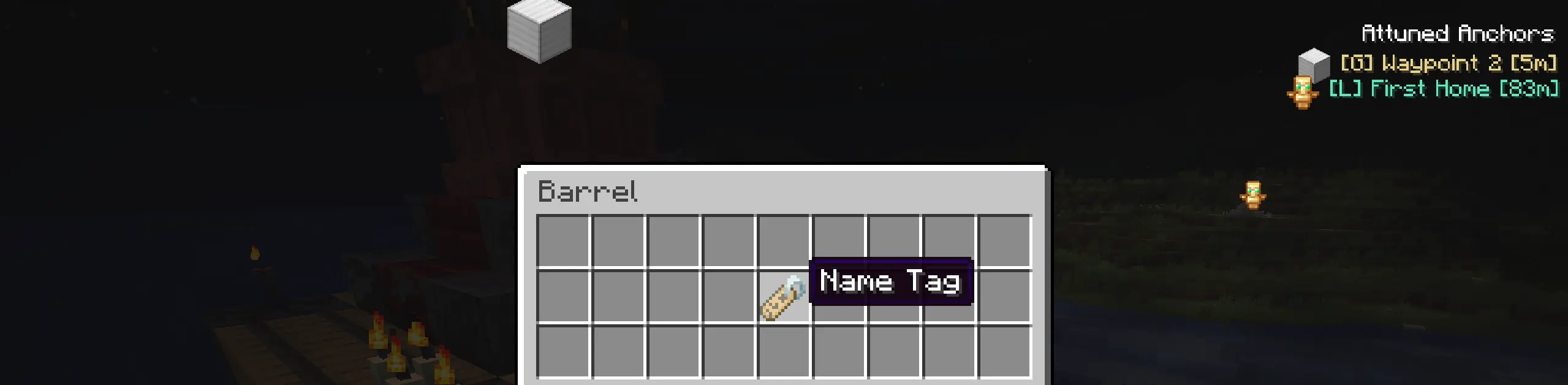
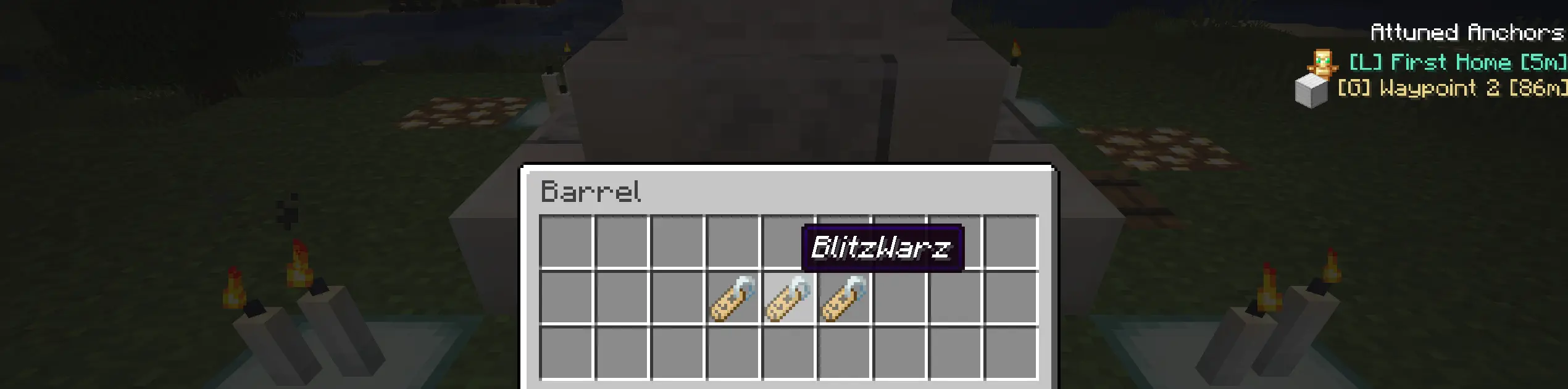
锚点的访问权限通过放置在锚点桶内的命名牌进行控制。
- 添加默认的
Name Tag 可使锚点公开。
- 添加重命名为玩家姓名的命名牌,可使锚点仅对该玩家可见。
- 不添加命名牌将使锚点保持禁用状态,直到配置好访问权限。
- 更多的桶意味着有更多的空间存放访问名称。
路标菜单
按 N 打开 Attuned Anchors 菜单。
在菜单中,玩家可以查看可用的锚点、切换 HUD 可见性、检查访问权限、编辑标记外观以及管理他们有权控制的锚点。
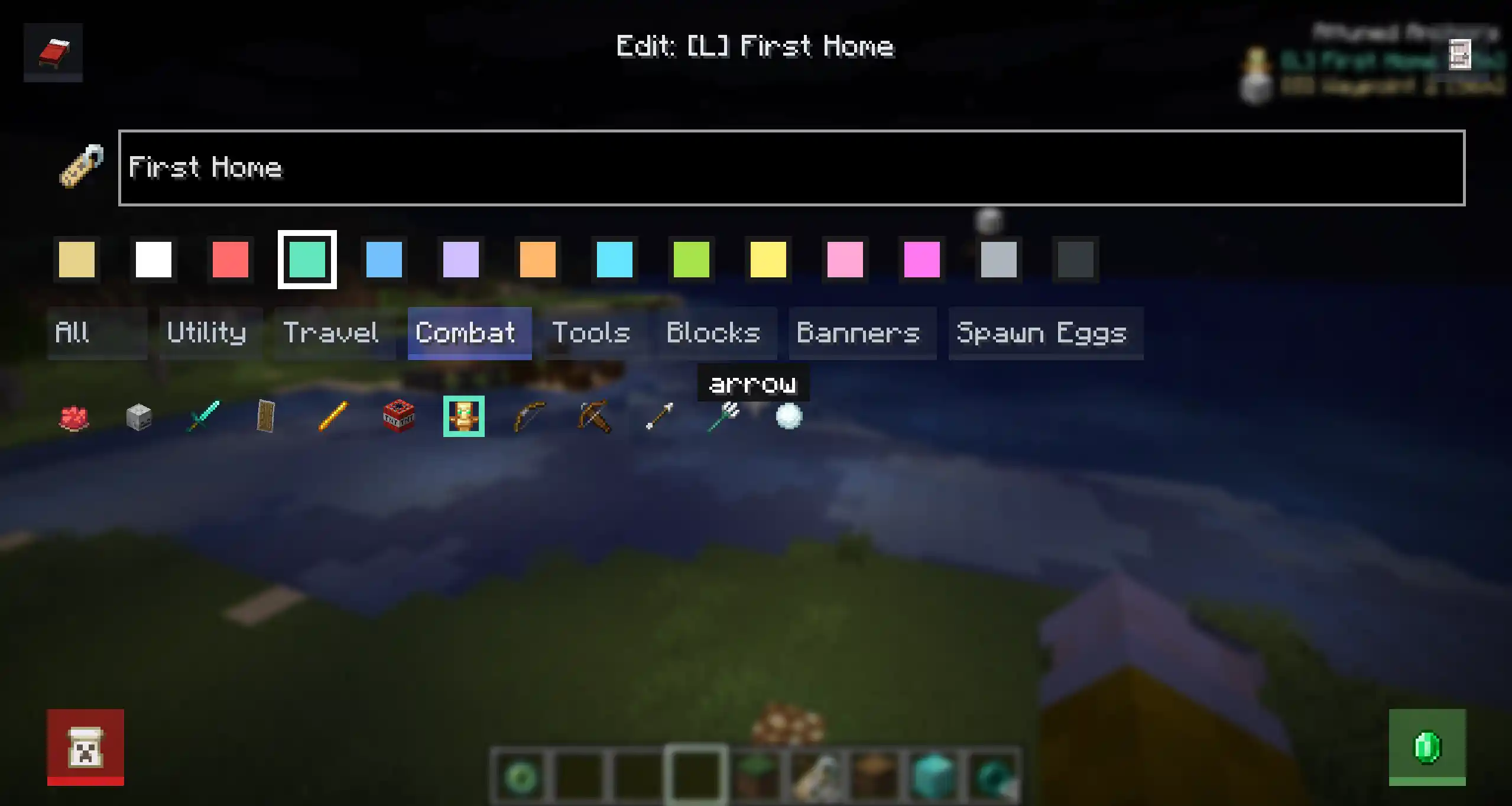
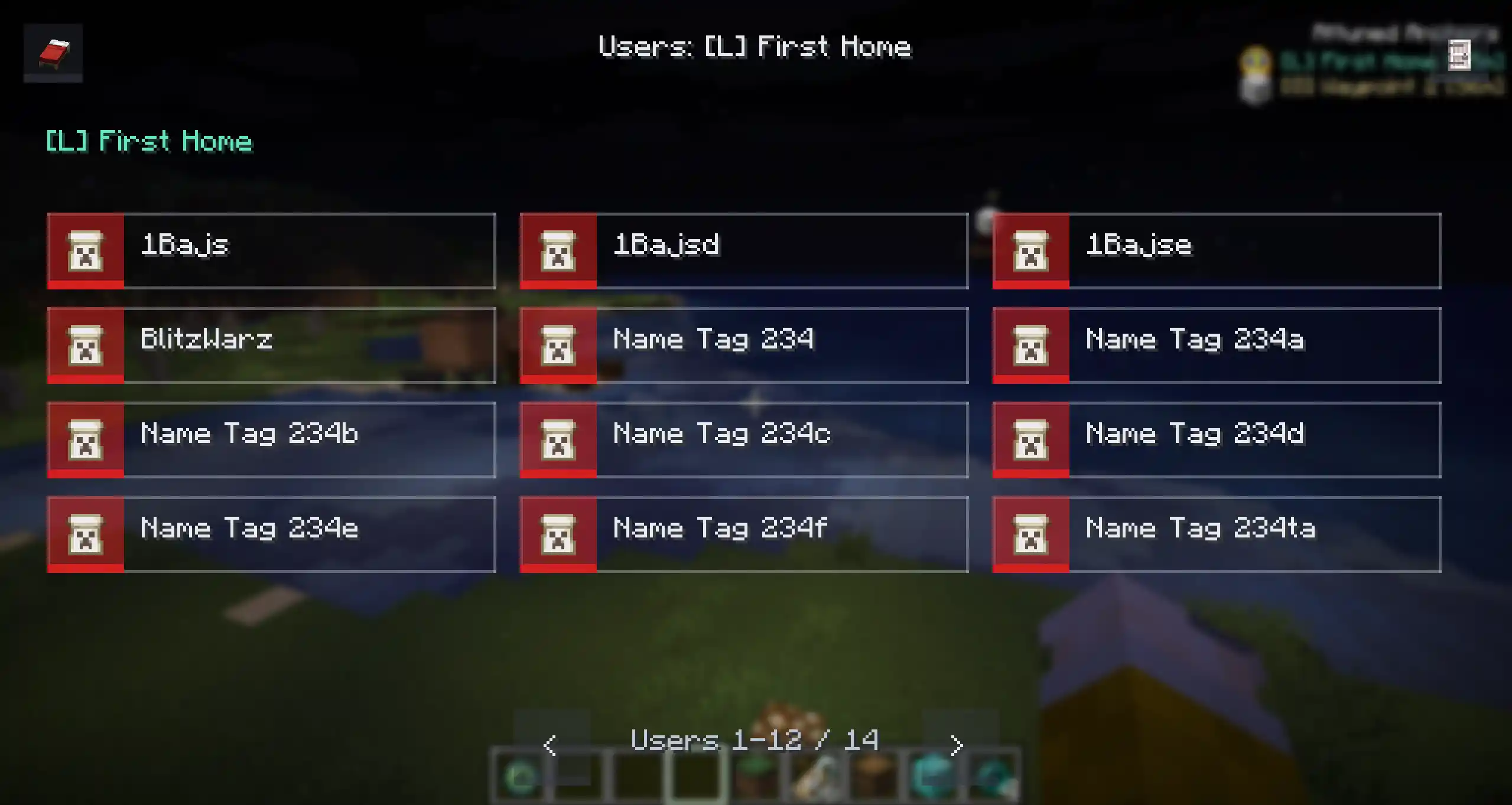
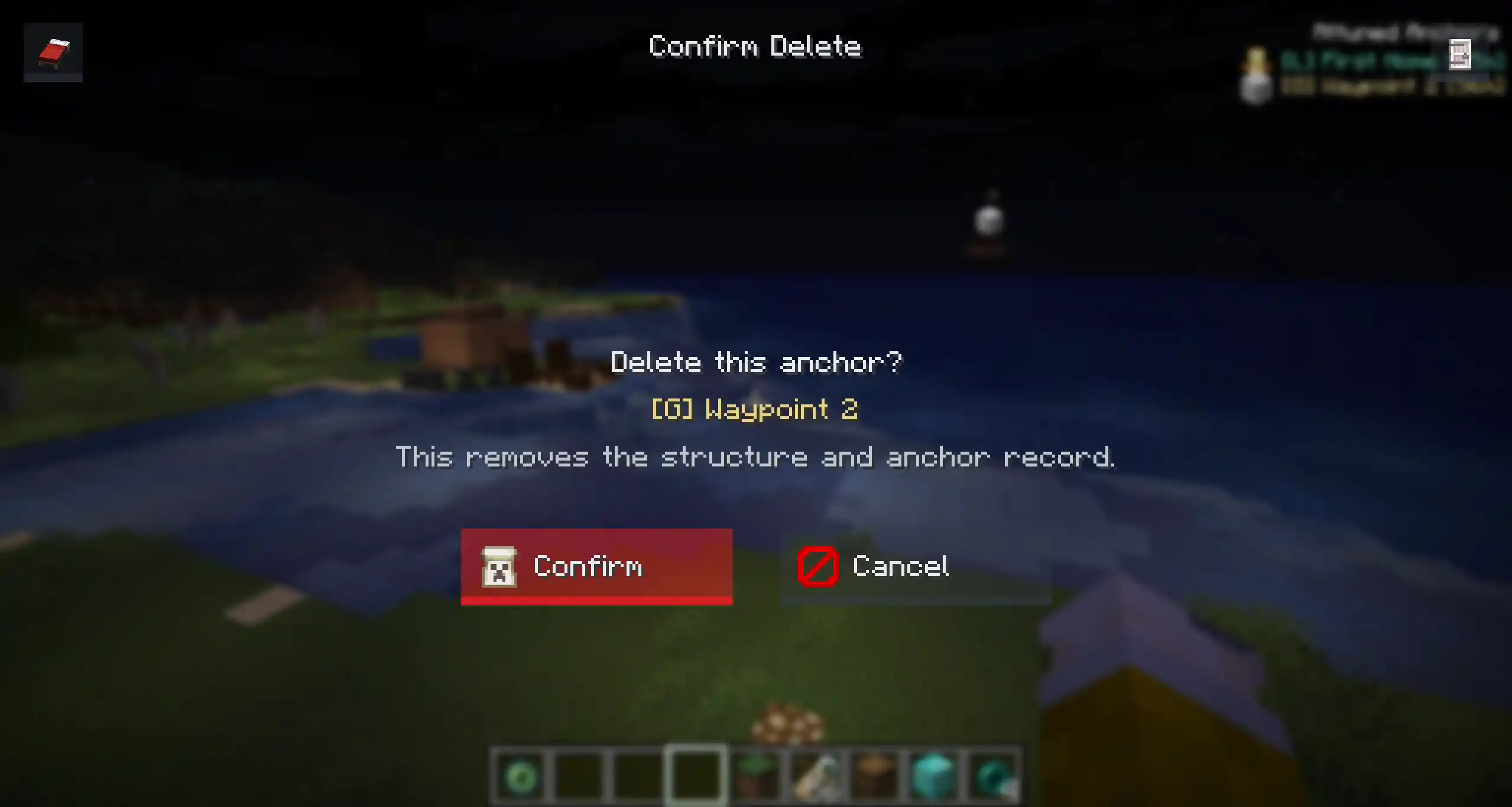
删除锚点时会使用确认屏幕以防止意外移除。
激活
建造结构,放置所需的物品展示框,然后与其中一个锚点物品展示框进行交互。
如果结构有效,锚点将被注册,其蜡烛由模组管理,并对有访问权限的玩家可见。
逐层建造指南
锚点使用 5x5 的基础面积。以核心方块的位置为中心建造每一层。
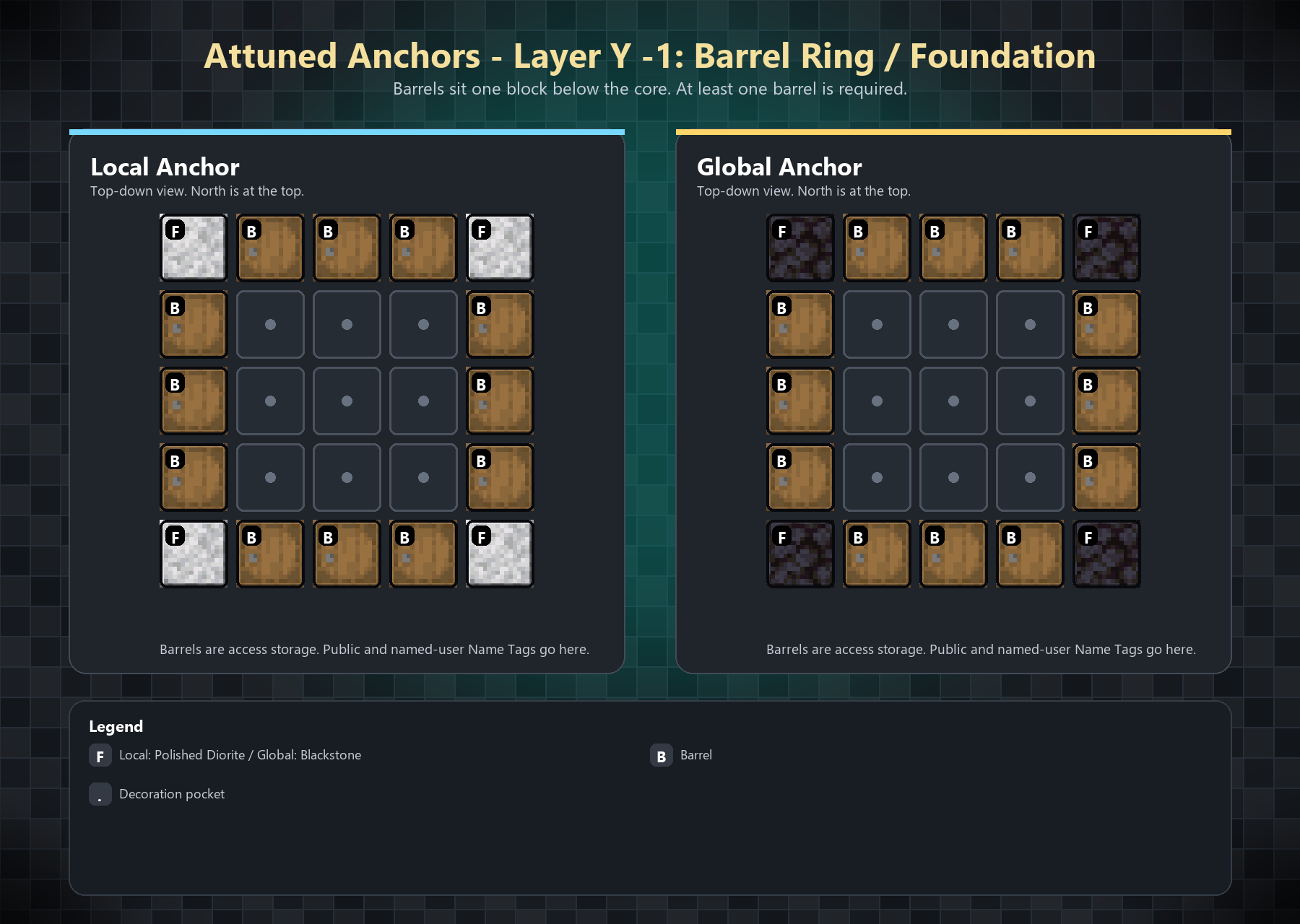
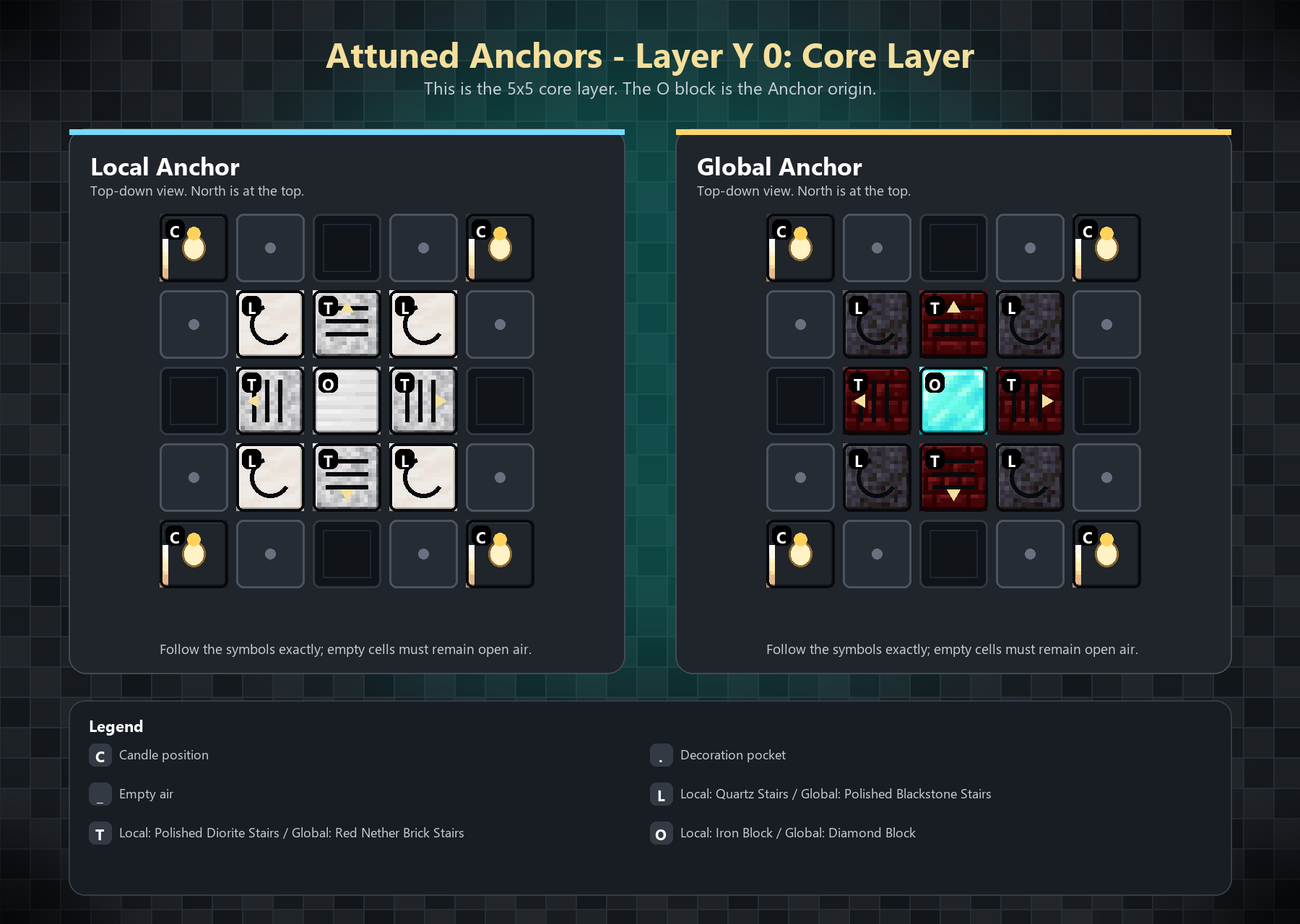
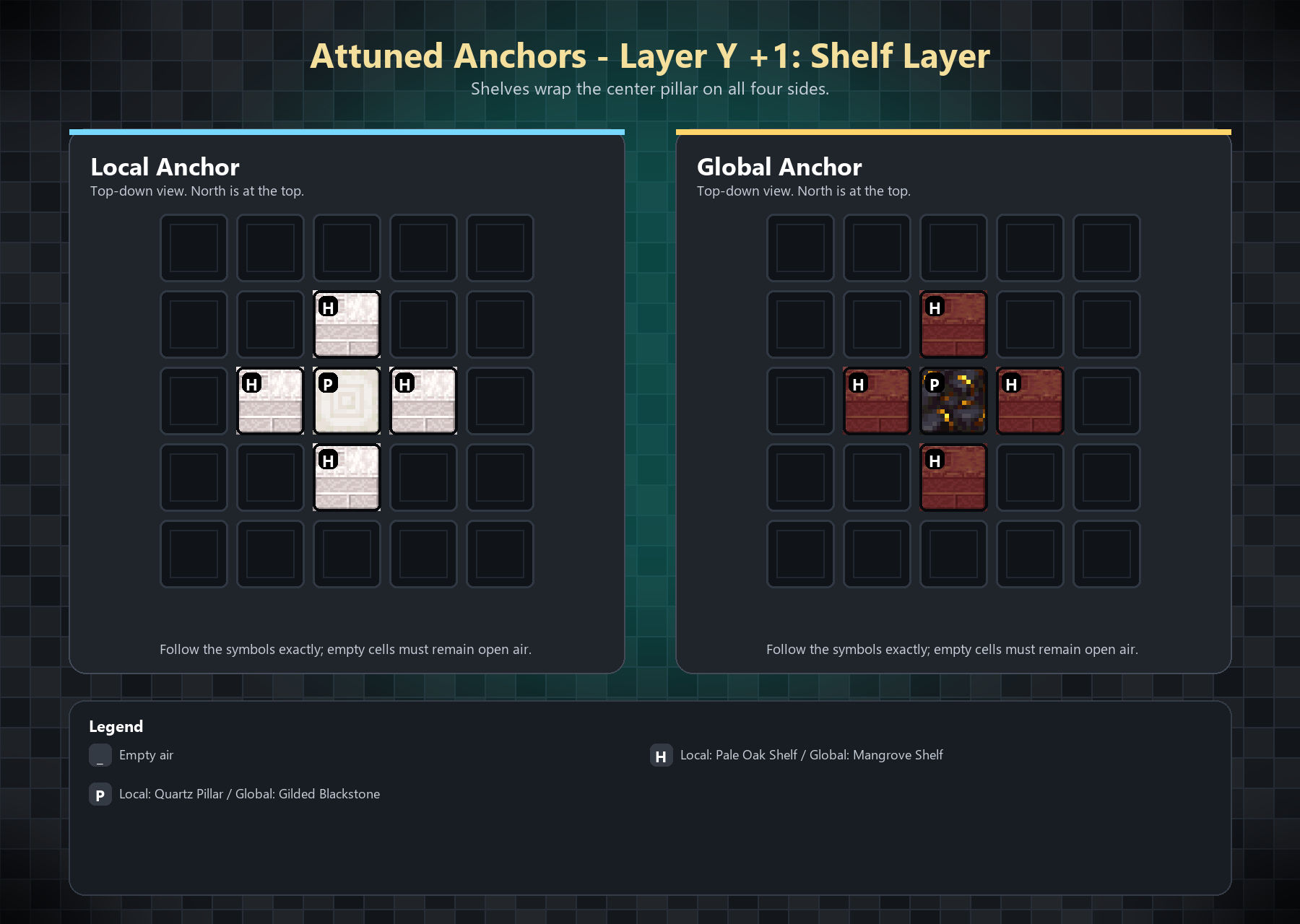
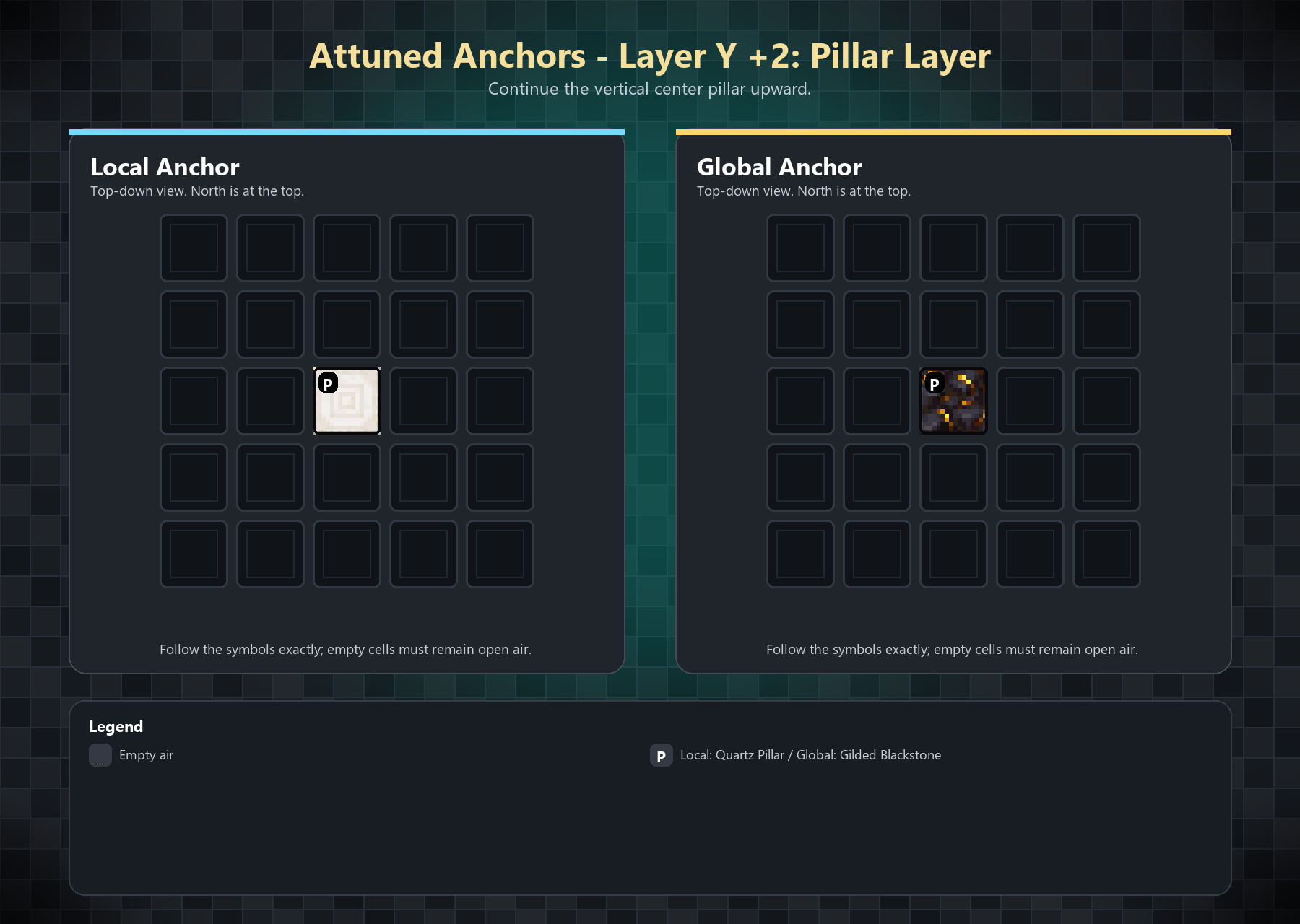
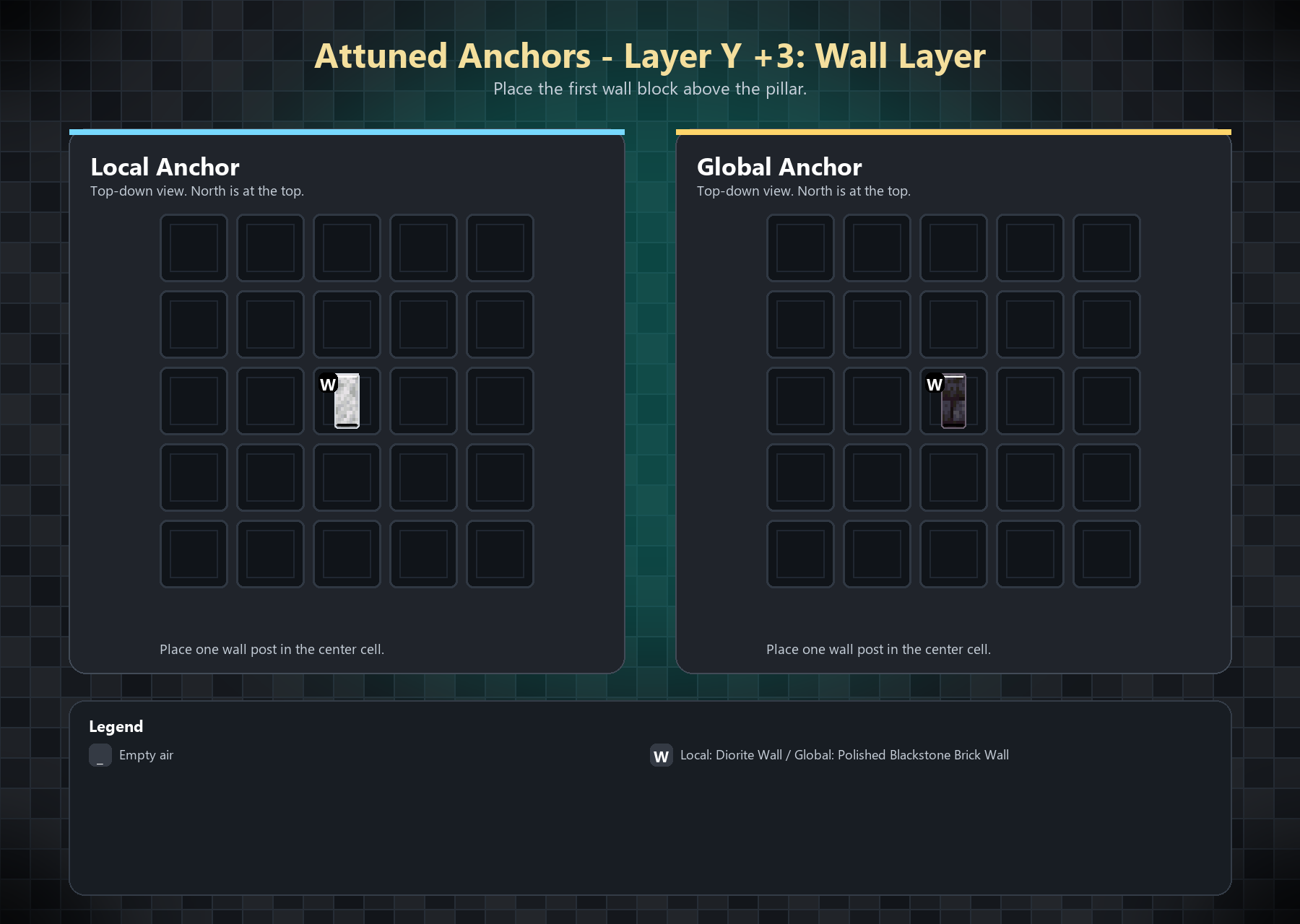
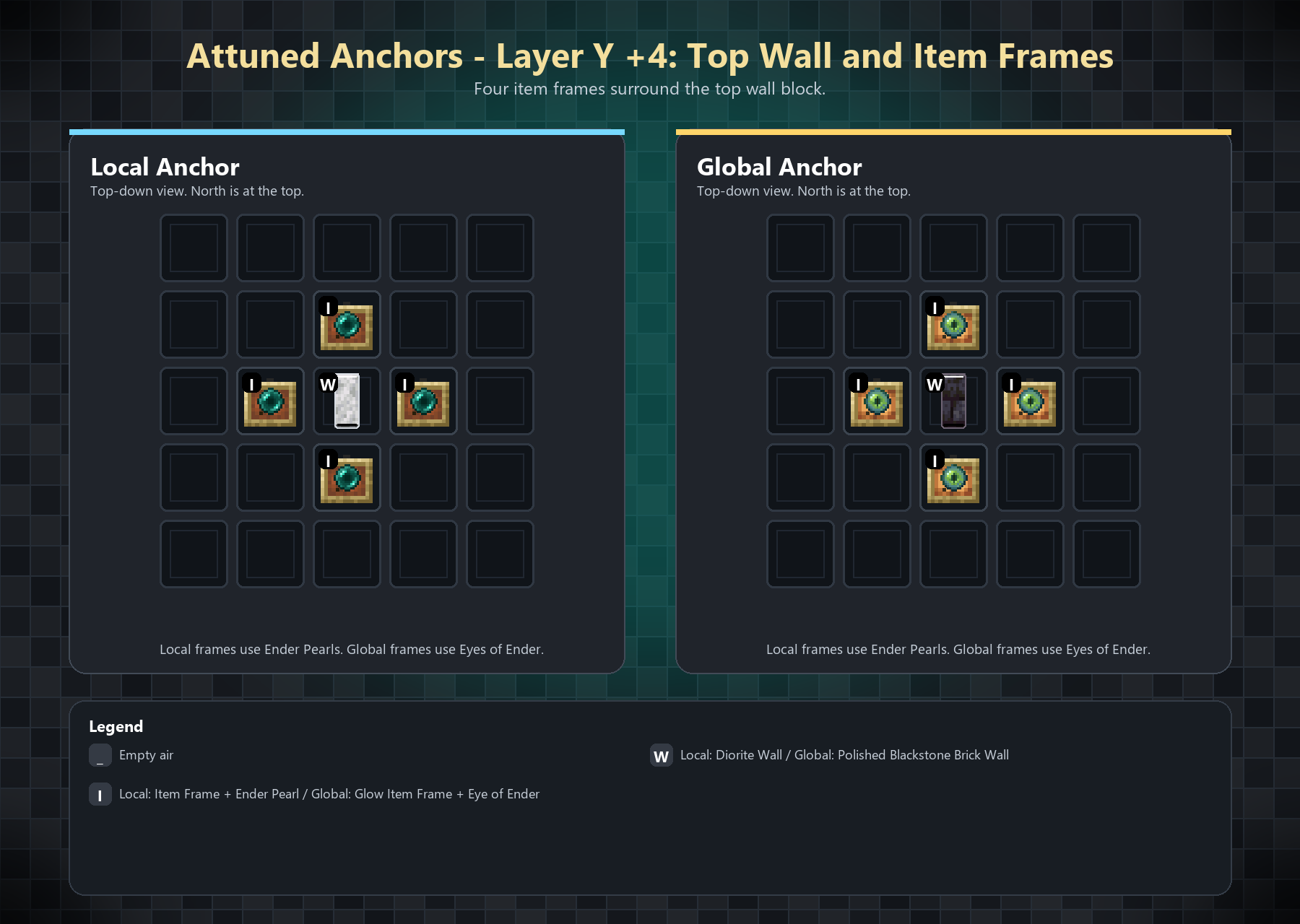
物品展示框必须包含:
全局锚点默认使用发光的物品展示框。
命令
主要命令是 /anchor,/an 为其快捷方式。
/anchor spawn <local | global> [<color> [<icon> [<name>]]] 创建一个完整的锚点。/anchor despawn 移除 32 格范围内最近的已注册锚点结构。/anchor list 显示对玩家可见的锚点。/anchor remove 删除最近的已注册锚点记录,但不破坏方块。/anchor help [spawn | despawn | list | remove] 显示命令帮助。
将此部分添加到底部,替换当前的 Configuration 部分:
配置
Attuned Anchors 在以下位置创建配置文件:
config/attunedanchors/
主配置
config/attunedanchors/config.json
默认值:
{
  "localRadius": 256,
  "validationIntervalSeconds": 60,
  "globalSameDimensionOnly": true,
  "anchorNameMaxLength": 16,
  "localNamePrefix": "[L] ",
  "globalNamePrefix": "[G] "
}
锚点记录按世界保存在以下位置:
data/attuned_anchors.tsv
结构定义可通过以下方式配置:
config/attunedanchors/structures.json
管理员与权限
Attuned Anchors 支持 Fabric Permissions API。
授予此节点以提供完全访问权限:
attunedanchors.admin
单独的权限节点:
| 权限 |
允许操作 |
attunedanchors.menu |
打开锚点菜单 |
attunedanchors.edit |
编辑锚点名称、颜色和图标 |
attunedanchors.manage |
管理锚点用户并删除锚点 |
attunedanchors.teleport |
从菜单传送至锚点 |
attunedanchors.command.list |
使用 /anchor list 命令 |
attunedanchors.command.spawn |
使用 /anchor spawn 命令 |
attunedanchors.command.remove |
使用 /anchor remove 命令 |
attunedanchors.command.despawn |
使用 /anchor despawn 命令 |
如果你未使用权限模组,可以在此处添加备用管理员:
config/attunedanchors/admins.json
示例:
{
  "uuids": [
    "00000000-0000-0000-0000-000000000000"
  ],
  "names": [
  ]
}
{
  "uuids": [
  ],
  "names": [
    "PlayerName"
  ]
}
Mach9Games Studio
Attuned Anchors!
Attuned Anchors adds buildable waypoint shrines to Minecraft.
Instead of placing waypoints from a map screen, players build an Anchor structure in the world, activate it, and then use it through an in-game waypoint menu and HUD.
Installation
Install the same jar on both the client and server.
- Client: required
- Server: required
Features
- Buildable Local Anchors and Global Anchors
- In-game waypoint HUD with distance markers
N menu for viewing, editing, teleporting, and managing Anchors- Admin teleport button for fast travel
- Name Tag based access control
- Public Anchors, private Anchors, and assigned-user Anchors
- Automatic structure validation
- Broken Anchors disable themselves and reactivate when repaired
- Fully removed Anchors are cleaned from storage
- Persistent world storage
Anchor Types
Attuned Anchors has two Anchor types with different visibility ranges.
| Type |
Visibility Range |
Core Block |
Item Frame |
| Local Anchor |
< 256m |
Iron Block |
Ender Pearl |
| Global Anchor |
> 256m |
Diamond Block |
Eye of Ender |
Local Anchors are short-range waypoints. By default, they are visible up to 256m away.
Global Anchors are long-range waypoints. They can be seen from beyond 256m and remain available from anywhere in the same dimension.
Access Control
Anchor access is controlled through Name Tags placed inside the Anchor barrels.
- Add a default
Name Tag to make the Anchor public.
- Add renamed Name Tags with player names to make the Anchor visible only to those players.
- Leave out Name Tags to keep the Anchor disabled until access is configured.
- More barrels means more room for access names.
Waypoint Menu
Press N to open the Attuned Anchors menu.
From the menu, players can view available Anchors, toggle HUD visibility, inspect access, edit marker appearance, and manage Anchors they are allowed to control.
Deleting an Anchor uses a confirmation screen to prevent accidental removals.
Activation
Build the structure, place the required item frames, then interact with one of the Anchor item frames.
If the structure is valid, the Anchor is registered, its candles are managed by the mod, and it becomes visible to players with access.
Layer-by-Layer Construction Guide
Anchors use a 5x5 footprint. Build each layer centered on the core block position.
The item frames must contain:
- Local Anchor: Ender Pearl
- Global Anchor: Eye of Ender
Global Anchors use glowing item frames by default.
Commands
The main command is /anchor, with /an as a shortcut.
/anchor spawn <local | global> [<color> [<icon> [<name>]]] creates a complete Anchor./anchor despawn removes the nearest registered Anchor structure within 32 blocks./anchor list shows Anchors visible to the player./anchor remove deletes the nearest registered Anchor record without breaking blocks./anchor help [spawn | despawn | list | remove] shows command help.
Add this near the bottom, replacing the current Configuration section:
Configuration
Attuned Anchors creates its config files in:
config/attunedanchors/
Main Config
config/attunedanchors/config.json
Default values:
{
  "localRadius": 256,
  "validationIntervalSeconds": 60,
  "globalSameDimensionOnly": true,
  "anchorNameMaxLength": 16,
  "localNamePrefix": "[L] ",
  "globalNamePrefix": "[G] "
}
Anchor records are saved per world at:
data/attuned_anchors.tsv
Structure definitions are configurable through:
config/attunedanchors/structures.json
Admins and Permissions
Attuned Anchors supports the Fabric Permissions API.
Grant this node to give full access:
attunedanchors.admin
Individual permission nodes:
| Permission |
Allows |
attunedanchors.menu |
Open the Anchor menu |
attunedanchors.edit |
Edit Anchor name, color, and icon |
attunedanchors.manage |
Manage Anchor users and delete Anchors |
attunedanchors.teleport |
Teleport to Anchors from the menu |
attunedanchors.command.list |
Use /anchor list |
attunedanchors.command.spawn |
Use /anchor spawn |
attunedanchors.command.remove |
Use /anchor remove |
attunedanchors.command.despawn |
Use /anchor despawn |
If you do not use a permissions mod, fallback admins can be added here:
config/attunedanchors/admins.json
Example:
{
  "uuids": [
    "00000000-0000-0000-0000-000000000000"
  ],
  "names": [
  ]
}
{
  "uuids": [
  ],
  "names": [
    "PlayerName"
  ]
}


 模组

 模组
 模组

 模组
 模组
 模组
评论 0
登录后参与评分
还没有评论,来抢沙发吧