
AutoDrop
保持背包整洁:自动丢弃你不想要的物品,就在你拾取它们之后。
? 展示
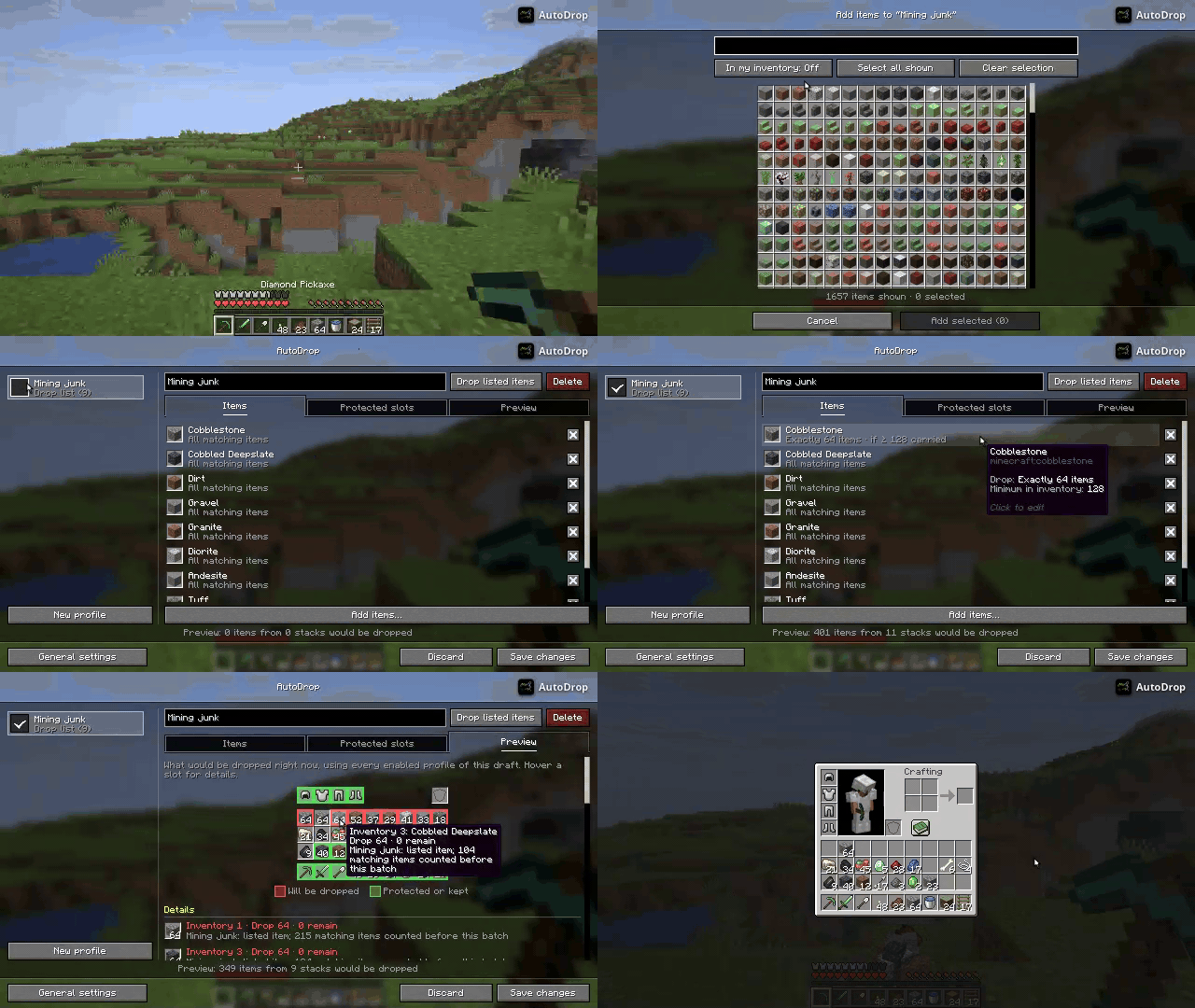
✨ 功能
- 配置档案(Profiles): 将物品分组到配置档案中,并开启或关闭每一个档案。所有已启用的配置档案会同时生效。
- 丢弃列表与保留列表: 仅丢弃列出的物品,或者保留列出的物品并丢弃其他所有物品。
- 单物品规则: 丢弃所有匹配的物品、每个堆叠的一半或确切数量的 X 个物品,并且仅在你携带达到最小数量时触发。
- 受保护槽位: 受保护槽位中的物品永远不会被丢弃。默认情况下,护甲槽位是受保护的。
- 实时预览: 查看当前会被丢弃的物品以及为什么某个槽位被丢弃或保留。
- 灵活的触发方式: 在拾取物品时、开始潜行时或使用按键绑定触发。
- 物品数据过滤器: 通过组件/NBT 匹配物品,例如仅匹配没有经验修补附魔的附魔书。
- 客户端运行: 在单人游戏和服务端无需安装任何内容即可在服务端上使用。
? 使用方法
打开配置界面
- 按下配置按键绑定(默认:O)。
- 或在 Mod Menu(Fabric)或模组列表中点击模组的配置按钮。
只有在按下 保存更改 后修改才会生效。当界面打开时,丢弃功能暂停。你也可以在世界外编辑配置档案,但背包视图和预览功能需要一个世界环境。
配置档案(Profiles)
物品按配置档案组织。每个配置档案可以在配置档案列表中开启或关闭,所有已启用的配置档案会同时生效。新创建的配置档案默认为关闭状态。
配置档案有两种工作模式:
- 丢弃列出物品: 丢弃列出的物品。
- 保留列出物品: 保留列出的物品并丢弃其他所有物品。在启用保留列表之前,你必须审查哪些物品会被丢弃。如果多个保留列表同时启用,只要出现在任何一个保留列表中的物品都会被保留。
每个配置档案有三个标签页:
- 物品: 使用物品选择器添加物品(可一次添加多个),并点击物品以编辑其规则。
- 受保护槽位: 受保护槽位中的物品不会被任何已启用的配置档案丢弃。新配置档案默认保护护甲槽位。
- 预览: 显示当前会被丢弃的物品以及为什么某个槽位被丢弃或保留。
物品规则
丢弃列表中的每个物品都可以进行配置:
- 数量: 丢弃所有匹配的物品、每个堆叠的一半,或每次触发确切数量的 X 个物品(如果需要则从多个堆叠中扣除)。
- 背包最低数量: 仅当你总共携带至少此数量的匹配物品时才触发丢弃。
触发方式与按键绑定
丢弃可以通过以下方式触发:
- 拾取物品(默认开启)
- 开始潜行(默认关闭)
- 触发按键绑定
| 按键绑定 | 默认值 | 操作 |
|---|---|---|
| 打开配置 | O | 打开配置界面 |
| 触发 | K | 立即丢弃已配置的物品 |
| 切换开关 | J | 开启或关闭 AutoDrop |
触发与丢弃之间的延迟可以在常规设置中更改。
物品数据过滤器(组件/NBT)
物品数据过滤器位于物品规则的高级选项中。
⚠️ 注意: 使用“任意物品”(
*)且留空过滤器会导致模组丢弃所有未受保护或未保留的物品。
过滤器的格式始终是你所游玩的 Minecraft 版本的物品谓词语法。除非你熟记该语法,否则你可以使用
指令生成器
并复制组件部分(由 [] 包围)。
语法也在
这篇 维基文章 中有描述。
对于物品的子类型,例如水瓶(药水的子类型),请使用专门的生成器,如 Minecraft Maps Generators。
❓ 常见问题
如何丢弃除特定物品外的所有物品?
创建一个处于 保留列出物品 模式的配置档案,并添加你想要保留的物品。
如需更精细的控制,可以使用带有过滤器 [!minecraft:stored_enchantments={mending:1}] 的“任意物品”。这将丢弃所有没有经验修补附魔的物品。如果你只想丢弃没有经验修补附魔的附魔书,请将“任意物品”替换为 minecraft:enchanted_book。
我需要在服务端安装 AutoDrop 吗?
不需要。AutoDrop 是一个客户端模组,只需在你的客户端上安装即可。
? 安装
从 Modrinth
或 CurseForge 下载适用于你的加载器的文件,将其放入 mods 文件夹,并添加所需的依赖项:
| 加载器 | 必需依赖项 | 可选依赖项 |
|---|---|---|
| Fabric / Quilt | Fabric API, Fabric Language Kotlin | Mod Menu |
| NeoForge | KotlinLangForge | – |
? 支持
如果你需要关于我的任何模组的帮助,请加入我的 Discord 服务器。
AutoDrop
Keep your inventory clean: automatically drop the items you don't want, right after you pick them up.
? Showcase
✨ Features
- Profiles: Group items into profiles and turn each one on or off. Every enabled profile applies at the same time.
- Drop lists & keep lists: Drop only the listed items, or keep the listed items and drop everything else.
- Per-item rules: Drop all matching items, half of each stack or exactly X items, and only once you carry a minimum amount.
- Protected slots: Items in protected slots are never dropped. Armor slots are protected by default.
- Live preview: See what would be dropped right now and why each slot is dropped or kept.
- Flexible triggers: Drop on item pickup, when you start crouching or with a keybinding.
- Item data filters: Match items by their components/NBT, e.g. only enchanted books without Mending.
- Client-side: Works in singleplayer and on servers without installing anything on the server.
? Usage
Opening the config screen
- Press the config keybinding (default: O).
- Or use the config button of the mod in Mod Menu (Fabric) or the mods list (NeoForge).
Changes are only applied when you press Save changes. Dropping is paused while the screen is open. You can edit profiles outside a world as well, but the inventory view and the preview need one.
Profiles
Items are organized in profiles. Each profile can be turned on or off in the profile list, and every enabled profile applies at the same time. New profiles start turned off.
A profile works in one of two modes:
- Drop listed items: The listed items are dropped.
- Keep listed items: The listed items are kept and every other item is dropped. You have to review what would be dropped before a keep list can be turned on. If several keep lists are on, an item on any of them is kept.
Each profile has three tabs:
- Items: Add items with the item picker (several at once) and click an item to edit its rule.
- Protected slots: Items in protected slots are never dropped by any enabled profile. New profiles protect the armor slots.
- Preview: Shows what would be dropped right now and why each slot is dropped or kept.
Item rules
Every item in a drop list can be configured:
- Amount: Drop all matching items, half of each stack, or exactly X items per trigger (taken from several stacks if needed).
- Minimum in inventory: Only drop once you carry at least this many matching items in total.
Triggers & keybindings
Dropping can be triggered by:
- picking up items (on by default)
- starting to crouch (off by default)
- the trigger keybinding
| Keybinding | Default | Action |
|---|---|---|
| Open config | O | Opens the config screen |
| Trigger | K | Drops the configured items now |
| Toggle | J | Turns AutoDrop on or off |
The delay between a trigger and dropping can be changed in the general settings.
Item data filters (Components/NBT)
The item data filter can be found in the advanced options of an item rule.
⚠️ Be careful: Using "Any item" (
*) and leaving the filter empty will cause the mod to drop every item that is not protected or kept.
The format of the filter is always the item predicate syntax of the version of Minecraft you're playing on.
Unless you know the syntax by heart, you can use
a give command generator
and copy the component part (enclosed by []).
The syntax is also described on
this wiki post.
For sub-types of items, such as Bottle of Water (subtype of Potion), use a specialized generator like the Minecraft Maps Generators.
❓ FAQ
How do I drop everything except a specific item?
Create a profile in Keep listed items mode and add the items you want to keep.
For finer control, use "Any item" with a filter like [!minecraft:stored_enchantments={mending:1}]. It will drop
every item that does not have Mending enchanted. If you want to only drop enchanted books that do not have Mending
enchanted, use minecraft:enchanted_book instead of "Any item".
Do I need to install AutoDrop on the server?
No. AutoDrop is a client-side mod and only needs to be installed on your client.
? Installation
Download the file for your loader from Modrinth
or CurseForge, put it in your mods folder and add
the required dependencies:
| Loader | Required dependencies | Optional |
|---|---|---|
| Fabric / Quilt | Fabric API, Fabric Language Kotlin | Mod Menu |
| NeoForge | KotlinLangForge | – |
? Support
If you need help with any of my mods, join my Discord server.

下载 autodrop
需要联机服务器吗?
稳定流畅、一键部署,几分钟即可和朋友联机开服
最低仅需 8 元/月 即可畅快联机
下载 autodrop
需要联机服务器吗?
稳定流畅、一键部署,几分钟即可和朋友联机开服
最低仅需 8 元/月 即可畅快联机
下载 autodrop
需要联机服务器吗?
稳定流畅、一键部署,几分钟即可和朋友联机开服
最低仅需 8 元/月 即可畅快联机
下载 autodrop
需要联机服务器吗?
稳定流畅、一键部署,几分钟即可和朋友联机开服
最低仅需 8 元/月 即可畅快联机
下载 autodrop
需要联机服务器吗?
稳定流畅、一键部署,几分钟即可和朋友联机开服
最低仅需 8 元/月 即可畅快联机
下载 autodrop
需要联机服务器吗?
稳定流畅、一键部署,几分钟即可和朋友联机开服
最低仅需 8 元/月 即可畅快联机
下载 autodrop
需要联机服务器吗?
稳定流畅、一键部署,几分钟即可和朋友联机开服
最低仅需 8 元/月 即可畅快联机
下载 autodrop
需要联机服务器吗?
稳定流畅、一键部署,几分钟即可和朋友联机开服
最低仅需 8 元/月 即可畅快联机
下载 autodrop
需要联机服务器吗?
稳定流畅、一键部署,几分钟即可和朋友联机开服
最低仅需 8 元/月 即可畅快联机
下载 autodrop
需要联机服务器吗?
稳定流畅、一键部署,几分钟即可和朋友联机开服
最低仅需 8 元/月 即可畅快联机
v3.0.0-26.3+fabric
- 从头重构配置界面,使用原版小部件
- 不再需要 YACL
- 存档现在称为配置文件(profiles),并在单一工作区中管理:左侧为配置文件列表,右侧为物品标签页、受保护槽位和实时预览
- 通过创意模式风格的选取器一次性选择多个物品,支持搜索和“我的背包中有”筛选器
- 所有编辑均在草稿中进行:保存应用更改,丢弃恢复原状,且在界面打开期间暂停自动掉落
- 该界面现在也适用于非世界环境;仅物品视图和预览需要处于世界中
- 添加保留列表(keep lists):配置文件可保留列出的物品,并丢弃其他所有物品
- 启用的保留列表会合并生效,在启用保留列表前需审查将被丢弃的物品
- 为每个物品规则新增数量选项:所有匹配物品、每堆的一半,或每次触发时精确 X 个物品
- 原有的每堆数量设置被替换为“背包内最低数量”,统计你携带的所有匹配物品
- 新增预览功能,显示当前哪些物品将被丢弃,并解释每个槽位是丢弃还是保留的原因
- 新建的配置文件默认关闭,并默认保护护甲槽位
- 旧存档会自动迁移为配置文件
- 关闭了“丢弃所有物品”的物品将变为“每堆的一半”规则
- 旧的每堆数量设置变为新的全背包最低数量限制
- 拾取触发器现在响应实际的背包变化,不再由 AutoDrop 自身的掉落行为触发
- 蹲下触发器现在仅在开始蹲下时触发,且不再阻塞其他触发器
- 无效的 ItemData 过滤器现在会暂停掉落,而不是每次触发都失败
关于这个资源的讨论、问题反馈与使用心得
还没有讨论,来发第一帖吧
你是这个资源的作者?登录后可认领此资源。
相似资源
 模组

显示你正在注视的方块的信息。(适用于 Minecraft 1.16+ 的 Hwyla/Waila 分支)
 模组
使用 JavaScript 编辑配方、添加自定义物品、编写世界事件!
 模组

查看物品与配方
 模组
在游戏画面角落显示附近世界地形、玩家、生物和实体的地图。可创建路径点,帮助你找到标记过的位置。
 模组
AE2:一款流行的自动化与存储模组
 模组
那是什么?一个 Waila/Hwyla 的分支。
评论 0
登录后参与评分
还没有评论,来抢沙发吧