?️ AutoInventorySorter
一款 Fabric 客户端模组,只需按下一次按键即可瞬间整理你的 Minecraft 物品栏。
无杂乱。无需翻找。只需按下 R,所有物品各归其位。
? 截图
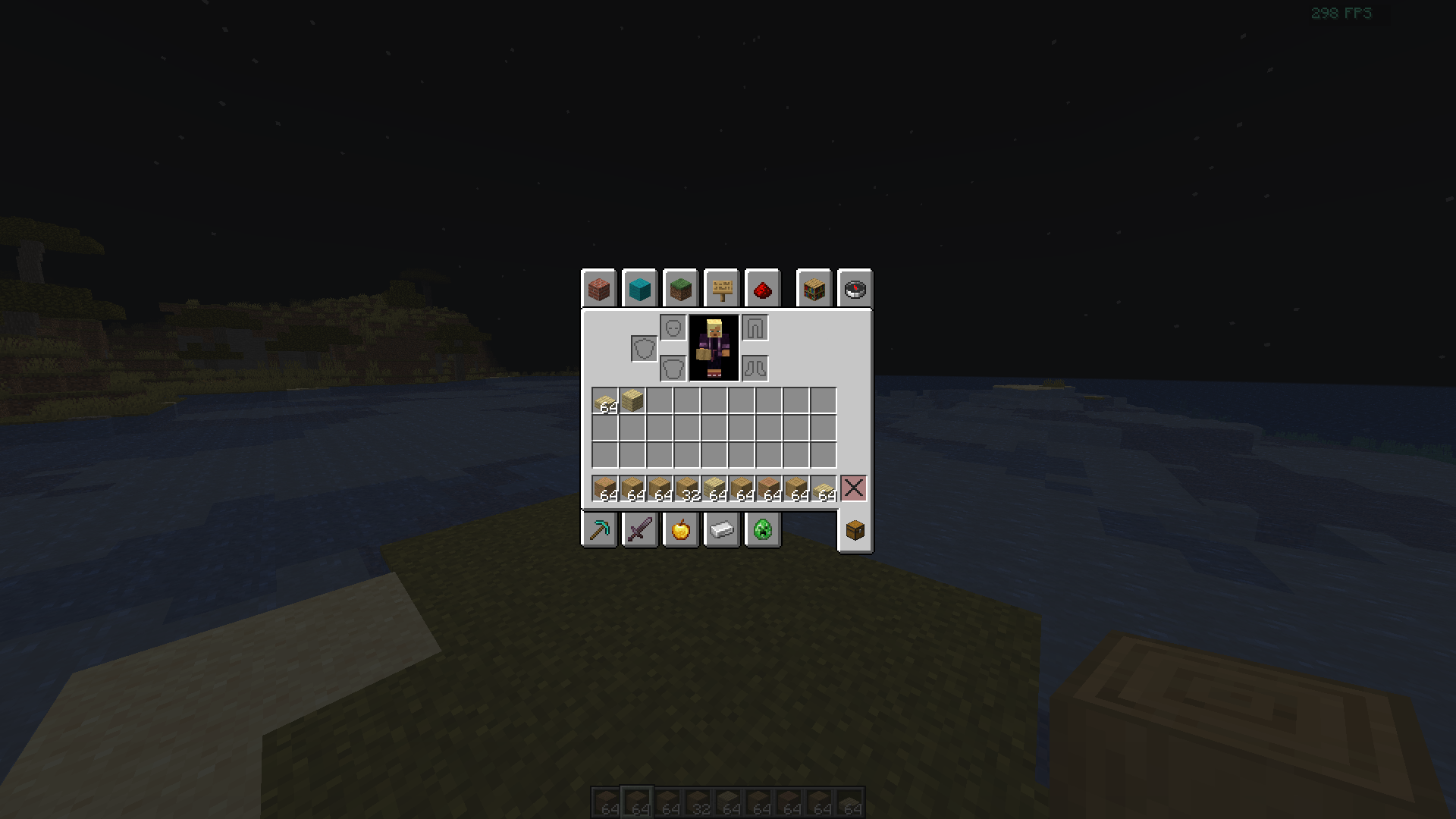
按下 R 键瞬间整理物品栏。方块、工具和食物自动分组。
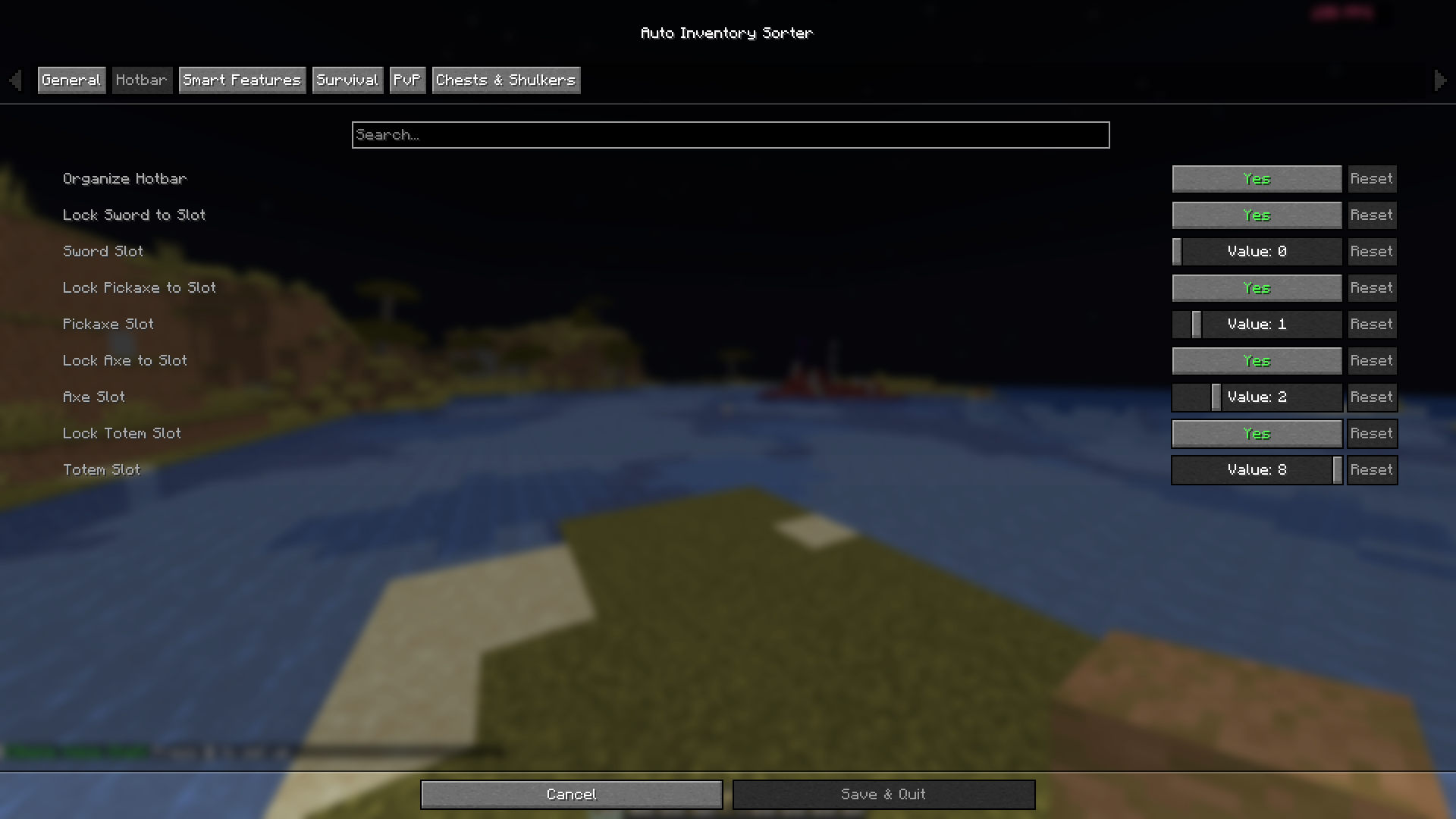
将剑、镐、斧和不死图腾锁定到固定的快捷栏槽位——可在游戏内配置。
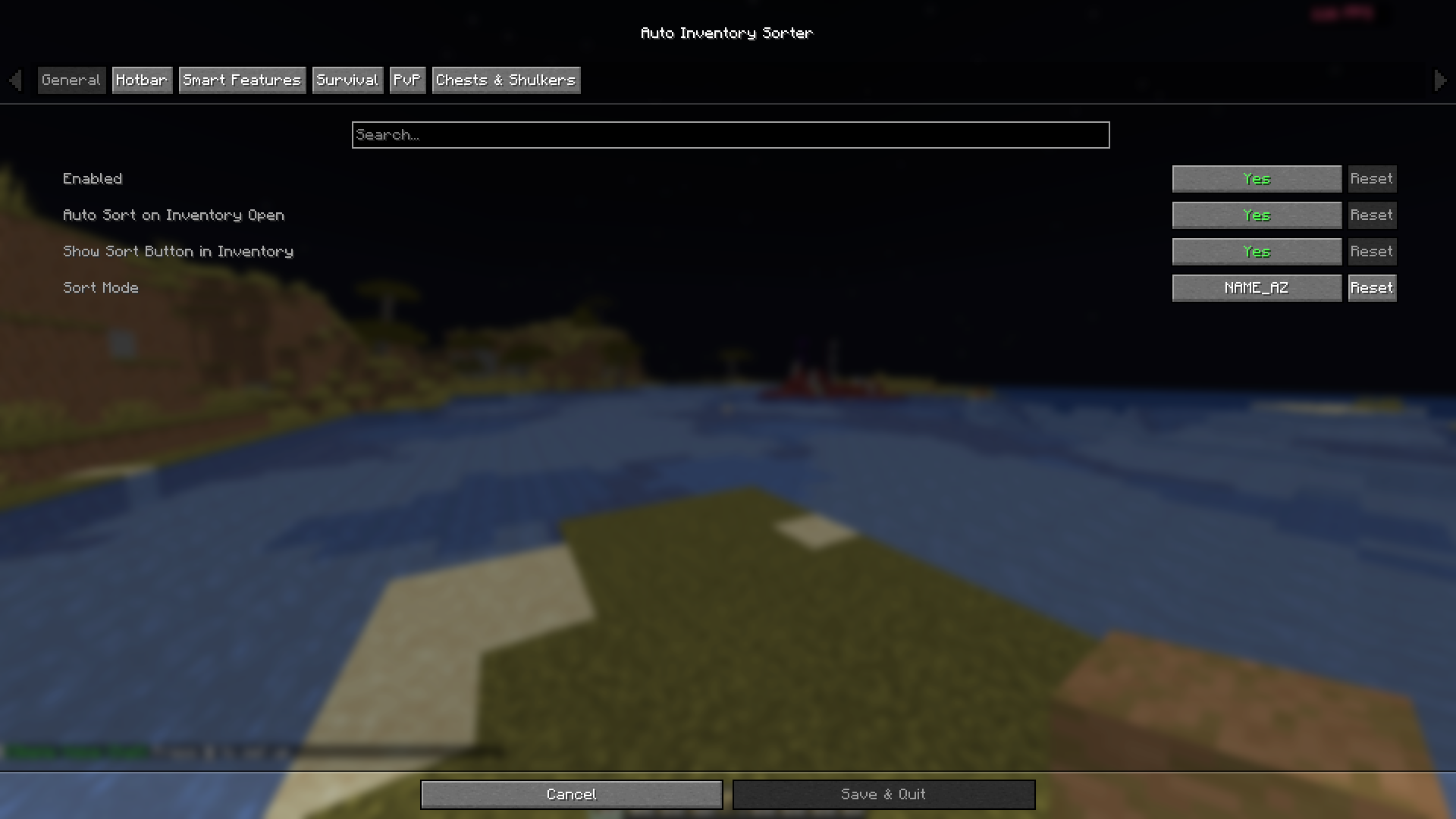
控制排序模式、打开时自动排序以及物品栏内的排序按钮——无需编辑文件。
? 这个模组做什么?
AutoInventorySorter 自动整理你的 Minecraft 物品栏。按下 R 即可整理所有物品——根据你选择的模式,物品会按类型、稀有度、名称、数量或耐久度进行分组。它还会锁定特定的快捷栏槽位,确保你的剑和镐不会被移动,并自动补充消耗品如食物、火把和箭矢。
该模组完全在客户端运行——无需安装服务器端组件。适用于任何服务器,包括原版、Paper 和 Fabric。
✨ 功能特性
? 一键排序
按下 R 即可瞬间整理你的物品栏或任何打开的箱子/容器。适用于个人物品栏、箱子、桶、潜影盒等。
? 5 种排序模式
| 模式 |
功能说明 |
ITEM_TYPE (物品类型) |
按类别分组——武器、工具、食物、方块、杂项 |
RARITY (稀有度) |
普通 → 罕见 → 稀有 → 史诗 → 传说 |
NAME_AZ (名称字母序) |
按物品名称字母顺序排列 |
QUANTITY (数量) |
最大堆叠优先显示 |
DURABILITY (耐久度) |
状态最好的工具排在最前面 |
通过 Mod Menu 在游戏内切换模式。
? 快捷栏槽位锁定
将特定的快捷栏槽位锁定为始终持有某些类型的物品。默认设置:
- 槽位 1 → 剑
- 槽位 2 → 镐
- 槽位 3 → 斧
- 槽位 9 → 不死图腾
在 Mod Menu 的 Hotbar(快捷栏) 标签页中配置每个槽位并开启/关闭锁定。
? 自动补货
当你从快捷栏槽位消耗掉最后一件物品时,AutoInventorySorter 会自动从你的物品栏中拉取替代品进行填充。支持:
? 黑名单系统
排除特定物品或物品栏槽位不参与排序。适用于地图、指南针、命名物品,或任何你想固定放置的物品。
? 配置文件系统
| 配置文件 |
适用场景 |
| Survival (生存) |
一般游玩——平衡的布局 |
| PvP (玩家对战) |
战斗——优先处理武器和药水 |
| Mining (挖矿) |
镐、火把、铲子、矿石置于前方 |
| Building (建筑) |
按类型和数量对方块进行排序 |
? 安装方法
必需依赖
| 依赖项 |
版本 |
| Minecraft |
1.21.5 – 1.21.x |
| Fabric Loader |
0.16.9+ |
| Fabric API |
0.136.1+1.21.8 或匹配版本 |
| Java |
21+ |
可选(推荐)
步骤
- 安装 Fabric Loader
- 下载对应 Minecraft 版本的 Fabric API
- 从 Versions(版本) 标签页下载 AutoInventorySorter
- 将两个
.jar 文件放入 .minecraft/mods/ 文件夹
- 启动 Minecraft
? 使用方法
| 操作 |
方法 |
| 整理物品栏 |
按下 R |
| 整理打开的箱子 |
打开箱子 → 按下 R |
| 打开时自动排序 |
常规标签页 → 打开物品栏时自动排序 |
| 更改排序模式 |
常规标签页 → 排序模式 |
| 锁定快捷栏槽位 |
快捷栏标签页 → 切换 + 设置槽位编号 |
| 保护物品 |
在配置 JSON 中添加至 blacklistedItems |
⚙️ 配置
所有设置均可通过 Mod Menu 在游戏内获取。
如需手动编辑,配置文件位于:.minecraft/config/autoinventorysorter.json
{
  "enabled": true,
  "sortMode": "ITEM_TYPE",
  "sortKey": "R",
  "enableSlotLocking": true,
  "autoRefillHotbar": true,
  "enableChestSorting": true,
  "enableBlacklist": true,
  "autoSortOnOpen": false,
  "refillFood": true,
  "refillBlocks": true,
  "refillTorches": true,
  "refillArrows": true,
  "lockSword": true,
  "swordSlot": 0,
  "lockPickaxe": true,
  "pickaxeSlot": 1,
  "lockAxe": true,
  "axeSlot": 2,
  "lockTotem": true,
  "totemSlot": 8,
  "blacklistedItems": [
    "minecraft:compass",
    "minecraft:filled_map"
  ],
  "blacklistedSlots": []
}
? 多人游戏
100% 客户端侧。无需安装服务器端组件。兼容以下服务器:
- 原版服务器
- Fabric 服务器
- Spigot 和 Paper 服务器
- Hypixel 等大型网络
使用前请始终检查服务器关于客户端模组的具体规则。
❓ 常见问题
这能用于 Forge 或 NeoForge 吗?
目前不行——仅支持 Fabric。Forge/NeoForge 移植版已在开发路线图中。
它支持模组物品吗?
是的。适用于任何物品,无论是原版还是模组物品。
我可以将排序键从 R 改为其他键吗?
可以。在配置文件中编辑 sortKey 或使用 Mod Menu 修改。
这在多人游戏中会引起问题吗?
不会。该模组仅重新组织本地物品栏,且不发送任何额外数据包。
? Bug 反馈
请在 GitHub Issues 上报告 Bug,并提供以下信息:
- Minecraft 版本
- Fabric Loader 和 Fabric API 版本
- AutoInventorySorter 版本
- 复现步骤
- 如有崩溃,请附上
.minecraft/logs/latest.log 中的崩溃日志
? 链接
☕ 支持
如果 AutoInventorySorter 为你节省了时间,欢迎请我喝杯咖啡!
? 许可证
MIT — 可自由使用、分叉并包含在整合包中。感谢署名,但非必需。
为 Minecraft 社区 ❤️ 打造
?️ AutoInventorySorter
A client-side Fabric mod that instantly organizes your Minecraft inventory with one keypress.
No clutter. No digging. Just press R and everything is in its place.
? Screenshots
Press R to instantly sort your inventory. Blocks, tools, and food grouped automatically.
Lock Sword, Pickaxe, Axe, and Totem to fixed hotbar slots — configurable inside the game.
Control sort mode, auto-sort on open, and the in-inventory sort button — no file editing needed.
? What does this mod do?
AutoInventorySorter automatically organizes your Minecraft inventory. Press R to sort everything — items are grouped by type, rarity, name, quantity, or durability depending on the mode you choose. It also locks specific hotbar slots so your sword and pickaxe never get displaced, and automatically refills consumed items like food, torches, and arrows.
It runs entirely on the client side — no server installation needed. Works on any server including vanilla, Paper, and Fabric.
✨ Features
? One-Key Sorting
Press R to instantly sort your inventory or any open chest/container. Works on personal inventory, chests, barrels, shulker boxes, and more.
? 5 Sort Modes
| Mode |
What it does |
ITEM_TYPE |
Groups by category — weapons, tools, food, blocks, misc |
RARITY |
Common → Uncommon → Rare → Epic → Legendary |
NAME_AZ |
Alphabetical by item name |
QUANTITY |
Largest stacks appear first |
DURABILITY |
Best-condition tools sorted to the top |
Switch modes from inside the game via Mod Menu.
? Hotbar Slot Locking
Lock specific hotbar slots to always hold certain item types. Defaults:
- Slot 1 → Sword
- Slot 2 → Pickaxe
- Slot 3 → Axe
- Slot 9 → Totem of Undying
Configure each slot and toggle locking on/off from the Hotbar tab in Mod Menu.
? Auto-Refill
When you consume the last item from a hotbar slot, AutoInventorySorter pulls a replacement from your inventory automatically. Supports:
- Food
- Blocks
- Torches
- Arrows
? Blacklist System
Exclude specific items or inventory slots from sorting. Useful for maps, compasses, named items, or any item you want pinned in place.
? Profile System
| Profile |
Best for |
| Survival |
General play — balanced layout |
| PvP |
Combat — weapons and potions prioritized |
| Mining |
Pickaxes, torches, shovels, ores up front |
| Building |
Blocks sorted by type and quantity |
? How to Install
Required
| Dependency |
Version |
| Minecraft |
1.21.5 – 1.21.x |
| Fabric Loader |
0.16.9+ |
| Fabric API |
0.136.1+1.21.8 or matching |
| Java |
21+ |
Optional (Recommended)
Steps
- Install Fabric Loader
- Download Fabric API for your Minecraft version
- Download AutoInventorySorter from the Versions tab
- Place both
.jar files in your .minecraft/mods/ folder
- Launch Minecraft
? How to Use
| Action |
How |
| Sort inventory |
Press R |
| Sort an open chest |
Open chest → press R |
| Auto-sort on open |
General tab → Auto Sort on Inventory Open |
| Change sort mode |
General tab → Sort Mode |
| Lock a hotbar slot |
Hotbar tab → toggle + set slot number |
| Protect an item |
Add to blacklistedItems in config JSON |
⚙️ Configuration
All settings are available in-game via Mod Menu.
For manual editing, config file is at: .minecraft/config/autoinventorysorter.json
{
  "enabled": true,
  "sortMode": "ITEM_TYPE",
  "sortKey": "R",
  "enableSlotLocking": true,
  "autoRefillHotbar": true,
  "enableChestSorting": true,
  "enableBlacklist": true,
  "autoSortOnOpen": false,
  "refillFood": true,
  "refillBlocks": true,
  "refillTorches": true,
  "refillArrows": true,
  "lockSword": true,
  "swordSlot": 0,
  "lockPickaxe": true,
  "pickaxeSlot": 1,
  "lockAxe": true,
  "axeSlot": 2,
  "lockTotem": true,
  "totemSlot": 8,
  "blacklistedItems": [
    "minecraft:compass",
    "minecraft:filled_map"
  ],
  "blacklistedSlots": []
}
? Multiplayer
100% client-side. No server installation required. Works with:
- Vanilla servers
- Fabric servers
- Spigot and Paper servers
- Large networks like Hypixel
Always check a server's specific rules on client mods before using.
❓ FAQ
Does this work with Forge or NeoForge?
Not yet — Fabric only. A Forge/NeoForge port is on the roadmap.
Does it support modded items?
Yes. Works with any item, vanilla or modded.
Can I change the sort key from R?
Yes. Edit sortKey in the config file or use Mod Menu.
Will this cause issues in multiplayer?
No. The mod only reorganizes your local inventory and sends no extra packets.
? Bugs & Feedback
Report bugs on GitHub Issues with:
- Minecraft version
- Fabric Loader and Fabric API version
- AutoInventorySorter version
- Steps to reproduce
- Crash log from
.minecraft/logs/latest.log if applicable
? Links
☕ Support
If AutoInventorySorter saves you time, consider buying me a coffee!
? License
MIT — free to use, fork, and include in modpacks. Credit appreciated but not required.
Made with ❤️ for the Minecraft community


 模组

 模组
 模组

 模组
 模组
 模组
评论 0
登录后参与评分
还没有评论,来抢沙发吧