
为什么?
你好,我制作了这个模组,用于方便地整理你储物箱中的物品。这主要是一个个人使用的模组。我曾想通过红石来构建一套整理系统,但那对我来说工作量太大了,所以我编写了这套代码,于是就有了它。如果你想修改我的模组,欢迎随意使用。我已附上我的 GitHub 仓库链接。
这个模组能做什么?
- 提供一套简单且完全可自定义的物品整理系统,无需复杂的红石装置。
- 根据过滤规则(白名单、基于库存、拒绝项),自动将物品分发到连接的存储箱子中。
- 允许通过“分拣放大器”或命令提升速度升级,以加快物品处理速度。
它是如何工作的?
共有 4 种新物品和 4 条新命令
物品
- 分拣控制器(方块)
- 过滤器(方块)
- 管道(方块)
- 分拣放大器(物品)
你需要将分拣控制器放置在你存放未整理物品的箱子下方。然后,用管道连接分拣控制器和过滤器。过滤器必须面向你储物系统中的箱子。管道必须在视觉上与分拣控制器和过滤器相连。
过滤器有三种模式:
- 白名单
- 根据过滤器方块库存中的物品进行过滤
- 基于库存
- 根据过滤器所面对的存储箱子中的物品进行过滤
- 拒绝项
- 接受被其他过滤器拒绝的物品(大致类似于垃圾桶)
- 也接受那些激活了过滤但箱子中没有足够空间的物品
你可以通过点击过滤器菜单中的图标来更改过滤器模式。右键单击过滤器方块即可打开其菜单。
物品通过空气传输,管道没有库存,不像漏斗那样。你可以将分拣放大器物品放入分拣控制器中来升级分拣速度。
如何合成新物品?
有 4 种新的合成配方:
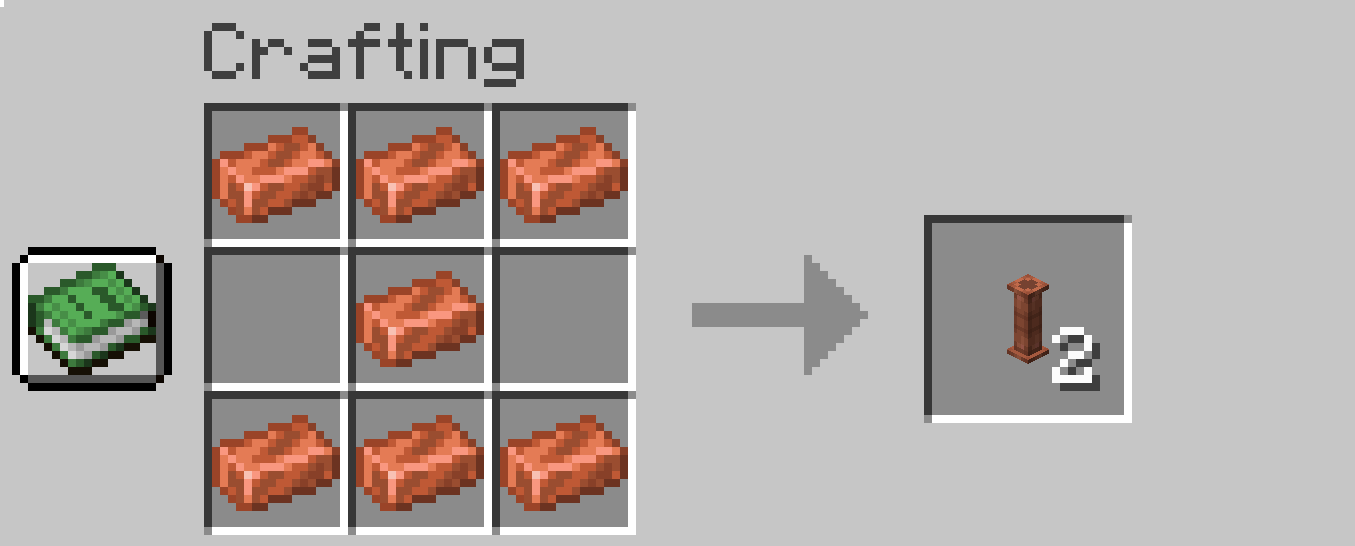
管道:
- 7x 铜锭
分拣控制器:
- 4x 铁锭
- 1x 红石比较器
- 1x 漏斗
- 1x 管道

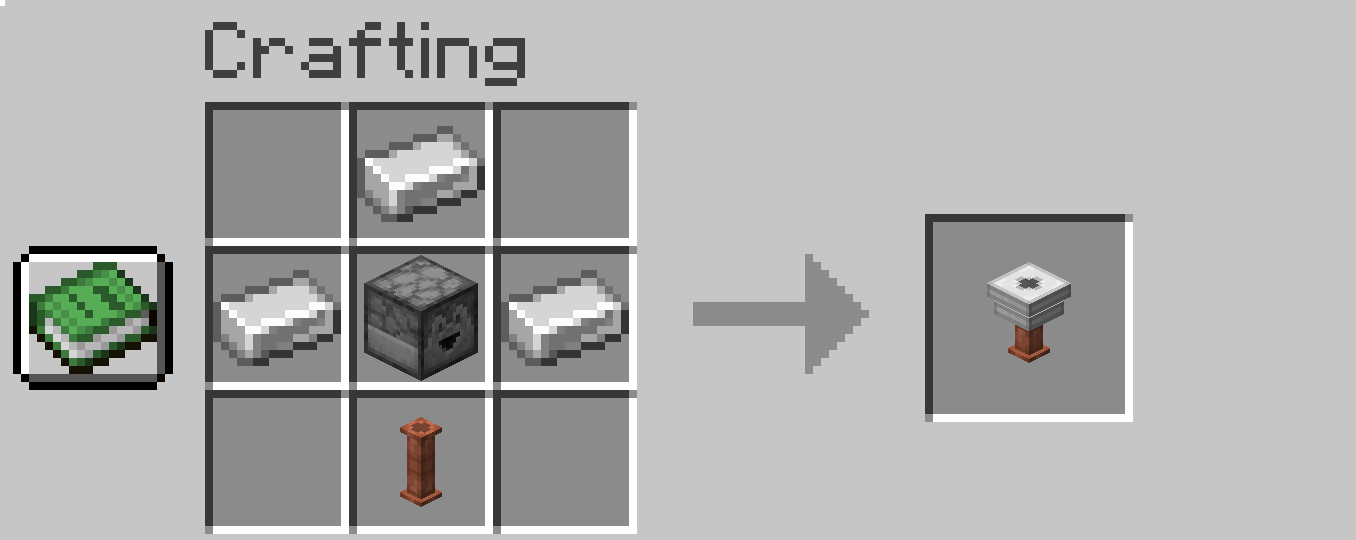
过滤器:
- 3x 铁锭
- 1x 发射器
- 1x 管道
分拣放大器:
- 1x 下界石英
- 1x 红石粉
- 1x 金粒

命令
分拣每秒触发 4 次(硬编码如此)。所有新命令仅限管理员使用,并以 as_ 开头:
- as_basespeed
- 更改分拣的基础速度(默认为 4 = 每秒 4 个物品)
- 例如:/as_basespeed 4
- as_basespeedboostperupgrade
- 更改来自分拣放大器的升级速度加成(默认为 0.4)
- 例如:/as_basespeedboostperupgrade 0.4
- as_instantsort
- 如果你不想等待,可以将其设置为 true(默认为 false)
- 例如:/as_instantsort false
- as_exportModBlocks
- 仅用于调试。此命令会将所有模组方块(仅来自本模组)保存到 minecraft 文件夹的 config 文件夹下的 sorter_controller_export.json 文件中。它会保存玩家范围内方块和物品的位置及属性。
- 例如,此命令会保存距离玩家 118 格范围内的所有方块
- /as_exportModBlocks 118
- 这将帮助我找到关于你分拣设置的答案,比诸如“你的过滤器是如何设置的?你有每个过滤器的截图吗?”这类问题的解决速度快得多。
遇到 bug 时该怎么办?
我需要以下信息:
- Minecraft 版本
- 加载器及其版本(fabric/forge)
- 模组版本
- automatic_sorter_export.json(从 1.4.0 版本开始 - 参见命令章节)
版本号背后的含义是什么?
版本号由三个用点分隔的数字组成。例如,1.3.4。
第一个数字(1)是模组的主版本号。当模组发生重大变化时,这个数字会改变。(这种情况不太可能发生。)
第二个数字(3)表示新功能,例如支持新的存储模组或对模组的总体改进(新方块、新物品等)。
第三个数字(4)表示热修复。在发布版本时,我可能在开发过程中遗漏了一些 bug。当我发布修复程序时,我只会增加这个数字。这纯粹是 bug 修复——不包含其他改进。
简要更新日志
1.4 - 添加了分拣放大器并改进了分拣控制器的功能
1.3 – 添加了对 Assorted Storage 模组的支持
1.2 – 过滤器方块升级(支持拒绝项模组和快速移动支持)
1.1 – 添加了对 Expanded Storage 模组的支持
1.0 - 模组发布
最后的话
就是这样。享受整理你的战利品吧 ^^
Why?
Hi, I created mod for easy sorting items in your storage. It is primarily personal mod. I wanted to create sorting system with redstone but that was too much work for me so I programmed something and here we are. If you wanna edit my mod, feel free to use it. I linked my github repository.
What this mod does?
- Provides a simple, fully customizable item-sorting system without needing complex redstone contraptions.
- Automatically distributes items into connected storage chests based on filter rules (whitelist, inventory-based, rejects).
- Allows speed upgrades via Sorter Amplifiers or commands for faster item processing.
How it's working?
There are 4 new items and 4 new commands
Items
- Sorter Controller (Block)
- Filter (Block)
- Pipe (Block)
- Sorter Amplifier (Item)
You need Sorter Controller put under your chest, where you put not sorted items. Then you connect Sorter Controller and Filter by pipes. Filter must facing chest in your storage. Pipes MUST be visually connected to Sorter controller and to filter.
Filter has three modes:
- Whitelist
- Filtering by items in Filter block inventory
- In inventory
- Filtering by items in storage chest where Filter is facing
- Rejects
- Accepting items which were rejected by other Filters (more or less like trash bin)
- Also accepting items which have active filtering but not enough room in chest
You can change Filter mode by clicking on icon in Filter menu. You can open Filter menu by right clicking on Filter block.
Items are transported via air, pipes don't have inventories or something like hoppers do. You can UPGRADE sorting speed by putting Sorter Amplifier item into Sorter Controller.
How to craft new items?
There are 4 new recepies:
Pipe:
- 7x Copper Ingot
Sorting Controller:
- 4x Iron Ingot
- 1x Redstone comparator
- 1x Hopper
- 1x Pipe
Filter:
- 3x Iron Ingot
- 1x Dropper
- 1x Pipe
Sorter Amplifier:
- 1x Nether Quartz
- 1x Redstone Dust
- 1x Gold Nugget
Commands
Sorting is triggering 4 times per second (just hardcoded that way). All new commands are for admins only and starts with as_
- as_basespeed
- Changing base speed of sorting (default 4 = 4 items per second)
- For example: /as_basespeed 4
- as_basespeedboostperupgrade
- Changing upgrade speed boost from Sorter Amplifier (default 0.4)
- For example: /as_basespeedboostperupgrade 0.4
- as_instantsort
- If you don't want to wait just set it to true (default false)
- For example: /as_instantsort false
- as_exportModBlocks
- Purely for debug only. This command saves all mod blocks (only from my mod) to the file sorter_controller_export.json in your minecraft folder in config folder. It saves position and properties of blocks and items in range of the player.
- For example this command saves all blocks in range of 118 from the player
- /as_exportModBlocks 118
- This will help me find the answer about your sorting setup and its much quicker solution than questions like "How your Filters are setup? Do you have screenshots of each one?"
What to do when you encounter a bug?
I need information of your:
- Minecraft version
- Mod loader and it's version (fabric/forge)
- Mod version
- automatic_sorter_export.json (from 1.4.0 - see Commands chapter)
What is meaning behind version numbers?
The version consists of three numbers separated by a dot. For example, 1.3.4.
The first number (1) is the major version of the mod. This number changes when the mod undergoes significant changes. (This is unlikely to happen.)
The second number (3) indicates new features, such as support for new storage mods or general improvements to the mod (new blocks, new items, etc.).
The third number (4) indicates a hotfix. When releasing a version, I might miss a bug during development. When I release a fix, I only increase this number. It is purely a bug fix—no other improvements are included.
Brief Changelog
1.4 - Added Sorter Amplifier and improved Sorter Controller capability
1.3 – Added support for the Assorted Storage mod
1.2 – Filter block upgrade (Rejects mod and quick move support)
1.1 – Added support for the Expanded Storage mod
1.0 - Mod release
Final words
So there it is. Enjoy sorting your loot ^^

下载 Automatic Sorter
下载 Automatic Sorter
下载 Automatic Sorter
需要联机服务器吗?
稳定流畅、一键部署,几分钟即可和朋友联机开服
最低仅需 8 元/月 即可畅快联机
下载 Automatic Sorter
下载 Automatic Sorter
下载 Automatic Sorter
下载 Automatic Sorter
下载 Automatic Sorter
需要联机服务器吗?
稳定流畅、一键部署,几分钟即可和朋友联机开服
最低仅需 8 元/月 即可畅快联机
下载 Automatic Sorter
下载 Automatic Sorter
当分拣控制器所在的箱子为空时,优化效果更佳
关于这个资源的讨论、问题反馈与使用心得
还没有讨论,来发第一帖吧
你是这个资源的作者?登录后可认领此资源。
相似资源
 模组

显示你正在注视的方块的信息。(适用于 Minecraft 1.16+ 的 Hwyla/Waila 分支)
 模组
使用 JavaScript 编辑配方、添加自定义物品、编写世界事件!
 模组

查看物品与配方
 模组
在游戏画面角落显示附近世界地形、玩家、生物和实体的地图。可创建路径点,帮助你找到标记过的位置。
 模组
AE2:一款流行的自动化与存储模组
 模组
那是什么?一个 Waila/Hwyla 的分支。
评论 0
登录后参与评分
还没有评论,来抢沙发吧