
| Modrinth | CurseForge | Discord |
Auto Mod Fetcher
立即加入模组服务器。不再需要四处寻找文件、猜测版本,或盯着“已断开连接”的屏幕。只需连接,让 AutoModFetcher 处理其余一切。
✨ 功能特性
- 自动同步: 服务器会告诉你的游戏具体缺少哪些模组,并为你下载它们。
- 安全且透明: 在安装任何内容之前,清晰的菜单会向你展示正在下载的具体内容。文件仅来自 Modrinth 和 CurseForge 等受信任的来源。
- 保护你的模组: 它仅清理你不再需要的遗留服务器模组。你的个人模组(如客户端性能增强器)永远不会被删除。
- 即插即用的服务器支持: 服务器所有者只需将模组放入即可。它会自动创建模组列表并与加入的玩家进行同步,无需任何复杂的设置。
- 欢迎自定义模组: 服务器可以轻松地将私有的、定制的或未列出的模组直接捆绑并与玩家共享。
- “信任此服务器”: 勾选此框一次,该服务器的未来模组更新将在后台静默进行。
截图预览
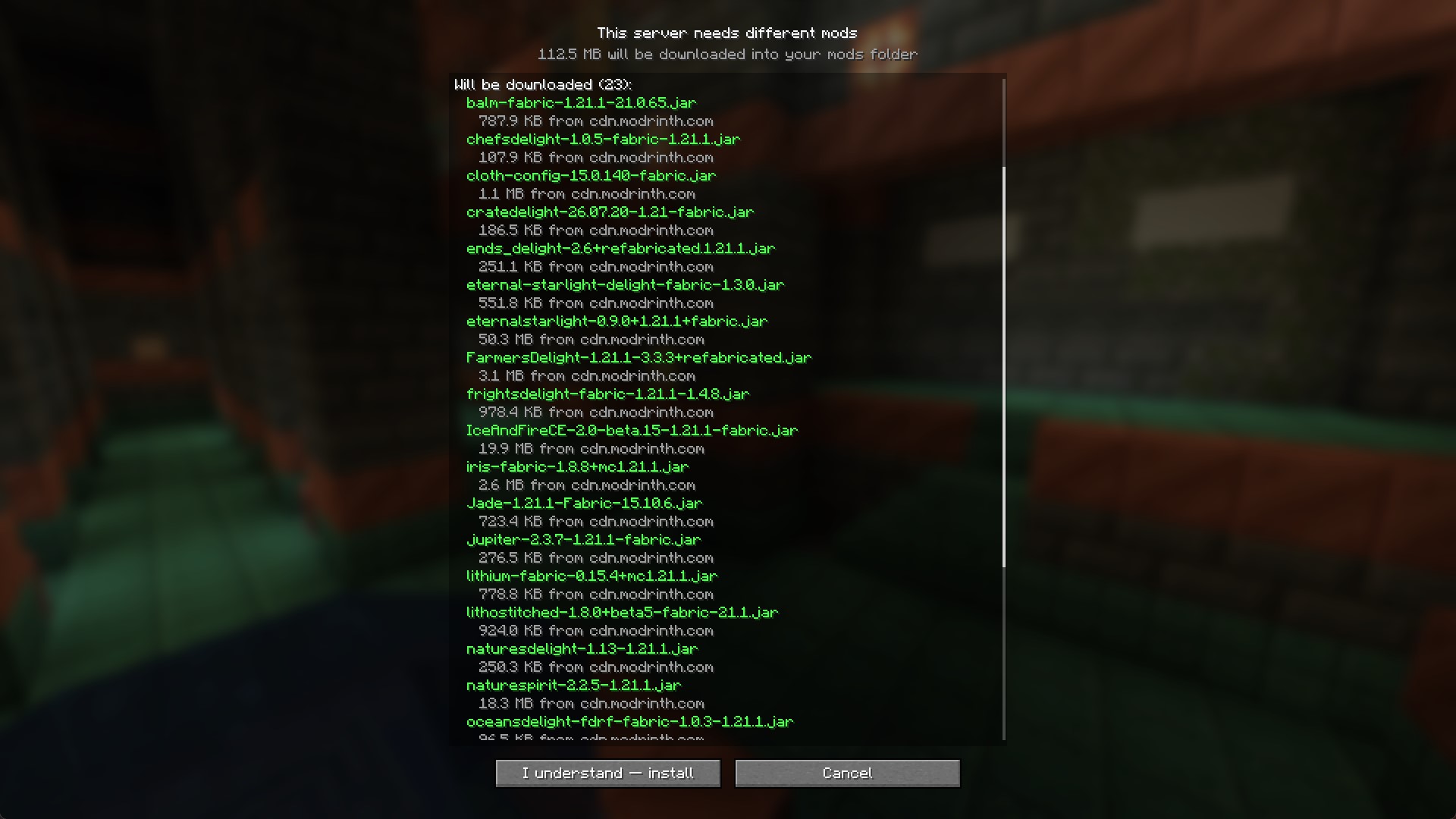
确认界面
在你同意之前,不会向磁盘写入任何内容,并且仅显示适用的部分:
- 将被下载: 显示每个模组的名称、大小及其来源网站。
- 来自服务器: 服务器内联发送的小型模组。
- 已拒绝: 任何被拒绝的内容。
- 需自行安装: 不允许分发的模组,每个都提供指向该确切版本页面的链接,而非项目主页。
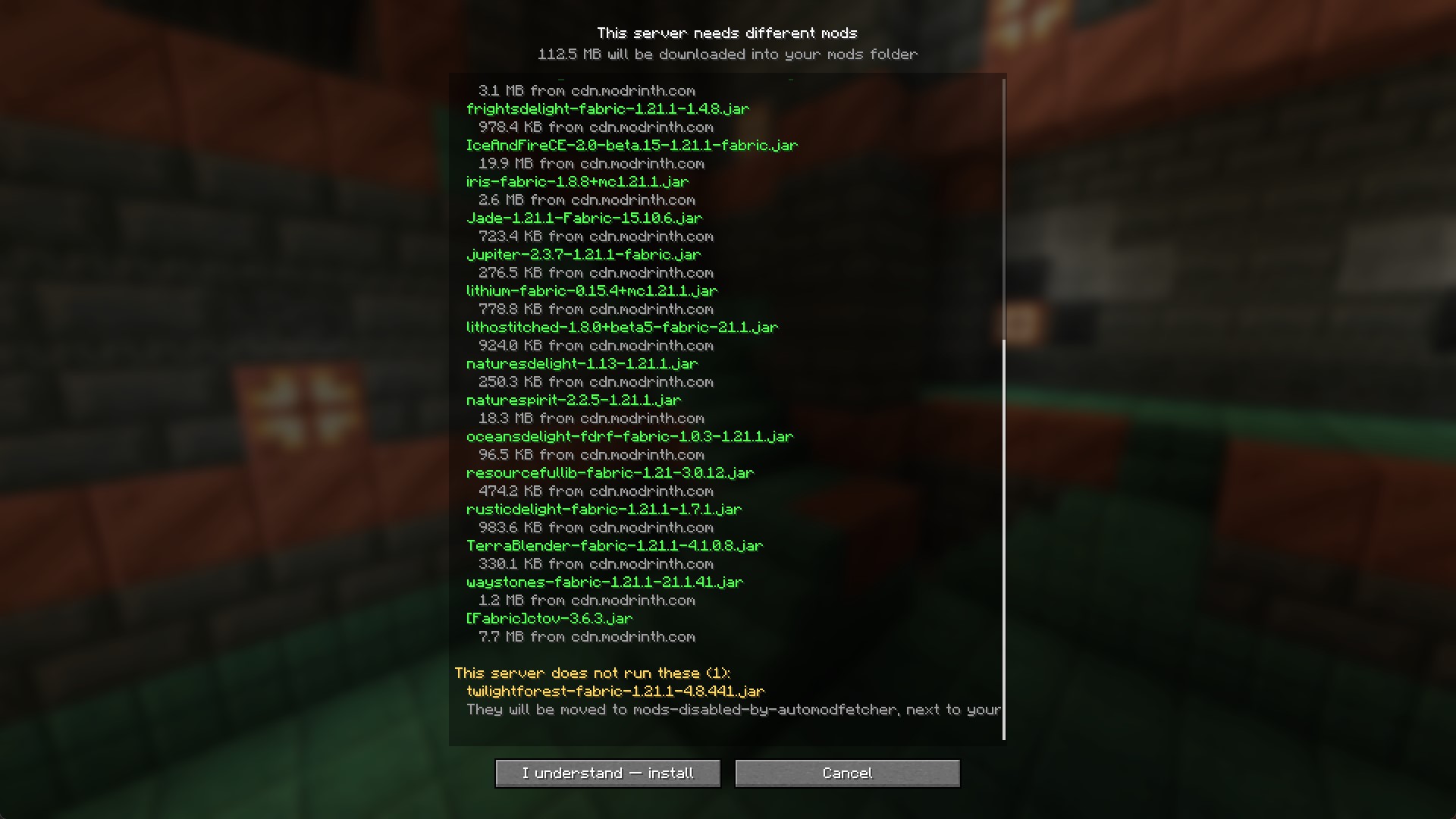
- 该服务器未运行的模组: 旧整合包的残留物会被移走而不是删除。
- 将被移除: 该模组先前安装但服务器不再需要的文件。
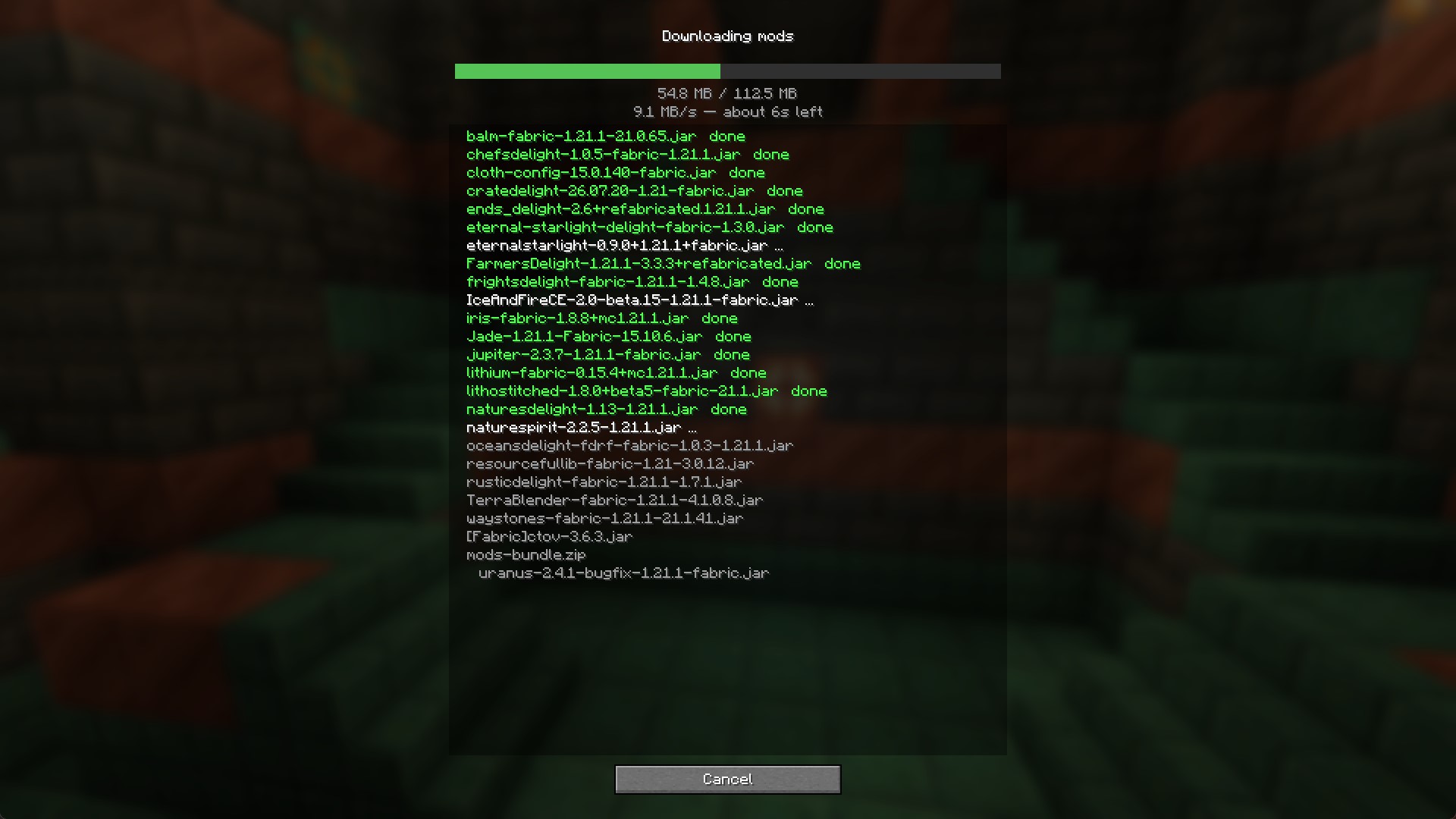
下载中
每行一个文件,标记每个模组的下载状态。
下载完成
显示完成下载后的结果。如果有缺失项,你可以轻松按下 “重试” 按钮。
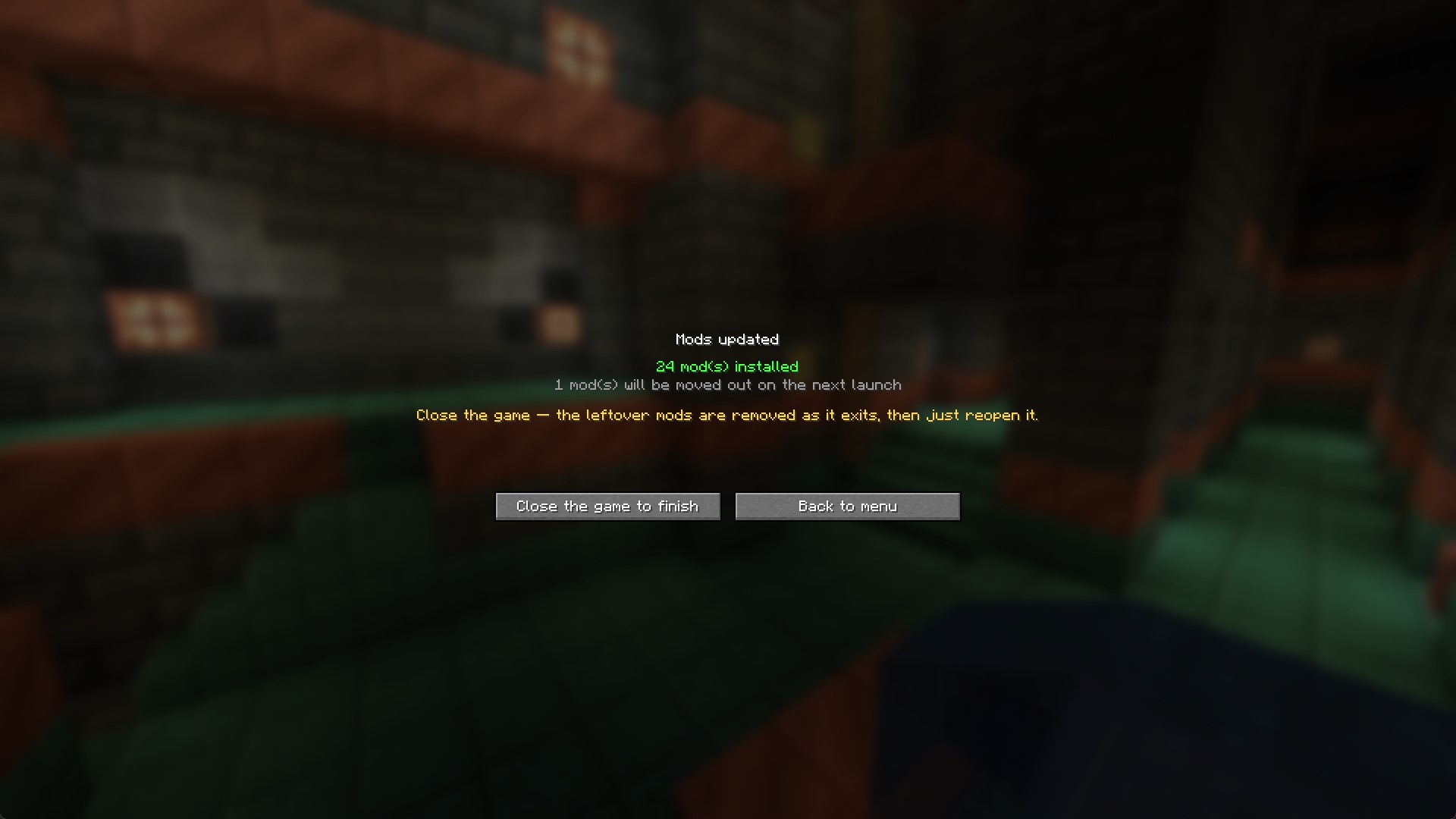
你的 mods 文件夹已经正确无误,但当前会话仍加载着旧的模组。为了避免让你刚修复的问题导致登录失败,它会阻止你并说明原因。
其他情况
在加入后一秒被踢出,而原版游戏仅显示“已断开连接”。此屏幕引用了服务器实际发送的消息,然后添加“可能原因如下:”并列出你缺少的模组。
配置文件
两个文件在首次运行时创建,并按原样工作。你仅在需要更改某些设置时才打开它们。
客户端 — config/automodfetcher/client.json
{
  "allowedDomains": ["cdn.modrinth.com", "edge.forgecdn.net", "mediafilez.forgecdn.net"],
  "allowInsecureHttp": false,
  "deleteRemovedMods": true,
  "maxConcurrentDownloads": 3
}
不在 allowedDomains 中的网站不会被静默阻止。它会在确认界面上显示该网站名称,且同意操作仅针对该特定服务器生效。
服务端 — config/automodfetcher/server.json
curseforgeApiKey— 可选。仅当模组存在于 CurseForge 但不存在于 Modrinth 时需要。excludeFileNames— 永不提供给玩家的文件。支持尾部通配符*。githubToken— 可选。填写此项后,/automodfetcher bundle命令会自动上传你的自定义模组,并自动填入地址。includeAuthorRestrictedMods— 默认关闭。如果你获得了模组作者的许可,可以开启此项。includeServerOnlyMods— 除非你明确要求,否则服务端专用模组不会提供给客户端。
兼容性
| 加载器 | 可用版本 | 备注 |
|---|---|---|
| Fabric | 1.20.1, 1.21.1 | 需要 Fabric API |
| Forge | 1.20.1 | |
| NeoForge | 1.21.1 |
⚠️ 要求与重要提示
- 双方安装: AutoModFetcher 必须安装在 服务器端 和 玩家客户端 上。
- 仅需重启一次: 模组下载完毕后,你只需重启游戏 一次 以加载它们并开始游玩。
- 尊重创作者: 如果模组作者禁用了第三方下载,AutoModFetcher 会尊重其意愿,并为玩家提供一个指向官方页面的直接可点击链接。
如需进一步联系,欢迎加入我的 Discord 群组。
许可证: 保留所有权利。允许在商业服务器及整合包/服务器包中使用,但需注明出处。禁止独立重新分发。
| Modrinth | CurseForge | Discord |
Auto Mod Fetcher
Join modded servers instantly. No more hunting for files, guessing versions, or staring at "Disconnected" screens. Just connect, and let AutoModFetcher handle the rest.
✨ Features
- Automatic Sync: The server tells your game exactly which mods are missing and downloads them for you.
- Safe & Transparent: Before anything installs, a clear menu shows you exactly what is being downloaded. Files only come from trusted sources like Modrinth and CurseForge.
- Keeps Your Mods Safe: It only cleans up leftover server mods you no longer need. Your personal mods (like client-side performance boosters) are never deleted.
- Plug-and-Play for Servers: Server owners just drop the mod in. It automatically creates the mod list and syncs it with joining players without any complex setup.
- Custom Mods Welcome: Servers can easily bundle and share private, custom-made, or unlisted mods directly with players.
- "Trust this Server": Check this box once, and future mod updates for that server will happen quietly in the background.
Snapshots
Confirm screen
Nothing is written to your disk until you agree, and only the sections that apply are shown:
- Will be downloaded: shows each mod name, size, and the site it comes from.
- Came from server: small mods the server sent inline.
- Refused: anything rejected.
- Install these yourself: mods that aren't allowed to distribute, each with a link to that exact version's page rather than a project front page.
- Which mod that server does not run: leftovers from an old pack are moved aside rather than deleted.
- Will be removed: files this mod installed earlier that the server no longer wants.
Downloading
One line per file, marked for each mod's download state.
Complete Download
Shows the result after completing the download. If something is missing, you can easily press the "Try again" button.
Your mods folder is already correct, but this session still has the old ones loaded. Rather than let you join into a failure you just fixed, it stops you and says why.
Extra
Get kicked a second after joining and vanilla just says "Disconnected". This screen quotes what the server actually said, then adds "This may be why:" and lists the mods you were missing.
Configs
Both files are created on first run and work exactly as they are. You only open them to change something.
Client — config/automodfetcher/client.json
{
  "allowedDomains": ["cdn.modrinth.com", "edge.forgecdn.net", "mediafilez.forgecdn.net"],
  "allowInsecureHttp": false,
  "deleteRemovedMods": true,
  "maxConcurrentDownloads": 3
}
A site outside allowedDomains is not silently blocked. It is shown on the confirm screen with the site named, and agreeing applies to that one server.
Server — config/automodfetcher/server.json
curseforgeApiKey— optional. Only needed for mods that are on CurseForge but not on Modrinth.excludeFileNames— files never offered to players. Supports a trailing*.githubToken— optional. Fill this in and/automodfetcher bundleuploads your custom mods for you, then fills in the address itself.includeAuthorRestrictedMods— off by default. If you have the permission of the mod author, you can turn it on.includeServerOnlyMods— server-side mods are not offered to clients unless you ask for it.
Compatibility
| Mod Loader | Available Versions | Notes |
|---|---|---|
| Fabric | 1.20.1, 1.21.1 | Fabric-API required |
| Forge | 1.20.1 | |
| NeoForge | 1.21.1 |
⚠️ Requirements & Important Notes
- Install on Both: AutoModFetcher must be installed on both the server and the player's client.
- One Restart Required: After the mods download, you just need to restart your game once to load them up and start playing.
- Respects Creators: If a mod author disables third-party downloads, AutoModFetcher respects their wishes and provides players with a direct, clickable link to the official page instead.
If you need to contact me further, you're welcome to join my Discord group.
License: All Rights Reserved. Free to use on commercial servers and in modpacks/server packs with credit. Standalone redistribution is not permitted.

下载 AutoModFetcher
下载 AutoModFetcher
下载 AutoModFetcher
下载 AutoModFetcher
下载 AutoModFetcher
下载 AutoModFetcher
下载 AutoModFetcher
下载 AutoModFetcher
- 当模组列表不匹配时,添加“继续连接”选项;将选择权交给玩家。
- 提高模组的兼容性。
关于这个资源的讨论、问题反馈与使用心得
还没有讨论,来发第一帖吧
你是这个资源的作者?登录后可认领此资源。
相似资源
 模组

显示你正在注视的方块的信息。(适用于 Minecraft 1.16+ 的 Hwyla/Waila 分支)
 模组
在游戏画面角落显示附近世界地形、玩家、生物和实体的地图。可创建路径点,帮助你找到标记过的位置。
 模组

查看物品与配方
 模组
使用 JavaScript 编辑配方、添加自定义物品、编写世界事件!
 模组
AE2:一款流行的自动化与存储模组
 模组
那是什么?一个 Waila/Hwyla 的分支。
评论 0
登录后参与评分
还没有评论,来抢沙发吧