
Auxilio
在拉丁语中意为帮助或协助。
专注于提升物品栏和合成界面中的鼠标/物品交互体验。
功能
所有选项均可通过游戏内模组配置菜单或 Minecraft 根目录下的配置文件进行开启/关闭。
Esc > Mods > Auxilio config
minecraft_root/config/auxilio-common.toml
合成网格中的滚轮点击排序:
在任意合成槽(2x2 或 3x3)上点击鼠标滚轮,即可对网格进行排序。
单一物品类型的网格会尽可能均匀地分布到所有有效的合成槽中。

混合物品网格使用类型局部平衡:每种物品类型会在已包含该物品的槽位中进行均衡分布。

Shift + 双击快速转移:
在玩家物品栏的槽位上按住 Shift 并双击,会将匹配的物品从玩家物品栏快速移动到当前打开的容器(例如箱子或工作台物品栏)中,具体取决于槽位规则。
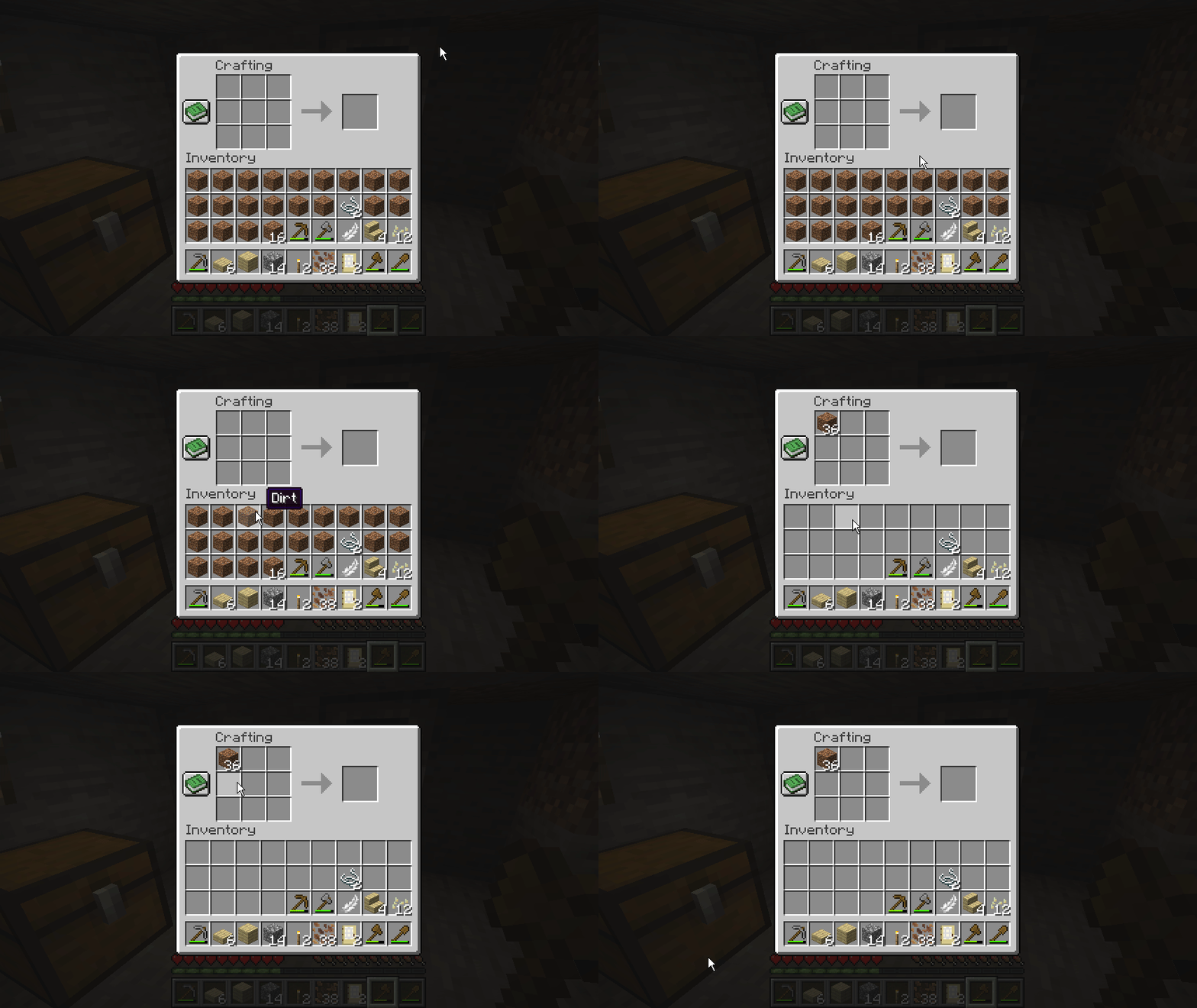
Shift + 拖拽快速移动:
按住 Shift 并左键拖拽经过多个槽位,可以快速移动悬停的物品堆。每次拖拽过程中,每个悬停的槽位最多被点击一次,以避免重复点击造成的混乱。

滚轮转移:
向上滚动:将 1 个物品从悬停槽位移向相反方向的物品栏侧。
向下滚动:将 1 个物品从非玩家槽位移入玩家物品栏。

熔炉燃料滚轮操作
将物品滚入熔炉时,几乎所有物品都会被存入顶部槽位。按住 Shift 向上滚动则会将物品存入燃料槽。

重复右键拖拽:
配置选项:enableRepeatRightDrag(默认 true)。
启用后,鼠标右键拖拽将替代原版拖拽行为。
在同一次拖拽过程中重新进入某个槽位,会在该槽位放置另一个物品。

调试日志记录:
- 配置选项:
debugMouseTweaks。
- 启用后,详细的鼠标调整跟踪信息将以
[MouseTweaks] 为前缀记录在 run/logs/latest.log 文件中。
[15:52:22] [FileWatcher-1-thread-1/DEBUG] [ne.ne.fm.co.ConfigWatcher/CONFIG]: Config file auxilio-common.toml changed, re-loading
[15:52:25] [Render thread/INFO] [co.ja.au.Auxilio/]: [MouseTweaks] scrollUp moved one item from slot 30 to slot 0
[15:52:25] [Render thread/INFO] [co.ja.au.Auxilio/]: [MouseTweaks] scrollUp moved one item from slot 30 to slot 0
[15:52:25] [Render thread/INFO] [co.ja.au.Auxilio/]: [MouseTweaks] scrollUp moved one item from slot 30 to slot 0
[15:52:25] [Render thread/INFO] [co.ja.au.Auxilio/]: [MouseTweaks] scrollUp moved one item from slot 30 to slot 0

Auxilio
Means help or assist in Latin.
Focuses on mouse/item interaction quality-of-life in inventory and crafting screens.
Features
All options can be toggled on/off via in-game mod config menu, or root Minecraft directory config file
Esc > Mods > Auxilio config
minecraft_root/config/auxilio-common.toml
Middle click sort in crafting grid:
Middle click on any crafting slot (2x2 or 3x3) and it will sort the grid.
Single-item-type grids are spread as evenly as possible across all valid crafting slots.

Mixed-item grids use type-local balancing: each type is equalized within the slots that already contain that type.

Shift + double left-click bulk transfer:
Shift + double left-click on a player-inventory slot quick-moves all matching items from player inventory into the currently open container (for example chest or crafting table inventory), as allowed by slot rules.

Shift + drag quick move:
Hold Shift and drag left-click across slots to quick-move hovered stacks. Each hovered slot is clicked at most once per drag stroke to avoid repeated click spam.

Scroll transfer:
Scroll up: move 1 item from hovered slot toward the opposite inventory side.
Scroll down: move 1 item from hovered non-player slot into player inventory.

Furnace fuel scroll
Scrolling items into furnaces will deposit almost anything into the top slot. Shift scroll up will scroll items into the fuel slot instead

Repeat right-drag:
Config option: enableRepeatRightDrag (default true).
When enabled, RMB drag replaces vanilla drag behavior.
Re-entering a slot during the same drag places another item there.

Debug logging:
- Config option:
debugMouseTweaks.
- When enabled, detailed mouse tweak traces are logged with
[MouseTweaks] in run/logs/latest.log.
[15:52:22] [FileWatcher-1-thread-1/DEBUG] [ne.ne.fm.co.ConfigWatcher/CONFIG]: Config file auxilio-common.toml changed, re-loading
[15:52:25] [Render thread/INFO] [co.ja.au.Auxilio/]: [MouseTweaks] scrollUp moved one item from slot 30 to slot 0
[15:52:25] [Render thread/INFO] [co.ja.au.Auxilio/]: [MouseTweaks] scrollUp moved one item from slot 30 to slot 0
[15:52:25] [Render thread/INFO] [co.ja.au.Auxilio/]: [MouseTweaks] scrollUp moved one item from slot 30 to slot 0
[15:52:25] [Render thread/INFO] [co.ja.au.Auxilio/]: [MouseTweaks] scrollUp moved one item from slot 30 to slot 0
评论 0
登录后参与评分
还没有评论,来抢沙发吧
