
受够了歪歪扭扭的线条和不平整的地面?这个客户端模组允许你将方块放置锁定在 X、Y 或 Z 轴上,从而构建出笔直的墙壁、平坦的地面和整齐的结构。
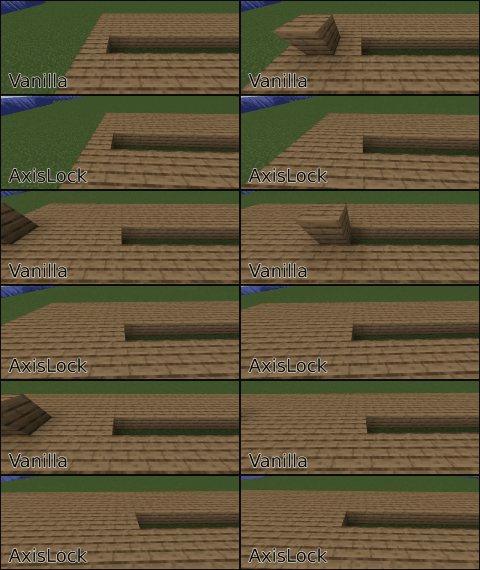
使用方法:
- 激活 AxisLock: 按 R(默认)来切换模组的开启/关闭状态。或者,在设置中分配一个按键,按住以实现临时锁定。
- 选择轴向:按 Y(默认)可在 X、Y 或 Z 轴之间循环切换。
- 放置第一个方块:这将在你所选的轴向上设定参考点。
- 建造直线结构:当你按住“放置方块”键(右键)时,AxisLock 会阻止你偏离所选轴向坐标放置方块!
本模组依赖 Architectury API 和 Cloth Config API。如果你使用的是 Fabric 或 Quilt 加载器,可能还需要安装 Mod Menu。
手动参考点
- AxisLock 现在允许你通过按下指定按键(默认:B)将特定方块手动设置为参考点。设置后,即使松开鼠标按钮,该方块也会保持为固定的参考点,从而实现更精确和一致的锁定。要更新参考点,请再次按下参考点按键。
- 你可以重置参考点:看向空气并按下该按键,或快速连续按下两次该按键。
AxisLock 模式
- 使用循环模式按键(默认:N),你可以选择是阻止方块放置、阻止方块破坏,还是两者都阻止。
仅限客户端使用。在服务器上使用前,请检查服务器规则或咨询管理员。使用风险自负。
建议将此模组与 accurate block placement 或自动点击器配合使用。
AxisLock 目前已功能完备。这并不意味着它不会再添加新功能。但截至目前,我仅会在修复错误或 Minecraft 新版本发布时对其进行更新。
Tired of wobbly lines and uneven floors? This client-side mod lets you lock block placement to the X, Y, or Z axis for perfectly straight walls, flat floors, and aligned structures.
How to Use:
- Activate AxisLock: Press R (default) to toggle the mod on/off. Or, assign a key in settings to hold for temporary lock.
- Select Axis: Press Y (default) to cycle through X, Y, or Z.
- Place First Block: This sets the reference point on your chosen axis.
- Build Straight: While holding your "place block" key (right-click), axislock will prevent you from placing blocks out of the selected axis coordinate!
This mod uses Architectury API and Cloth Config API. If you're using fabric or quilt, you may also need Mod Menu
Manual Reference Point
- AxisLock now allows you to manually set a specific block as the reference point by pressing the assigned key (default: B). Once set, this block will remain as the fixed reference point even after releasing the mouse button, allowing for more precise and consistent locking. To update the reference point, press the reference point key again.
- You can reset the reference point, look at the air and press the key or press the key quickly twice.
AxisLock Modes
- By using the Cycle Mode Key (default: N) you can choose to block block placement, block breaking or both.
Client-side only. Before using this mod on servers check the server rules or ask a moderator. Use at your own risk.
It is recommended to use this mod together with accurate block placement or an autoclicker.
AxisLock is now feature complete. This doesn't mean It won't get any more features anymore. But by now I will only update It to fix bugs or when new Minecraft versions come out.

下载 AxisLock
下载 AxisLock
下载 AxisLock
下载 AxisLock
下载 AxisLock
下载 AxisLock
下载 AxisLock
下载 AxisLock
下载 AxisLock
下载 AxisLock
暂无更新日志
关于这个资源的讨论、问题反馈与使用心得
还没有讨论,来发第一帖吧
你是这个资源的作者?登录后可认领此资源。
相似资源
 模组

显示你正在注视的方块的信息。(适用于 Minecraft 1.16+ 的 Hwyla/Waila 分支)
 模组
使用 JavaScript 编辑配方、添加自定义物品、编写世界事件!
 模组

查看物品与配方
 模组
在游戏画面角落显示附近世界地形、玩家、生物和实体的地图。可创建路径点,帮助你找到标记过的位置。
 模组
AE2:一款流行的自动化与存储模组
 模组
添加区块认领和玩家组队功能,并与 Xaero's Minimap 和 World Map 集成
评论 0
登录后参与评分
还没有评论,来抢沙发吧