
一个用于在游戏聊天栏中显示 Bilibili 直播消息的模组。只需将其放入模组文件夹,启动游戏,然后设置房间号以连接服务器,即可实现在游戏中输出直播弹幕的功能。
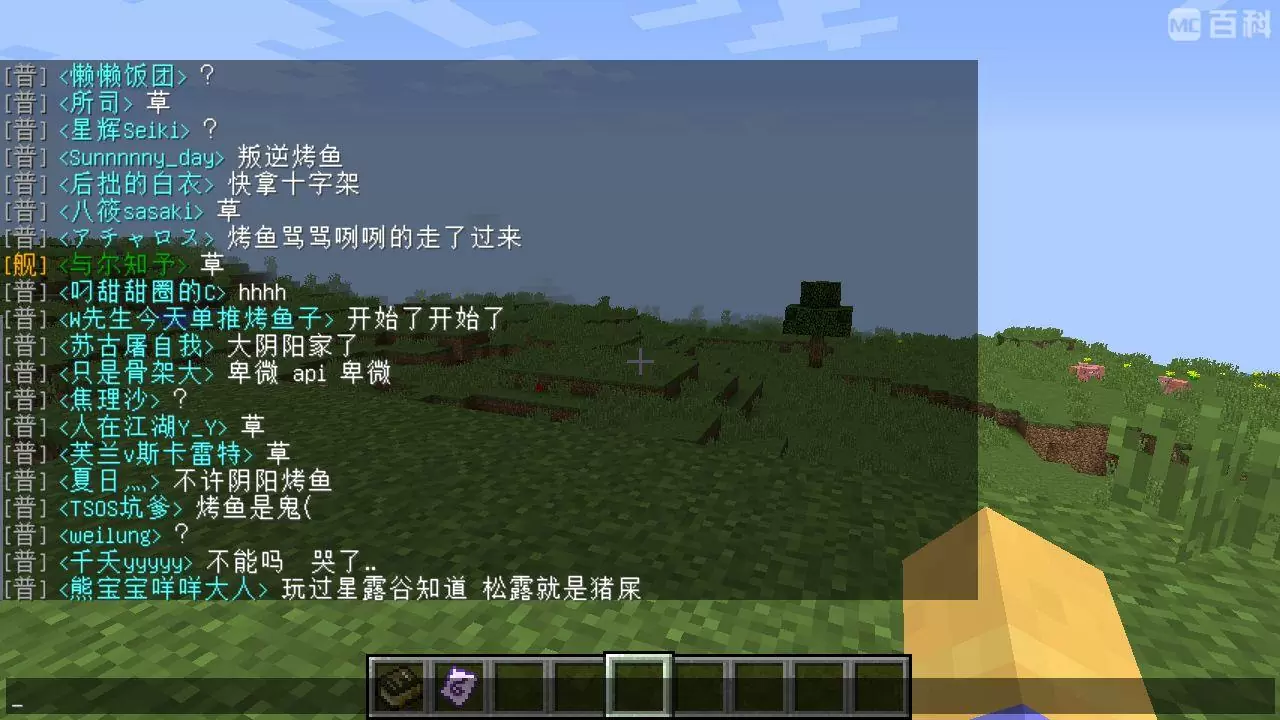
具体效果如下图所示:
-
Forge 版本:
- 1.12.2 及以下版本使用 /BakaDanmaku 命令重新加载配置。
- 1.13.2 及以上版本使用快捷键 Alt+B 重新加载配置。
-
Fabric 版本:使用快捷键 B 重新加载配置。
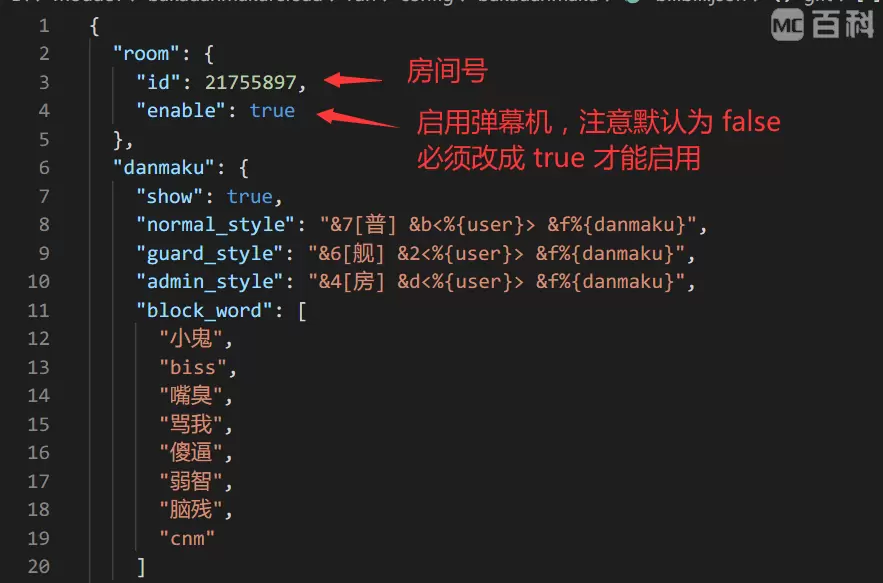
配置文件位于游戏主目录下的 config/bakadanmaku/bilibili.json。建议使用 Sublime Text 或 Visual Studio Code 等软件打开此文件。
通常来说,你只需要修改房间号并启用它,也就是说你只需要修改以下两个位置:
A mod for displaying the message of Bilibili live in the chat bar in the game. Just drop it into the mod folder, start the game, and set the room number to connect to the server and realize the function of outputting live message screen in the game.
The specific effect is shown in the figure below:
-
Forge version:
- 1.12.2 and below use the /BakaDanmaku command to reload the configuration.
- 1.13.2 and above use the shortcut key Alt+B to reload the configuration.
-
Fabric version: shortcut key B to reload the configuration.
The configuration file is in config/bakadanmaku/bilibili.json in the main directory of the game. It is recommended to use software such as Sublime Text and Visual Studio Code to open this file.
Generally speaking, you only need to modify the room number and enable it, which means you only need to modify the following two places:

下载 BakaDanmaku
下载 BakaDanmaku
下载 BakaDanmaku
下载 BakaDanmaku
需要联机服务器吗?
稳定流畅、一键部署,几分钟即可和朋友联机开服
最低仅需 8 元/月 即可畅快联机
下载 BakaDanmaku
下载 BakaDanmaku
下载 BakaDanmaku
下载 BakaDanmaku
下载 BakaDanmaku
下载 BakaDanmaku
bakadanmaku-neoforge-1.21-2.1.1
关于这个资源的讨论、问题反馈与使用心得
还没有讨论,来发第一帖吧
你是这个资源的作者?登录后可认领此资源。
相似资源
 模组

显示你正在注视的方块的信息。(适用于 Minecraft 1.16+ 的 Hwyla/Waila 分支)
 模组
在游戏画面角落显示附近世界地形、玩家、生物和实体的地图。可创建路径点,帮助你找到标记过的位置。
 模组

查看物品与配方
 模组
使用 JavaScript 编辑配方、添加自定义物品、编写世界事件!
 模组
AE2:一款流行的自动化与存储模组
 模组
那是什么?一个 Waila/Hwyla 的分支。
评论 0
登录后参与评分
还没有评论,来抢沙发吧