
Baston's Coordinates
一款适用于 Fabric 的现代极简坐标 HUD —— 灵感源自 Batty's Coordinates PLUS,这款深受喜爱的 1.12.2 模组从未得到更新。
专为 Minecraft 26.1.2 从零重构,并通过 Mod Menu 提供完全可配置性 —— 无需记忆按键绑定,没有杂乱信息,只保留你真正希望在屏幕上看到的内容。
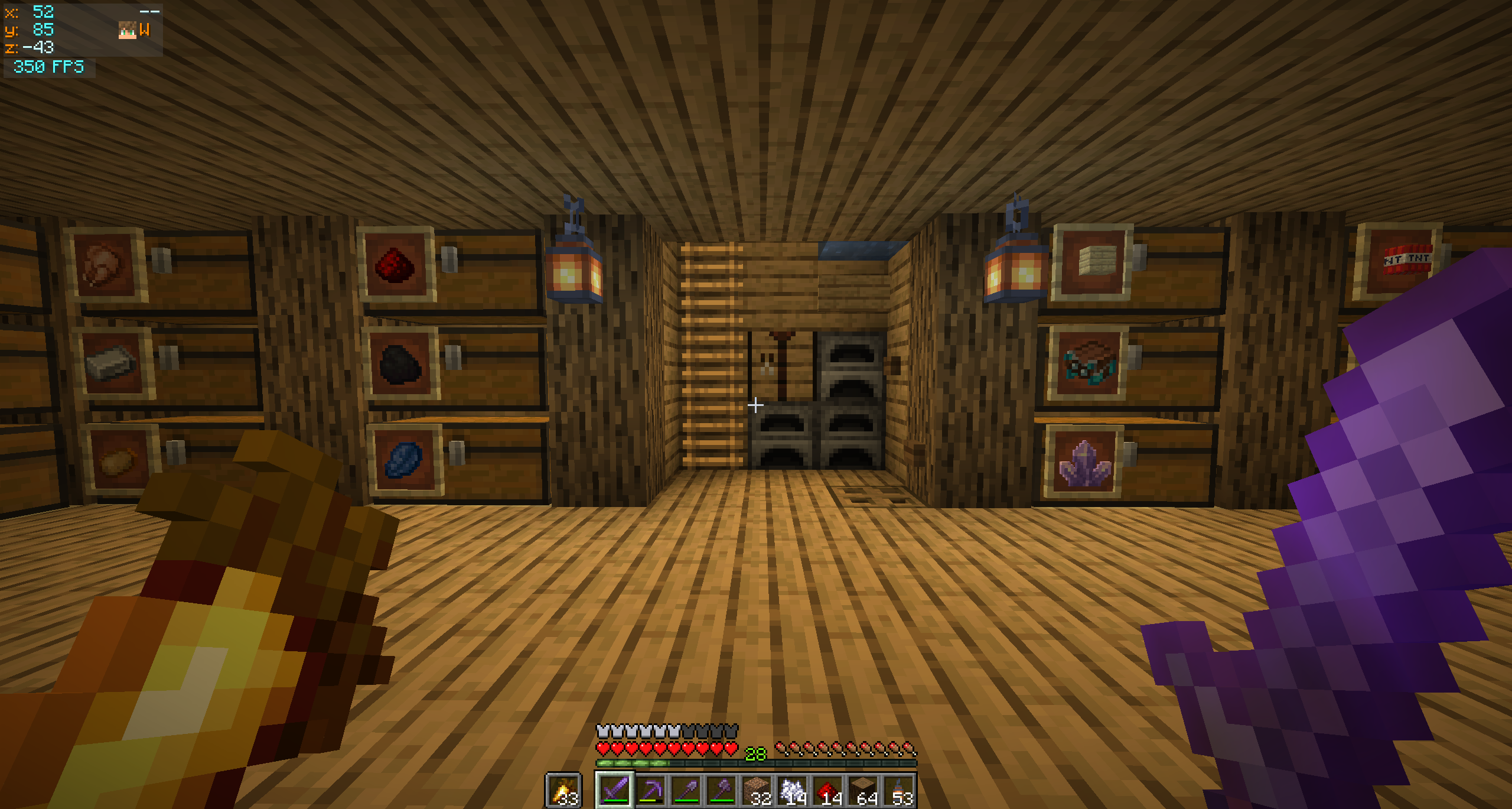
✨ 功能
- XYZ 坐标:正负数值采用不同颜色显示
- 指南针方位:N / NE / E / SE / S / SW / W / NW
- 移动箭头:X 和 Z 行上的 V 形符号(
+/-)指示行走时坐标的变化方向 - 玩家头像:渲染在指南针旁边 —— 包含面部和帽子叠加层,使用与多人列表相同的辅助渲染方式
- 本地时间:独立一行显示现实时钟,支持
HH:mm或HH:mm:ss格式 - 独立 FPS 面板:当两者共享同一屏幕角落时,自动堆叠在坐标下方
- 自动隐藏:开启 F3 调试界面时自动隐藏 —— 避免信息重复
- 动态面板宽度:仅根据当前激活的功能所需宽度增长(可设置最小宽度下限)
? 自定义
打开 Mod Menu → 点击 Baston's Coordinates 旁边的齿轮图标。
坐标面板
- 切换各个独立功能(指南针、箭头、时间、玩家头像等)
- 选择屏幕角落(左上 / 右上 / 右下)
- 通过 X / Y 偏移滑块微调位置
- 设置面板最小宽度下限
FPS 面板
- 独立的开关和屏幕角落选项
- 当与坐标面板处于同一角落时,FPS 面板会自动堆叠在其下方(若为底部角落则堆叠在上方),间距可配置
颜色
- 每个文本元素均提供 R / G / B 滑块及实时预览色块
- 背景支持 RGBA 格式 —— 完全控制透明度
HUD 会渲染在配置界面上方,以便你在点击 Save & Quit 后立即预览更改效果。
? 依赖项
| 依赖项 | 版本 |
|---|---|
| Minecraft | 26.1.2 |
| Fabric Loader | 0.19.3+ |
| Fabric API | 任意匹配构建版本 |
| Java | 25+ |
可选但强烈建议安装
- Mod Menu —— 配置界面的入口
- Cloth Config —— 提供配置 UI 控件
缺少这些依赖项模组仍可正常运行,但会使用默认设置。你可以手动编辑位于 config/bastons_coordinates.properties 的文件。

你是这个资源的作者?登录后可认领此资源。
相似资源
 模组

玉Jade ?
Snownee
显示你正在注视的方块的信息。(适用于 Minecraft 1.16+ 的 Hwyla/Waila 分支)
实用前置
270
 模组

物品管理器Just Enough Items (JEI)
mezz
查看物品与配方
前置实用
229
 模组
Xaero的小地图
thexaero
在游戏画面角落显示附近世界地形、玩家、生物和实体的地图。可创建路径点,帮助你找到标记过的位置。
冒险交通
196
 模组
KubeJS
Lat
使用 JavaScript 编辑配方、添加自定义物品、编写世界事件!
前置实用
181
 模组
Applied Energistics 2
shartte
AE2:一款流行的自动化与存储模组
存储科技
165
 模组
开放派对与认领Open Parties and Claims
thexaero
添加区块认领和玩家组队功能,并与 Xaero's Minimap 和 World Map 集成
前置实用
153
评论 0
登录后参与评分
还没有评论,来抢沙发吧