
想要来一趟怀旧之旅吗?如果你希望在现代版 Minecraft 中模拟 Beta 版本的功能和特性,这个模组正适合你。
为了增添更多怀旧感,我们建议搭配任何添加了旧版材质和音效的资源包 (试试我们的 Minecraft Beta 资源包 - Legacy Default),并将此模组与 therealMRBURGERUS 制作的 Beta+ 配合使用,后者是旧版 Beta 和 Alpha 生成器的复刻。你可以使用诸如 Glacier 和 worstseedever 等旧种子。
?️ 功能
经典 HUD
提供经典的 HUD 界面,移除饥饿条,并调整护甲条的位置。启用此选项仅改变 HUD 的外观。你可能希望禁用饥饿系统,这样进食时会直接恢复生命值。

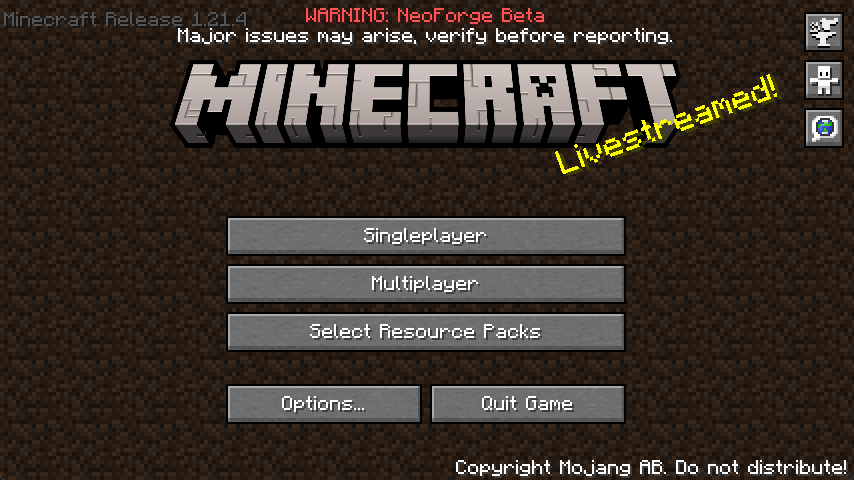
启用 Beta 主菜单
这将把你的主菜单替换为带有轻微调整的 Beta 版本主菜单。版本号位于左上角,背景则是经典的泥土平铺背景。
经典 Beta 风格弓箭
允许你像 Beta 版本那样无需充能即可连续射击弓箭。

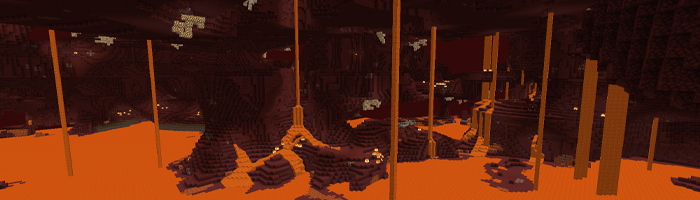
禁用下界迷雾
禁用了下界的迷雾效果,让你在下界中能更清晰、更远地视物。
禁用 1.9+ 战斗系统
随心所欲地使用武器进行快速点击攻击。经典系统回归了。我现在都能听到你的鼠标在疯狂点击的声音了!
禁用疾跑
如果你想还原 Beta 体验,这会很有用。同时也会禁用 1.14.4+ 版本中的新游泳机制。
禁用饥饿
如果你想还原 Beta 体验,这会很有用。这将使食物直接回复生命值而非饥饿值,并且会被立即消耗。
禁用经验掉落
如果你想还原 Beta 体验,这会很有用。击杀生物将不再掉落经验球。
自定义维度提示消息
将在加载屏幕显示经典的提示消息,如“正在进入下界”和“正在进入末地”,就像当年 Beta 版本那样。
……还有更多!
为 Minecraft 1.21.3+ 配置 Beta Days
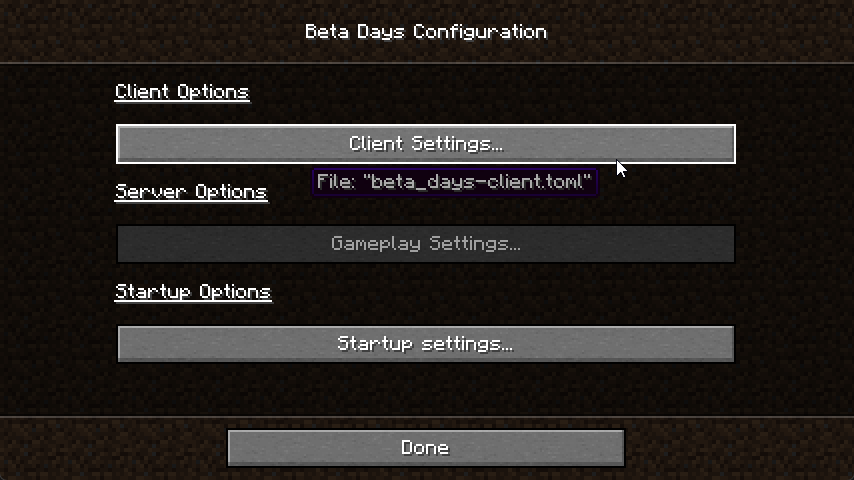
你可以在
config 文件夹中找到
beta_days-client.toml,并在你的 Minecraft 世界/serverconfig 文件夹中找到
beta_days-server.toml。你也可以通过点击 "Mods" 按钮,选择该模组并点击 "Configure",在 NeoForge 中轻松配置此模组。
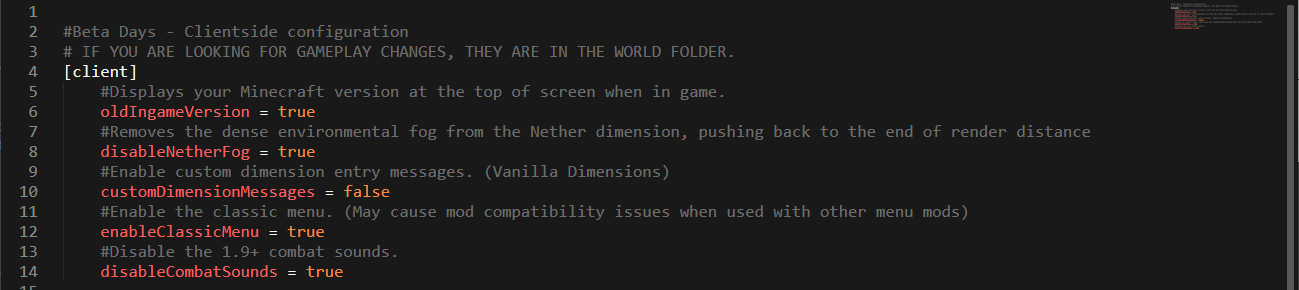
beta_days-client.toml
beta_days-server.toml
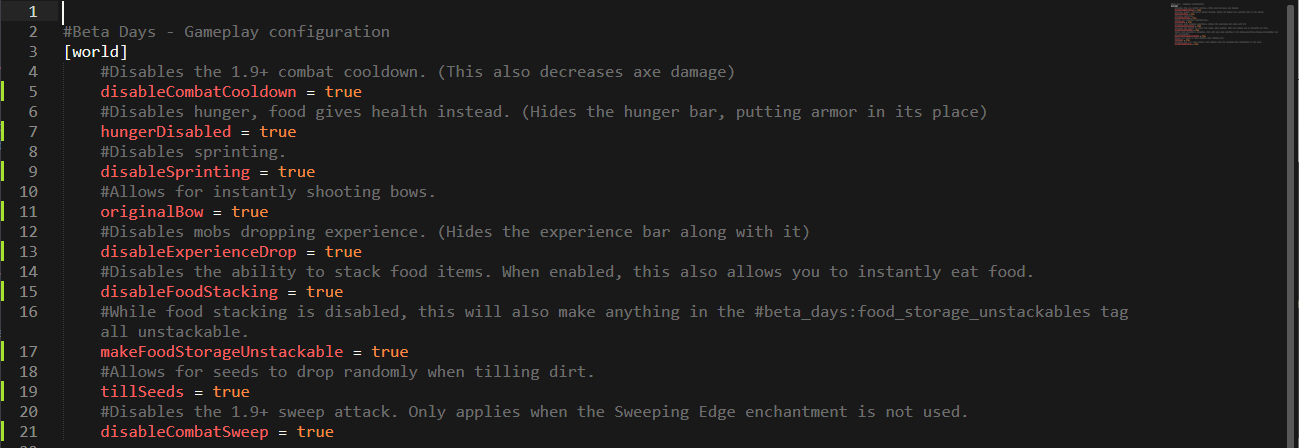
为 Minecraft 1.19.x 配置 Beta Days
Spoiler
你可以在 config 文件夹中找到 beta_days-client.toml,并在你的 Minecraft 世界/serverconfig 文件夹中找到 beta_days-server.toml。你也可以通过点击 "Mods" 按钮,选择该模组并点击 "Configure",在 NeoForge 中轻松配置此模组。
beta_days-client.toml
beta_days-server.toml
为 Minecraft 1.16.4 配置 Beta Days
Spoiler
在你的 Minecraft 文件夹内,然后进入 config 文件夹,编辑 beta_days-client.toml 和 beta_days-common.toml 文件。
beta_days-client.toml
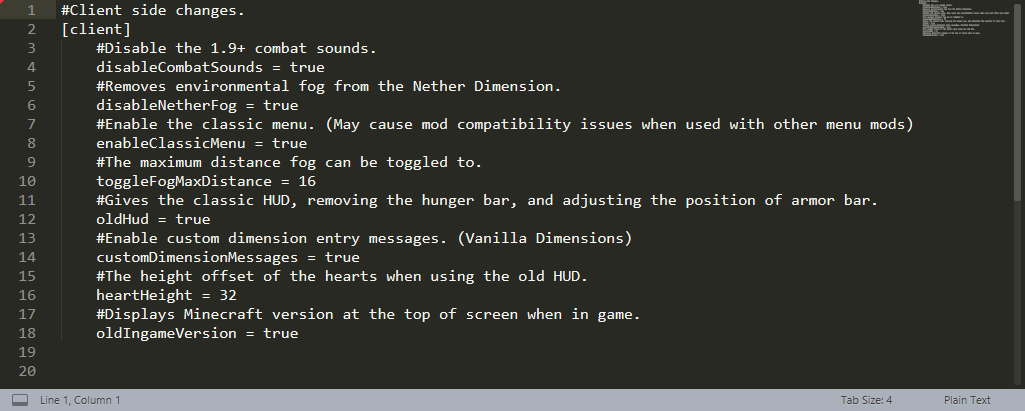
beta_days-common.toml
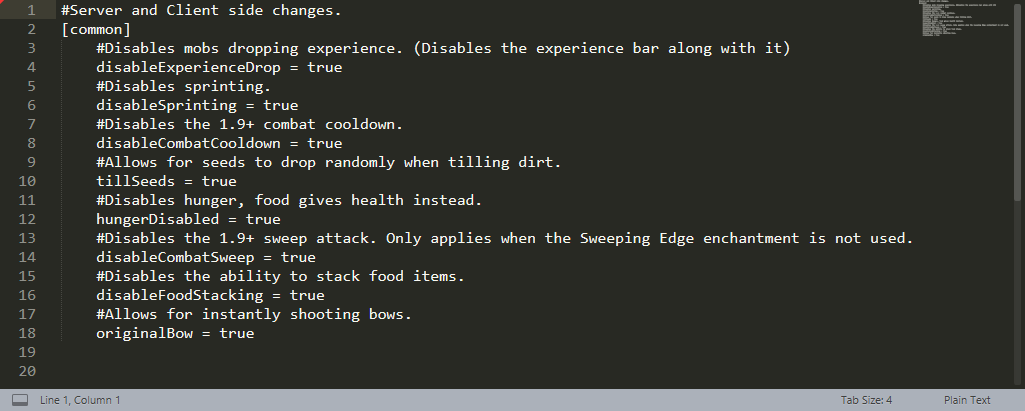
为 Minecraft 1.12.2 配置 Beta Days
剧透警告
您可以在游戏中配置 1.12.2 版本,也可以通过编辑配置文件文件夹中的 beta_days.cfg 文件进行设置。
游戏内配置编辑
请确保在主菜单中编辑配置,因为在加载到世界后无法修改某些选项!点击“Mods”按钮,然后点击“Beta Days”,接着点击“Config”按钮。
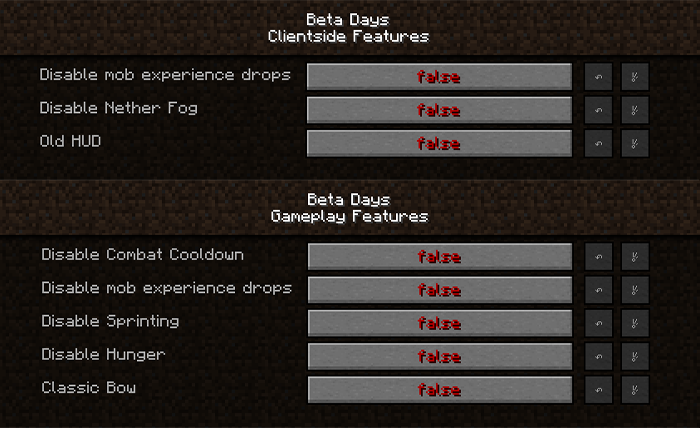
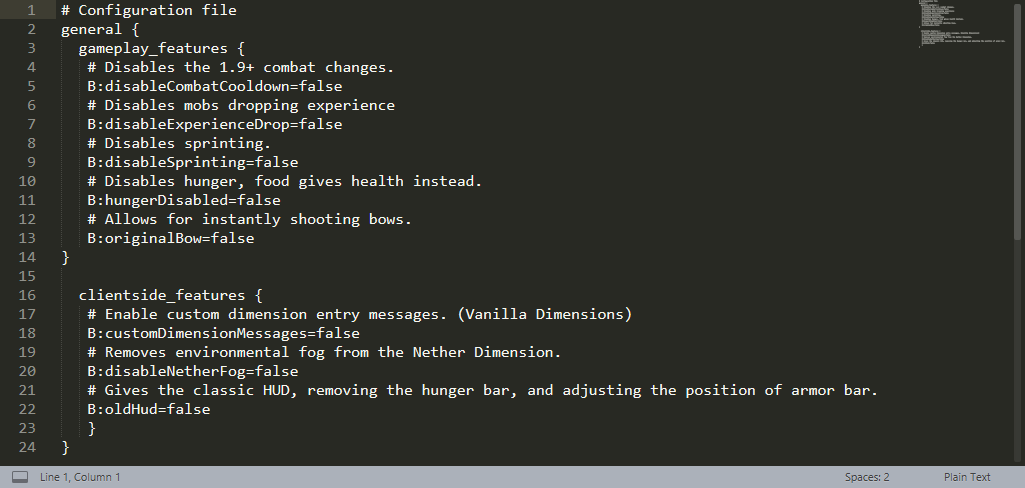
Minecraft 1.12.2 的 beta_days.cfg
? 支持:如果您对我们的模组有任何疑问或问题,请先阅读常见问题解答(FAQ)!您也可以 在问题追踪器上提交问题,或者加入我们的 Discord 服务器,我们将为您提供帮助!
Do you want to take a trip down memory lane? This mod is for you if you would like to emulate Minecraft Beta functionality and features inside of modern Minecraft.
For even more nostalgia, we recommend pairing this with any resource pack (try our Minecraft Beta resource pack - Legacy Default) that adds old textures and sounds, and this mod with Beta+ by therealMRBURGERUS, which is a replica of the old Beta and Alpha generator. You could use old seeds with it like Glacier and worstseedever.
?️ Features
Old Hud
Gives the classic HUD, removing the hunger bar, and adjusting the position of the armor bar. Enabling this is only the aesthetic of the HUD. You may want to disable hunger, which will make food give you health when eaten.
Enable Beta Main Menu
This will replace your main menu with the one from beta with minor tweaks. The version number is at the top left, and the background is the classic tiling dirt background.
Classic Beta Style Bow
Allows you to shoot the bow without having to recharge, just like in beta.
Disable Nether Fog
Disables the Nether fog and allows you to see more clearly and far in the Nether.
Disable 1.9+ Combat System
Spam click with your weapons to your heart's content. The classic system is back. I can hear your mice now!
Disable Sprinting
Useful if you want to capture the beta experience. This also disables the new swimming in 1.14.4+.
Disable Hunger
Useful if you want to capture the beta experience. This will make food give you health points instead of hunger points and will be eaten instantly.
Disable Experience Drops
Useful if you want to capture the beta experience. Killing mobs will stop them from dropping XP.
Custom Dimension Messages
Will display classic messages on the loading screen like “Entering the Nether” and “Entering the End,” just how beta did it back in the day.
… And More!
Configuring Beta Days for Minecraft 1.21.3+
You can find the
beta_days-client.toml in the
config folder and
beta_days-server.toml inside of your Minecraft world/serverconfig folder. You can also configure the mod easily in NeoForge by clicking the "Mods" button, selecting the mod, and clicking "Configure".
beta_days-client.toml
beta_days-server.toml
Configuring Beta Days for Minecraft 1.19.x
Spoiler
You can find the beta_days-client.toml in the config folder and beta_days-server.toml inside of your Minecraft world/serverconfig folder. You can also configure the mod easily in NeoForge by clicking the "Mods" button, selecting the mod, and clicking "Configure".
beta_days-client.toml
beta_days-server.toml
Configuring Beta Days for Minecraft 1.16.4
Spoiler
In your Minecraft folder, and then inside of the config folder, edit the beta_days-client.toml and beta_days-common.toml files.
beta_days-client.toml
beta_days-common.toml
Configuring Beta Days for Minecraft 1.12.2
Spoiler
You can configure the 1.12.2 version in-game or by editing the beta_days.cfg files in your config folder.
In-Game Config Editing
Make sure you edit the config at the Main Menu as you cannot edit some things while loaded in a world! Click your “Mods” button and click on “Beta Days,” and then the “Config” button.
beta_days.cfg for Minecraft 1.12.2
? Support: If you have questions or any issues with our mods, read the FAQ! You can also either submit an issue on the issue tracker, or come into our Discord server where we can help you!


 模组

 模组
 模组

 模组
 模组
 模组
评论 0
登录后参与评分
还没有评论,来抢沙发吧