
Better Controls 是对 Better Sprinting 的重新构想,提供了更高的自定义程度。它引入了若干新的按键绑定以及大量可配置选项,用于调整疾跑、潜行和飞行的行为方式。
Better Controls 仅专注于补充原版机制,而非添加仅在客户端生效且需要服务器管理员明确选择启用的新机制(例如 Better Sprinting 中允许向所有方向疾跑的选项)。由于不包含此类功能,Better Controls 无需提供服务端版本,也无需在游戏运行时完全禁用模组的方法,从而显著降低了复杂性。
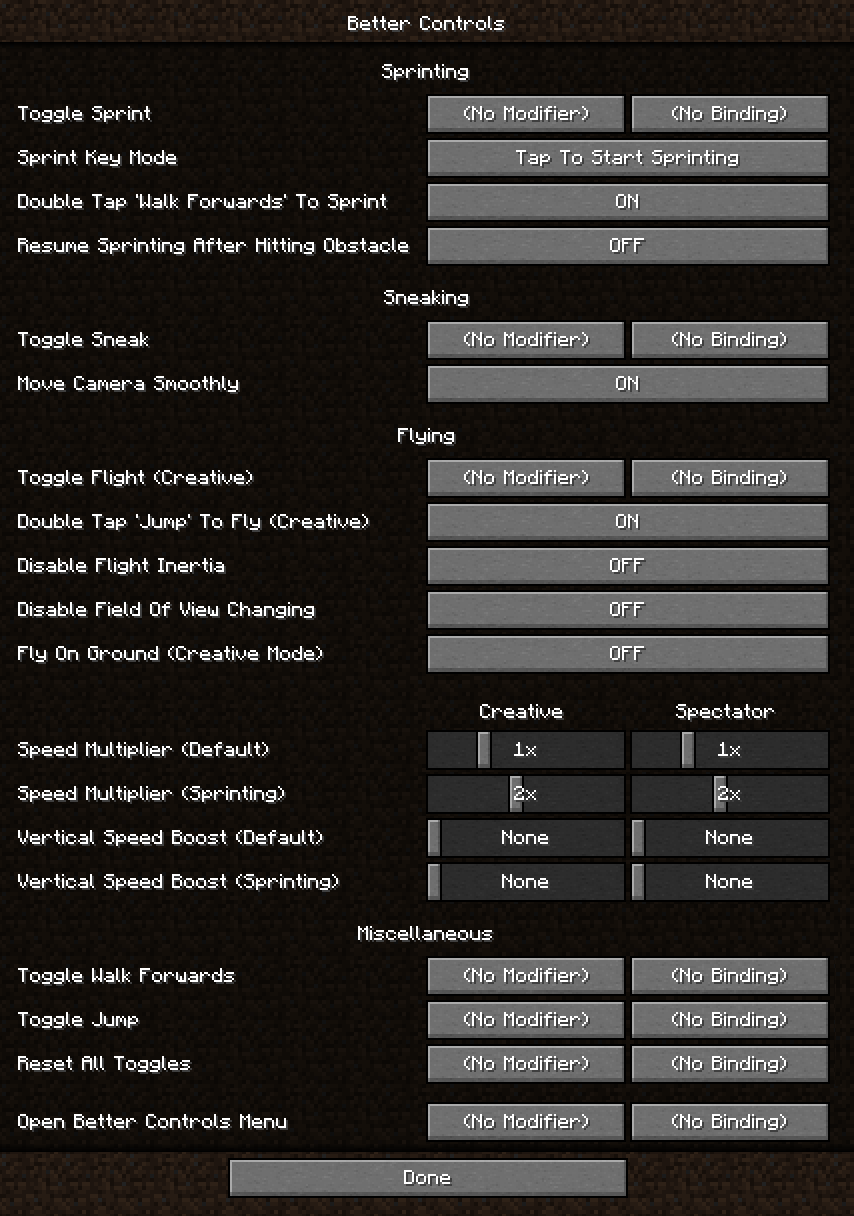
另一个主要区别在于选项的数量和细致程度。Better Controls 可以被视为一款 高级控制模组 —— 默认情况下,所有按键绑定均未分配,所有选项均设置为匹配原版行为。要充分利用其功能,请进入 选项 - 控制设置 - Better Controls,查看所有可用选项,并找出最适合您的配置。
功能
该模组为疾跑、潜行、飞行(创造模式)、行走和跳跃添加了 切换按键绑定。您可以为每个功能使用修饰键(Control / Shift / Alt),例如将 Control 设置为潜行,并将 Control + Y 设置为切换潜行状态。如果您按下原始按键,切换状态将被取消(在上述示例中,您可以通过按 Control + Y 来切换潜行状态,只需轻触 Control 即可停止潜行)。请注意,为了避免与自定义按键绑定冲突,原版中的疾跑/潜行切换选项已被禁用。
您还可以绑定一个一键重置所有 切换按键绑定 的按键。这使得例如开启行走、跳跃和疾跑后,可以通过按下单个按键而不是三个按键来同时关闭它们变得容易。
疾跑
- Sprint Key Mode(疾跑键模式) 更改疾跑键的行为方式。您可以在 轻触开始疾跑、轻触开始/停止疾跑 和 按住疾跑 之间进行选择。
- Double Tap 'Walk Forwards' To Sprint(双击“向前行走”以疾跑) 可以关闭。
- Resume Sprinting After Hitting Obstacle(撞击障碍物后恢复疾跑) 在您不再接触任何方块后重新激活疾跑。
潜行
- Move Camera Smoothly(平滑移动摄像机) 可以关闭以禁用潜行或取消潜行时的平滑移动效果。
滑翔
- Start a Glide(开始滑翔) 使用专用按键启动。
- Double Tap 'Jump' To Glide(双击“跳跃”以滑翔) 可以关闭。
飞行
- Double Tap 'Jump' To Fly(双击“跳跃”以飞行) 可以关闭。
- Flight Inertia Multiplier(飞行惯性乘数) 更改您在停止按住移动键时在空中停止移动的速度。
- Disable Field Of View Changing(禁用视野变化) 防止在创造模式和旁观者模式下飞行时,疾跑、药水和其他因素改变视野 (FOV)。
- Fly On Ground(在地面飞行) 允许您在创造模式下贴地飞行。通过在地面时轻触潜行键来停止飞行。
- Flight Speed Multiplier(飞行速度乘数)(0.25x - 8x)更改创造模式和旁观者模式下的飞行速度。
- Vertical Speed Boost(垂直速度提升)(最高 +300%)在创造模式和旁观者模式下增加额外的垂直飞行速度提升。
这两种速度提升都可以单独为疾跑进行配置,当按住疾跑键时生效。与原版不同,疾跑飞行提升可以在所有方向上工作。
安装
支持以下模组加载器:
安装您选择的模组加载器后,下载模组 并将 .jar 文件放入 .minecraft/mods 目录。
Minecraft 更新
模组会尝试在新版本的 Minecraft(包括快照版)发布时加载。我这样设计是为了如果模组在新发布的 Minecraft 版本上无需任何更改即可正常工作,我可以简单地将其标记为兼容,而您无需等待更新。
虽然这很方便,但可能存在影响服务器游玩的潜在错误。如果您计划在服务器上使用该模组,请始终使用模组的最新版本,并等待我将该版本标记为与新 Minecraft 更新兼容,或者发布标记为兼容的新模组版本。
兼容性
- Better Controls 是一个客户端模组,安装在服务器上不会有任何作用。
- 如果您遇到与其他修改 控制设置 屏幕的模组的冲突,请在打开 控制设置 时按住 Alt 键,以防止 Better Controls 添加其按钮。如果其他模组阻止该按钮出现,则可以在模组菜单中找到一个打开模组配置的按钮(对于 Fabric,请安装 Mod Menu)。
截图
Better Controls is a reimagining of Better Sprinting with even more customizability. It features several new keybindings and many configurable options for how sprinting, sneaking, and flying should behave.
Better Controls only focuses on complementing vanilla mechanics, rather than adding new mechanics (such as Better Sprinting's option to allow sprinting in all directions) that only work on client side and server owners must explicitly opt in to enable them. By not having such features in Better Controls, it significantly reduces complexity by not having a server side version of the mod, and not needing a way to completely disable the mod while the game is running.
Another major difference is the amount and granularity of options. Better Controls could be considered an advanced controls mod - by default, none of the keybinds are bound, and all options are set to match vanilla behavior. To take full advantage, go into Options - Controls - Better Controls, check out all of the available options, and figure out the best configuration for you.
Features
The mod adds Toggle Keybinds for sprinting, sneaking, flying (creative mode), walking, and jumping. You can use modifier keys (Control / Shift / Alt) for each, including for example setting Control to Sneak, and Control + Y to Toggle Sneak. If you press the original key, the toggle will be canceled (in the previous example, you can Toggle Sneak by pressing Control + Y, and stop sneaking by simply tapping Control). Note that the vanilla options for toggling sprinting/sneaking are disabled to avoid conflicts with the custom keybinds.
You can also bind a key that resets all Toggle Keybinds at once. That makes it easy to for ex. turn on walking, jumping, and sprinting, and then turn all of them off again by pressing one key instead of three.
Sprinting
- Sprint Key Mode changes how the Sprint key behaves. You can choose between Tap To Start Sprinting, Tap To Start / Stop Sprinting, and Hold To Sprint.
- Double Tap 'Walk Forwards' To Sprint can be turned off.
- Resume Sprinting After Hitting Obstacle re-activates sprinting once you are no longer touching any blocks.
Sneaking
- Move Camera Smoothly can be turned off to disable the smooth movement when sneaking or unsneaking.
Gliding
- Start a Glide with a dedicated key.
- Double Tap 'Jump' To Glide can be turned off.
Flying
- Double Tap 'Jump' To Fly can be turned off.
- Flight Inertia Multiplier changes how quickly you stop moving in the air when you stop holding movement keys.
- Disable Field Of View Changing prevents sprinting, potions, and other factors from changing the FOV while flying in creative and spectator mode.
- Fly On Ground lets you fly while touching the ground in creative mode. Stop flying by tapping Sneak while touching the ground.
- Flight Speed Multiplier (0.25x - 8x) changes flight speed in creative and spectator mode.
- Vertical Speed Boost (up to +300%) adds additional vertical flight speed boost in creative and spectator mode.
Both speed boosts can be configured separately for sprinting, which will be active when the Sprint key is held. Unlike in vanilla, the sprinting flight boost works in all directions.
Installation
The following mod loaders are supported:
After you install the mod loader of your choice, download the mod and place the .jar file into .minecraft/mods.
Minecraft Updates
The mod will attempt to load on new versions of Minecraft (including snapshots) as they come out. I made it that way so that if the mod works on a newly released version of Minecraft without any changes, I can simply mark it as compatible and you don't have to wait for an update.
While this is convenient, there is potential for bugs which can affect server play. If you plan to use the mod on a server, please always use the latest version of the mod, and wait until I either mark the version as compatible with new Minecraft updates, or release a new version of the mod that is marked as compatible.
Compatibility
- Better Controls is a client-side mod, it will do nothing when installed on a server.
- If you run into a conflict with another mod that modifies the Controls screen, hold Alt while opening Controls to prevent Better Controls from adding its button. If another mod prevents the button from appearing, a button to open the mod's configuration is available in the Mods menu (for Fabric, install Mod Menu).
Screenshot

下载 Better Controls
下载 Better Controls
下载 Better Controls
需要联机服务器吗?
稳定流畅、一键部署,几分钟即可和朋友联机开服
最低仅需 8 元/月 即可畅快联机
下载 Better Controls
需要联机服务器吗?
稳定流畅、一键部署,几分钟即可和朋友联机开服
最低仅需 8 元/月 即可畅快联机
下载 Better Controls
下载 Better Controls
下载 Better Controls
需要联机服务器吗?
稳定流畅、一键部署,几分钟即可和朋友联机开服
最低仅需 8 元/月 即可畅快联机
下载 Better Controls
下载 Better Controls
下载 Better Controls
- 修复了损坏的滑块选项
关于这个资源的讨论、问题反馈与使用心得
还没有讨论,来发第一帖吧
你是这个资源的作者?登录后可认领此资源。
相似资源
 模组

显示你正在注视的方块的信息。(适用于 Minecraft 1.16+ 的 Hwyla/Waila 分支)
 模组
使用 JavaScript 编辑配方、添加自定义物品、编写世界事件!
 模组

查看物品与配方
 模组
在游戏画面角落显示附近世界地形、玩家、生物和实体的地图。可创建路径点,帮助你找到标记过的位置。
 模组
AE2:一款流行的自动化与存储模组
 模组
那是什么?一个 Waila/Hwyla 的分支。
评论 0
登录后参与评分
还没有评论,来抢沙发吧