
Better Fabric Console
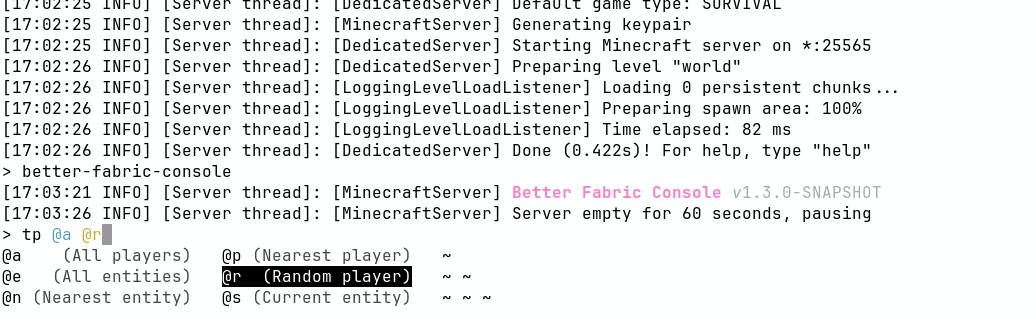
Better Fabric Console 是一个服务端 Fabric 模组,用交互式、支持颜色的终端替换原版专用服务器的控制台体验。
功能特性
- 在服务台控制台中使用 Brigadier 感知命令补全
- 命令语法高亮,支持可配置的参数颜色
- 终端控制台中输出彩色日志
- 在
.console_history中持久保存命令历史 - 可选记录玩家执行的命令
要求
- Fabric 服务器
- Fabric API
- adventure-platform-fabric
安装
- 下载最新的 Better Fabric Console、Fabric API 和 adventure-platform-fabric 的 jar 文件。
- 将 jar 文件放入服务器的
mods/目录中。 - 启动一次服务器以生成配置文件。
- 停止服务器并根据需要编辑配置。
- 再次启动服务器。
你也可以选择使用 --nogui 参数运行服务器(即 java -jar fabric.jar --nogui)来禁用服务器 GUI(这是原版选项)。
配置
Better Fabric Console 会生成并读取以下文件:
config/better-fabric-console/better-fabric-console.confconfig/better-fabric-console/log4j2.xml
随附的默认 Log4j 配置也会写入 config/better-fabric-console/defaults/log4j2.xml 供参考。
如果你自定义了 log4j2.xml 且随附的默认配置发生更改,Better Fabric Console 会在启动时发出警告,直到你查看/合并更改并运行:
/better-fabric-console dismiss-log4j-config-update
你也可以通过添加 -Dbetter-fabric-console.dismiss-log4j-config-update=true 参数启动一次来消除该警告。
默认的 better-fabric-console.conf 参考如下:
# 按顺序指定参数高亮颜色。可能的值:[BLACK, RED, GREEN, YELLOW, BLUE, MAGENTA, CYAN, WHITE]
highlight-colors=[
    CYAN,
    YELLOW,
    GREEN,
    MAGENTA,
    BLUE
]
# 是否记录玩家执行到控制台的命令。
log-player-executed-commands=true
点击此处 查看默认的 log4j2.xml 配置。
Better Fabric Console 还遵循以下系统属性以覆盖终端环境检测:
- Adventure ANSI 属性:
更改后需要重启服务器。
命令
/better-fabric-console(操作员权限):打印模组版本信息。/better-fabric-console dismiss-log4j-config-update(操作员权限):标记当前随附的 Log4j 默认配置为已审阅。
许可证
MIT。请参阅 license.txt。
Better Fabric Console
Better Fabric Console is a server-side Fabric mod that replaces the vanilla dedicated server console experience with an interactive, color-aware terminal.
Features
- Brigadier-aware command completion in the server console
- Command syntax highlighting with configurable argument colors
- Colored log output in terminal consoles
- Persistent command history in
.console_history - Optional logging of player-executed commands
Requirements
- Fabric server
- Fabric API
- adventure-platform-fabric
Installation
- Download the latest Better Fabric Console, Fabric API, and adventure-platform-fabric jars.
- Place the jars in your server
mods/directory. - Start the server once to generate config files.
- Stop the server and edit configuration as needed.
- Start the server again.
You may also choose to run the server with the --nogui argument (i.e. java -jar fabric.jar --nogui)
to disable the server GUI (this is a Vanilla option).
Configuration
Better Fabric Console generates and reads:
config/better-fabric-console/better-fabric-console.confconfig/better-fabric-console/log4j2.xml
The bundled default Log4j config is also written to config/better-fabric-console/defaults/log4j2.xml for reference.
If you customize log4j2.xml and the bundled default changes, Better Fabric Console will warn on startup until you review/merge the change and run:
/better-fabric-console dismiss-log4j-config-update
You can also start once with -Dbetter-fabric-console.dismiss-log4j-config-update=true to dismiss the warning.
Default better-fabric-console.conf for reference:
# Specify argument highlight colors, in order. Possible values: [BLACK, RED, GREEN, YELLOW, BLUE, MAGENTA, CYAN, WHITE]
highlight-colors=[
    CYAN,
    YELLOW,
    GREEN,
    MAGENTA,
    BLUE
]
# Whether to log commands executed by players to console.
log-player-executed-commands=true
Click here to see the default log4j2.xml configuration.
Better Fabric Console also respects the following system properties to override terminal environment detection:
- Adventure ANSI properties:
Changes require a server restart.
Command
/better-fabric-console(operator-level): Prints mod version information./better-fabric-console dismiss-log4j-config-update(operator-level): Marks the current bundled Log4j default as reviewed.
License
MIT. See license.txt.

下载 Better Fabric Console
下载 Better Fabric Console
下载 Better Fabric Console
下载 Better Fabric Console
下载 Better Fabric Console
下载 Better Fabric Console
下载 Better Fabric Console
下载 Better Fabric Console
下载 Better Fabric Console
下载 Better Fabric Console
更新内容
- 修复在收到 SIGQUIT 信号(例如 spark 实时视图附加时)导致服务器被终止且无崩溃报告或关闭钩子的问题,通过更新 JLine 至 4.4.5 版本解决。
- 允许模组在 Minecraft 26.2 上加载
完整更改日志:
关于这个资源的讨论、问题反馈与使用心得
还没有讨论,来发第一帖吧
你是这个资源的作者?登录后可认领此资源。
相似资源
 模组

显示你正在注视的方块的信息。(适用于 Minecraft 1.16+ 的 Hwyla/Waila 分支)
 模组
在游戏画面角落显示附近世界地形、玩家、生物和实体的地图。可创建路径点,帮助你找到标记过的位置。
 模组

查看物品与配方
 模组
使用 JavaScript 编辑配方、添加自定义物品、编写世界事件!
 模组
AE2:一款流行的自动化与存储模组
 模组
那是什么?一个 Waila/Hwyla 的分支。
评论 0
登录后参与评分
还没有评论,来抢沙发吧