
Better Shulker Boxes

Better Shulker Boxes 是一款高度互动的 UI/UX 模组,彻底改变了你在 Minecraft 中与潜影盒交互的方式。不再需要繁琐的放置、打开、操作、破坏并拾起潜影盒的步骤,此模组允许你通过高级互动提示框直接在物品栏中操作潜影盒和末影箱。
主要功能
现代提示框
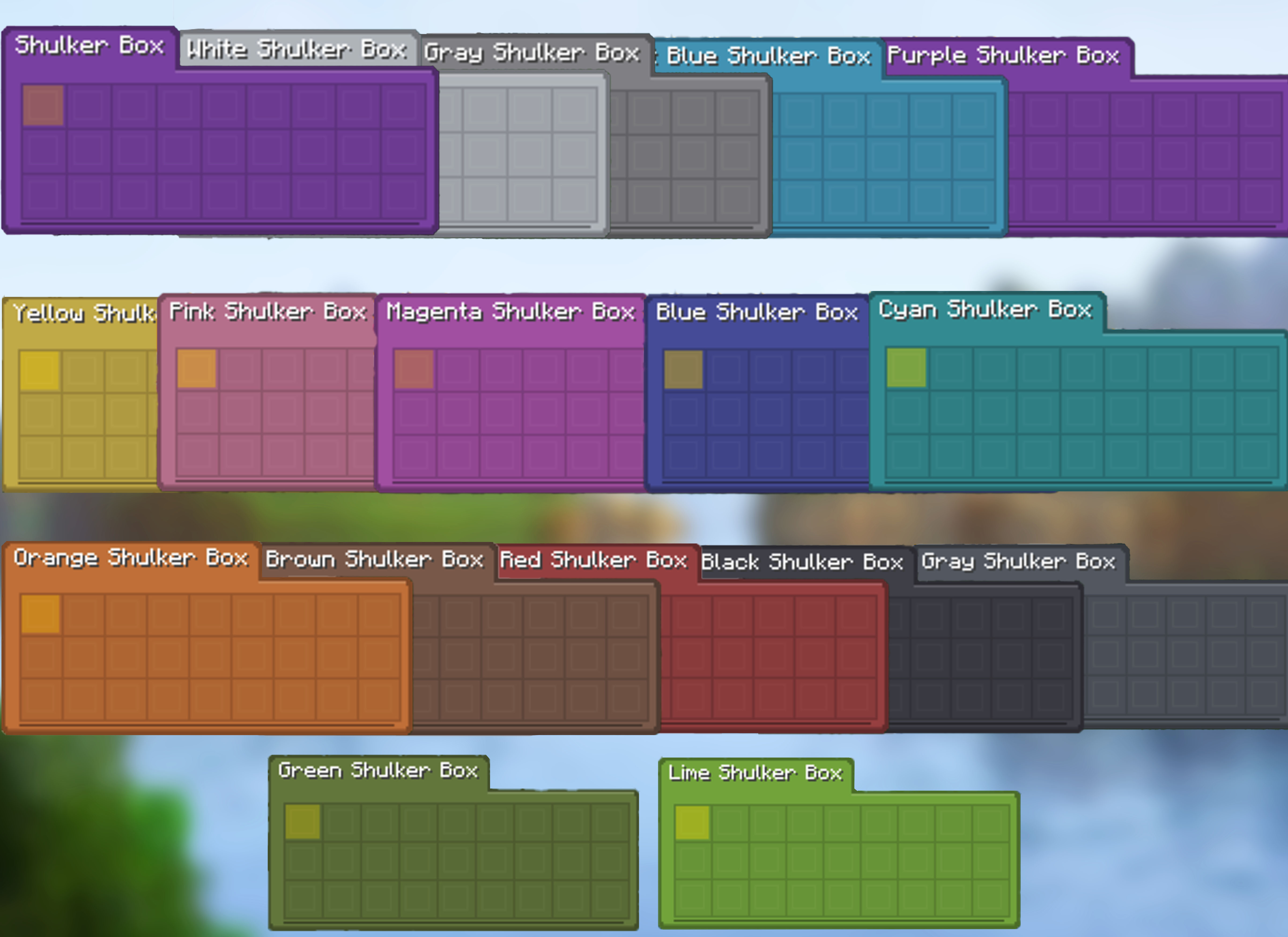
一个扁平圆角卡片,颜色与盒子本身的染料一致,顶部边缘带有容器名称和选中物品名称的标签页。这是自 1.5.0 版本起的默认样式,之前的外观仍然作为 Vanilla(原版)样式提供。
- Modern(现代)—— 染料颜色的卡片,无原版提示框边框
- Vanilla(原版)—— 基于容器的 GUI 纹理构建,与以前一样
- 每种染料都有各自的卡片颜色,末影箱也有其专属颜色
- 主题和颜色滑块适用于 Vanilla 样式;Modern 样式自身着色
完整与紧凑提示框
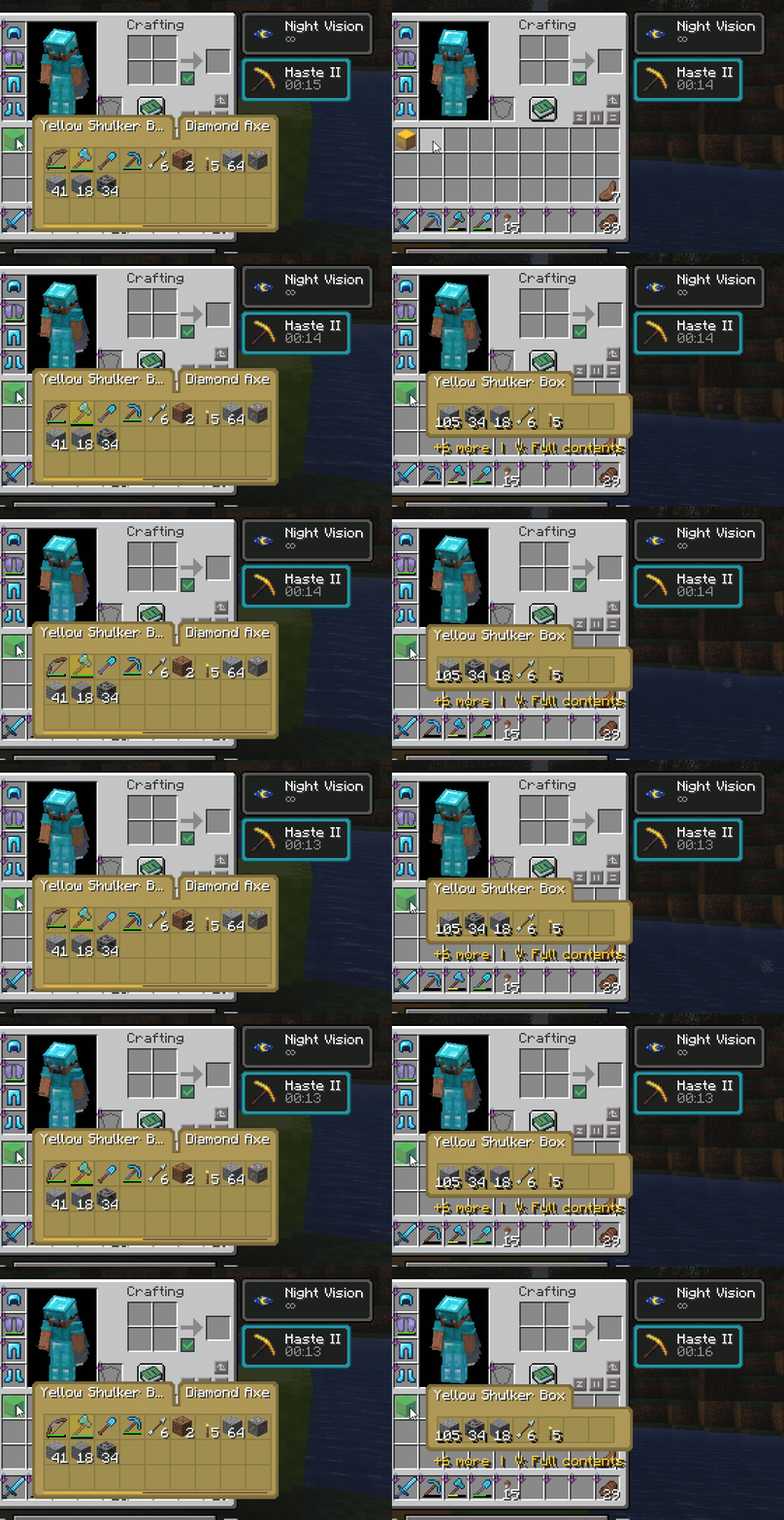
无需放置即可快速查看潜影盒内的物品。当你想要看到每个槽位时使用完整的 9×3 预览,或者仅在需要重要内容摘要时使用紧凑模式。
- 完整的 27 格预览以显示全部盒子内容
- 合并重复堆叠的紧凑模式
- 紧凑模式显示最大的五个堆叠,其余部分以
+N more页脚表示 - 紧凑视图中显示物品总数,格式化为
1.7k而非999+ - 合并的工具保留耐久度条
- 空的紧凑容器保持隐藏以减少杂乱
快速插入与提取
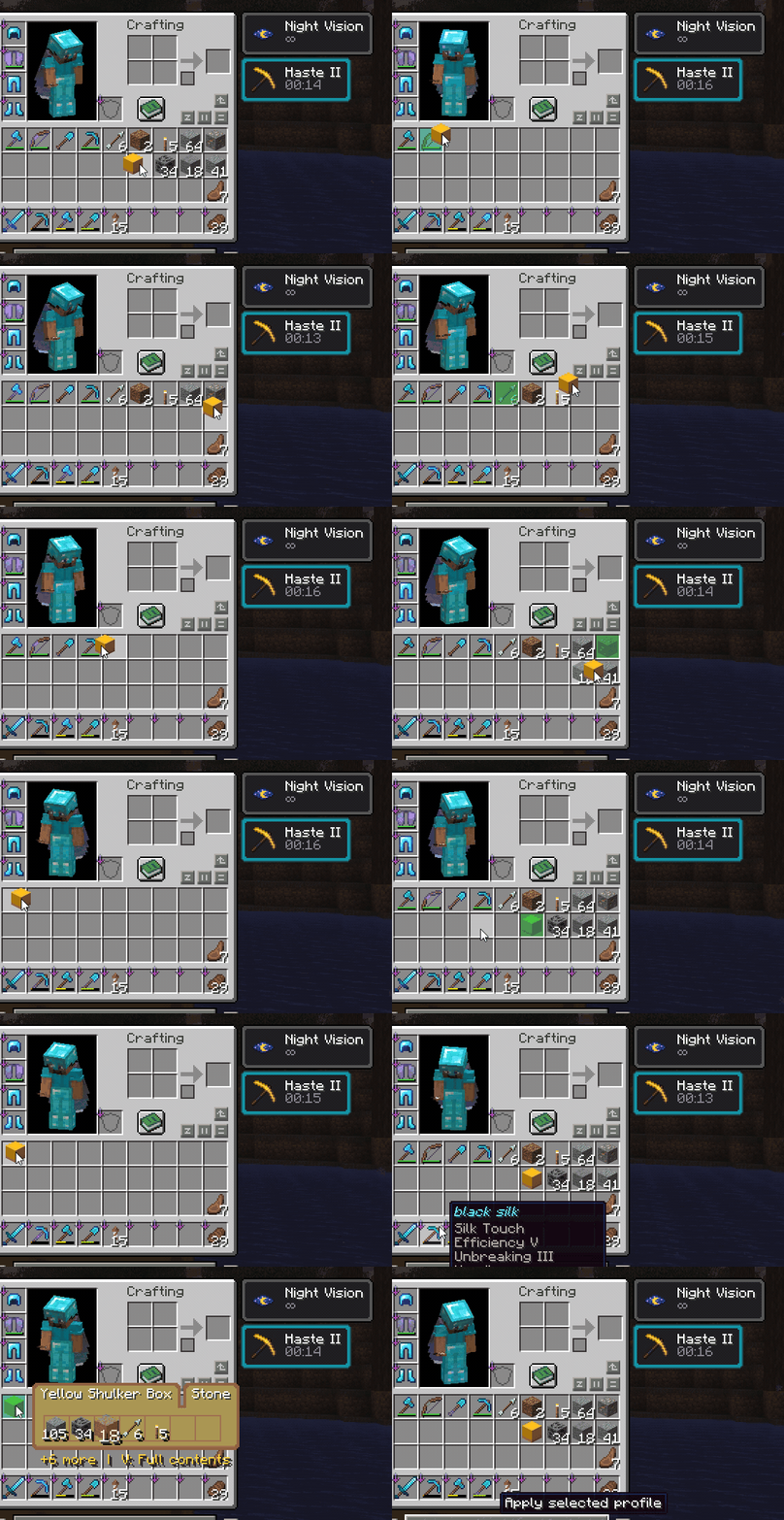
直接从提示框中将物品移入或移出潜影盒。模组在保持服务器权威性的同时提供即时视觉反馈。
- 按住 左键 拖拽以插入,右键 拖拽以提取
- 直接将光标持有的物品放入盒子
- 直接从预览槽位提取物品
- 智能合并现有堆叠
- 平滑的客户端反馈与服务端验证
选择槽位并使用 E 提取
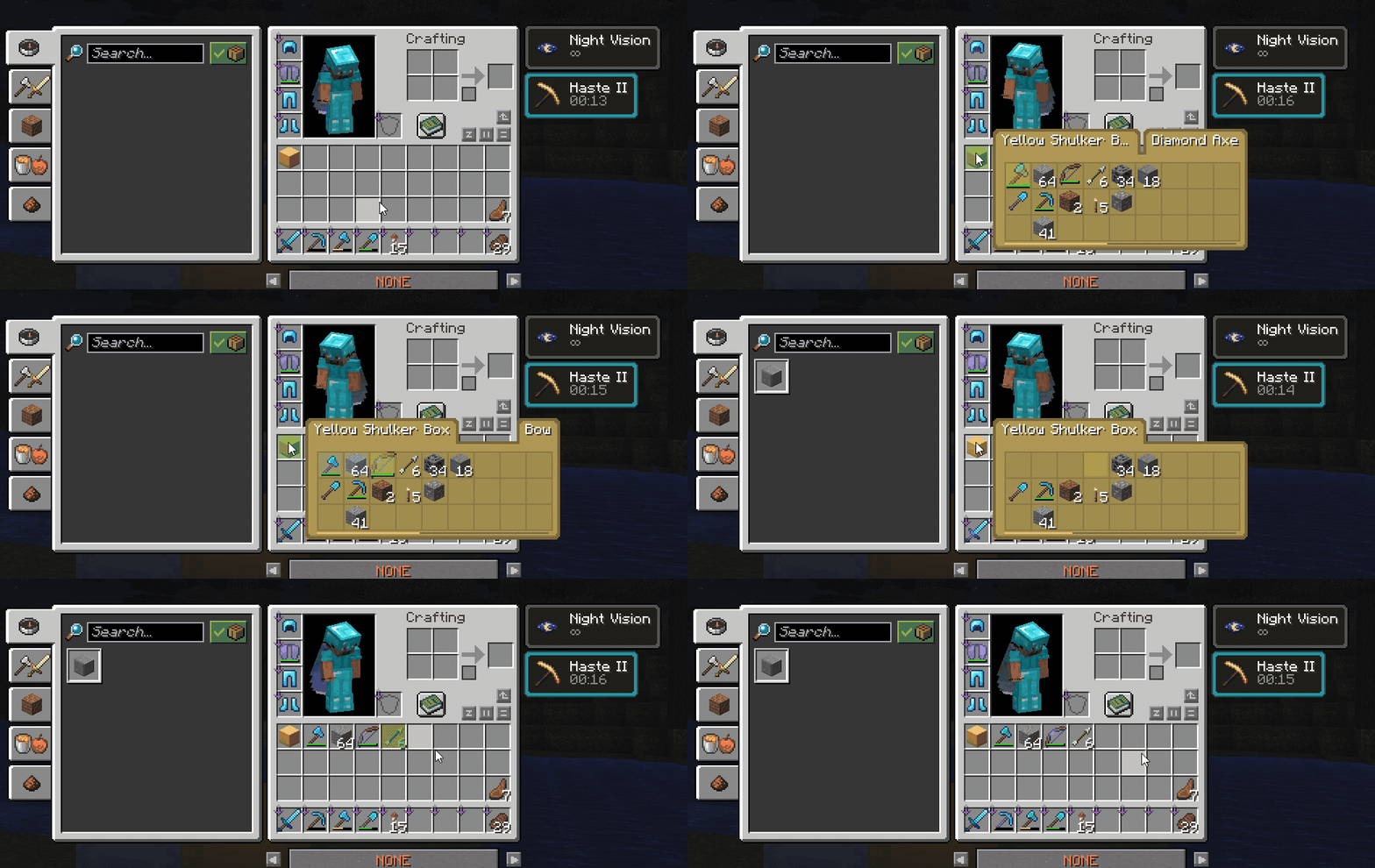
从提示框中选择特定槽位并一起提取。这使得无需打开或放置盒子即可轻松获取你想要的物品。
Space选择或切换提示框槽位E提取选中的槽位- 如果未选中任何槽位,
E将执行正常操作并关闭物品栏 - 当你切换到另一个容器时,选择状态会清除,从而避免清空错误的盒子
键盘与滚动导航
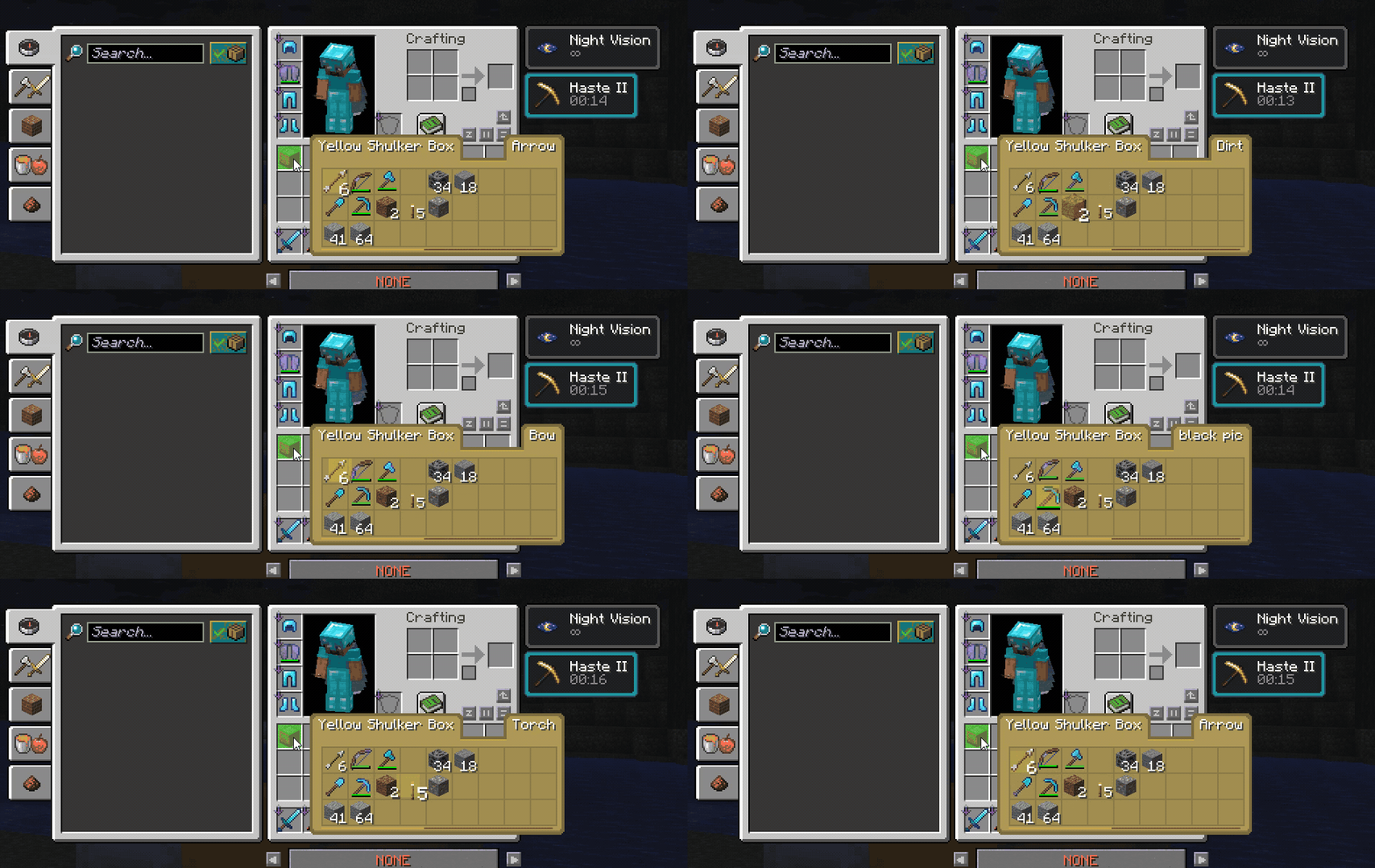 使用鼠标滚轮或方向键导航提示框槽位,以实现更快的控制,特别是在管理包含大量物品的盒子时。
- 鼠标滚轮选择移动
- 方向键槽位导航,并在同一列内循环
- 选择步骤跳到下一个有物品的槽位,而不是停在每一个空槽位上
- 稳定的选中槽位高亮
- 悬停提示框时平滑的选择行为
补货与存入
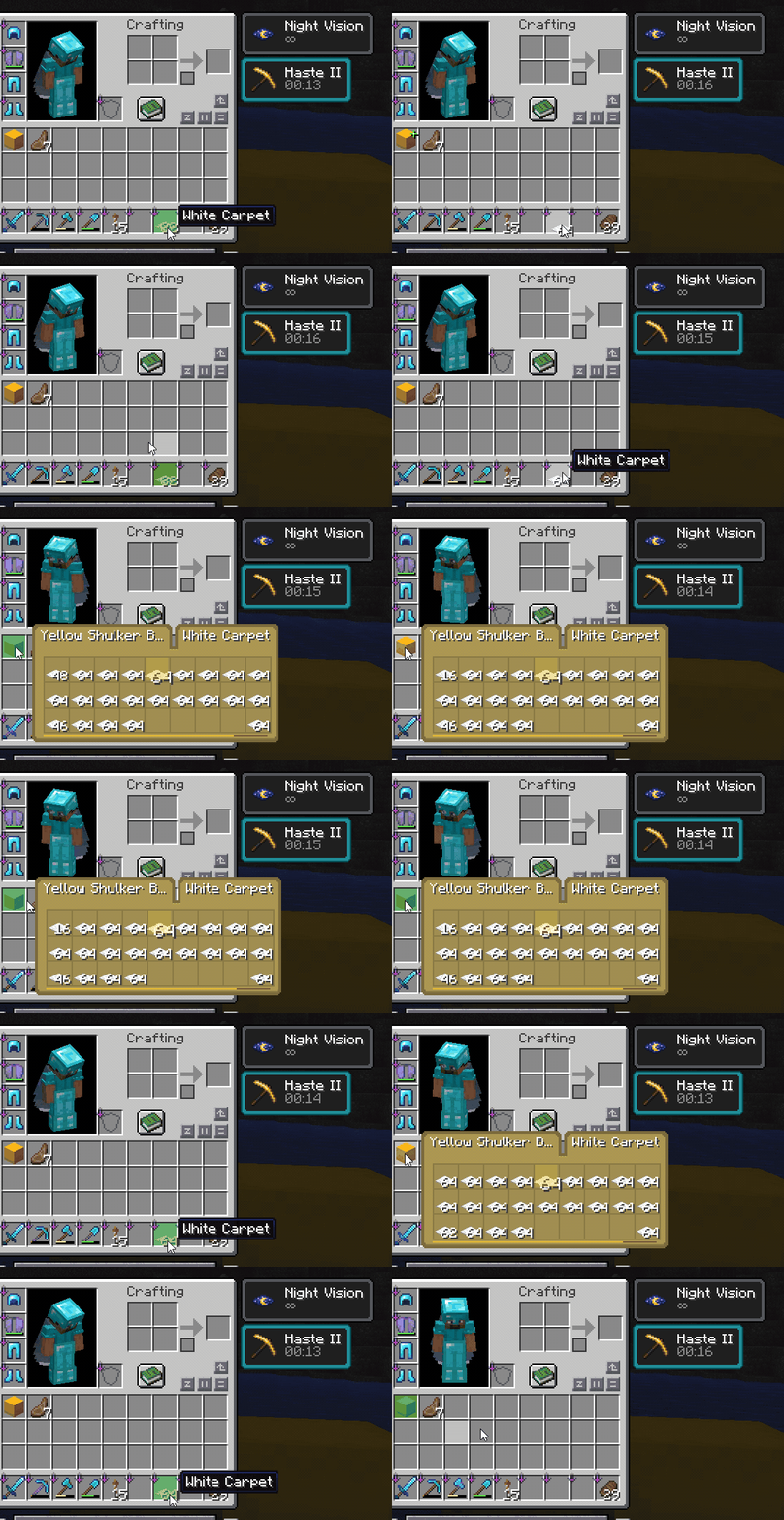
使用 Restock / Deposit(补货/存入)快捷键快速在你物品栏和悬停的容器之间移动匹配的物品。默认情况下此快捷键为 R。
- 悬停在容器预览上时按
R以补货匹配物品 - 使用相同的 shift+
R快捷键将匹配的物品存入存储容器 - 支持潜影盒和末影箱
- 可在 Minecraft 的控制菜单中更改此快捷键
资源包兼容性
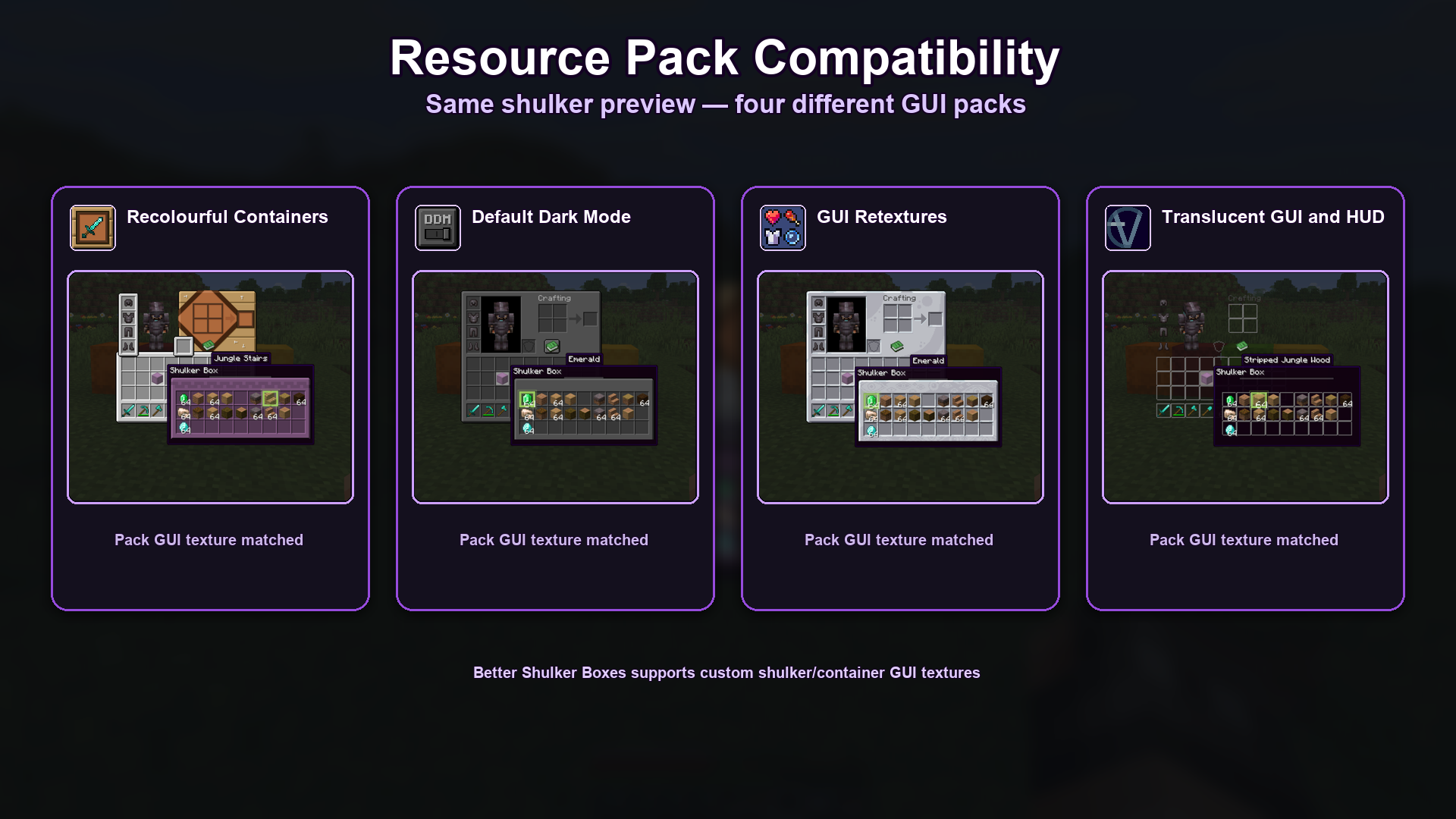
Better Shulker Boxes 旨在尊重来自资源包的自定义 GUI 纹理,因此预览可以与你当前使用的资源包风格相匹配,而不会显得突兀。这适用于 Vanilla 提示框样式,该样式是从容器 GUI 纹理绘制的。
- 支持自定义潜影盒/容器 GUI 纹理
- 支持可用的彩色潜影盒 GUI 样式
- OptiGUI/OptiFine 风格资源包的自动布局配置
- 资源包可以在
assets/bettershulker/layouts/*.json提供自己的槽位布局 - 设置屏幕中提供 X/Y 槽位偏移量和底部盖子控制,以应对非标准资源包
- 经过测试展示的资源包包括:
- Recolourful Containers
- Default Dark Mode
- GUI Retextures
- Translucent GUI and HUD
本资源包已测试并 100% 正常工作。其他资源包可能会遇到一些问题。
更多功能
- 无线末影箱预览
- 当携带仍有空间的物品时,潜影盒会在其槽位中弹跳,此功能可关闭
- 槽位上的填充指示器以及沿提示框下边缘的指示条
- 创造模式物品栏中支持潜影盒预览
- 手持盒子时按住 Alt 强制显示提示框
- 彩色潜影盒支持
- 选中物品名称提示
- 多种提示框主题
- 自定义主题颜色
- Cloth Config 设置界面
- 实时主题与颜色预览
- 声音和音量选项
许可证
本模组根据 MIT License(MIT 许可证)授权
Better Shulker Boxes
Better Shulker Boxes is a highly interactive UI/UX mod that revolutionizes how you interact with Shulker Boxes in Minecraft. Instead of the tedious cycle of placing down a Shulker Box, opening it, interacting with it, breaking it, and picking it back up, this mod allows you to interact with Shulker Boxes and Ender Chests directly from your inventory using an advanced interactive tooltip!
Key Features
The Modern Tooltip
A flat rounded card, coloured by the box's own dye, with the container name and the selected item's name in tabs along its top edge. It is the default style as of 1.5.0, and the previous look is still available as the Vanilla style.
- Modern — a dye-coloured card, no vanilla tooltip frame
- Vanilla — built from the container's GUI texture, as before
- Every dye has its own card colour, and Ender Chests have theirs
- Theme and colour sliders apply to the Vanilla style; Modern colours itself
Full & Compact Tooltips
Quickly check what is inside a Shulker Box without placing it down. Use the full 9×3 preview when you want to see every slot, or compact mode when you only need a small summary of the most important contents.
- Full 27-slot preview for complete box contents
- Compact mode with merged duplicate stacks
- Compact shows the five largest stacks and a
+N morefooter for the rest - Total item counts in compact view, reading as
1.7krather than999+ - Merged tools keep their durability bar
- Empty compact containers stay hidden to reduce clutter
Fast Insertion & Extraction
Move items in and out of Shulker Boxes directly from the tooltip. The mod gives instant visual feedback while still keeping the server authoritative.
- Hold left-click and drag to insert and right-click and drag to extract
- Insert cursor-held items directly into boxes
- Extract items directly from preview slots
- Smart merging with existing stacks
- Smooth client-side feedback with server-side validation
Select Slots and Extract with E
Select specific slots from the tooltip and extract them together. This makes it easy to grab only the items you want without opening or placing the box.
Spaceselects or toggles tooltip slotsEextracts selected slots- If no slots are selected,
Ebehaves normally and closes the inventory - Selections clear when you move to another container, so you never empty the wrong box
Keyboard & Scroll Navigation
Navigate tooltip slots with the mouse wheel or arrow keys for faster control, especially when managing boxes with many items.
- Mouse wheel selection movement
- Arrow-key slot navigation, wrapping to the same column
- Selection steps to the next slot that holds something instead of stopping on every empty one
- Stable selected-slot highlight
- Smooth selection behavior while hovering tooltips
Restock & Deposit
Use the Restock / Deposit key to quickly move matching items between your inventory and the hovered container. By default this key is R.
- Press
Rwhile hovering a container preview to restock matching items - Use the same shift+
Rkey to deposit matching inventory items into storage - Works with Shulker Boxes and Ender Chests
- The keybind can be changed in Minecraft's controls menu
Resource Pack Compatibility
Better Shulker Boxes is designed to respect custom GUI textures from resource packs, so previews can match the style of your current pack instead of looking out of place. This applies to the Vanilla tooltip style, which is drawn from the container GUI texture.
- Supports custom shulker/container GUI textures
- Supports colored shulker GUI styles where available
- Automatic layout profiles for OptiGUI/OptiFine-style packs
- Packs can ship their own slot layout at
assets/bettershulker/layouts/*.json - X/Y slot offsets and bottom-cap controls in the settings screen for unusual packs
- Tested showcase packs include:
- Recolourful Containers
- Default Dark Mode
- GUI Retextures
- Translucent GUI and HUD
This Packs Has Been Tested And 100% Working Other Packs Might Face Some Issues.
More Features
- Wireless Ender Chest preview
- A Shulker Box bounces in its slot while you carry an item it still has room for, and can be turned off
- Fill indicator on the slot and along the tooltip's lower edge
- Shulker Box previews work in the creative inventory
- Alt Force tooltip while holding a box
- Colored shulker support
- Selected item name tooltip
- Multiple tooltip themes
- Custom theme colors
- Cloth Config settings screen
- Live Theme & Colors preview
- Sound and volume options
License
This mod is licensed under the MIT License

下载 Better Shulker Boxes
下载 Better Shulker Boxes
下载 Better Shulker Boxes
下载 Better Shulker Boxes
下载 Better Shulker Boxes
下载 Better Shulker Boxes
下载 Better Shulker Boxes
下载 Better Shulker Boxes
下载 Better Shulker Boxes
下载 Better Shulker Boxes
暂无更新日志
关于这个资源的讨论、问题反馈与使用心得
还没有讨论,来发第一帖吧
你是这个资源的作者?登录后可认领此资源。
相似资源
 模组

显示你正在注视的方块的信息。(适用于 Minecraft 1.16+ 的 Hwyla/Waila 分支)
 模组
在游戏画面角落显示附近世界地形、玩家、生物和实体的地图。可创建路径点,帮助你找到标记过的位置。
 模组

查看物品与配方
 模组
使用 JavaScript 编辑配方、添加自定义物品、编写世界事件!
 模组
AE2:一款流行的自动化与存储模组
 模组
那是什么?一个 Waila/Hwyla 的分支。
评论 0
登录后参与评分
还没有评论,来抢沙发吧